openai/swarm hands off with a plain Python function and points you elsewhere
Educational framework exploring ergonomic, lightweight multi-agent orchestration. Managed by OpenAI Solution team.
At a glance
- What is it?
- openai/swarm is an experimental, educational framework built from two primitives, Agent and handoff, running entirely on the Chat Completions API and storing nothing between calls. Its own README tells you it has been replaced by the OpenAI Agents SDK, so the interesting reading is the orchestration model, not a dependency to ship.
- Who is it for?
- Read Swarm if you want to understand multi-agent handoff in plain Python, and do not ship it: the README says it is replaced by the OpenAI Agents SDK and recommends migrating for production, the last push to this repository was on April 15, 2026, and there are no tagged releases to pin. If you do evaluate it, cap client.run() with max_turns, keep context_variables yourself between calls, and plan the move to the Agents SDK from the first commit rather than later.
- Can I use it commercially?
- Yes. MIT is a permissive licence: you can use, modify and sell software built on it, as long as you keep its copyright and licence notices.
- Is it still maintained?
- Activity is slowing. The repository last received commits 7 months ago.
- What is it written in?
- Mainly Python, according to GitHub's language statistics.
Answers come from the project's GitHub data, last synced on November 13, 2026, and from our analysis. They are not legal advice.
Star history
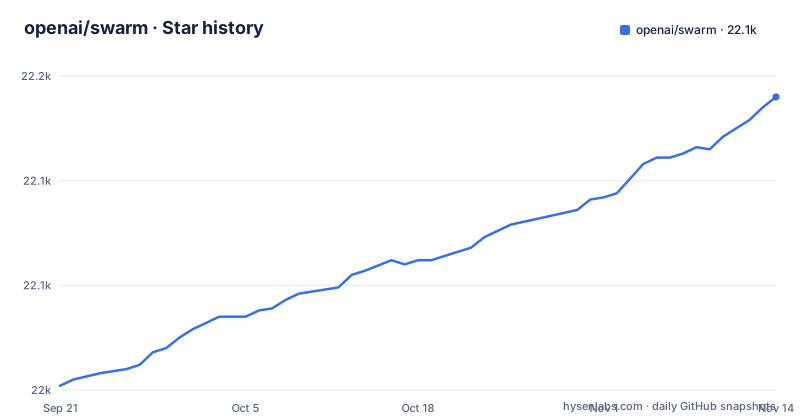
- openai/swarm22,135 ★ · +133
| Repository | 2026-09-21 | 2026-11-13 |
|---|---|---|
| openai/swarm | 22k | 22.1k |
133 Stars in the last 53 days, measured from the daily GitHub snapshot. Compare with other projects
Editorial analysis
The first thing the README tells you is to use a different project
Swarm is titled experimental, educational, and it opens with a notice rather than a feature list. The notice says Swarm is now replaced by the OpenAI Agents SDK at openai/openai-agents-python, described as a production-ready evolution of Swarm that features key improvements and will be actively maintained by the OpenAI team, with the explicit recommendation to migrate to the Agents SDK for all production use cases.
The repository metadata lines up. The description calls it an educational framework exploring ergonomic, lightweight multi-agent orchestration, managed by the OpenAI Solution team, there are no GitHub releases, and the last push landed on April 15, 2026. Read together, that means the maintenance line belongs to the other project now. What remains here is worth reading as a working example of an orchestration model, not as a dependency whose patches will keep arriving.
The install is a git URL, so every install takes whatever main holds
There is no package index step. The requirement is Python 3.10 or newer, and the two documented routes both point at Git:
pip install git+ssh://[email protected]/openai/swarm.gitor
pip install git+https://github.com/openai/swarm.gitNeither URL carries a tag, a branch name, or a commit. The consequence is that two people running those lines on different days can get different code, with no version number to compare afterwards, and no release page to check when something breaks. The SSH form additionally needs a key that can read your repositories. If you follow the README as written while experimenting, run the plain https form, and if the experiment ever graduates, pin a commit or move to the SDK the notice points at.
client.run is a five step loop with an unbounded turn count
The core of the framework is spelled out as a loop: get a completion from the current Agent, execute tool calls and append results, switch Agent if necessary, update context variables if necessary, and return when there are no new function calls. run() is described as analogous to chat.completions.create() in the Chat Completions API, with the addition that it handles function execution, handoffs, and context variable references, and can take several turns before returning to the user.
The arguments show where the bounds are, and most of them are open. max_turns defaults to float("inf"), so nothing stops a chain of tool calls from running turns until the model stops calling functions. context_variables defaults to an empty dict. model_override, stream, and debug all default to None or False. The one switch worth knowing is execute_tools: set it to False and execution stops immediately with the tool_calls message, which is the cheap way to see what an Agent wanted to call before letting it happen.
Nothing survives a call, so the conversation lives in your variables
Swarm runs almost entirely on the client and, much like Chat Completions itself, does not store state between calls. When run() finishes it returns a Response holding the updated messages, the last Agent to be called, and the most up to date context_variables, and the documented way to continue is to pass those values back in with new user messages.
That is the whole memory story, and it is the sharp contrast drawn in the README: the Assistants API is presented as the option for developers who want fully hosted threads with built in memory management and retrieval, while Swarm is the educational option that leaves all of that to you. The failure mode to watch is quiet rather than loud. Forget to carry context_variables into the next call and the run continues with an empty dict, so Agent instructions see no context and nothing errors out. Persist those three response fields yourself, or you are debugging a conversation that forgets itself.
Swarm Agents have nothing to do with Assistants API assistants
There is a note in the overview that exists to prevent a specific mistake: Swarm Agents are not related to Assistants in the Assistants API. They are named similarly for convenience and are otherwise completely unrelated. The framework is powered entirely by the Chat Completions API.
For a reader, that removes a false path. Porting an Assistants API project to Swarm is not a rename of the same object, and the word agent carries a different meaning in each place, with threads and managed memory on one side and a stateless client loop on the other. It also explains the direction of travel in the migration notice, since the Agents SDK is where the maintained version of this orchestration model now lives and where an existing Assistants API team would look next.
A handoff is a Python function that returns another Agent
The routing mechanism has no framework of its own. In the usage sample, a plain function returns the target agent object and is passed to the source Agent in its functions list:
def transfer_to_agent_b():
    return agent_b
with `functions=[transfer_to_agent_b]` on Agent A, so the model decides when to call it and the handoff happens as an ordinary tool call. The example tree grows from there: basic for setup, function calling, handoffs, and context variables, triage_agent for a first routing step, weather_agent for plain function calling, airline for multi agent customer service, support_bot with a user interface agent and a help center agent, and personal_shopper for sales and refunds, with separate customer_service, customer_service_lite, and customer_service_streaming directories.
Because the handoff is ordinary Python, you can call it in a test without a model in the loop. That is the testability claim in practical form, and it is the part of this design worth carrying into whatever you build next.
Package metadata lives in setup.cfg because pyproject.toml declares only a backend
The build configuration is split in an unusual way. pyproject.toml contains only a build system section:
[build-system]
requires = ["setuptools"]
build-backend = "setuptools.build_meta"
There is no project table there, so the package name and version are not declared in pyproject.toml at all and live in setup.cfg instead. For a repository that is installed straight from a git URL, that split is the piece to know about, because the install path has to resolve metadata from setup.cfg correctly and there is no declarative project table to inspect first.
The rest of the tree is small and conventional: swarm/ for the package, tests/, examples/, assets/, a logs/ directory, SECURITY.md, a pre-commit config, and the MIT LICENSE. There is no packaging polish beyond that, which fits an educational repository that expects you to read the source.
The name collides with a television series and half a dozen other things
Swarm is a crowded word. Many unrelated things share the name, and none of those are what this repository is. The practical hazard is real for anyone who searches for the tool rather than the repository.
Install is already disambiguated by the instructions themselves, because both documented routes are git URLs against openai/swarm rather than a bare package name. Carry that habit into the rest of your workflow: refer to the project as openai/swarm, and when you follow the migration notice, refer to the successor as the OpenAI Agents SDK. Both handles are unambiguous, and both put the reader on the project you actually mean.
Editorial conclusion
Read Swarm if you want to understand multi-agent handoff in plain Python, and do not ship it: the README says it is replaced by the OpenAI Agents SDK and recommends migrating for production, the last push to this repository was on April 15, 2026, and there are no tagged releases to pin. If you do evaluate it, cap client.run() with max_turns, keep context_variables yourself between calls, and plan the move to the Agents SDK from the first commit rather than later.
Frequently asked questions
how to install swarm
Swarm requires Python 3.10 or newer and is installed from Git rather than a package index, with either pip install git+https://github.com/openai/swarm.git or the SSH form pip install git+ssh://[email protected]/openai/swarm.git. Neither URL pins a tag, so an unpinned install follows the current default branch.
how to setup swarm
Instantiate a Swarm client, define Agent objects with a name, instructions, and an optional functions list, then call client.run with an initial agent and a list of messages. Worked setups live in the examples directory, including basic, triage_agent, weather_agent, airline, support_bot, and personal_shopper, each with its own README.
how to use swarm
Swarm is built from two primitives, Agent and handoff, where an Agent holds instructions and tools and can hand the conversation to another Agent. client.run loops through a completion, tool execution, an agent switch, and context variable updates until no new function calls remain, then returns messages, the last agent, and the updated context variables for you to pass back in.
how to install swarm ai
The framework is not distributed on a package index, so installation means installing from the Git URL with pip and Python 3.10 or newer. The README also notes that Swarm has been replaced by the OpenAI Agents SDK, which is the production-oriented version the project points to.
Official sources
Add this badge to your README
If you maintain this project, the badge below links readers to this analysis and shows its maintenance status from the daily GitHub snapshot. Paste the markdown into your README; add ?metric=license or ?metric=stars to the image URL for a different field.

[](https://hysenlabs.com/projects/openai-swarm)Star history chart for your README
[](https://hysenlabs.com/projects/openai-swarm)Was this useful?