ocm-system: a .NET backend whose fast path is a cache you refresh by hand
Open Charge Map is the global public registry of electric vehicle charging locations. Established 2011. Help wanted.
At a glance
- What is it?
- Open Charge Map's ocm-system repository is the C# backend behind a charging location registry established in 2011: SQL Server through Entity Framework Core for the data, a MongoDB cache serving most API reads, and a web site whose admin menu is the only control for rebuilding that cache.
- Who is it for?
- This repository is worth reading if you are building on the Open Charge Map data set, because it shows how a crowdsourced registry keeps a .NET API quick with a hand refreshed MongoDB cache, and that cache discipline is the part most walkthroughs leave out.
- Can I use it commercially?
- Yes. MIT is a permissive licence: you can use, modify and sell software built on it, as long as you keep its copyright and licence notices.
- Is it still maintained?
- Yes. The repository last received commits 35 days ago.
- What is it written in?
- Mainly C#, according to GitHub's language statistics.
Answers come from the project's GitHub data, last synced on October 4, 2026, and from our analysis. They are not legal advice.
Star history
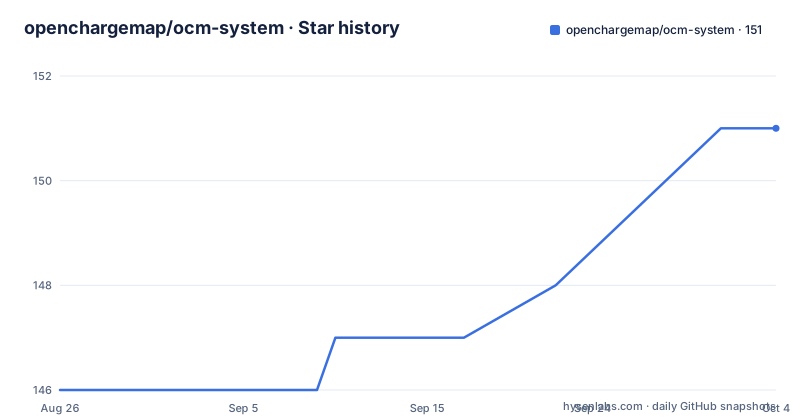
- openchargemap/ocm-system151 ★ · +5
| Repository | 2026-08-26 | 2026-10-04 |
|---|---|---|
| openchargemap/ocm-system | 146 | 151 |
5 Stars in the last 39 days, measured from the daily GitHub snapshot. Compare with other projects
Editorial analysis
Most API reads come from the MongoDB cache, not from SQL Server
Data lives primarily in SQL Server, reached through Entity Framework Core, and a second store sits in front of it as a caching layer: MongoDB, which serves most API reads. That one design choice decides what a fresh checkout looks like in practice. A restored SQL database clone arrives with rows and no cache, so until you build the cache yourself, queries have nothing to read from MongoDB and the system answers from the SQL database instead. Building it is not a migration and not a build step. It is a menu path inside the running web application, reachable only after the Admin menu exists: Admin > Dashboard > Check POI Cache Status > Refresh Cache (All). From then on you are asked to run Refresh Cache (Modified) periodically, because the failure mode of a cache nobody refreshes is exactly that it stops tracking changes and queries fall back to the SQL database. Two stores, one manual control, and the control is a web form. The split also shapes who consumes the system, since the same records reach drivers through hundreds of apps and sites, along with researchers, EV market analysts and government policy makers, and a cached read path is what keeps that many callers away from the primary database.
Administrator access is a JSON blob in the User table
Local setup starts outside this repository. The data comes from a clone held in a different one, at https://github.com/openchargemap/ocm-docs/tree/master/Database/Clone, and you restore that before anything in the solution can serve a request. Then you run the OCM.Web project, the main website, and create a user account through it. Administrator rights are not assigned in the interface. You edit the User table and set the Permissions field on your own row to a JSON document that carries two permission systems side by side, a Permissions array of Level objects and a LegacyPermissions string written as bracketed key=value pairs. Both halves belong there; the array on its own does not reproduce the string.
{"Permissions":[{"Level":100},{"Level":1000}],"LegacyPermissions":"[CountryLevel_Editor=All];[Administrator=true];"}Only after that edit does the Admin menu appear in the web interface, which is the point at which the cache controls become reachable at all.
The prerequisite list says dotnet 10.x, the build line says .Net 6
The build description and the build prerequisites do not line up. The About section says the server-side code is developed mostly in C#, currently building under Visual Studio 2022 Community Edition or higher with .Net 6. The prerequisite list underneath says dotnet 10.x sdk for Windows or Linux, plus SQL Server Express and MongoDB. Nothing in the text reconciles the pair, so the developer has to decide which number to trust for the version installed on the machine, and the answer is not recorded anywhere in the tree. Storage has a similar split: the prose names SQL Server Express as the local database, while docker-compose.yml pulls mcr.microsoft.com/mssql/server:2025-latest with MSSQL_PID set to Developer. There is a top level file named BuildPrerequisites.md sitting next to the README, and the README never says what is in it.
docker-compose.yml ships the sa password as the word example
The compose file at the repository root wires four services: ocm-web on host port 8080, ocm-api on 8081, mongodb on 27017, and ocm-sql on 14333, each with restart set to unless-stopped. The two application services take their configuration from environment variables rather than from a file, and the same four values go to both.
  ocm-web:
    container_name: ocm-web
    build:
      context: .
      dockerfile: Website/OCM.Web/Dockerfile
    image: ocm-web:latest
    environment:
      - ASPNETCORE_ENVIRONMENT=Production
      - ASPNETCORE_URLS=http://+:80
      - OCM_SQL_CONNECTION_STRING=Server=ocm-sql,1433;Database=OCM;User Id=sa;Password=example;TrustServerCertificate=True
      - OCM_MONGODB_CONNECTION_STRING=mongodb://mongodb:27017
    ports:
      - "8080:80"
    depends_on:
      - ocm-sql
      - mongodb
    restart: unless-stopped
The port arithmetic matters for anything you run beside compose rather than inside it. The connection string names Server=ocm-sql,1433, the port on the compose network, while the host publishes 14333, so a local tool connecting from the machine needs the remapped port. TrustServerCertificate=True sits on the same string, which switches off certificate validation for that connection.
  mongodb:
      image: mongodb/mongodb-community-server:latest # Or a specific version like 6.0
      container_name: mongodb
      ports:
        - "27017:27017" # Map host port 27017 to container port 27017
      volumes:
        - mongodb_data:/data/db # Persist data outside the container
      restart: unless-stopped # Restart the container unless manually stopped

  ocm-sql:
     image: mcr.microsoft.com/mssql/server:2025-latest
     container_name: ocm-sql
     hostname: ocm-sql

     environment:
        - ACCEPT_EULA=Y
        - SA_PASSWORD=example
        - MSSQL_PID=Developer
     ports:
       - "14333:1433"
     volumes:
       - mssql_data:/var/opt/mssql
       - /data:/data
     restart: unless-stopped
The database and cache both persist through named volumes, so a compose up that recreates a container keeps the data, while the additional /data:/data mount is an absolute path on the host machine and needs to exist with the right permissions. The SQL container is started with ACCEPT_EULA=Y and SA_PASSWORD=example, and that same word example appears as the password in the connection string both application services receive. Convenient for a laptop, and something to replace before this file is used anywhere with a network address.
web.config is the deployment config, compose passes environment variables
The deployment notes are three lines and they are all Windows and IIS shaped: configure MongoDB as a service and initialise the ocm_mirror database, enable read and write for the app pool user on the Temp folders, and configure web.config. None of that is what the compose file does. Compose hands the applications ASPNETCORE_ENVIRONMENT and ASPNETCORE_URLS plus two connection strings as environment variables, and it mentions neither web.config nor an app pool, so the two paths run the same code under a different configuration story. The one deployment topic the main README hands off instead of explaining is the API mirror, which it defers to a readme inside OCM.API.Worker. If the plan is to run a mirror rather than the main site, that readme is where the steps live, and the ocm_mirror database named in the deployment list is the piece of setup that belongs to the mirror path.
Updates go through refresh-docker.bat, then a pull and an up
Updates on a deployed host are a two part ritual. Run refresh-docker.bat, a batch file in the repository root, to rebuild the latest images and push them to the deployment registry. Then, on the target docker host, pull and restart.
cd docker-config
docker compose pull
docker compose up -d
Three details deserve a look before relying on that. The first line puts you in a directory called docker-config, and no directory of that name appears among the top level entries of this repository, where the compose file sits at the root, so what you run is a deployed copy rather than the file in the tree. The sequence is a pull followed by an up, with no build step, so the image you end up running is whatever the registry held at that moment. And because all four services are marked restart: unless-stopped, an up that fails on one of them leaves the others running on the older image.
The map app is not in this repository
What sits in this tree is the server side, and the pieces people picture first are elsewhere. The top level is the .NET solution OCM.Net.sln over directories named API/, App/, Website/, Import/, Database/, Localisation/ and Tests/, which matches the three jobs the project claims for itself: the API, the web site, and server-side import processing. The map application that most people mean when they say Open Charge Map is not in that list. Its source is at https://github.com/openchargemap/ocm-app, built with the latest Ionic, Angular and TypeScript, and the running app is at map.openchargemap.io. Two more of the things a new developer needs first also live outside: the database clone is in the openchargemap/ocm-docs repository, and the API mirror instructions are in the OCM.API.Worker readme. App/ is the one name in the tree that the README never ties to a specific project. The two entry points that outsiders are pointed at instead of the source are https://openchargemap.org/site/develop/ for the API itself and https://openchargemap.org/site/develop/apps/ for the third party apps built on it, which is where the registry's reach is measured rather than in any directory listing.
Half the data is entered by hand, half is imported
The data set is the product, and the contribution list is mostly about data rather than code. Open Charge Map was established in 2011 and mixes manually entered information with imported open data sources, such as government-run registries and charging networks that publish under an open data license. That mixture explains the editor model: anyone can submit comments, checkins and photos through the website, and anyone can become an editor for their own country. Code contributions are listed too, including help translating the app, tracked as an issue at https://github.com/openchargemap/ocm-app/issues/35, alongside sample code for developers, a map widget for embedding, and testing. The licence is MIT and the default branch is master. The repository has no GitHub releases, so the push dated 2026-09-18, along with the commit log behind it, is the only signal of how current the code is.
Editorial conclusion
This repository is worth reading if you are building on the Open Charge Map data set, because it shows how a crowdsourced registry keeps a .NET API quick with a hand refreshed MongoDB cache, and that cache discipline is the part most walkthroughs leave out. It is the wrong starting point if you want something you can install on its own, since the data set arrives as a database clone from another repository, the map app is a separate codebase, and configuration arrives in two incompatible shapes, web.config and environment variables. Before building on it, verify three things: which .NET version your build needs, since the prerequisite list and the build description name different ones; what the OCM.API.Worker readme says about running an API mirror, which the main README defers to; and whether the credentials committed in docker-compose.yml are acceptable outside a laptop.
Frequently asked questions
What does OCM stand for in the Open Charge Map project?
It stands for Open Charge Map, the global public registry of electric vehicle charging locations, first established in 2011. The ocm-system repository holds the C# backend behind it: the API, the web site, and server-side import processing.
What does ocm-system need before a local build can serve requests?
The prerequisites are the dotnet 10.x sdk on Windows or Linux, SQL Server Express, and MongoDB. The SQL Server data itself arrives as a clone restored from the openchargemap/ocm-docs repository, and the MongoDB cache is built afterwards through the admin menu in the running web app.
How do you get administrator access in a local ocm-system setup?
Create a user account through the running OCM.Web project, then set the Permissions field on that row in the User table to the administrator JSON document, which carries both a Permissions array of Level values and a LegacyPermissions string. The Admin menu appears only after that edit.
Where do most ocm-system API reads come from?
Most API reads are served by the MongoDB cache that sits in front of the SQL Server store, which is reached through Entity Framework Core. When the cache is not refreshed, queries use the SQL database instead, which is why periodic Refresh Cache (Modified) runs are part of the local workflow.
Does the ocm-system repository publish tagged releases?
It publishes none at all, and the default branch is master. The most recent push is dated 2026-09-18, so the commit history rather than a release feed is the only way to judge how current the code is.
Official sources
Add this badge to your README
If you maintain this project, the badge below links readers to this analysis and shows its maintenance status from the daily GitHub snapshot. Paste the markdown into your README; add ?metric=license or ?metric=stars to the image URL for a different field.

[](https://hysenlabs.com/projects/openchargemap-ocm-system)Star history chart for your README
[](https://hysenlabs.com/projects/openchargemap-ocm-system)Was this useful?