hutb: a film-grade simulator for humans as well as vehicles
Human-vehicle Simulator
At a glance
- What is it?
- hutb is a MIT-licensed physics simulator from the OpenHUTB group that extends CARLA to embodied people, ground, air and water vehicles, ships reusable digital assets alongside the code, and is built and launched through Windows batch scripts on a branch named hutb rather than main.
- Who is it for?
- hutb is worth a look if your work is at the seam between human behaviour and vehicle control, because pedestrian navigation, VR cockpit interaction and biomechanics are things a driving simulator does not normally attempt, and the digital assets are usable without reading the C++. Two constraints should shape your plan.
- Can I use it commercially?
- Yes. MIT is a permissive licence: you can use, modify and sell software built on it, as long as you keep its copyright and licence notices.
- Is it still maintained?
- Yes. The repository last received commits 1 day ago.
- What is it written in?
- Mainly C++, according to GitHub's language statistics.
Answers come from the project's GitHub data, last synced on November 15, 2026, and from our analysis. They are not legal advice.
Star history
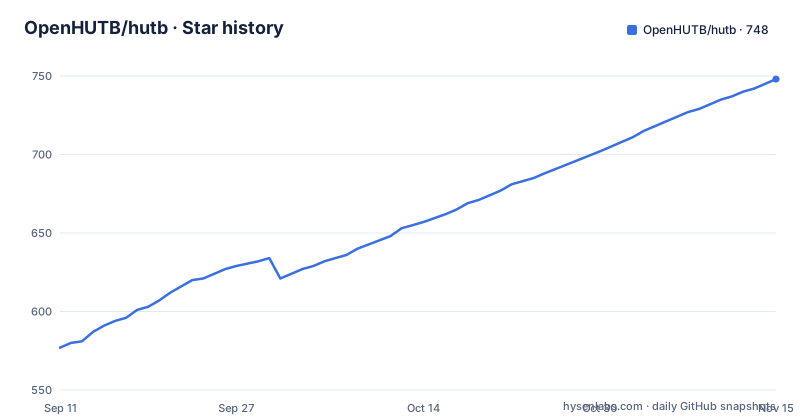
- OpenHUTB/hutb748 ★ · +171
| Repository | 2026-09-11 | 2026-11-15 |
|---|---|---|
| OpenHUTB/hutb | 577 | 748 |
171 Stars in the last 65 days, measured from the daily GitHub snapshot. Compare with other projects
Editorial analysis
The subject is people as much as it is vehicles
Most driving simulators simulate vehicles. This one starts from a wider question and lists four vehicle classes: embodied humans, ground vehicles, air vehicles and water vehicles. The stated purpose is to accelerate algorithm development, training and validation for both people and robots, which is a different claim from making a driving policy better. It is also what the surrounding documentation is organised around, with separate pages for the embodied human, for ground vehicles, for the air domain and for the underwater domain. What ships alongside the code matters as much as the code. The project publishes freely usable open digital assets: town layouts, buildings, vehicles, pedestrians and props, each with its own catalogue page. For a research group that would otherwise spend a quarter modelling a pedestrian mesh, that is the part with the highest ratio of value to download size. The simulator sits on top of CARLA, which the acknowledgements credit, and the air side is described in its own documentation set.
One launcher brings up both the Carla and AirSim modes
The intended entry point is a download tool that installs the simulator, then a batch file that starts it, and the default start supports the Carla mode and the AirSim mode at the same time. That pairing is the first thing to understand about the architecture, since air and ground simulation are separate stacks sharing one launcher. After the first run you move into the generated directory and install the Python package as a wheel chosen for your interpreter:
python PythonAPI/examples/generate_traffic.py
The wheels are prebuilt per Python version, which is why the instructions name a version range rather than telling you to install from source, and why the repository carries a batch file for selecting among interpreters. Two more example scripts show what the package is for. One generates vehicles and pedestrians in the scene, and another drives pedestrians manually with a filter argument that selects them by actor name:
python PythonAPI/examples/manual_control.py --filter walker.pedestrian.*
The filter is the interesting part, since it lets you control one class of actor while the rest of the simulation runs around it.
Python 3.7 to 3.14 is an unusual wheel range to advertise
The stated support window runs from Python 3.7 through 3.14, which is wide enough to be worth interrogating rather than celebrating. Building a wheel for every interpreter in that range means a per-version artifact set, and the wheel filename pattern in the install instruction is what you match against your own interpreter. A range that starts at 3.7 covers interpreters that have been out of upstream support for years, so treat the low end as legacy compatibility rather than as a recommendation. The high end is the more interesting claim, since matching a release to an interpreter newer than the one the project was written against is where small incompatibilities live. The only requirements file at the repository root is documentation tooling rather than the simulator API, listing a Markdown math extension, an image library and a Markdown extensions package. So the runtime dependency set for the Python API is not visible in that file, which means the wheel carries its own assumptions.
setup.bat has two verbs, and the hutb branch is the one to use
Building from source is two commands in one script, and the split is between running the editor and producing a package:
# 启动编辑器
setup.bat -l
# 打包
setup.bat -p
A hyphen and a single letter is a small interface, and knowing which one you want before you start saves a long build. The repository also carries a note that matters more than the commands: the hutb branch contains the newest version along with the latest fixes and features. That branch is the default branch, not main, which is unusual for a project of this size and tells you something about how releases are cut. The release history supports that reading. The tags are v2.10.0 in July 2026, v2.3 in June 2026 and v2.2 in July 2025, and the v2.2 release is named for having been synced to a specific upstream version, which is the pattern of a project that periodically merges a base simulator forward. Build instructions for Windows and for Linux live in the documentation, and the repository carries matching scripts for both, with a shell script for Linux and a PowerShell script for Windows builds.
Artists can unzip a prebuilt editor and skip compilation entirely
Not everyone working with a simulator wants to build one, and the project draws that line explicitly. There is a separate download, an archive named for the editor, hosted on a file-sharing service rather than on the release page, and the instruction is to extract it and double-click a batch file that launches the Unreal editor with the plugins already in place. That is a meaningful distinction for a film and art pipeline, where the goal is the rendered result rather than a training environment. The same split shows up elsewhere in the repository layout: an Unreal directory holds the engine content, while a Python API directory holds the scripting side, and a LibCarla directory stands in for the upstream simulator that this project extends. If you are evaluating the project as an art or content pipeline, that prebuilt editor is the fastest route in, and the compilation route only becomes relevant once you need to modify the simulator itself.
The hardware floor is an RTX 2070 and 16 GB of memory
The stated requirements are concrete enough to plan a machine around. Processors are Intel i7 or i9 from the 9th to the 11th generation, or an AMD Ryzen 7 or Ryzen 9. Memory is listed as 16 GB or more. The graphics requirement is an NVIDIA RTX 2070 or above, which is the line that decides whether a laptop can run this at all, and the reason is the film-grade rendering ambition rather than the physics. Operating systems listed as supported are Windows 10 or later, Ubuntu 18.04 or later and macOS 12 or later. The macOS entry is the one to treat carefully, because the build and launch tooling described on this page is Windows-first and the Linux path has its own scripts, so a listed operating system is not the same as an equally supported one. The graphics requirement also implies the project is aimed at workstations, which is consistent with the assets it ships and the research use it names.
The file names show a Windows-first project
The repository tree is the clearest statement of what this project is built around, and the batch files outnumber everything else. There are separate scripts for setting up the environment, starting the Carla air stack, starting a VR session, stopping the simulator, testing the environment and updating, alongside PowerShell scripts for the Windows build and for VR. Linux gets a smaller set: an update script, an environment script, a setup script and a Carla air shell script. Continuous integration is split the same way, with a Jenkinsfile and a Jenkinsfile_linux, and an older Travis configuration still present. The build itself is delegated rather than written in the top-level file, where the Makefile includes a shared variables file and then either a Windows or a Linux include depending on the detected operating system. Two documentation toolchains also coexist, a Doxyfile and an mkdocs configuration. None of this is a criticism so much as a warning to a contributor about where to add a change.
Co-simulation with SUMO and Vissim, plus a drone plugin
The feature list extends past driving. Joint simulation with SUMO and with PTV Vissim is documented, which matters if your traffic model already lives in one of those tools, since moving a validated demand model into the simulator is otherwise the hardest part of an evaluation setup. There is integration with an RSS-lib implementation of a safety standard, an external sensor interface for feeding in sensors the simulator does not model, and an OpenDRIVE standalone mode for working on road networks without the rest of the stack. Modules are separate repositories rather than directories: a MuJoCo plugin for the simulator, an air plugin for drones, and an interaction and behaviour plugin that drives the VR cockpit. The most recent release, v2.10.0, is described as an integrated simulation of embodied humans, drones and unmanned vehicles, which is the direction the earlier air-ground integration release pointed at. Around that sits an ecosystem of related projects: the CARLA leaderboard, Scenario Runner for traffic scenarios, the ROS bridge, driving benchmarks, an AutoWare bridge, a map editor and reinforcement learning code.
Editorial conclusion
hutb is worth a look if your work is at the seam between human behaviour and vehicle control, because pedestrian navigation, VR cockpit interaction and biomechanics are things a driving simulator does not normally attempt, and the digital assets are usable without reading the C++. Two constraints should shape your plan. The build path is Windows-first, with most of the tooling in batch files and a separate set of shell scripts for Linux, and the hardware floor is an RTX 2070 with 16 GB of memory, which is a real cost for a lab. Also check the release cadence before planning around a version: v2.10.0 shipped in July 2026 and the branch has moved since, so treat the branch as the source of truth for fixes and the tags as milestones.
Frequently asked questions
What does the hutb simulator simulate besides cars?
Embodied humans, ground vehicles, air vehicles and water vehicles, with documentation sections for each. The most recent release is described as an integrated simulation of embodied people, drones and unmanned vehicles.
Which Python versions does hutb publish wheels for?
Python 3.7 through 3.14. You install the wheel matching your interpreter with pip install on the hutb wheel file, from the carla distribution directory inside the generated project folder.
What hardware does hutb require?
An Intel i7 or i9 from the 9th to 11th generation or an AMD Ryzen 7 or 9, 16 GB of memory or more, and an NVIDIA RTX 2070 or above. The operating systems listed are Windows 10 or later, Ubuntu 18.04 or later and macOS 12 or later.
How do I build hutb from source?
Clone the repository or download it, then run setup.bat with -l to start the editor or -p to package. The hutb branch is the one holding the newest version along with the latest fixes and features.
Does hutb work with traffic tools other than its own?
Joint simulation with SUMO and with PTV Vissim is documented, alongside an external sensor interface, an OpenDRIVE standalone mode and integration with an RSS-lib implementation. There are also separate plugins for underwater work in MuJoCo and for drones.
Official sources
Add this badge to your README
If you maintain this project, the badge below links readers to this analysis and shows its maintenance status from the daily GitHub snapshot. Paste the markdown into your README; add ?metric=license or ?metric=stars to the image URL for a different field.

[](https://hysenlabs.com/projects/openhutb-hutb)Star history chart for your README
[](https://hysenlabs.com/projects/openhutb-hutb)Was this useful?