OpenReplay: a session replay stack you run yourself, tracker to player
Session replay, cobrowsing and product analytics you can self-host. Best for reproducing issues and iterating on your product.
At a glance
- What is it?
- OpenReplay is a TypeScript platform for session replay, cobrowsing and product analytics that you deploy inside your own cloud instead of a vendor's. The trade is concrete: no third-party processor and no ad blockers eating your data, in exchange for running the stack and writing the masking rules yourself.
- Who is it for?
- OpenReplay suits a regulated team that has been told it cannot send customer sessions to an external vendor and has the engineers to run a multi-service stack. It does not suit a small team wanting a settings page instead of infrastructure.
- Can I use it commercially?
- Check first. The repository uses a licence we do not classify automatically, so read its LICENSE file before any commercial use.
- Is it still maintained?
- Yes. The repository last received commits 1 day ago.
- What is it written in?
- Mainly TypeScript, according to GitHub's language statistics.
Answers come from the project's GitHub data, last synced on November 22, 2026, and from our analysis. They are not legal advice.
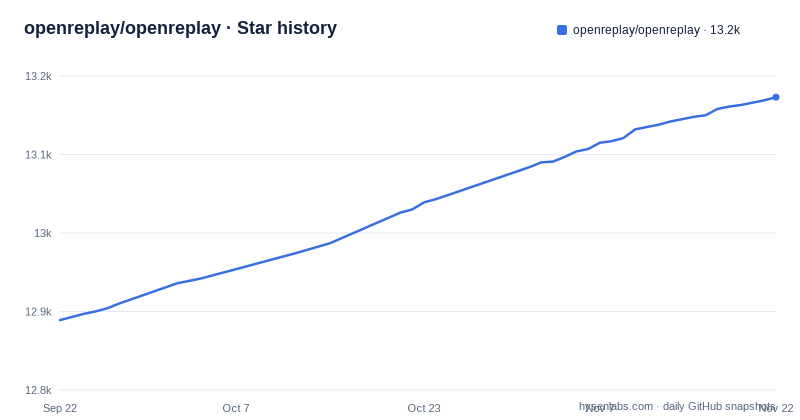
Star history
- openreplay/openreplay13,173 ★ · +284
| Repository | 2026-09-22 | 2026-11-22 |
|---|---|---|
| openreplay/openreplay | 12.9k | 13.2k |
284 Stars in the last 61 days, measured from the daily GitHub snapshot. Compare with other projects
Editorial analysis
Sixteen directories ship in one repository, and the tracker is only one of them
The top level of the repository is a monorepo, not an SDK. Alongside tracker/ and player/ there are backend/, api/, frontend/, assist/ and assist-server/ for cobrowsing, mobs/, networkProxy/, snippet/, spot/ for the Chrome extension, sourcemap-uploader/, sourcemapreader/, mcp_app/, ee/, static/, scripts/ and docs/. Only some of those names map onto anything the README explains, so a reader picking up the repository has to work out which pieces are mandatory and which are optional before any of them is useful. The tracker is described as lightweight and sends minimal data asynchronously, but a tracker alone replays nothing; the replay surface, the storage and the API have to come from the same deployment. There is no single install command to quote. Deployment instructions are organised by cloud, and these four guides are the paths the project names:
https://docs.openreplay.com/en/deployment/deploy-aws
https://docs.openreplay.com/en/deployment/deploy-gcp
https://docs.openreplay.com/en/deployment/deploy-azure
https://docs.openreplay.com/en/deployment/deploy-digitalocean
Sanitization happens in the tracker, so a masking miss is permanent
The privacy story is built on where the filtering occurs. Data can be masked, obscured or skipped at capture time, before it ever reaches your servers, with the options to mask by CSS selector, redact inputs and sanitize network payloads. Private mode goes further and masks all text and inputs by default, which the README positions as the right setting for healthcare, banking and legal applications. The consequence follows from the timing: the filter is code running on the user's device, expressed as selectors and redaction rules tied to your markup. If a new page, a rewritten form field or an unexpected input type does not match the rules you wrote, the unmasked value was already transmitted and no server-side pass is described that would catch it. Nobody disputes the mechanism works; the risk is coverage, and coverage is your responsibility to test.
First-party tracking is the feature, and it also means you cannot be blocked
One line in the README explains why self-hosting captures more than a vendor-hosted tool would: because you self-host, tracking is first-party and is not blocked by ad blockers, so you capture complete data. That is a genuine advantage for anyone debugging a funnel, because a session that silently stops halfway through telemetry is not a session. It is also a property you cannot switch off. A user who has trained themselves to block third-party trackers cannot block this one, so the only remaining control is what the tracker masks at capture time. Teams in sensitive categories should read the ad-blocker resistance and the private mode description together, because one increases capture and the other is what compensates.
The tracker is minimal by design, while the payload you search is not
OpenReplay makes two claims about weight that pull in opposite directions, and both are about the same capture. The tracker is called lightweight and sends minimal data asynchronously for very limited impact on performance. What comes out the other end is described as full technical context: network activity, console logs, JS errors, store actions and state, and 40 or more performance metrics, plus session replay where you can search and filter by almost any user action, session attribute or technical event with no instrumentation required. The zero-instrumentation promise is the part that appeals most; before you enable it on a high-traffic property, decide your own limits.
SOC 2 Type II covers OpenReplay Cloud, not the instance you install
The compliance claim is scoped narrowly and it matters. The README states that OpenReplay Cloud is SOC 2 Type II compliant, which is a statement about the vendor's hosted service, not about a deployment you run yourself. On your own infrastructure the compliance work does not disappear, it transfers: GDPR and CCPA support is described as built-in tools to sanitize sensitive data, manage exports and honour deletion requests, and access control is role-based with Owner, Admin and Member plus SSO through SAML and OIDC. Those are capabilities your team operates, not evidence about it. A team that self-hosts to satisfy an auditor will find the sanitizer settings, the export tooling and the access rules available, and will still need its own controls, logging and evidence for the part that lives inside its own cloud account.
The competitor rows in the comparison table carry footnotes that soften them
OpenReplay publishes a comparison against FullStory, LogRocket and PostHog, and two of the cells are annotated. On self-hosting in production for free, OpenReplay is marked yes, FullStory no, PostHog deprecated, and LogRocket carries footnote 1: LogRocket has a self-hosted version but for enterprise customers only, limited and not open-source. The PostHog cell carries footnote 2, which says PostHog is open source but its self-hosted Kubernetes deployment is deprecated. Rows without footnotes mark all four as equal on cloud serverless and on masking PII at capture. Read as evidence rather than as a sales table, it tells you where the genuine differences sit: data staying in your infrastructure, no third-party processor, and the dedicated and bring-your-own-cloud deployment models that the other three are marked as not offering. The rows say nothing about accuracy, price or setup cost.
Minor versions land months apart, so a tag is a five month old decision
The release history is v1.25.0 on 2026-01-30, v1.27.0 on 2026-05-05 and v1.28.0 on 2026-09-25, so roughly three to five months separate the listed releases, with nothing at patch level between them in that list. The default branch main is pushed to regularly, with the last push dated 2026-11-02. Two consequences follow for an operator. First, pinning to v1.28.0 means deploying a build that is more than a month behind the branch while every fix since lands only on main. Second, because the version string only moves on minor bumps, you cannot tell from a tag whether it contains a security or data-loss fix without reading the changelog, and the repository has no release notes at the top level to check. A team that treats session replay data as sensitive will want its own cadence for taking those tags.
The repository publishes without a machine readable license, so read the file
The README calls OpenReplay open source, tells you to read the code and self-host it for free, and links a LICENSE file at the root of the repository. The repository's own licence metadata reads NOASSERTION rather than a named licence, which means a tool that reads package or repository metadata will not resolve a licence for this project and may block or warn about it in an automated compliance scan. That gap between the prose claim and the metadata is small but real, and it lands hardest in the organisations that self-host precisely because they need a defensible licence answer. The top level also carries third-party.md alongside SECURITY.md, CONTRIBUTING.md, CLA.md and CODE_OF_CONDUCT.md, so attribution and security contact details exist in the repository even though the licence identifier does not appear in its metadata.
Editorial conclusion
OpenReplay suits a regulated team that has been told it cannot send customer sessions to an external vendor and has the engineers to run a multi-service stack. It does not suit a small team wanting a settings page instead of infrastructure. Before you commit, read the LICENSE file rather than the README claim, decide who writes and reviews the capture-time masking rules, and work out what your fallback is when the tracker fires first-party on every page load.
Frequently asked questions
What is OpenReplay?
OpenReplay is an open-source experience platform you host on your own infrastructure, covering session replay, cobrowsing and product analytics. The point of self-hosting is that a user's session data never leaves your own cloud.
Is Openreplay free?
Self-hosting is free, because the code is open source and you run it yourself. The hosted options are separate: a serverless cloud on usage-based pricing, a managed dedicated instance, or a bring-your-own-cloud deployment inside your own account.
Is OpenReplay safe for user data?
Data is captured by a tracker on your own site and stored in your own infrastructure, and you can mask, obscure or skip data at capture time so it never reaches your servers. Private mode masks all text and inputs by default, aimed at healthcare, banking and legal applications.
How do you use OpenReplay?
Capture happens with no instrumentation required, then you search and filter sessions by user action, session attribute or technical event. When you open one, the DevTools view gives network activity, console logs, JS errors, store actions and state, and 40 or more performance metrics.
How does OpenReplay compare to FullStory?
The project's own table marks FullStory as not open source, not self-hostable in production for free, and without a dedicated or bring-your-own-cloud option, while OpenReplay is marked yes on all of those. Both are marked as offering cloud serverless and masking PII at capture.
What are the alternatives to OpenReplay?
The README compares OpenReplay with FullStory, LogRocket and PostHog. It notes that LogRocket has a self-hosted version for enterprise customers only that is limited and not open source, and that PostHog's self-hosted Kubernetes deployment is deprecated.
Official sources
Add this badge to your README
If you maintain this project, the badge below links readers to this analysis and shows its maintenance status from the daily GitHub snapshot. Paste the markdown into your README; add ?metric=license or ?metric=stars to the image URL for a different field.

[](https://hysenlabs.com/projects/openreplay-openreplay)Star history chart for your README
[](https://hysenlabs.com/projects/openreplay-openreplay)Was this useful?