OpenSC: where the manuals, card test runs and installers actually live
Open source smart card tools and middleware. PKCS#11/MiniDriver
At a glance
- What is it?
- OpenSC is a C toolset and middleware layer for smart cards, licensed LGPL-2.1. Its README is a short index, so the useful detail sits in the in-tree manual pages, two separate continuous integration systems, and a download list split by architecture.
- Who is it for?
- Start with OpenSC if you need command line access to smart card applets and want per card test coverage you can check before committing to a version. Hold off if you only need a PKCS#11 module for a single card nobody in the table covers, because the repository will not tell you what happens on that hardware.
- Can I use it commercially?
- Yes, with conditions. LGPL-2.1 is a weak copyleft licence: you can use it inside commercial and closed-source software, but if you distribute changes to its own files, you must publish those changes under the same licence.
- Is it still maintained?
- Yes. The repository last received commits 2 days ago.
- What is it written in?
- Mainly C, according to GitHub's language statistics.
Answers come from the project's GitHub data, last synced on November 15, 2026, and from our analysis. They are not legal advice.
Star history
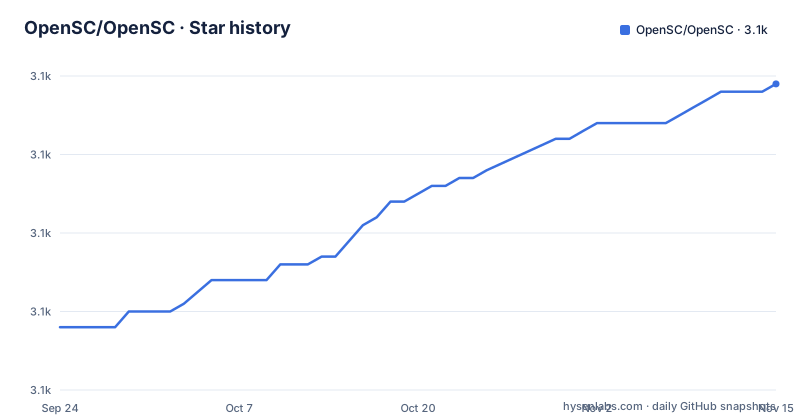
- OpenSC/OpenSC3,129 ★ · +31
| Repository | 2026-09-24 | 2026-11-15 |
|---|---|---|
| OpenSC/OpenSC | 3.1k | 3.1k |
31 Stars in the last 52 days, measured from the daily GitHub snapshot. Compare with other projects
Editorial analysis
Manual pages for tools and config files live in the tree
OpenSC keeps two kinds of manual pages in the repository itself. `doc/tools/tools.html` covers the command line tools and `doc/files/files.html` covers the configuration files, and both are published as rendered HTML as well as distributed with your installation. That split has a practical consequence: a tool's options and a config file's keys are documented side by side in the same tree, so a change to either lands in the same review as the code that reads it.
The wiki covers the rest, and its entries are arranged by platform rather than by component: a Windows Quick Start, a macOS Quick Start, a page on compiling and installing on Unix flavors, and a frequently asked questions page, described as user and developer provided. Plan your first contact by deciding which of those four your situation needs, since the repository itself carries no setup walkthrough.
Three download shapes, and the filenames are the only label
Release assets come in three shapes, and the filenames are the only way to tell them apart. Windows gets an MSI per architecture: `OpenSC*_x64.msi` for 64 bit Intel, `OpenSC*_x86.msi` for 32 bit, and `OpenSC*_arm64.msi` as a separate package for Arm. macOS gets a disk image named `OpenSC*.dmg`. Everyone else gets source in `opensc*.tar.gz`.
Arm having its own file means an Intel installer will not cover an Arm machine, which is the kind of detail that turns into a support question later. The surviving 32 bit package also tells you that a project whose repository default branch is master still ships a 32 bit Windows path, so treat the asset list rather than the branch name as the statement of what is currently packaged.
Nightly builds are addressed by commit hash
Nightly builds are identified by commit hash rather than by version, and they live in branches of the separate OpenSC/Nightly repository. Anyone chasing one specific fix needs the hash first and then the matching branch, because no nightly artifact carries a version in its name. For plain source, the master archive link is the route, which tracks the tip of the default branch instead of any tagged release.
The practical split is this: releases on the main repository for people who want a stable installer, the Nightly repository for people who need one specific commit, and the master archive for people who intend to build the current tree themselves.
Card support is tracked in two CI systems
The card table is the most informative part of this README, and its badges point at two different continuous integration systems. CAC, Coolkey, SmartCard-HSM and ePass2003 report into gitlab.com/redhat-crypto/OpenSC/pipelines. virt_CACard, PivApplet, the OpenPGP Applet, GidsApplet, IsoApplet, OsEID (MyEID) and Pico HSM report into the GitHub Actions linux workflow. Eleven cards in total, each one an applet project with its own repository link in the same row.
Reading those badges as infrastructure rather than as advertising pays off: a card marked with the Actions badge is exercised by the workflow that also builds the Linux package, while a card marked with the GitLab badge is exercised by Red Hat Crypto's pipeline instead. A card absent from the table has no status here, and that is not the same as a card marked broken.
Analysis trackers are linked, verdicts are not
The same page links a Coverity project, a CodeQL workflow, an OSS-Fuzz issue list filtered to this project, and a Core Infrastructure Best Practices entry, alongside the linux, windows and macos workflow runs. All of them are links to external trackers rather than badges that state an outcome, so the page tells you where a defect would surface and not whether anything is open today. When card behaviour is what you care about, the per card table is the part that carries actual status.
Three governance files sit next to the code: SECURITY.md, CONTRIBUTING.md and an AGENTS.md at the top of the tree. None of them is described in the README itself, so treat them as pointers rather than as documentation you have already read.
Autotools on Unix, a separate makefile for Windows
The build on Unix is autotools: `bootstrap` and `bootstrap.ci` for the generated configure step, `configure.ac` and `VERSION.mk` for configuration and version, `m4/` for macros, and `Makefile.am` at the top. Windows carries `Makefile.mak` alongside a `win32/` directory, and macOS has its own `MacOSX/` directory, so the three platforms are not sharing one build description. Packaging is split off as well: `packaging/` for distributions, `containers/` for images, and `.packit.yaml` as the packaging service configuration.
One oddity to expect: there is a plain `README` sitting next to `README.md`. Two files with the same name and one purpose, which is worth knowing before you file an issue about missing documentation.
Version 0.27.1 shipped 2026-03-31, the tree has moved on
Version 0.27.1 is the newest release in this snapshot, published 2026-03-31, and it followed two release candidates on the same line: 0.27.0-rc1 on 2026-02-24 and 0.27.0-rc2 on 2026-03-13. The repository's last commit is dated 2026-10-01, so the source tree has moved a long way past the tag the release assets carry. That gap is exactly what the Nightly branches exist to cover.
For a distribution package the gap is the first thing to check: whether the version on offer is 0.27.1 or one of the release candidates changes what you actually install, and the tag list is the only place that ordering is recorded. The project is LGPL-2.1 licensed, has 3101 stars and 857 forks, and showed 94 open issues at the time of this snapshot.
Editorial conclusion
Start with OpenSC if you need command line access to smart card applets and want per card test coverage you can check before committing to a version. Hold off if you only need a PKCS#11 module for a single card nobody in the table covers, because the repository will not tell you what happens on that hardware. Before you install anything, confirm three things: which asset matches your architecture, whether the tag on offer is 0.27.1 or one of the release candidates, and whether the card you care about has a status line at all, since a missing row means no coverage rather than a passing one.
Frequently asked questions
What does OpenSC do?
It provides open source smart card tools and middleware with PKCS#11 and MiniDriver support, written in C under LGPL-2.1. Command line tools and configuration files each have their own manual pages generated inside the repository.
what is opensc
A C codebase on the master branch built with autotools, where `bootstrap` and `configure.ac` produce the build and `Makefile.am` drives it on Unix, while `win32/` with `Makefile.mak` covers Windows and `MacOSX/` covers macOS.
how to install opensc
Pick the asset that matches your platform from the release: `OpenSC*_x64.msi`, `OpenSC*_x86.msi` or `OpenSC*_arm64.msi` on Windows, `OpenSC*.dmg` on macOS, or `opensc*.tar.gz` for source. Unix builds follow the wiki page on compiling and installing on Unix flavors.
how to use opensc
Start with the manual pages: `doc/tools/tools.html` for the command line tools and `doc/files/files.html` for the configuration files, both distributed with the installation. Platform quick starts for Windows and macOS plus a FAQ page sit on the project wiki.
Official sources
Add this badge to your README
If you maintain this project, the badge below links readers to this analysis and shows its maintenance status from the daily GitHub snapshot. Paste the markdown into your README; add ?metric=license or ?metric=stars to the image URL for a different field.

[](https://hysenlabs.com/projects/opensc-opensc)Star history chart for your README
[](https://hysenlabs.com/projects/opensc-opensc)Was this useful?