FluentFlyout: the .msixbundle install path asks you to put a certificate in Trusted Root, and Store features cost €2.99
The modern Flyout app for Windows 11, built with Fluent 2 Design principles. Media Flyouts, Taskbar Widgets and more.
At a glance
- What is it?
- FluentFlyout is unchihugo's GPLv3 Windows flyout app built with Fluent 2 design components, with v2.16.1 released in October 2026. Its README is unusually explicit about funding: the Microsoft Store version unlocks a small set of features behind a one-time purchase of €2.99, while the GitHub build is described as completely free and fully featured, and the .msixbundle install path requires installing a root certificate into the Trusted Root store on the local machine.
- Who is it for?
- FluentFlyout fits a Windows 11 user who wants media controls, a lock key indicator and a taskbar widget without waiting for Microsoft to ship them. Two decisions to make before you install.
- Can I use it commercially?
- Yes, with conditions. GPL-3.0 is a copyleft licence: if you distribute software that includes it, you must release that software's source code under the same licence. Running it internally without distributing it does not trigger that obligation.
- Is it still maintained?
- Yes. The repository last received commits 4 days ago.
- What is it written in?
- Mainly C#, according to GitHub's language statistics.
Answers come from the project's GitHub data, last synced on November 15, 2026, and from our analysis. They are not legal advice.
Star history
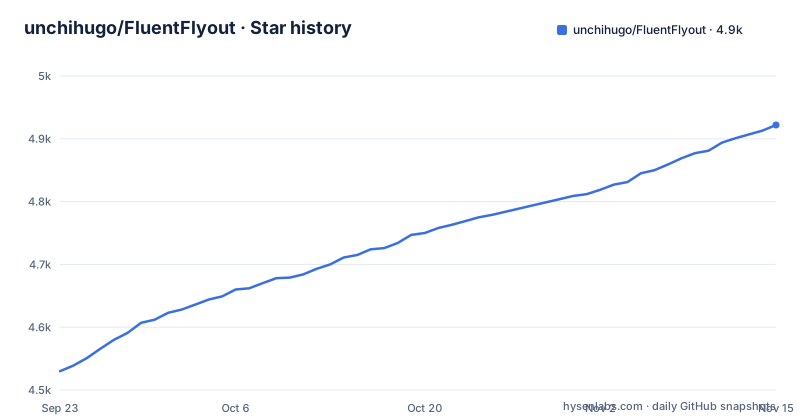
- unchihugo/FluentFlyout4,922 ★ · +392
| Repository | 2026-09-23 | 2026-11-15 |
|---|---|---|
| unchihugo/FluentFlyout | 4.5k | 4.9k |
392 Stars in the last 53 days, measured from the daily GitHub snapshot. Compare with other projects
Editorial analysis
The two builds differ in updates and in which features you pay for
The sustainability section is the most useful paragraph in the README and it comes near the end, just before the credits. It opens by saying the project is and always will be free and open source, and that you can download the latest builds from the Releases tab or compile the project yourself to access the full feature set without restrictions. Then the trade. Maintaining a project of this scale takes time and effort, and to support ongoing development the Microsoft Store version offers a convenient way to install the app and includes a few optional features unlockable via a small payment of €2.99, varying by region. The two options are then contrasted directly: the Store version provides automatic background updates and one-click installation, with a small set of features unlocked by a one-time purchase, while the GitHub version is completely free, fully featured and open source, with the only trade-off being that updates and installation must be done manually. So the paid build buys convenience, not capability.
The sideload route puts a certificate into the machine's trusted root store
There are three installation paths and the third is the one to read carefully. The Microsoft Store route is marked recommended and is a single link. The manual installer route is: open the download page, download the manual installer described as the GitHub release for x64, and run FluentFlyout_Installer.bat, with a pointer to the msixbundle section if you would rather not use it. The third route is spelled out in seven steps, and the first five are about the certificate rather than the app. Find and download the file with the .cer extension, open the certificate and choose Install Certificate, then in the Certificate Import Wizard select Local Machine, press Next and grant Admin Access. Next, choose Place all certificates in the following store, browse to Trusted Root Certification Authorities and confirm, then finish, possibly confirming once more. Only steps six and seven install anything: download the .msixbundle and press Install, or Update if you have the app already. Installing to the local machine's trusted root store is a machine-wide trust change, and the README gives no detail about what the certificate covers.
Four flyouts and a taskbar widget, all living in the system tray
The feature list is short and each entry names a surface rather than a capability. The Audio flyout displays cover, title, artist and media controls. The Up Next flyout shows what is queued when a song ends, which is a separate window from the audio flyout and is the entry that tells you the app tracks the media session rather than just the current track. The Lock Keys flyout displays the status of lock keys at a glance, so this is not a media app with a utility bolted on. The Taskbar widget shows media info directly on the Windows taskbar rather than in a popup, and it has its own section with a video demo in the README. The remaining entries are presentation and behaviour: native Windows-like design, Fluent 2 components, Windows Mica blur, light and dark mode, matching the device color theme, smooth animations, customizable flyout positions, Repeat All, Repeat One and Shuffle, and sitting unobtrusively in the system tray.
Six README languages and a Weblate project, with translations credited individually
The language row at the top of the README offers six versions: English plus Simplified Chinese, Dutch, Turkish, Russian and Korean, each a separate README file in the repository root rather than a generated localisation. Translation work is routed through a hosted Weblate project linked from the header and again from the contributing section. The credits section then names contributors by what they contributed, which is unusually specific for a project this size: Hugo Li as original developer, Microsoft Store publisher and for the Chinese and Dutch translations; LiAuTraver for the app theme switcher; AksharDP for the media seekbar and duration; Hykerisme for the Chinese translation; and nopeless for quality of life features. So the theme switcher, the seekbar and the duration display are all attributable to named individuals rather than to the project as a whole, which is what you would want to know before reporting a bug in any of those.
Three projects in one solution, including a separate MSIX packaging project
The repository is a Visual Studio solution with a small number of directories, and they explain the build. There is FluentFlyout.sln at the root, then FluentFlyoutWPF which is the application, FluentFlyoutMSIX which is the packaging project for the store and bundle distribution, and FluentFlyout.SourceGenerators which is a separate project for source generators. A source generator project at the root of a WPF application is a deliberate choice: it moves work that would otherwise be reflection into the compiler, which for a UI project usually means generating notification or command plumbing rather than writing it by hand. The rest of the root is governance and documentation: CODE_OF_CONDUCT.md, PRIVACY-POLICY.md, LICENSE, .gitattributes, .gitignore, and the .github/ directory that the contributing section points at for CONTRIBUTING.md. There is no test project in the listing, and no separate assets or resources directory at the root.
The dependency list explains the media features and the blur
The README's dependency list names CommunityToolkit.Mvvm, Dubya.WindowsMediaController, MicaWPF and Microsoft.Toolkit.Uwp.Notifications. CommunityToolkit.Mvvm is the Microsoft MVVM toolkit, which is the standard choice for a WPF application with bindable view models. Dubya.WindowsMediaController is the library that reads the Windows media session, and that is what makes both the Audio flyout and the Up Next flyout possible, since a queue display needs the session's next-track information rather than just the currently playing item. MicaWPF provides the Windows Mica backdrop, which is the blur effect listed as a design feature. Microsoft.Toolkit.Uwp.Notifications is the notification toolkit.
Two press quotes are reproduced verbatim, and both name Microsoft by contrast
The README carries two review quotes, and they are worth reading because of who is being contrasted with whom. The first is from Windows Central and reads that Windows 11 may have just gained another must-have app. The second is from Neowin and reads that it does a better job than what Microsoft officially offers. Both are placed with a link to the source article, so they are checkable rather than decorative. The framing is worth noting because it tells you the project's positioning, which is that it fills a gap Microsoft has not closed and is not intended to. The Windows Central article's own headline, linked beside the quote, is about Microsoft being too busy with AI to fix Windows 11's design and developers stepping up, so the coverage arrived with an explicit premise about why a third party app exists at all. Neither quote is a benchmark or a measurement, and the README offers no performance claims of its own.
Editorial conclusion
FluentFlyout fits a Windows 11 user who wants media controls, a lock key indicator and a taskbar widget without waiting for Microsoft to ship them. Two decisions to make before you install. If you take the Microsoft Store build you get automatic background updates and one-click installation, and a small set of features stays locked behind a one-time purchase of €2.99 that varies by region. If you build from the GitHub release the README describes that version as completely free and fully featured, and updates become your problem. On the certificate question: the .msixbundle route asks you to install the shipped certificate into the Trusted Root Certification Authorities store on the local machine, which is a machine-wide trust decision and is the one step here worth understanding rather than clicking through. The last push is dated 2026-11-02.
Frequently asked questions
Is FluentFlyout free?
It depends on which build you install. The Microsoft Store version provides automatic background updates and one-click installation, and a small set of features is unlocked with a one-time purchase of €2.99 that varies by region. The GitHub version is described as completely free, fully featured and open source, with the only trade-off being that updates and installation must be done manually.
how to install fluentflyout
The Microsoft Store route is the recommended one. The manual route is to open the project's download page, download the GitHub release installer for x64, and run FluentFlyout_Installer.bat. A third route installs a msixbundle, and it requires first installing the shipped certificate into the Trusted Root Certification Authorities store on the local machine with admin access.
what is fluent flyout
FluentFlyout is a Windows flyout app built with Fluent 2 design principles, described as blending in with Windows 11. It ships an Audio flyout with cover, title, artist and controls, an Up Next flyout for what plays after the current song, a Lock Keys flyout showing lock key status, and a taskbar widget that shows media info on the taskbar itself.
Official sources
Add this badge to your README
If you maintain this project, the badge below links readers to this analysis and shows its maintenance status from the daily GitHub snapshot. Paste the markdown into your README; add ?metric=license or ?metric=stars to the image URL for a different field.

[](https://hysenlabs.com/projects/unchihugo-fluentflyout)Star history chart for your README
[](https://hysenlabs.com/projects/unchihugo-fluentflyout)Was this useful?