VisualVM from source: Ant, Oracle JDK 8, and a platform zip pinned to a tag
VisualVM is an All-in-One Java Troubleshooting Tool
At a glance
- What is it?
- The VisualVM repository documents how to build the tool from master rather than how to obtain it, and it does that with five short sections. The interesting details are in what those instructions pin, what they leave out, and which three top-level directories the page never mentions.
- Who is it for?
- This repository suits someone who needs to build VisualVM against a specific NetBeans Platform build, or who wants to read the core and plugin suites as source, rather than someone looking for a download or a profiling manual. Three things to settle first.
- Can I use it commercially?
- Check first. The repository uses a licence we do not classify automatically, so read its LICENSE file before any commercial use.
- Is it still maintained?
- Yes. The repository last received commits 19 days ago.
- What is it written in?
- Mainly Java, according to GitHub's language statistics.
Answers come from the project's GitHub data, last synced on November 14, 2026, and from our analysis. They are not legal advice.
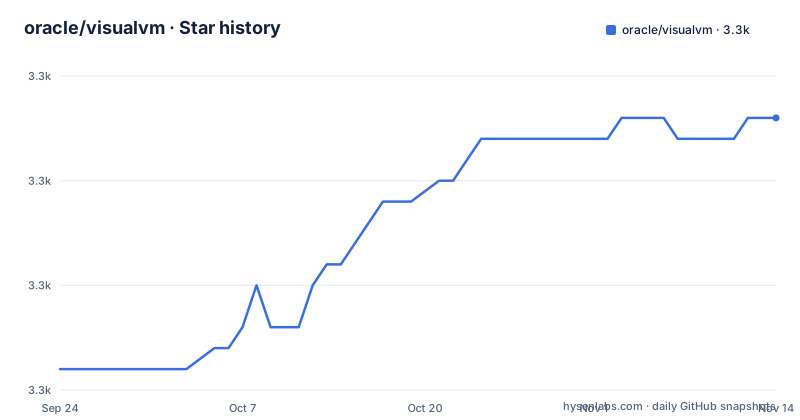
Star history
- oracle/visualvm3,278 ★ · +12
| Repository | 2026-09-24 | 2026-11-14 |
|---|---|---|
| oracle/visualvm | 3.3k | 3.3k |
12 Stars in the last 51 days, measured from the daily GitHub snapshot. Compare with other projects
Editorial analysis
Building from source needs Ant 1.9.15, Oracle JDK 8 and a platform zip
The toolchain is spelled out in one line: Apache Ant 1.9.15 or above, plus Oracle JDK 8. That is the build JDK, which is a separate question from the JDK you later want to diagnose, and the distinction matters because the platform payload you compile against is a much newer artifact. The platform arrives as a zip extracted into the `visualvm/visualvm` directory, where it creates a `visualvm/visualvm/netbeans` directory. The archive named in the instructions is the NetBeans Platform 22 build, and the file itself carries a build stamp inside its name, so what you are linking against is one specific platform build rather than a floating version. After that extraction, `ant build-zip` in `visualvm/visualvm` produces the distribution and `ant run` launches it. Nothing in the page mentions a way to point the build at a different platform, an offline mirror, or a proxy, so a reader behind a restrictive network has to fetch roughly a platform-sized archive by hand first.
The plugins suite builds the core first, and the order is not optional
The repository holds two Ant project suites. The first, under `visualvm/visualvm`, is the core VisualVM tool. The second, under `visualvm/plugins`, is the suite of plugins available in the Plugins Center, and it has a dependency on the first that the page is unusually explicit about. Running `ant build` or `ant run` in `visualvm/plugins` does not start from the plugins. It first builds the zip distribution of the core tool into `visualvm/visualvm/dist/visualvm.zip`, extracts that zip into `visualvm/plugins/visualvm`, and only then builds each individual plugin. Running the plugins suite therefore means starting VisualVM with every plugin installed, which is a different artifact from the lean build. The practical reading is that a plugin contributor cannot shortcut the core build, and that the plugin workspace is seeded from a zip rather than from a shared source directory, so two copies of VisualVM exist on disk during a plugin build.
This repository is the sources, and downloads live on the project site
The first line of the page settles the most common question about this repository, which is where to get VisualVM. It describes itself as the master sources repository and directs readers to visualvm.github.io for details, downloads and documentation. Nothing is built for you here and no installer is hosted; the GitHub Releases area attached to the platform zip in the build instructions is where the NetBeans Platform archive comes from, not a VisualVM distribution. The positioning sentence is also narrow and worth quoting accurately, since it is the whole of the product description on this page: VisualVM is a visual tool integrating command line JDK tools and lightweight profiling capabilities. That is a front end over tooling that already ships with a JDK, plus a profiling tier the page qualifies as lightweight and never further specifies. If you arrived looking for a profiler comparable to a commercial product, this page will not tell you what you get.
The platform payload is a URL pinned to the 2.2.2 release asset
The platform zip is not fetched from a stable platform location. The instruction links a specific asset inside a specific release of this same repository, the one tagged 2.2.2, and names the file as the NetBeans Platform 22 build. That has two consequences. A reader who wants to build against a newer platform has no supported path, because the version lives in a link inside the build instructions rather than in a property or a documented override, so changing it means editing the page or guessing at the equivalent asset. And a reader who wants to reproduce the platform the maintainers used has to match that tag exactly. The release history around it shows how that pin gets updated: 2.2 shipped 2025-04-22, 2.2.1 on 2026-02-15 and 2.2.2 on 2026-09-08, and the repository itself was pushed on 2026-09-18. A contributor cutting a release has to remember to move this link, and nothing in the build enforces it.
No external pull requests, so feedback goes through an issue or a feedback page
The contributing section states a constraint that is unusual enough to be worth quoting rather than paraphrasing: for legal reasons, the project cannot accept external pull requests. Feedback is still invited, and two channels are offered for it. One is the issue tracker, with a chooser that separates a request for enhancement from a bug report. The other is a feedback form on the project site. The repository's own `CONTRIBUTING.md` is linked for details on what to do with each. Security has a third path again, a separate `SECURITY.md` holding the responsible disclosure process, which keeps vulnerability reports away from the public issue tracker. The practical effect for anyone who found a bug while reading the source is that a patch cannot be sent in as a pull request, so the work has to be described well enough for someone inside the project to reproduce and apply it.
GPL version 2 with the Classpath Exception in the text, no assertion in the metadata
The license section is short and specific: copyright 2017, 2026 Oracle and/or its affiliates, released under the GNU General Public License version 2 with the Classpath Exception. The Classpath Exception is the part that matters for anyone planning to link this code into their own product, because it is what permits linking independent modules rather than treating the combined work as a single GPL work. The tree backs this up with two files at the root, `LICENSE.txt` and `THIRDPARTYLICENSE`, the second covering the third party components that a build of this size inevitably pulls in. Against that, the license metadata attached to this repository reports no assertion rather than a named license, so the machine readable field and the stated terms disagree even though the file names and the license section agree with each other. If you are scanning dependencies automatically, the field will not tell you what you are obliged to do.
samples/, templates/ and integrations/ are in the tree and absent from the page
Three top-level directories get no mention in the build instructions. `integrations/` is not described at all. `templates/` is not described at all. And `samples/` is not described either, although its contents say what it is for: `samples/apptype/`, `samples/datasource/`, `samples/filtersortsample/`, `samples/hellovvm/`, `samples/hostcompare/`, `samples/jvmcap/`, `samples/pluggableViewDemoSuite/`, `samples/sampleBundle/` and `samples/subnodes/`. Read as a set those names describe the extension surface, which is more informative than the prose would have been: application type detection, data sources, filter and sort behaviour, a minimal working tool, host comparison, JVM capability detection, a pluggable view, a bundle, and a subnode. That is the closest thing on this page to an API tour, and it arrives as a directory listing rather than as documentation. The two Ant suites the page does explain are therefore not the whole of what the tree holds.
Editorial conclusion
This repository suits someone who needs to build VisualVM against a specific NetBeans Platform build, or who wants to read the core and plugin suites as source, rather than someone looking for a download or a profiling manual. Three things to settle first. Downloads and documentation live on the project site, not here, and the pages readers usually want, memory leak hunting, heap dump analysis, profiler guidance and IntelliJ integration, are not in this repository at all. The platform zip you build against is a URL pinned to the 2.2.2 release asset, so building from master against a newer platform means editing the build instructions yourself. And the contribution route is an issue or the feedback page, since the project states it cannot accept external pull requests for legal reasons. Licensing is GPL version 2 with the Classpath Exception as stated in the page, though the repository metadata reports no assertion.
Frequently asked questions
What is VisualVM used for?
It is described as a visual tool integrating command line JDK tools and lightweight profiling capabilities. In other words it is a graphical front end over tooling that already ships with a JDK, plus a profiling tier the page qualifies as lightweight and does not further specify. Downloads and documentation are on the project site, not in this repository.
Is Java VisualVM free?
The stated terms are the GNU General Public License version 2 with the Classpath Exception, copyright 2017, 2026 Oracle and/or its affiliates. The Classpath Exception is what allows independent modules to be linked against it. The tree carries `LICENSE.txt` and `THIRDPARTYLICENSE`, though the repository's license metadata field reports no assertion.
How do you build VisualVM from this repository?
Install Apache Ant 1.9.15 or above and Oracle JDK 8, clone into a directory named `visualvm`, extract the NetBeans Platform 22 zip into `visualvm/visualvm` so it creates `visualvm/visualvm/netbeans`, then run `ant build-zip` for the distribution or `ant run` to launch it. The platform zip is linked from inside the 2.2.2 release of this repository.
How do I contribute a fix to VisualVM?
You cannot send a pull request: the page states that for legal reasons external pull requests are not accepted. Feedback goes through the issue tracker, which separates enhancement requests from bug reports, or through the feedback form on the project site, with `CONTRIBUTING.md` holding the details. Security reports go through the separate process in `SECURITY.md`.
Does VisualVM have anything for finding memory leaks or reading heap dumps?
This repository does not answer that. The only profiling statement on the page is that VisualVM integrates command line JDK tools and lightweight profiling capabilities, with no list of tools, no heap or memory view, and no leak hunting workflow. The documentation linked from the page is where that material would be.
Official sources
Add this badge to your README
If you maintain this project, the badge below links readers to this analysis and shows its maintenance status from the daily GitHub snapshot. Paste the markdown into your README; add ?metric=license or ?metric=stars to the image URL for a different field.

[](https://hysenlabs.com/projects/oracle-visualvm)Star history chart for your README
[](https://hysenlabs.com/projects/oracle-visualvm)Was this useful?