PrivateAgent taps Android screens by coordinate, one loop turn at a time
PrivateAgent is an open-source Android automation agent built with Flutter. It utilizes the DeepSeek API and native Android Accessibility Services to interpret screen layouts and execute multi-step tasks across any installed application via natural language commands.
At a glance
- What is it?
- PrivateAgent is a Flutter Android automation agent that reads the Android UI tree, ships each screen layout to a DeepSeek or OpenRouter model, and acts on the coordinates that come back. It installs as an APK, depends on a restricted accessibility setting, and accepts commands by voice, text, or a Telegram bot.
- Who is it for?
- PrivateAgent suits someone who wants to see the coordinate tap and the accessibility plumbing before trusting an agent with a phone, and suits nobody who needs a scripted install, a documented answer about how an API key is stored, or a license file. Before the first run, check which APK your device needs, expect to clear Android's restricted setting, and decide what happens if a task needs a confirmation you never see.
- Can I use it commercially?
- Not without permission. GitHub finds no licence file in the repository, and without a licence all rights are reserved by default: you may read the code but not reuse it. Check the README, or ask the authors, before using it.
- Is it still maintained?
- Yes. The repository last received commits 121 days ago.
- What is it written in?
- Mainly Dart, according to GitHub's language statistics.
Answers come from the project's GitHub data, last synced on November 14, 2026, and from our analysis. They are not legal advice.
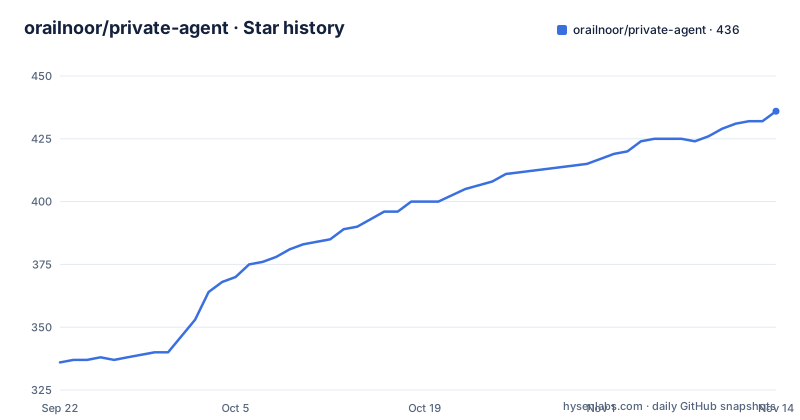
Star history
- orailnoor/private-agent436 ★ · +100
| Repository | 2026-09-22 | 2026-11-14 |
|---|---|---|
| orailnoor/private-agent | 336 | 436 |
100 Stars in the last 53 days, measured from the daily GitHub snapshot. Compare with other projects
Editorial analysis
The loop turns one screen dump into one tap
PrivateAgent does not plan a whole task in one shot. It runs a six step feedback loop, and every turn of that loop sends a fresh picture of the screen to the model. The user issues a command through voice, text, or Telegram remote access. The agent captures the current screen hierarchy and calculates the exact spatial coordinates of every interactive element on it. That layout data goes to the AI provider together with the current task context and the result of the previous action. The model answers with a single next action, such as clicking specific coordinates, inputting text, or scrolling. A native Android layer performs that action on the device, and the loop starts over until the task is marked as complete.
Two properties follow from that shape. The model picks one action per turn instead of receiving a script up front, so the outcome of each tap is fed back in before the next choice gets made. And completion is a state the agent reports about itself, since the loop only stops once the task is marked as complete. Nothing in those six steps leaves a place for a person to watch the screen in between. The cost of that design is bandwidth and latency rather than correctness: every turn resends a layout, and a task that takes twenty taps takes twenty round trips to the provider before the last one lands.
Why it taps coordinates instead of matching labels
Screen reading is the input side of the loop: PrivateAgent parses the Android UI tree to map clickable, scrollable, and editable elements, then works from the geometry of what it found. Actions are expressed as simulated physical taps at coordinate positions rather than as selectors bound to a text label. The stated reason is coverage. An icon that exposes no readable label, or a control a label matching approach cannot match at all, can still be reached, because a position can be tapped.
The three element kinds the parser names also explain the action vocabulary. A clickable element is what a tap resolves, an editable element is what receives typed input, and a scrollable element is what a scroll gesture moves, so the same pass over the tree has to classify a control before the model is asked to act on it.
The cost sits on the other side of that trade. A coordinate is only correct for the screen it was measured on, so pairing a hierarchy read with a tap is sensitive to whatever moves in between. A dialog that appears, a list that settles after a scroll, and a keyboard that reflows the layout each change where a tap should land, and the loop as described does not include a verification step that re-reads the screen between reading it and acting on it. Elements also lose their identity once reduced to geometry: the UI tree distinguishes a control meant for editing from one meant for tapping, but a bare coordinate does not carry that distinction to the model.
Sideloaded APKs hit Android's restricted setting wall
Installing PrivateAgent as an APK makes Android treat it differently from an app that arrived through a store, and the difference lands on the one permission the whole design depends on. Android may block accessibility access for apps installed from an APK. That block is an operating system safety restriction rather than a fault in the app, and unlocking it takes five steps. Open Settings, then Apps, then PrivateAgent. Open the three dot menu in the top right corner. Tap Allow restricted settings and confirm. Return to PrivateAgent and open Accessibility Settings again. Enable PrivateAgent Screen Control.
The service name matters because that is the label the operating system shows in its accessibility list, and an app that is missing from that list cannot drive anything. PrivateAgent carries its own remedy for the detour: it now displays these instructions during onboarding and provides shortcuts to both App Info and Accessibility Settings, so the route through the system menus is reachable from inside the app instead of something a first time user has to find unaided.
Two APK shapes and a 16 KB alignment check
There is no package manager step and no build step, so the install path is a download from the releases page, and the choice of file is not cosmetic because the releases are not always one shape. When it is available, app-universal-release.apk is the file to take, since it supports ARM64, 32 bit ARM, and x86_64 devices in one package. When a release only provides split APKs, the choice narrows: most modern Android phones, including Snapdragon devices, must use app-arm64-v8a-release.apk.
The platform floor is Android 8.0, meaning API 26 and newer, which the setup walkthrough softens into API 30 or later as a recommendation. Sitting on top of that floor is a constraint that recent Android versions made common: current release builds are also checked for the 16 KB native library alignment requirement that Android 15 and Android 16 impose. That check is what keeps the packaged native code loadable on devices that map pages at the larger size, and the packaging choice above decides which ABI folder you actually receive.
Since the project publishes APKs rather than a package, installing it also means it can never arrive through a store channel, which is exactly the situation the next section is about. Sideloading is not a shortcut taken here, it is the only installation path on offer.
The free path swaps the Base URL to OpenRouter
The app ships without a model of its own, so an AI provider has to be configured before it can act, and the documented route to running at no cost points at OpenRouter. An account and a free API key come first, then the configuration lives on the Settings screen. Tap the OpenRouter quick select chip under Base URL, paste the API key, and type openai/gpt-oss-120b:free, or any other free model, into the Model field. The chip carries the weight here, because the project's own summary names DeepSeek as the model API, which makes changing the Base URL the switch between the bundled provider and an OpenRouter endpoint while the Model field stays a free text box.
One detail deserves attention from anyone pasting a key into this app: the key is stored in a settings field on the device, and the README does not document how that field protects it. On a shared or compromised phone, that is the first thing to check. The documented setup sequence also ends with the same mechanical step as the APK path, enabling the PrivateAgent Screen Control service in Android accessibility settings, which means the restricted setting detour is part of configuration rather than a corner case.
Telegram access is a poll, not an inbound socket
Remote control runs over the Telegram Bot API, and the transport is polling rather than an inbound connection. Acquire a bot token from BotFather on Telegram, enter that token on the PrivateAgent Settings screen, and turn on the integration toggle. The application then maintains a background polling connection to the Telegram API to receive commands, and the same channel reports task execution progress while a multi step task runs.
That arrangement has a practical shape worth naming. The phone holds a long lived outbound connection to Telegram for as long as the integration is enabled, so the remote command surface is reachable without the phone sharing a network with whoever is typing. The polling loop also gives the chat a second job, since progress on the six step cycle is reported back through it, which turns one Telegram conversation into both a command line and a status display for a task whose intermediate steps are invisible on a locked phone.
It also means the channel that issues commands feeds the same screen hierarchy parser and the same coordinate taps, which makes the bot token the whole of the access control. The README does not document additional authentication on that channel, per sender restrictions, or a command allow list, so the token itself is what stands between a stranger and the accessibility service.
Voice input is a third door into the same loop
Hands free operation is the reason voice sits in the loop at all. PrivateAgent integrates native speech to text on the device, which turns the first step of the six step cycle into a spoken command instead of a typed one and leaves the phone undemanding to hold. Paired with a device that can be set down after the instruction, it lets the hierarchy be read and the coordinate taps executed with nobody touching the screen.
What the loop does not contain is a pause. Reading the hierarchy, choosing one action, executing it, and reporting the result all run back to back, and the cycle ends only when the task is marked as complete. So the three entry points, voice, text, and Telegram, differ solely in how the first command arrives; once it has, the remaining steps look identical to the model. Anything a task does to an account, a purchase, or a message is carried by that same uninterrupted sequence, and the only stopping point in the design is the agent's own completion signal.
What the tree shows about the build
The tracked layout matches the split described in the loop: Dart code under lib/, the platform layer under android/, an assets directory for bundled media, and a local_plugins directory for first party plugins, alongside the usual Flutter project files pubspec.yaml, pubspec.lock, analysis_options.yaml, and devtools_options.yaml. Testing is a small part of it, since the test directory holds test_parse.dart, and .metadata plus .github are standard scaffolding. That arrangement fits a project whose heavier half is the native Android side and whose Dart half is the glue between the accessibility service and a chat endpoint. The presence of local_plugins/ also says the plugins in use live inside the repository rather than coming only from a package registry, which suits code that needs to sit next to the native layer it drives.
Release history is short and recent. v1.0.0 shipped as PrivateAgent App v1.0.0 on 2026-06-26, v1.0.1 followed on 2026-07-16, and v1.0.2 on 2026-07-17, with the most recent push to the main branch dated 2026-07-17 as well, three releases inside three weeks. Licensing is stated in prose rather than a file: the project is described as open source and available for modification, and no LICENSE file sits at the top level next to README.md, so anyone planning to redistribute a modified build is working from that sentence rather than from a license grant.
Editorial conclusion
PrivateAgent suits someone who wants to see the coordinate tap and the accessibility plumbing before trusting an agent with a phone, and suits nobody who needs a scripted install, a documented answer about how an API key is stored, or a license file. Before the first run, check which APK your device needs, expect to clear Android's restricted setting, and decide what happens if a task needs a confirmation you never see.
Frequently asked questions
Which AI provider does PrivateAgent use, and can it run for free?
The project summary names the DeepSeek API. The documented no cost route points the Base URL at OpenRouter, pastes a free API key, and uses a model name such as openai/gpt-oss-120b:free in the Model field, where any other free model also works.
Which PrivateAgent APK should I download for a modern Android phone?
Take app-universal-release.apk when a release offers it, because it covers ARM64, 32 bit ARM, and x86_64 in one package. When a release ships only split APKs, most modern phones, Snapdragon devices included, need app-arm64-v8a-release.apk.
Why does Android refuse to enable PrivateAgent Screen Control after an APK install?
Android blocks accessibility access for apps installed from an APK as an operating system safety restriction. Clear it through Settings, then Apps, then PrivateAgent, the three dot menu, Allow restricted settings, and only then enable PrivateAgent Screen Control in Accessibility Settings.
How does PrivateAgent receive Telegram commands without an inbound port?
You get a bot token from BotFather, enter it on the Settings screen, and enable the integration toggle. The app then keeps a background polling connection to the Telegram API open to receive commands and to report task progress.
Which Android versions does PrivateAgent support?
Android 8.0, or API 26, and newer, with API 30 or later recommended in the setup steps. Current release builds are also checked against the 16 KB native library alignment requirement that Android 15 and Android 16 impose.
Official sources
Add this badge to your README
If you maintain this project, the badge below links readers to this analysis and shows its maintenance status from the daily GitHub snapshot. Paste the markdown into your README; add ?metric=license or ?metric=stars to the image URL for a different field.

[](https://hysenlabs.com/projects/orailnoor-private-agent)Star history chart for your README
[](https://hysenlabs.com/projects/orailnoor-private-agent)Was this useful?