MoCha: video character replacement without pose or depth guidance
MoCha: End-to-End Video Character Replacement without Structural Guidance
At a glance
- What is it?
- MoCha replaces a character in a source video from reference images and a single first frame mask, skipping the per frame masks and pose or depth conditioning that earlier reconstruction based methods rely on. The code in this repository is an inference pipeline built on DiffSynth, published alongside a CVPR 2026 paper.
- Who is it for?
- Adopt this inference code if you need character replacement in a source video and can supply a clean reference portrait plus a first frame mask, since that is the exact input set the pipeline expects and the reason it avoids per frame annotation. Do not expect a training setup here, because the repository ships inference only and the training data came from a separate synthesis pipeline described in the paper.
- Can I use it commercially?
- Not without permission. GitHub finds no licence file in the repository, and without a licence all rights are reserved by default: you may read the code but not reuse it. Check the README, or ask the authors, before using it.
- Is it still maintained?
- Activity is slowing. The repository last received commits 6 months ago.
- What is it written in?
- Mainly Python, according to GitHub's language statistics.
Answers come from the project's GitHub data, last synced on November 7, 2026, and from our analysis. They are not legal advice.
Star history
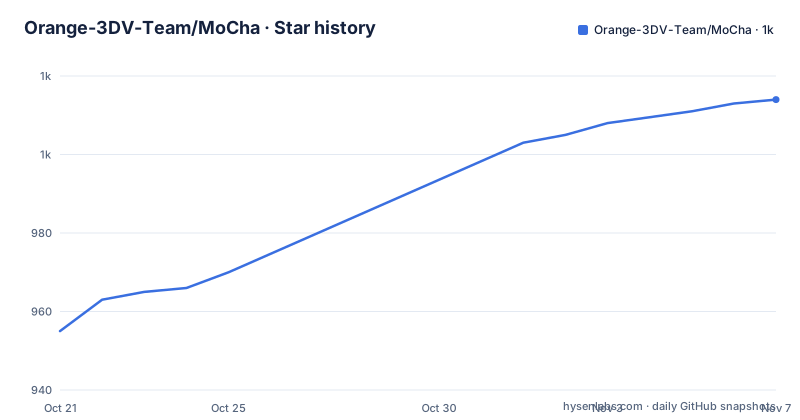
- Orange-3DV-Team/MoCha1,014 ★ · +59
| Repository | 2026-10-21 | 2026-11-07 |
|---|---|---|
| Orange-3DV-Team/MoCha | 955 | 1k |
59 Stars in the last 17 days, measured from the daily GitHub snapshot. Compare with other projects
Editorial analysis
One mask in the first frame instead of masks on every frame
The design decision that separates MoCha from earlier work is what the model is asked to condition on. The abstract states that prior approaches predominantly used a reconstruction based paradigm that relied on per frame masks and explicit structural guidance such as pose and depth, and that this reliance makes them fragile in occlusions, rare poses, character and object interactions, or complicated lighting, often producing visual artefacts and temporal discontinuities.
MoCha's answer is to require only a single first frame mask and to re-render the character by unifying different conditions into a single token stream. The mask marks where the source character is in frame one, and the model carries that identity through the rest of the sequence by itself. That is the entire practical difference, and it is why you do not need an annotation pass over your footage.
The second component is a condition aware RoPE, the rotary position encoding used in transformer models, adapted here to support multiple reference images and variable length video generation. Reference conditioning and sequence length flexibility are therefore handled inside the positional scheme rather than by padding or truncating.
The problem being attacked is stated as controllable video character replacement with a user provided character, which remains hard because qualified paired video data is scarce. The team addressed that with a data synthesis pipeline for collecting paired training videos, and reports in the paper that the method substantially outperforms existing state of the art approaches.
What you actually need to supply for a replacement
Three inputs are required, and the documentation is specific about each one. The source video is the original footage containing the character you want replaced. The designation mask for the first frame marks that character in the very first frame of the source video. The reference images are pictures of the new character with a clean background, and the guidance is to upload at least one high quality, front facing facial close up.
The reference set is capped at two in the documented data layout, and the second reference has a stricter requirement than the first: it needs to be a high quality, front facing facial close up, and the documentation notes you can zoom in on your first reference to produce it. If you truly cannot provide that second image, you leave the field as None.
The data is organised as a CSV, and the path shown in the repository is ./data/test_data.csv. The columns are source_video, which is the path to the source video, source_mask, which is the path to the designation mask, reference_1, the path to the first reference image, and reference_2, the path to the second reference image.
The practical consequence is that the quality of your output is bounded by the quality of a single portrait and a single mask. If the new character's look is not captured in a clean front facing image, the model has nothing else to work from.
Setting up the environment and running the bundled example
The getting started section is a four step path, and it assumes a CUDA machine with conda available.
# 1. Create conda environment
conda create -n MoCha python==3.10

# 2. Activate the environment
conda activate MoCha

# 3. Install pip dependencies
pip install -r requirements.txt
Python 3.10 is the pinned version. The dependency list in requirements.txt is worth reading before you install anything, because it fixes several packages tightly. Torch is required at 2.0.0 or newer, torchvision is unpinned, and cupy-cuda12x pins the CUDA 12 wheels of the CuPy array library. Transformers is pinned exactly to 4.46.2 and controlnet-aux to 0.0.7, which tells you the pipeline was validated against one specific transformer stack rather than the latest one.
The remaining dependencies are the usual video and model plumbing: imageio with the ffmpeg extra, safetensors, einops, sentencepiece, protobuf, modelscope, ftfy, lightning, pandas and websockets.
After the environment comes the checkpoints. You download the pre-trained Wan2.1 models from the Wan-AI Hugging Face repository, download the pre-trained MoCha checkpoint from the Orange-3DV-Team Hugging Face repository, and place them in ./checkpoints.
With that done, the bundled example runs with a single command.
python inference_mocha.pyRunning your own video through the CSV driven entry point
Your own footage goes through the same script with a data file argument.
python inference_mocha.py --data_path path/to/your/data.csvThe CSV is a contract with the script rather than a configuration file, which is a deliberate design choice worth understanding. The rows of your file point at a video, a mask and up to two reference images, and the script walks that list. That makes batch processing straightforward: write one row per clip, run the script once, and collect what comes out.
The repository layout supports that reading. Alongside README.md and requirements.txt there are data/, results/ and teasers/ directories, a diffsynth/ directory holding the framework code, and inference_mocha.py at the top level as the single entry point. There is no config file, no model registry and no service layer, which is what you would expect from an inference script distributed with a paper.
Two things to note for anyone planning around this. The dependency on DiffSynth means the framework version matters, and the repository does not pin it in the requirements list, so it comes from the vendored diffsynth/ directory. And there is no separate training or fine tuning entry point in the repository, so this code is for running the released checkpoint rather than for adapting the model to a character of your own beyond what the reference images give you.
The code release, the paper and the ComfyUI path
The timeline in the updates section tells you how the pieces arrived. The project page was released on 2025-10-20, the inference code was released on 2025-10-21, and on the same day a ComfyUI workflow became available. A note on 2025-10-22 credits kijai for adding MoCha to the custom ComfyUI node WanVideoWrapper. The paper was released on arxiv on 2026-01-14 and was accepted by CVPR 2026 on 2026.02.21.
There is one navigation wrinkle worth flagging. The link labelled Code in the header points to the Orange-3DV-Team/MoCha-Code repository, while the inference steps in this repository's getting started section tell you to clone this repository and run inference_mocha.py from it. So the two are not the same thing: this repository is the inference project with its own script and data layout, and the other repository is the one the project page links as the code release. If you are reading the paper and following the header links, expect to look in two places.
The ComfyUI route deserves a mention for people who already build video workflows. The workflow lives in kijai's WanVideoWrapper project rather than here, so adopting MoCha through ComfyUI means using someone else's node graph, with this repository supplying the weights and the pipeline logic underneath.
For citation, the project asks for a star and for the repository to be cited, and gives a BibTeX entry with the authors Zhengbo Xu, Jie Ma, Ziheng Wang, Zhan Peng, Jun Liang and Jing Li.
What the repository does not tell you
Several things a buyer of a video tool would want are absent, and it is better to name them than to infer them.
First, licence. The repository's licence field is not identified, and the README contains no licence section, so there is no stated grant covering the code, the weights or the outputs. For a research team this is normal, for a commercial project it is a blocker until the terms are confirmed directly with the authors. The project does list a WeChat group for in depth discussion, which is where that conversation would start.
Second, there are no GitHub releases, so there is no tagged version to pin, and no changelog describing what changed between iterations of the inference script. The repository is not archived, and the last push was on 2026-04-30.
Third, the documentation gives no hardware requirements beyond the CUDA oriented dependencies, no expected run time for a given clip length, and no description of the output format or resolution the script produces. The dependency on cupy-cuda12x makes a CUDA 12 environment a reasonable inference, but the card requirements are not stated anywhere.
Finally, the paper claims a substantial improvement over existing approaches, and that claim is backed by experiments described in the paper rather than by anything reproducible in this repository. The evaluation data and the training data synthesis pipeline are not part of the code release here.
Editorial conclusion
Adopt this inference code if you need character replacement in a source video and can supply a clean reference portrait plus a first frame mask, since that is the exact input set the pipeline expects and the reason it avoids per frame annotation. Do not expect a training setup here, because the repository ships inference only and the training data came from a separate synthesis pipeline described in the paper. Verify first that you can obtain the Wan2.1 text to video checkpoints and the MoCha checkpoint from Hugging Face and place them under ./checkpoints, that your environment provides the CUDA 12 wheels listed in requirements.txt, and that you accept a research code base with no stated licence, so check the terms in the repository before using the output commercially.
Frequently asked questions
What inputs does MoCha need to replace a character in a video?
Three: the source video with the character to replace, a designation mask marking that character in the first frame of the source video, and reference images of the new character with a clean background. The documentation recommends at least one high quality, front facing facial close up, and the second reference can be left as None if you cannot provide it.
How do I install MoCha and run the example videos?
Create a conda environment with python 3.10, activate it, install requirements.txt, download the pre-trained Wan2.1 models and the MoCha checkpoint from Hugging Face into ./checkpoints, then run python inference_mocha.py. For your own footage, arrange the data as ./data/test_data.csv with source_video, source_mask, reference_1 and reference_2 columns and run python inference_mocha.py --data_path path/to/your/data.csv.
Does MoCha need pose or depth information for each frame?
No, and that is the point of the method. The abstract contrasts MoCha with reconstruction based approaches that rely on per frame masks and explicit structural guidance such as pose and depth, and states that MoCha requires only a single first frame mask while unifying different conditions into a single token stream.
Can I use MoCha through ComfyUI?
Yes, through the WanVideoWrapper node project rather than this repository. The updates list a ComfyUI workflow dated 2025-10-21 and a note on 2025-10-22 crediting kijai for adding MoCha to the custom WanVideoWrapper node.
Official sources
Add this badge to your README
If you maintain this project, the badge below links readers to this analysis and shows its maintenance status from the daily GitHub snapshot. Paste the markdown into your README; add ?metric=license or ?metric=stars to the image URL for a different field.

[](https://hysenlabs.com/projects/orange-3dv-team-mocha)Star history chart for your README
[](https://hysenlabs.com/projects/orange-3dv-team-mocha)Was this useful?