Plotly Dash: the callback graph underneath, and where it stops
Data Apps & Dashboards for Python. No JavaScript Required.
At a glance
- What is it?
- Dash turns Python callbacks into a served web app on top of Plotly.js, React and Flask. The open source package is a laptop tool, and the repository is honest about the line it will not cross.
- Who is it for?
- Adopt Dash when the app serves one analyst on one machine, or when your team intends to build its own hosting, because the open source package stops at your laptop and heavy callback work stays inside the request. Do not pick it expecting shared URLs, single sign-on or a background job queue without budgeting for the commercial tier.
- Can I use it commercially?
- Yes. MIT is a permissive licence: you can use, modify and sell software built on it, as long as you keep its copyright and licence notices.
- Is it still maintained?
- Yes. The repository last received commits 1 day ago.
- What is it written in?
- Mainly Python, according to GitHub's language statistics.
Answers come from the project's GitHub data, last synced on November 13, 2026, and from our analysis. They are not legal advice.
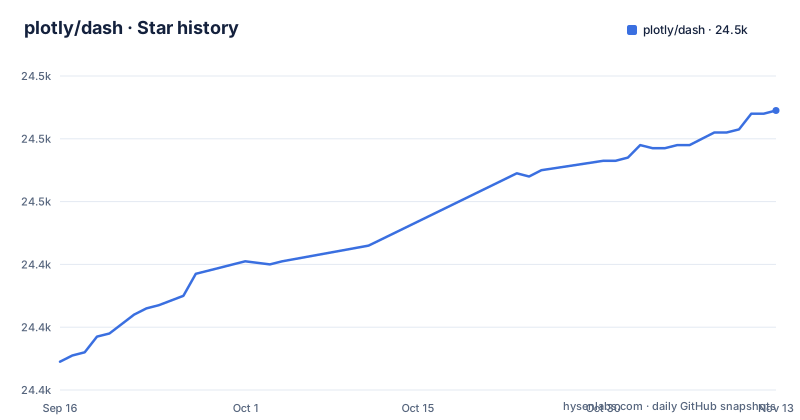
Star history
- plotly/dash24,489 ★ · +80
| Repository | 2026-09-16 | 2026-11-13 |
|---|---|---|
| plotly/dash | 24.4k | 24.5k |
80 Stars in the last 58 days, measured from the daily GitHub snapshot. Compare with other projects
Editorial analysis
A Dropdown that reruns Python through Plotly.js
Pick a value in a Dash Dropdown and the browser sends it to a Python function that returns a new figure. No page reload, no template. The example in the repository wires a Dropdown to a Plotly Graph that exports data from Google Finance into a Pandas DataFrame, in 43 lines of code. A second example declares 5 inputs, 3 outputs and cross filtering in 160 lines, all Python. Inputs and outputs are the unit of work here, and the crossfilter behaviour comes out of those declarations rather than hand-written markup.
The stack underneath decides what you inherit. Plotly.js draws, React composes the components, Flask serves the page and answers the callbacks. The chart set is Plotly.js's: about 50 types, including maps. Dash adds the Python binding, which is what the project description means by No JavaScript Required, not an absence of JavaScript from the build.
setup.py reads its dependencies out of files named after each extra
setup.py does not list Dash's dependencies inline. A helper opens a text file under requirements/, strips every line, drops blanks and anything starting with #, and hands the rest to install_requires or to one of the extras. Each extra is its own text file, and the names tell you what the optional machinery is:
python_requires=">=3.9",
extras_require={
    "async": read_req_file("async"),
    "ci": read_req_file("ci"),
    "dev": read_req_file("dev"),
    "testing": read_req_file("testing"),
    "celery": read_req_file("celery"),
    "diskcache": read_req_file("diskcache"),
    "redis": read_req_file("redis"),
    "compress": read_req_file("compress"),
    "fastapi": read_req_file("fastapi"),
    "quart": read_req_file("quart"),
    "cloud": read_req_file("cloud"),
    "ag-grid": read_req_file("ag-grid"),
    "shared_storage": read_req_file("shared_storage")
},
Read those names as a map of the seams in the system. Celery, Diskcache and Redis cover background work and caching. FastAPI and Quart name alternative server back ends beside the default Flask, which fits the MAKE_A_NEW_BACK_END.md document sitting at the repository root. ag-grid names the grid component. A base install pulls requirements/install.txt and nothing else, so an app written against a Redis cache needs that extra present before the import resolves, and the repository documents no error message to expect if you forget it. The version string arrives the same indirect way, by executing dash/version.py inside setup.py.
The renderer is a separate npm build that pip never runs
The Python package and the JavaScript package are produced by different toolchains. The root package.json is marked "private": true with "license": "UNLICENSED", and lerna.json sits beside package-lock.json and a .nvmrc pin. The renderer lives in dash/dash-renderer, the components in components/dash-core-components and components/dash-table, and the @plotly directory holds the JupyterLab extension plus three test component packages. Every renderer build starts by deleting the previous artifact:
cd dash/dash-renderer && rimraf build/dash_renderer.min.js && renderer build && sh renderer-test.shsetup.py, by contrast, calls find_packages, reads requirements/install.txt and declares console scripts. Nothing in it invokes npm. The Node chain is therefore invisible to someone installing from PyPI and unavoidable for anyone changing a component or the renderer. For a fork that means the pinned Node version, the build step and the renderer test script are part of your release process rather than optional chores. If your change is Python only, none of it applies.
Deploying open-source Dash and managed options
A Dash app commonly starts on localhost during development, but the open-source app can be deployed to a server and shared with other users. A self-hosted deployment requires the team to choose and operate its own hosting, access controls and scaling approach.
Plotly also offers managed and commercial deployment products. Dash Enterprise adds features such as application management and enterprise authentication integrations; evaluate those against your team’s operational requirements rather than assuming a commercial product is required for every shared deployment.
Background callbacks for long-running work
Ordinary synchronous callbacks can keep a request waiting while expensive work runs. Dash also supports background callbacks through a configured manager. Its documentation shows Diskcache for local development and Celery with Redis for a queue-backed deployment.
Choose the manager and deployment infrastructure to suit the workload, and measure the cost of the query or computation before deciding how to scale it. Dash Enterprise offers additional managed job-queue features, but background callbacks are not exclusive to that product.
Every build script is namespaced private:: in package.json
There is no install line to copy. The README links the PyPI project page for dash and sends new users to the getting-started guide, and setup.py names the distribution dash, but the repository text contains no pip command, so there is nothing to paste on your behalf. For the source route, the first commands live in package.json. The renderer installs its dependencies with:
cd dash/dash-renderer && npm ciComponents are regenerated through a Python script that walks the component directories:
python dash/development/update_components.py 'all' --ci TrueThe JupyterLab extension builds on its own:
cd @plotly/dash-jupyterlab && jlpm install && jlpm build:packTwo details are worth noticing. Every script name in package.json begins with private::, including private::lint.flake8 and private::build.renderer, so toolchain steps stay out of the names published to users. And the console scripts setup.py installs include dash-generate-components and renderer, both pointing into dash/development, which puts the CLI for working on Dash components inside the library itself.
MIT in setup.py, UNLICENSED in package.json
Two license statements live in the same repository and they cover different ground. setup.py declares license="MIT" and the README badge points at the root LICENSE file, so the Python package you install carries MIT terms. The root package.json, a private workspace manifest, says "license": "UNLICENSED" and "private": true. An unlicensed npm manifest grants nothing on its own.
The practical split: ship an application that imports dash and you inherit MIT, the same terms the repository root states. Fork the renderer or a component and redistribute the JavaScript you built, and you should read the root LICENSE and the metadata of the specific package you took. The repository does not spell out how the two scopes relate, and this is a reading of two files rather than legal advice.
The default branch and the 4.5.0 release
Install from source and you are not tracking a release line. The default branch of plotly/dash is dev, so a clone with an editable install gives you whatever currently sits on the development branch. The tags tell a different story: v4.5.0rc1 on 2026-10-15, v4.5.0rc2 on 2026-10-23, then the final v4.5.0 on 2026-10-29. The last push to the repository was on 2026-11-02.
A CHANGELOG.md sits at the root for the diffs between those tags. Two consequences follow. Two release candidates preceded the final 4.5.0, so the changelog deserves a read before anything depends on the new minor version. And a team cloning the default branch to reproduce a bug is working from moving code, so record the version your environment actually used rather than the branch name.
Editorial conclusion
Adopt Dash when the app serves one analyst on one machine, or when your team intends to build its own hosting, because the open source package stops at your laptop and heavy callback work stays inside the request. Do not pick it expecting shared URLs, single sign-on or a background job queue without budgeting for the commercial tier. Before committing, pin a tag instead of the dev branch, read CHANGELOG.md for v4.5.0 and its release candidates, and confirm the extras your callback actually needs are installed.
Frequently asked questions
What is Plotly Dash?
A Python framework for building reactive web apps, developed by Plotly and released under the MIT license. It sits on Plotly.js for charting, React for the component layer and Flask for the server, so widgets such as dropdowns and sliders call Python callbacks instead of a template.
How do you install Plotly Dash?
The repository does not contain an install line to copy; it links the PyPI project page for dash and the getting-started guide. setup.py names the distribution dash, requires Python 3.9 or newer, and reads its requirements from text files under requirements/.
What is Plotly Dash used for?
Analytical web apps that live behind Python callbacks: dashboards and single-purpose internal tools. The repository's own examples cover a Dropdown driving a Plotly Graph, an app with 5 inputs, 3 outputs and cross filtering, and an app styled to look like a PDF report.
What is Plotly Dash Enterprise?
The commercial tier wrapped around the open source package. It adds an app manager, Kubernetes scaling, authentication including LDAP, SAML, OpenID Connect and email, a Job Queue for background processing, and embedding into an existing site without IFrames.
What is the difference between Dash and Plotly?
Plotly.js is the charting library, about 50 chart types including maps. Dash is the Python framework built on top of it, binding those figures and the surrounding widgets to Flask callbacks, so the choice depends on whether you need a served app with callbacks or a figure on its own.
Is Plotly Dash free for commercial use?
setup.py declares the dash package under the MIT license, which permits commercial use, and the commercial tier is a separate product. The private root package.json is marked UNLICENSED, so read the root LICENSE and the specific package's metadata before redistributing JavaScript you built from the repository.
Official sources
Add this badge to your README
If you maintain this project, the badge below links readers to this analysis and shows its maintenance status from the daily GitHub snapshot. Paste the markdown into your README; add ?metric=license or ?metric=stars to the image URL for a different field.

[](https://hysenlabs.com/projects/plotly-dash)Star history chart for your README
[](https://hysenlabs.com/projects/plotly-dash)Was this useful?