astro-notion-blog: a static blog generated from a Notion database
🚀 Begin building your very own Notion Blog with Astro.
At a glance
- What is it?
- astro-notion-blog is an Astro project that turns a Notion database into a statically generated blog, with the official Notion API as the content source and Cloudflare Pages as the host. The interesting part of the dependency list is what a Notion blog actually turns out to need: image processing, metadata extraction, maths rendering and diagrams.
- Who is it for?
- astro-notion-blog suits a writer who wants to draft in Notion and publish a fast static site without maintaining a content management system, particularly if Cloudflare Pages is already where you deploy. It is a poor fit if you want publishing to be automatic, because every new post needs a deployment unless you add scheduled continuous integration, and it is a poor fit if your writing needs anything Notion cannot express, since the database is the model.
- Can I use it commercially?
- Yes. MIT is a permissive licence: you can use, modify and sell software built on it, as long as you keep its copyright and licence notices.
- Is it still maintained?
- Yes. The repository last received commits 5 days ago.
- What is it written in?
- Mainly Astro, according to GitHub's language statistics.
Answers come from the project's GitHub data, last synced on November 7, 2026, and from our analysis. They are not legal advice.
Star history
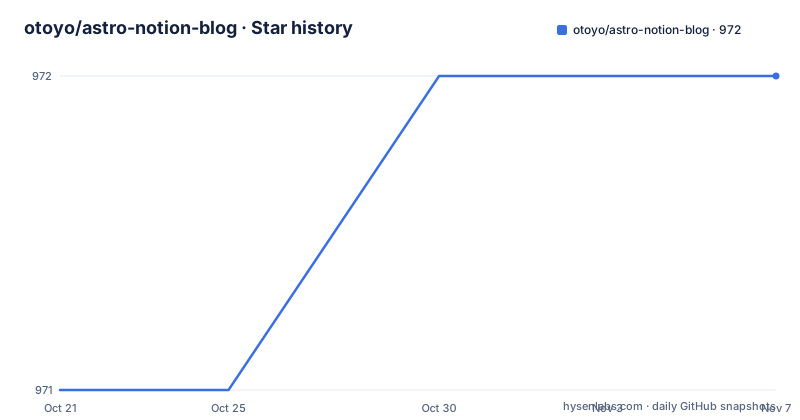
- otoyo/astro-notion-blog972 ★ · +1
| Repository | 2026-10-21 | 2026-11-07 |
|---|---|---|
| otoyo/astro-notion-blog | 971 | 972 |
1 Stars in the last 17 days, measured from the daily GitHub snapshot. Compare with other projects
Editorial analysis
Notion for the writing, Astro for the rendering
The pitch is one sentence: create a blog using Notion and generate it statically, resulting in fast page views.
That combination is the interesting idea. Notion is where people already write, with an editor that handles rich text, images, tables and code, and a collaborative model that a team of writers can share. Astro is the static site generator that turns a content source into HTML at build time, with the output served as plain files from a CDN.
The feature list spells out the four benefits: fast page views, the ability to write the content in Notion, the ability to customise the appearance, and the use of the official Notion APIs rather than a scraping workaround. That last point is the one that matters technically. There was a generation of tools that read a Notion page by asking the web interface for it, which broke whenever Notion changed, and there were tools that asked the unofficial API, which was against the terms and fragile in a different way. This one uses the supported route, which means the integration token and the database sharing are the price of admission.
The result is a site that is as fast as a static site and as editable as a document, and the cost is a build step between writing and publishing. The readme is direct about that cost, and it is the single most important operational fact in the project.
The quick start: eleven steps and three secrets
The setup is long and each step is short, which is what makes it followable.
The requirements are three: Notion, Cloudflare Pages and Git. Then you duplicate the blog template, which is a Notion page holding a database, into your own workspace, and customise it by changing the icon, title and description.
Two identifiers come out of that. The database identifier is the portion of the duplicated page URL between the account name and the version query, and the integration token comes from creating an integration in the Notion developer documentation, where the internal integration token is what you note down. The token is only half the story, because you also have to share the database with the integration, and that is the step that people miss: a token that is valid and a database that is not shared with it produce a build that fails with an authorisation error rather than with a clear message.
Then you fork the repository, go to Cloudflare Pages, create a new project connecting to Git with your fork, and begin setup. In the build settings you select Astro as the framework preset and open the advanced environment variables panel to set three values: the Node version, which must be 20.18.1 or higher, the Notion API secret, and the database identifier. After you save and deploy, the blog is published.
The readme also points at the Astro documentation for deploying with Git, which is a reasonable thing to read if Cloudflare Pages is new to you, and the demo site is published on the same platform, so you can see the result before you build anything.
Publishing is a manual step, and the readme admits it
There is a note under the quick start that is worth more attention than its position in the document.
The project requires manual deployment every time you publish a new post or make updates, and you can deploy manually from the Cloudflare Pages dashboard or set up a scheduled deploy using continuous integration tools such as GitHub Actions.
So the writing experience is seamless and the publishing experience is a button. That is the trade this project makes, and it is a real one for a blog that gets a post a week, because every post becomes a deploy you have to remember to trigger. The mitigation the readme offers is a scheduled deploy, which is a partial fix, because a scheduled build that does not know there is new content has to rebuild unconditionally, and Notion's rate limits and the build's request pattern will not love that.
The deeper issue is that there is no webhook. Notion can tell an application that a page changed, and a build pipeline could use that to trigger a deploy, and this project does not. Which is understandable for a template, since a webhook needs a server, and a static site has no server, but it is the obvious next feature and its absence is the reason the flow is not fully automatic.
For a reader deciding whether this suits them, the question to answer is how often they publish. Monthly, it is fine. Daily, it will be a nuisance.
Local development and the build cache
Running the site locally is three commands, and the readme puts the secrets in environment variables first.
export NOTION_API_SECRET=<YOUR_NOTION_API_SECRET>
export DATABASE_ID=<YOUR_DATABASE_ID>npm install
npm run devThen you open the local server in a browser and stop it with the control and C combination. The requirement for the customisation section is Node 20.18.1 or higher, the same floor as the deployment.
The package manifest shows the scripts that make the build work at scale, and they are worth understanding because they are how the project copes with the Notion API.
There is a cache fetch script that runs a node script to collect the blog contents, and a build variant that fetches the cache and then builds. There is a separate script that retrieves the block children of a page, which is the low-level Notion call for the contents of a page. And there is a purge script that resets the task runner cache and clears the temporary directory.
The task runner here is Nx, with its cloud plugin in the development dependencies, which is what the reset command is resetting. So the caching strategy is: fetch the Notion content once into a local cache, build from the cache, and reset when the cache goes stale. That is a sensible design for an API with rate limits, and it is why the build has a cached variant at all.
The formatting and linting are also present, with a Prettier configuration, an ignore file for it, an ESLint flat configuration file, and a lint script that turns the flat config off, which is a small sign of a migration in progress.
What the dependency list reveals about the project
The runtime dependencies are the best documentation of what a Notion blog turns out to need.
The core is Astro 5 with the official Notion client, the React integration, the RSS integration and React 19 itself. The React integration is a surprise until you notice that the components used to render a Notion block are React components, which is how a rich block like a table or a column list gets rendered.
Then there are the ones that correspond to specific Notion features. KaTeX is there for maths, which Notion supports as a block. Mermaid is there for diagrams. Prism is there for syntax highlighting of code blocks, and the icon packages are there because Notion has an icon concept.
Two of them are for images and they are the interesting pair. Sharp is a native image processing library, and exif-be-gone strips metadata from images, which is a privacy measure: a photo taken on a phone carries the camera, the location and the time in its metadata, and a blog that republishes those images would otherwise publish that too. That is a thoughtful inclusion for a project whose whole premise is that a photographer writes in Notion and publishes to the web.
The metadata scraping family is for the other end of that pipeline. The metascraper packages with their title, description and image variants are for pulling a summary and a preview image out of each post, which is what a link preview needs.
And two utility libraries deserve a mention for what they say about the API. The promise pool library is for issuing many Notion requests concurrently, and the retry library is for surviving the failures that come with doing that. Both are there because the Notion API is the bottleneck and the failure mode of a blog build is a rate limit.
Provenance, licensing and the project's shape
A few closing details that tell you what you are adopting.
The licence is MIT, the default branch is main, and the project is published to npm as a private package with a version, so it is a template rather than a library you would depend on. The version in the manifest is 0.12.0, and the release history shows 0.12.0 in April 2026, 0.12.1 in May and 0.13.0 on 2026-10-16, with the last push on the same day. So the 0.13 release is the current one and the manifest in the repository is a version behind it, which is a small sign that the manifest version is not the thing to track.
The project is based on an earlier repository by the same author, which is a useful piece of history, because it means the Notion to static site approach came first and Astro is a port of it. The readme is also available in Japanese, and the bug reporting section says issues can be written in either English or Japanese, which fits an author who works in both.
The community support is a sponsorship link, and the readme is straightforward about it, sponsoring so the author can keep developing the software. There is a demo site published on Cloudflare Pages, and the topic tags cover Astro, the blog template, Cloudflare, the content management system, the Notion API and the Notion blog itself.
One last practical observation. The repository includes a temporary directory and an ignore file for the task runner, which tells you the cache is written to disk, and the cache purge script clears it. If you ever find a deploy that serves stale content, that script and a fresh cache fetch are the first two things to try, before you go looking at the Notion side.
Editorial conclusion
astro-notion-blog suits a writer who wants to draft in Notion and publish a fast static site without maintaining a content management system, particularly if Cloudflare Pages is already where you deploy. It is a poor fit if you want publishing to be automatic, because every new post needs a deployment unless you add scheduled continuous integration, and it is a poor fit if your writing needs anything Notion cannot express, since the database is the model. Before you start, create the Notion integration and share the database with it, since that is the step whose omission produces a build that fails with an authorisation error rather than an obvious message.
Frequently asked questions
What do I need to deploy an astro-notion-blog site?
A Notion account, a Cloudflare Pages account and Git. You duplicate the Notion template, create an integration for the Notion token, share the database with that integration, fork the repository, and then connect it to Cloudflare Pages with the Astro framework preset and three environment variables set: the Node version of 20.18.1 or higher, the Notion API secret and the database identifier.
Does publishing a new post happen automatically?
No. The readme states that the project requires manual deployment every time you publish a new post or make updates. You can deploy from the Cloudflare Pages dashboard or set up a scheduled deploy using continuous integration tools such as GitHub Actions.
How do I run astro-notion-blog on my own machine?
Export the Notion API secret and the database identifier as environment variables, run npm install and npm run dev, open the local server, and stop it with the control and C combination. Node 20.18.1 or higher is required for the customisation work as well.
Why does the build fail with a permission error on Notion?
The usual cause is that the database has not been shared with the integration. Creating an integration gives you a token, but the database also has to be shared with that integration separately, and the readme lists it as its own step in the setup.
Official sources
Add this badge to your README
If you maintain this project, the badge below links readers to this analysis and shows its maintenance status from the daily GitHub snapshot. Paste the markdown into your README; add ?metric=license or ?metric=stars to the image URL for a different field.

[](https://hysenlabs.com/projects/otoyo-astro-notion-blog)Star history chart for your README
[](https://hysenlabs.com/projects/otoyo-astro-notion-blog)Was this useful?