gosu: exec instead of fork, and a warning about uses outside a container entrypoint
Simple Go-based setuid+setgid+setgroups+exec
At a glance
- What is it?
- tianon/gosu is a small Go program that switches to a user and group, then replaces itself with the command you asked for. Its README is unusually honest about where that design stops being safe, and its build is stranger than the program.
- Who is it for?
- gosu is the right tool for one job: stepping down from root to a named user in a container ENTRYPOINT, where nothing but the final process should hold PID 1 and signals should reach the program that matters. It is not a sudo replacement, the author says so, and the project's own warning names CVE-2016-2779 as the risk of using it for anything else.
- Can I use it commercially?
- Yes. Apache-2.0 is a permissive licence: you can use, modify and sell software built on it, as long as you keep its copyright and licence notices.
- Is it still maintained?
- Yes. The repository last received commits 20 days ago.
- What is it written in?
- Mainly Shell, according to GitHub's language statistics.
Answers come from the project's GitHub data, last synced on November 14, 2026, and from our analysis. They are not legal advice.
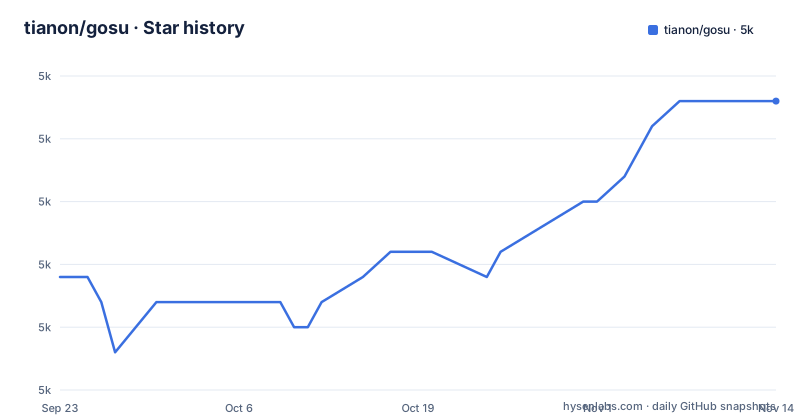
Star history
- tianon/gosu5,019 ★ · +7
| Repository | 2026-09-23 | 2026-11-14 |
|---|---|---|
| tianon/gosu | 5k | 5k |
7 Stars in the last 52 days, measured from the daily GitHub snapshot. Compare with other projects
Editorial analysis
gosu execs, so no process of its own survives in the tree
The whole point is what gosu does not leave behind. It resolves the user and group, switches to them, and then `exec`s the command you gave it, so once the target program starts, gosu itself is no longer resident or involved in the process lifecycle at all. That is why the README opens by complaining about `su` and `sudo`: both have strange and often annoying TTY and signal forwarding behaviour, and gosu pushes that problem back to the process that invoked it and the process it invoked, where the README argues it belongs. The mechanics are borrowed rather than invented. The user and group processing comes straight from the code Docker's libcontainer uses to start an application inside a container, which is where the project's claim of exact 1:1 parity with Docker's own `--user` flag comes from. The dependency list reflects where that code lives now: `github.com/moby/sys/user` rather than libcontainer itself.
The usage sample still prints a version line from 1.1
The usage block in the README is the oldest thing in the repository:
$ gosu
Usage: ./gosu user-spec command [args]
   eg: ./gosu tianon bash
       ./gosu nobody:root bash -c 'whoami && id'
       ./gosu 1000:1 id

./gosu version: 1.1 (go1.3.1 on linux/amd64; gc)
That version line reads 1.1 on go1.3.1, while the published releases are 1.18 and 1.19 within three weeks in September 2025, then 1.20 on 2026-10-25. The syntax shown is still the syntax to use, but the sample output cannot be used to tell you which release you have. The release rhythm is uneven: two releases close together in September 2025, then 1.20 more than a year later, on 2026-10-25, the same day as the last push. `go.mod` declares `go 1.20` while the build image is `golang:1.24.6-trixie`, so the declared language version and the toolchain that produces the binary are not the same number either.
The project's own warning names CVE-2016-2779 and scopes itself to one line
There is a Warning section, and it is short. The core use case is to step down from root to a non-privileged user during container startup, specifically in the ENTRYPOINT, usually. Anything beyond that, the README says, could suffer from vulnerabilities such as CVE-2016-2779, a class of problem the Docker use case naturally shields against, and it points at issue 37 in the repository for the discussion. Read that as a scope statement rather than a caveat to note and move past: gosu is a privilege step down helper, not a general purpose run-as-anything tool, and the reason is that its job assumes something else is already holding root. The mechanism is also visible in the examples the README gives for why the project exists, where `su -c` and `sudo` leave an extra process in the listing above the program you asked for, while an exec leaves one.
Installation is a signed binary and a gpg round trip
The install steps are five lines, and the middle three are the ones people skip. The binary is named after your dpkg architecture, `gosu-$(dpkg --print-architecture | awk -F- '{ print $NF }')`, and the matching `.asc` file is downloaded alongside it as `gosu.asc`. Then the key, then the verification, then the executable bit:
gpg --batch --keyserver hkps://keys.openpgp.org --recv-keys B42F6819007F00F88E364FD4036A9C25BF357DD4
gpg --batch --verify gosu.asc gosu
chmod +x gosu
So the tool is not installed from a package index. It is fetched, checked against a key whose fingerprint the README prints inline, and only then made executable. That is a heavier install than most single binaries ask for, and it is the right trade for something whose whole job is changing your user identity inside a container. If you would rather not repeat those steps in a build image, `INSTALL.md` in the repository has the Dockerfile form of the same steps.
CGO off, and a fake git tag to satisfy Go's version rules
The Dockerfile builds on `golang:1.24.6-trixie`, installs `arch-test` and `file`, and then does something unusual: it clones a repository called fake-git, symlinks its script over `/usr/local/bin/git`, and sets a commit to pretend to be. The reason is spelled out in the build script comments. Go requires semver before it will record a version number, so the build scrapes the version number out of `version.go`, validates it against a pattern, and cross-grades something like 1.2 into the v1.2.0 form Go insists on. The flags are set to strip and trim the binary, and CGO is turned off with the stated reason that it helps ensure no libc:
ENV BUILD_FLAGS="-v -trimpath -ldflags '-d -w' -buildvcs=true"
ENV CGO_ENABLED 0
A comment above them notes that the usual size flags cannot be used because `govulncheck` then stops working, and calls the roughly 0.2MiB increase worth it, with a date and Go version attached. A security tool that depends on symbols surviving the link is a reasonable constraint to state out loud, and `SECURITY.md` is where the reasoning lives.
Three Dockerfiles, one for the binary and two for testing it
The root holds `Dockerfile`, `Dockerfile.test-alpine` and `Dockerfile.test-debian`, which splits the build into the thing you install and the environments you check it in. The README points at the Alpine one when it invites you to look at the edge cases gosu handles, calling it the test suite, with `test.sh` as the script that wraps it up for testing arbitrary binaries. That is the project's answer to the question of whether its user and group parsing matches Docker in the corner cases, and it is checkable: the same test files run against Alpine and Debian layouts. `build.sh`, `sign.sh` and `govulncheck-with-excludes.sh` cover the other three jobs, release signing and vulnerability scanning. A `hub/` directory, `main.go`, `version.go` and `setup-user.go` complete the layout, and `LICENSE` is Apache-2.0.
setpriv, chroot --userspec and su-exec already do this
The README keeps an alternatives section, which is more useful than the usual one. `setpriv` ships in newer util-linux, version 2.32.1-0.2 or later in Debian, and does the same step down with flags rather than a user specification:
$ docker run -it --rm buildpack-deps:buster-scm setpriv --reuid=nobody --regid=nogroup --init-groups ps faux
USER       PID %CPU %MEM    VSZ   RSS TTY      STAT START   TIME COMMAND
nobody       1  5.0  0.0   9592  1252 pts/0    RNs+ 23:21   0:00 ps faux
`chroot` does it with `--userspec`. `su-exec` is the closest relative, a minimal rewrite of gosu in C for the Alpine ecosystem, in the main Alpine package repository and small enough that the size difference is the argument for it, with the warning that versions older than 0.3 had a pretty severe parser bug. Then there is a list of others, starting with `chpst` from runit, introduced with the author saying he is not terribly familiar with them. That disclaimer is worth taking at face value: the section is a starting point, not a comparison.
Not a sudo replacement, and the fork is the reason
The README says plainly that sudo has different goals from this project and that gosu is not intended as a sudo replacement, then links an explanation of why sudo forks before execing instead of execing directly. That difference is the whole design. sudo keeps a process of its own alive so it can do things after the command finishes, which is what makes it expressive, and the README's complaint is that the expression is also what brings the TTY and signal problems. gosu gives that up: no parent process, no wrapper, no post-run work, so there is nothing to misbehave. The tradeoff is that gosu can only do the one thing, which is why its own warning scopes it to a container entrypoint and why the alternatives section lists small single-purpose tools rather than replacements. If your need is authentication, session recording, or running a command as a user other than root from your own shell, this is the wrong program, and the README agrees before you decide that.
Editorial conclusion
gosu is the right tool for one job: stepping down from root to a named user in a container ENTRYPOINT, where nothing but the final process should hold PID 1 and signals should reach the program that matters. It is not a sudo replacement, the author says so, and the project's own warning names CVE-2016-2779 as the risk of using it for anything else. Before adopting it, check the three things the repository itself shows: the latest release is 1.20, published on 2026-10-25; the README's usage sample still prints a version line from 1.1, so it is not a reliable reference; and the install path is a signed binary you verify with gpg, with explicit Dockerfile instructions in `INSTALL.md` rather than in the README. If you only need the same effect, `setpriv` from util-linux, `chroot --userspec`, or Alpine's `su-exec` all do the job without a separate download, and su-exec below 0.3 has a parser bug worth avoiding.
Frequently asked questions
What is gosu and what does it do?
gosu is a small Go program that switches to a user and group, then execs the command you gave it, so no process of its own survives. Its user and group handling comes from the code Docker's libcontainer uses to start a container process, and it has exact 1:1 parity with Docker's own `--user` flag.
How do I install gosu?
Download the binary named for your dpkg architecture together with its matching `.asc` file, fetch the author's public key over keys.openpgp.org, run `gpg --batch --verify gosu.asc gosu`, then `chmod +x gosu`. Explicit Dockerfile instructions for the same steps are in `INSTALL.md` rather than in the README.
Is gosu a replacement for sudo?
No, and the README says so directly. sudo forks before execing so that it can do work after your command finishes, while gosu execs and disappears, which is what removes the TTY and signal forwarding behaviour gosu exists to avoid.
What are the alternatives to gosu?
`setpriv` from newer util-linux, `chroot --userspec`, and `su-exec`, a minimal rewrite of gosu in C for the Alpine ecosystem that lives in the main Alpine package repository. Versions of su-exec older than 0.3 had a severe parser bug, so use 0.3 or above.
What is the current gosu version?
Release 1.20, published on 2026-10-25, following 1.19 on 2025-09-23 and 1.18 on 2025-09-05. The repository's last push was on 2026-10-25, and the usage sample in the README still prints a version line from 1.1.
Official sources
Add this badge to your README
If you maintain this project, the badge below links readers to this analysis and shows its maintenance status from the daily GitHub snapshot. Paste the markdown into your README; add ?metric=license or ?metric=stars to the image URL for a different field.

[](https://hysenlabs.com/projects/tianon-gosu)Star history chart for your README
[](https://hysenlabs.com/projects/tianon-gosu)Was this useful?