overtype calls itself 10 times smaller than alternatives, and its own table says 2.4
The markdown editor that's just a textarea https://overtype.dev
At a glance
- What is it?
- panphora/overtype is an MIT licensed JavaScript markdown editor library that overlays an invisible textarea on styled preview output, at 2.5.0 with no GitHub releases. The bundle is about 132KB, the comparison table puts the nearest alternative at 323.69KB, and two of the three export subpaths do not point at the same build as the main entry.
- Who is it for?
- OverType fits a project that wants markdown syntax to stay visible while it is edited, on mobile, with no build step and no plugin ecosystem to learn, because the whole editor is a transparent textarea over rendered output. Three things to check first.
- Can I use it commercially?
- Yes. MIT is a permissive licence: you can use, modify and sell software built on it, as long as you keep its copyright and licence notices.
- Is it still maintained?
- Yes. The repository last received commits 11 days ago.
- What is it written in?
- Mainly JavaScript, according to GitHub's language statistics.
Answers come from the project's GitHub data, last synced on November 25, 2026, and from our analysis. They are not legal advice.
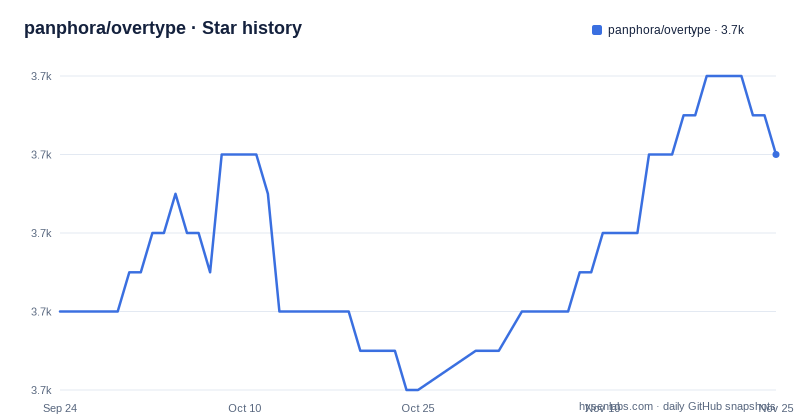
Star history
- panphora/overtype3,708 ★ · +4
| Repository | 2026-09-24 | 2026-11-25 |
|---|---|---|
| panphora/overtype | 3.7k | 3.7k |
4 Stars in the last 62 days, measured from the daily GitHub snapshot. Compare with other projects
Editorial analysis
The size table and the 10x claim disagree with each other
The bundle is described as about 132KB minified with all features, and the comparison table gives the alternatives as HyperMD at 364.02 KB, Milkdown at 344.51 KB, TUI Editor at 560.99 KB and EasyMDE at 323.69 KB.
Against the nearest of those, EasyMDE at 323.69 KB, the ratio is about two and a half times, not ten. The tenfold figure appears a few lines further down, in the list of reasons to choose OverType, as tiny bundle size, 10x smaller than alternatives.
So the document contains both numbers and they cannot both be about the same comparison. TUI Editor at 560.99 KB is the only one where ten is in the neighbourhood, and it is also the entry with multiple library dependencies.
The precision differs too, which tells you how each figure was produced. The alternative sizes carry two decimal places, the look of a measured bundle, while OverType's own is prefixed with a tilde, the look of an estimate.
The dependency row is the more substantive difference. OverType is listed as bundled where the others pull CodeMirror, ProseMirror plus plugins, or several libraries, and the approach row separates the invisible textarea from ContentEditable and CodeMirror.
Both CDN examples load whatever is newest
The package installs the ordinary way:
npm install overtypebut the two CDN routes are worth reading closely, because both pin nothing. The native ES module example is:
<script type="module">
  import OverType from 'https://cdn.jsdelivr.net/npm/overtype@latest/dist/overtype.esm.js';
  const [editor] = new OverType('#editor', { value: '# Hello' });
</script>
and the global script tag example loads `https://cdn.jsdelivr.net/npm/overtype@latest/dist/overtype.min.js`.
`@latest` is a moving target. The same page reloaded next month can execute a different build, which sits awkwardly beside the selling point of a no-build-step integration and beside the promise of dead-simple setup. Both examples are demos rather than recommendations, but they are the snippets a reader copies.
The manifest is where a real pin belongs. The package is 2.5.0 and it declares `main` as the CommonJS build, `module` as the ES module build, `browser` and `unpkg` and `jsdelivr` as the minified build, and `types` for the declarations.
The document also states that OverType is ESM-first and ships a CommonJS build, and shows both import styles plus a destructured `require`.
The parser subpath exports source while the rest export the build
The export map has three entries and they do not agree.
The root entry is complete: types, import, require and browser conditions, all pointing into `dist/`.
`./parser` points at `./src/parser.js` for both import and require. That is the unbuilt source file, so a consumer importing the parser subpath gets source rather than the compiled artefact every other entry uses, and there is no separate dist build of it in the map.
`./webcomponent` points at a dist build, but the entry has only `import` and `browser` conditions. There is no `require` condition, so a CommonJS consumer cannot load it, and no `types` condition either, so a TypeScript consumer gets no declaration for it.
The main entry declares `type: module`, which means the `.js` files in `dist/` are ES modules by default and the CommonJS build has to be named `.cjs`, which it is. That part is consistent.
So of three public entry points, one ships unbuilt source and one is missing half its conditions. For a library whose pitch is a single file you can drop in, the packaging map is where the rough edges are.
WONT-DO.md exists, and the feature ceiling is stated twice
The tree contains `ARCHITECTURE.md` and `WONT-DO.md` next to the changelog and the documentation. A file named for what the project will not do is a stronger signal than a feature list, and the README states the same boundary in prose.
The list of reasons to choose another editor runs to six items: full WYSIWYG with hidden markdown syntax, advanced features such as tables, diagrams or collaborative editing, rich plugin ecosystems, enterprise features and extensive customization, framework-specific integration for React or Vue, and a complex multi-layered architecture for deep customization.
The comparison table agrees. Markdown syntax is listed as Visible for OverType where HyperMD and Milkdown are Hidden, advanced features as Basic where those two are Full, and best for as simple, fast and mobile rather than full WYSIWYG or modern frameworks.
What survives inside that boundary is still a real editor: two named themes, Solar and Cave, applied globally across instances, keyboard shortcuts including Cmd and Ctrl for bold, GitHub-style list continuation on Enter, selection-preserving shortcuts, an optional toolbar, and mobile-specific styles. The claims about mobile being native and syntax being visible are the two that the architecture actually earns.
The default toolbar is nine buttons and the rest is your code
Enabling the toolbar takes one option, `toolbar: true`, and the default set is described in a single line: Bold, Italic, Code, Link, H1, H2, H3, Lists, Tasks, Quote, View Mode.
Anything beyond that is built by the consumer, and version 2.0 added the API for it. You import `toolbarButtons` from the package and pass your own array, mixing the built-in buttons with your own objects. A custom button is a `name`, an `icon`, a `title` and an `action` that receives the editor and a `getValue` function, which is enough to write a save button that puts the draft into local storage.
Toggles are handled too. A button may provide `isActive`, receiving the editor and the active formats, and returning true or false makes the library maintain the button's `active` class and its `aria-pressed` state, so a custom toggle behaves like a built-in one for styling and for screen readers.
There is a second route for people who want their own interface entirely. The bundled `markdown-actions` library is re-exported, so you can call it against the editor's textarea directly:
import OverType, { markdownActions } from 'overtype';

const [editor] = new OverType('#editor');

document.querySelector('#bold-btn').addEventListener('click', () => {
  markdownActions.toggleBold(editor.textarea);
  editor.textarea.focus();
});
The documented actions include `toggleBold`, `toggleItalic`, `toggleCode`, `insertLink`, the list and quote toggles, `insertHeader`, `toggleH1` through `toggleH3`, `getActiveFormats` and `hasFormat`.
The constructor returns an array and the tests are thirteen scripts
Every example destructures the result: `const [editor] = new OverType('#editor', { value: '# Hello World', theme: 'solar' })`. The constructor returns an array even for a single instance, which is the API shape that supports the multiple-instances demo.
The instance surface shown is small: `getValue`, `setValue` and `setTheme`, plus an `onChange` callback that receives the value and the instance. Themes are the two named ones, with `setTheme('cave')` changing one instance while the global setting applies to all of them.
The build and test scripts are where the size of the project shows. `build` runs a type generation step and then the build script, `build:prod` runs the build and then the test suite, and `test` runs a runner script followed by a type test.
Underneath are at least thirteen named suites: main, preview mode, links, API methods, comprehensive alignment, sanctuary parsing, mode switching, webcomponent, custom syntax, and three CommonMark files for invariants and conformance, plus the type test. Names like alignment, commonmark-conformance and sanctuary-parsing describe what is being held to a standard rather than what is being exercised.
The `dev` script serves the `website` directory on port 8080 with caching disabled, and `dist/` is committed in the tree, so the built artefacts are versioned alongside the source.
DOM persistence recovery is aimed at one platform by name
One feature bullet reads: DOM persistence aware, recovers from existing DOM, described as perfect for HyperClay and similar platforms.
That is a narrow claim with a named beneficiary. If your platform re-renders or re-mounts a container, an editor that can rebuild itself from markup already in the DOM survives that; if your platform throws the DOM away, it does not matter. Naming the platform is more useful than a generic resilience claim, and it tells you the feature was built against a specific integration.
The framework-agnostic claim sits next to it, listing React, Vue and vanilla JavaScript. With a transparent textarea over a rendered layer and no contenteditable, that claim is easy to believe: the editor needs a container element and a theme.
The mobile claim is the one with the most behind it. The comparison table marks mobile as perfect native for OverType where three alternatives are marked as having issues common and one as limited, and the stated reason is the same mechanism: a real textarea gets the platform keyboard, the platform undo and redo, and optional spellcheck, none of which contenteditable gives you consistently.
That mechanism is also the constraint. Anything contenteditable editors do with the caret, selection ranges or IME composition has to be reimplemented against a textarea, and the shortcut list, with selection preservation called out as a feature, is where that work shows.
Editorial conclusion
OverType fits a project that wants markdown syntax to stay visible while it is edited, on mobile, with no build step and no plugin ecosystem to learn, because the whole editor is a transparent textarea over rendered output. Three things to check first. The size story is the document's weakest claim, since a 132KB bundle against a 323.69KB alternative is closer to two and a half times than to ten. The CDN examples both point at @latest, so a production page is loading whatever is newest rather than a version you chose. And the subpath exports are uneven, with the parser exported from source and the web component entry carrying neither a CommonJS condition nor type declarations. MIT licensed, two themes, thirteen test scripts including CommonMark conformance, and a WONT-DO.md that states the ceiling more honestly than the feature list does.
Frequently asked questions
How do I install overtype?
With npm install overtype, which ships an ES module build and a CommonJS build. Two CDN routes are documented: the ES module at https://cdn.jsdelivr.net/npm/overtype@latest/dist/overtype.esm.js and the IIFE bundle at https://cdn.jsdelivr.net/npm/overtype@latest/dist/overtype.min.js as a plain script tag. Both CDN URLs use @latest rather than a pinned version.
What is OverType?
A markdown editor library that overlays an invisible, transparent textarea on styled preview output, so you edit plain text while seeing rendered markdown with the syntax visible. It is about 132KB minified with features bundled, needs no build step, and is described as working with React, Vue or vanilla JavaScript.
Does OverType hide markdown syntax like Milkdown or HyperMD?
No. The project's comparison table lists markdown syntax as Visible for OverType, Hidden for HyperMD and Milkdown, and Toggle for TUI Editor, and lists advanced features as Basic for OverType against Full for those two. The README says to choose another editor if you need hidden syntax, tables, diagrams or collaborative editing.
Can I add my own buttons to the OverType toolbar?
Yes. Since v2.0 you import toolbarButtons and pass your own array, where a custom button is a name, icon, title and an action receiving the editor and getValue. Supplying isActive({ editor, activeFormats }) lets the library maintain the button's active class and aria-pressed state. The bundled markdown-actions library is re-exported so you can also format the textarea directly.
How does OverType compare on bundle size?
The project's own table lists OverType at about 132KB against HyperMD at 364.02 KB, Milkdown at 344.51 KB, TUI Editor at 560.99 KB and EasyMDE at 323.69 KB, with dependencies listed as bundled against CodeMirror or ProseMirror plus plugins. The same document also claims OverType is 10x smaller than alternatives.
Official sources
Add this badge to your README
If you maintain this project, the badge below links readers to this analysis and shows its maintenance status from the daily GitHub snapshot. Paste the markdown into your README; add ?metric=license or ?metric=stars to the image URL for a different field.

[](https://hysenlabs.com/projects/panphora-overtype)Star history chart for your README
[](https://hysenlabs.com/projects/panphora-overtype)Was this useful?