Paper2Poster's architecture paragraph is inside an HTML comment and its Quick Start cannot run
[NeurIPS 2025] Open-source Multi-agent Poster Generation from Papers
At a glance
- What is it?
- A multi-agent pipeline from a paper PDF to an editable presentation file, where the only description of the three agents sits in a commented-out block, all three Quick Start examples break the shell line continuation, and the container is built on a GPU development image for a workload that calls a hosted API.
- Who is it for?
- Paper2Poster suits a research group that already has API access and wants a starting layout rather than a finished design, and it is a poor fit for anyone expecting a reproducible pipeline today. Check five things.
- Can I use it commercially?
- Yes. MIT is a permissive licence: you can use, modify and sell software built on it, as long as you keep its copyright and licence notices.
- Is it still maintained?
- Yes. The repository last received commits 4 days ago.
- What is it written in?
- Mainly Python, according to GitHub's language statistics.
Answers come from the project's GitHub data, last synced on November 15, 2026, and from our analysis. They are not legal advice.
Star history
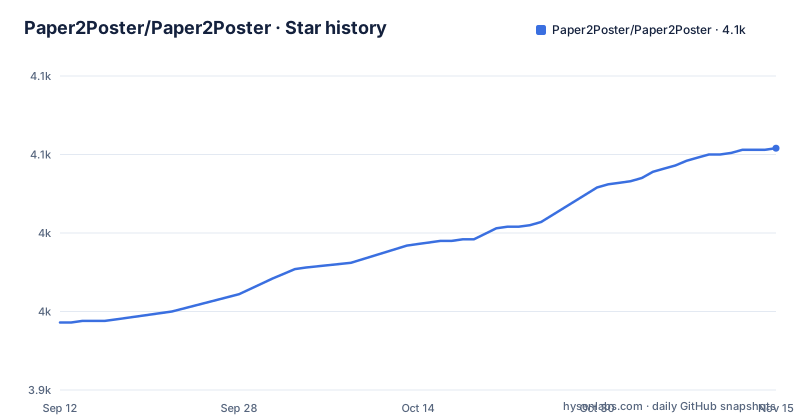
- Paper2Poster/Paper2Poster4,054 ★ · +111
| Repository | 2026-09-12 | 2026-11-15 |
|---|---|---|
| Paper2Poster/Paper2Poster | 3.9k | 4.1k |
111 Stars in the last 64 days, measured from the daily GitHub snapshot. Compare with other projects
Editorial analysis
The only description of the three agents is switched off
The file explains its own architecture in a block that no rendered page will show. There is a heading for an introduction, wrapped in an HTML comment. There is a table of contents entry linking to that introduction, also wrapped in a comment. And there is a single commented paragraph that is the sole description of how the system works: a parser that distills the paper into a structured asset library, a planner that aligns text and visual pairs into a binary tree layout preserving reading order and spatial balance, and a painter and commentor loop that refines each panel by executing rendering code and using vision model feedback to eliminate overflow and ensure alignment. All three stages, and the only mention of the tree layout, are inside that one comment. A second commented block describes the evaluation half of the project, including a set of metrics and a quiz-based evaluation. What a reader actually sees is a single line calling the system top-down and visual-in-the-loop, and a section heading reading Paper2Poster for Paper2Poster with no content under it at all.
Every Quick Start example puts a comment after the line continuation
The three local examples, the ones labelled high performance, economic and local, all have the same defect. Take the first:
python -m PosterAgent.new_pipeline \
    --poster_path="${dataset_dir}/${paper_name}/paper.pdf" \
    --model_name_t="4o" \  # LLM
    --model_name_v="4o" \  # VLM
    --poster_width_inches=48 \
    --poster_height_inches=36
A backslash continues a command only when it is the final character on the line. On the third line here it is followed by two spaces and then a comment, so it escapes the first space instead of continuing the command. The shell ends the command there, and the remaining flag lines are then read as separate commands, which is an error. The comments themselves are the point of the pattern, since they label which slot is the language model and which is the vision model, so the labels are the reason the continuation is broken in all three examples. The Docker example further down has the same flags with no inline comments and does not have the problem, and it also switches to the equals form for its values. One smaller inconsistency in the same section: the layout diagram writes the two directory names with plain braces while the commands use a dollar sign and braces, and the file never says to export them.
The Docker example asks you to create a directory called with angle brackets on it
The output directory in the container example is a template that was never filled in. The instruction is to create a directory whose name is written with angle brackets around a model pair and the word generated posters, and the volume mount repeats the same literal on both sides. The pattern reads as the two model slot values joined by a single separating character, since the example sets both to the same name, which would give a directory called 4o_4o_generated_posters. As printed, the mkdir line is not a directory name at all. The angle brackets are unquoted on that line, so the shell reads the opening bracket as an input redirection from a file whose name is the model pair, and the closing bracket as an append redirection to a file named with the suffix, leaving mkdir with no arguments. The same string inside the volume flag is inside double quotes and is therefore safe, so the command is half broken rather than wholly broken. The paragraph after the example then describes the result path using the same unsubstituted placeholder, twice, so a reader following the text end to end never learns the real directory name.
A GPU development image for a pipeline that calls a hosted API
The container is built on a vendor base image for GPU development, a specific version of CUDA on Ubuntu 24.04, using the development variant rather than the runtime variant. That is a large base image carrying a compiler toolchain, and it is a strange choice for a pipeline whose default model is a hosted API and whose local option talks to a separately deployed server. Nothing in the container runs a model, so the CUDA layers are carried through two build stages for no visible reason. The system packages installed are sensible for the job: LibreOffice, poppler utilities, a Java runtime, git and curl, plus the graphics and font libraries the rendering step needs. Two details are worth naming. Python is installed as a symlink to python3, and the dependency install passes a flag that tells pip to stop enforcing the operating system's protection against modifying system packages. The entrypoint is generated inline at build time and, on every container start, writes the API key from the environment into a dotenv file inside the container filesystem before execing the command. The image's default command is the pipeline's own help output.
The dependency file is a machine freeze with four unpinned entries
requirements.txt is alphabetical, several hundred lines long, and reads as the output of freezing a working machine rather than as a curated list. The proof is in the entries that have nothing to do with making a poster: a Discord client, a news lookup package, two hosted service clients, a code formatter, a deep comparison library, a debug adapter, a remote code interpreter sandbox, a search client, and a build frontend. What the pipeline genuinely needs is visible too, in the shape of a PDF parsing stack with its parser runtime, an arXiv client and a bibliography parser, an imaging library, a diffusion library, two object detection packages and an audio library. Four entries carry no version at all, so a fresh install resolves them to whatever is current while everything around them is pinned, which means the environment is only partly reproducible. Two more details are more than hygiene. A version of one vendor's model client library is pinned, yet the only API key the file documents is a different vendor's, so an installed client has no documented configuration path. And the free search client is a hard requirement while the configurable search path is the optional one, so the logo search defaults to the engine you cannot point anywhere.
Running open models means editing a function inside the source tree
There are three documented model pairings. The first uses the hosted model for both the language and vision slots. The second, labelled economic, replaces the language model with a self-hosted instruct model while keeping the vision model on the hosted API. The third, labelled local, runs both from a self-hosted deployment. All three are the same command with different names in two slots, and the file says you can try other combinations freely. What it also says is that the settings live in a function in a utility module, and that to use open models you must first deploy them and then make sure the port is correctly specified in that same function. So the one setting that changes most between the three presets, the address of your own model server, is a literal in a Python file. There is no flag for it, no environment variable and no config entry, and the tree does contain a configuration directory that it is not in. That means the two presets that avoid a hosted API both require editing a tracked source file, which any later pull will conflict with.
The parallelism flag is announced in the changelog and used in no example
One of the project's headline capabilities appears exactly once in the file. A changelog line dated September 2025 says the system now generates per-section content in parallel for faster generation, by simply specifying a worker count flag. No example uses it. The three local commands, the container command and the layout instructions all omit it, and the file gives no description of what the flag accepts or what a sensible value is, so the only way to learn its name is the changelog checkbox. Two other option-level gaps sit next to it. A flag that disables blank detection appears in the economic example with an inline comment, which means blank detection is on by default and that example is the only place the behaviour is mentioned at all. And the flexible combination claim, that you can pair any language model with any vision model, names exactly the three presets the file already documents, so the set of model names the code accepts is never written down anywhere.
A dependency-free skill that produces content, and a container that produces a file
There are two ways in, and they share almost nothing. The first is a directory called skills, described as lightweight and explicitly as needing no dependencies, meant for agent runtimes rather than for Python. The invocation is a sentence with a dollar-prefixed name in it, which is one vendor's convention for referring to a skill from inside a conversation, and the file points at a readme in that directory for more examples. What it produces is described as poster-ready content, and the example sentence calls the output a poster package, so this path prepares material rather than producing the finished artefact. The second way is the full pipeline, which needs a container or a local Python environment, LibreOffice, poppler, a several-hundred-line dependency file and a hosted API key, and whose output is an editable presentation file. The input contract is rigid in both cases, one directory per paper with the file inside it named paper.pdf. That LibreOffice requirement is not arbitrary: the output is a presentation file and the pipeline is described as looking at its own rendering, so an office suite has to be present for the agent to see what it produced.
Editorial conclusion
Paper2Poster suits a research group that already has API access and wants a starting layout rather than a finished design, and it is a poor fit for anyone expecting a reproducible pipeline today. Check five things. There are no tagged releases at all, so nothing here can be pinned. Every documented local example breaks at the line continuation, so budget for debugging the commands before the code. Using open-weight models means editing a function in a source file, and there is a configuration directory in the tree that the model endpoint is not in. The dependency list is a machine freeze with several entries unpinned, including one that installs a Discord client. And the architecture the project is built around is documented only inside a comment that the rendered page never shows.
Frequently asked questions
how to use paper2poster
Create a directory per paper under your dataset directory, place the PDF inside it named paper.pdf, then run the pipeline module with a poster path, a model name for the language slot, a model name for the vision slot, and a width and height in inches. The three documented presets are a hosted model for both slots, a self-hosted language model with a hosted vision model, and both self-hosted.
What are the three agents in Paper2Poster's pipeline?
A parser that distills the paper into a structured asset library, a planner that aligns text and visual pairs into a binary tree layout, and a painter and commentor loop that refines each panel using vision model feedback. This description appears inside an HTML comment in the README, so it is not visible on the rendered page.
What does Paper2Poster need installed besides Python?
LibreOffice, which the file says to install with an apt command, and poppler, installed from the conda-forge channel. The container image installs LibreOffice, poppler-utils and a Java runtime. An OpenAI API key goes in a dotenv file at the project root, with Google search credentials optional for logo search.
Does Paper2Poster have any tagged releases?
No, the repository has no GitHub releases. The branch was last pushed on 8 June 2026, and the newest entry in the file's own update list is dated 6 June 2026, so there is no version to pin a dependency to.
How do I run Paper2Poster with open-weight models?
Deploy them first with a serving engine, then make sure the port is correctly specified in the get_agent_config function in the utils module, which the file names as the place to customise settings. There is no command line flag or environment variable for the endpoint.
Official sources
Add this badge to your README
If you maintain this project, the badge below links readers to this analysis and shows its maintenance status from the daily GitHub snapshot. Paste the markdown into your README; add ?metric=license or ?metric=stars to the image URL for a different field.

[](https://hysenlabs.com/projects/paper2poster-paper2poster)Star history chart for your README
[](https://hysenlabs.com/projects/paper2poster-paper2poster)Was this useful?