omacosy: seven binaries, seven permission grants, one repo
Pre-1.0. An omarchy-style desktop environment for macOS: tiling with a real Super key, dwindle layout, a themed status bar written for it, focus-follows-mouse, trackpad workspace swipes and a live workspace overview — ~157MB, six self-built Swift binaries, one repo. Built and tested on macOS 26 / Apple Silicon.
At a glance
- What is it?
- omacosy is an omarchy-style desktop setup for macOS that ships its own tiling manager support, status bar, gesture reader and workspace overview because several of the tools that work on Linux are broken on macOS 26. It installs with one command from one clone, idles at about 157MB, makes exactly one network call, and documents every permission it asks for along with exactly what stops working when you refuse it.
- Who is it for?
- omacosy fits you if you have been running a Linux-style window manager on macOS by hand and want the same thing maintained in one place, because the alternative is a folder of launch agents, a patched config, a status bar you compiled last year and a keyboard remapper you already forgot about.
- Can I use it commercially?
- Yes. MIT is a permissive licence: you can use, modify and sell software built on it, as long as you keep its copyright and licence notices.
- Is it still maintained?
- Yes. The repository last received commits 11 days ago.
- What is it written in?
- Mainly C, according to GitHub's language statistics.
Answers come from the project's GitHub data, last synced on November 15, 2026, and from our analysis. They are not legal advice.
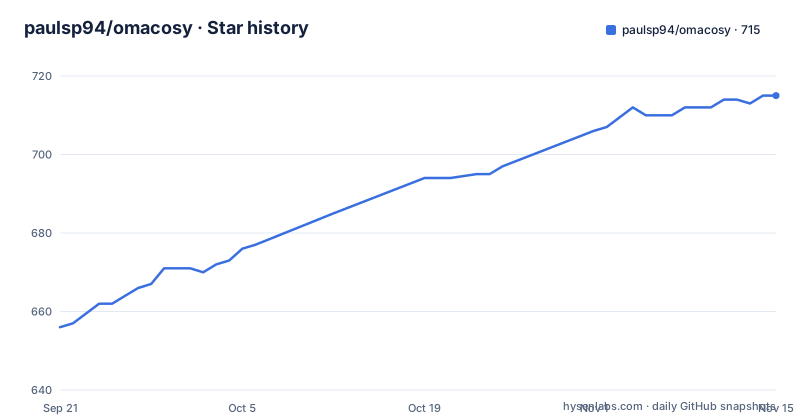
Star history
- paulsp94/omacosy715 ★ · +59
| Repository | 2026-09-21 | 2026-11-15 |
|---|---|---|
| paulsp94/omacosy | 656 | 715 |
59 Stars in the last 55 days, measured from the daily GitHub snapshot. Compare with other projects
Editorial analysis
Seven binaries, because the tools you already have are broken here
The architecture starts from an admission rather than a manifesto: several of the existing tools are broken on macOS 26, so this repository builds its own. Seven small signed binaries written in Swift and C, compiled by the installer, add up to the whole environment. The status bar is deliberately one process rather than four: the bar itself, its popups, its sliders and screen dimming all live together, which is the difference between a status bar and a status bar plus three daemons. Add tiling window management with a real Super key and Hyprland's dwindle layout, focus follows mouse, trackpad workspace swipes, a workspace overview with live previews, border rings around the focused window, and one theme switch that reaches the wallpaper, and the total is the feature set of a full desktop environment. Memory is the number the project leads with: about 157MB for everything, with per-process figures given separately so you can check the claim rather than take it. The repository's own description says six self-built Swift binaries where the readme says seven in two languages, which is a small discrepancy in a project whose selling point is measured frugality. The primary language is C, the licence is MIT, and there are no tagged releases yet.
The Super key is a remapped Caps Lock, and the trackpad is read raw
Everything in this setup hangs off one key, and macOS will not give it to you natively, which is why a third-party keyboard remapper is a hard dependency rather than a nice-to-have. Karabiner-Elements remaps Caps Lock into a real Super key, and that remapping needs the input monitoring grant. The same grant covers the gesture binary, which reads raw trackpad contacts directly, and the reason is a platform change rather than a preference: macOS 26 stopped carrying touch data in normal events, so three-finger and four-finger gestures cannot be read the way they were before. If you refuse input monitoring you lose both halves at once, which the permissions table states plainly: no Super key and no swipe gestures. That is the honest shape of this dependency. A tiling window manager without a modifier key is a set of keyboard shortcuts you have to memorise, and a workspace system without gestures is a set of keyboard shortcuts too. So the project accepts a driver extension, a permission prompt, and an extra agent in exchange for the interaction model it is actually built around, and it tells you exactly what you give up if you say no.
Configs are symlinked into the repo, and privacy controls decide whether that works
This is the detail that will cost you an afternoon if it goes wrong, and the readme warns about it before you install anything. Configs are symlinked into the clone rather than copied out of it, which is the right design: you edit a file in the repository and the running agent sees the change immediately, with no reinstall step. The cost is that the symlinks point into wherever you cloned, and macOS privacy controls stop launch agents from reading three specific user folders. Clone into Documents, Desktop or Downloads and those agents cannot follow the symlinks. The installer's fallback is to copy the configuration files instead of linking them, which still works, but it quietly changes your workflow: every edit now needs the installer re-run before it takes effect, and that is not something the system will tell you. The same failure appears from the other side in the permissions table, where the files-and-folders grant exists only if your clone lives in one of those folders. The status bar reads its colour palette from the theme directory inside the repository, so in that case it does not degrade politely, it hangs at startup waiting on a prompt nobody sees. The fix is one directory: keep the clone where the documentation suggests.
Every grant is refusable and the dependent feature hides itself
A window manager asks for a lot of access, and this project's response is a table with four columns: the grant, which binary requests it, what it is used for, and what you lose by refusing. That structure is the most reviewable thing in the repository, because it converts a permission dialog into a decision you can make in advance. Accessibility is the broadest and, in practice, not optional: it is what moves, resizes and focuses other applications' windows, so refusing it means nothing tiles at all. The window manager asks for it, the gesture binary asks for it, the status bar asks for it to read the focused application's menus for its app pill, and one more binary asks for it only in the default window-manager mode. Screen recording captures a thumbnail per window for the overview cards, including windows the window manager has stashed offscreen where a screenshot of the visible screen could never see them; without it the cards fall back to application icons and titles. Bluetooth is for the adapter pill, which hides itself. Automation covers Apple Events to a music service, to System Events for sleep, lock, restart and wallpaper, and to Finder for one window shortcut; without it the media pill hides, those menu rows do nothing and the shortcut opens no window. The stated rule is that everything is refusable and dependent parts hide rather than half-work, which is the correct behaviour for a tool asking for this much.
The location grant buys one string, and it needs an app bundle to get it
The location permission sounds alarming and is the subject of its own explanation in the readme, because the author thought it was worth defending. It buys exactly one string: the name of the wi-fi network. macOS classifies network names as location data, so reading one requires the grant, and the grant itself is what unlocks the system call that returns it. No coordinate is ever requested, none is stored, and no location updates are started. Refuse it and the only loss is that the wi-fi popup's title row reads a generic label instead of your network's name. The interesting part is the second requirement, which the readme is unusually candid about: measured on macOS 26.3, an unbundled binary reads a null value however it is authorised. Authorisation alone is not enough, and neither is the binary being correct. Both conditions are needed, which is why the status bar ships inside a minimal application bundle rather than as a plain executable. That is a platform quirk rather than a design choice, and it is the kind of thing that would otherwise have been discovered by a user wondering why their network name never appeared.
The screen recording grant is billed to whoever started the overview first
The overview takes a thumbnail for every window so the cards can show live previews, and it needs screen recording for that. Here the permission attribution is the trap, and the readme explains it at length. The overview keeps running in the background after it first opens, and macOS holds the program that started it that first time responsible for every later opening as well. So the entry you have to switch on is not the overview's own entry; it belongs to whatever launched the overview the first time. Observed in the system permission log on macOS 27.2 with the overview started fresh each time: the gesture binary when a four-finger swipe up started it, and the Karabiner user session when a keyboard shortcut started it under the alternative window manager, with the overview's own entry never consulted. The same log entry answers for a terminal that started the overview, until that terminal stops. One inconsistency to keep in mind while reading all this: the project targets macOS 26, while this particular observation comes from a later system version, so treat the attribution rule as measured on one machine rather than as a documented guarantee. The fallback, for what it is worth, is graceful: app icons and titles instead of live previews.
Two window managers, and the installer remembers which one you picked
The default window manager is AeroSpace, and there is a second one behind a flag.
d=~/.local/share/omacosy
if [ -d "$d/.git" ]; then git -C "$d" pull --ff-only; else git clone https://github.com/paulsp94/omacosy.git "$d"; fi &&
cd "$d" && ./install.sh
The install script takes an option that installs the alternative manager instead, in which case AeroSpace is not installed at all, and a later run of the installer or the update command keeps whichever manager you chose rather than reverting to the default. That stickiness matters more than it sounds: an installer that silently switches your window manager on update would be a support nightmare, and this one records the decision instead. There are optional extras in the same spirit, both off by default: one flag adds an optional file manager bound to a key combination, and a fuller variant adds its video and raw-photo previews. The installer itself is idempotent and does a specific, bounded list of things. It installs Homebrew if it is missing, runs a bundle install from the checked-in Brewfile, compiles the helper binaries, generates the window manager's configuration from your application choices, symlinks the configs while backing up anything it would replace, hides the native menu bar, applies the default theme and starts the services. A separate script holds the system defaults, and there is an uninstall script at the top level. Nothing in that list is clever; all of it is idempotent, which is the property that makes the whole thing reinstallable.
One network call, no update daemon, and an updater that refuses to guess
The networking story is stated as a principle rather than a feature. There is no background update check. The status bar makes exactly one network call, for the weather, and the reasoning is given: a daemon polling the forge on a timer would quietly make that two. Nothing in the environment contacts the network unless you run a command yourself. That is a coherent position for a desktop configuration tool, and it is the kind of thing a status bar plugin collection usually gets wrong. The update path respects the same principle.
omacosy-update          # pull, then re-run the installer
omacosy-update --check  # just say whether there is anything new
A command pulls the clone and re-runs the installer; a check flag only reports whether anything new exists. The installer rebuilds only the binaries whose sources changed and restarts their agents, so an update is a pull plus a re-run rather than a full compile of everything. Two refusals are worth noting because most dotfiles installers do the opposite: it refuses a clone with local edits, and it refuses one whose branch has diverged, rather than deciding for you in either case. On scope, the readme is unusually direct. This was built for one desk, a laptop and a single external display, on macOS 26, and although it tries to generalise with display roles instead of hardware names and per-display notch detection, it has only run on that machine. Support promises are explicitly not made.
Editorial conclusion
omacosy fits you if you have been running a Linux-style window manager on macOS by hand and want the same thing maintained in one place, because the alternative is a folder of launch agents, a patched config, a status bar you compiled last year and a keyboard remapper you already forgot about. It does not fit a machine you cannot grant accessibility and input monitoring to, and it does not fit a multi-display desk it has never seen, since the author says plainly that it runs on one laptop and one external display and makes no support promises. Two things to do before the first install. Clone outside the protected user folders, because symlinked configs plus launch agents that cannot read them is the one failure mode that hangs the status bar at startup rather than degrading. And read the permissions table top to bottom before granting anything, because the parts you refuse hide themselves and you will want to know in advance which ones you are giving up. Then check the memory figure yourself against the per-process numbers before you decide 157MB is a selling point.
Frequently asked questions
What does omacosy actually install?
An omarchy-style macOS desktop: tiling window management with a real Super key and Hyprland's dwindle layout, a status bar built for it that also handles popups, sliders and screen dimming, focus follows mouse, trackpad workspace swipes, a workspace overview with live previews, focus border rings and one theme switch. It idles at about 157MB across seven self-built binaries.
How do I install omacosy on a Mac?
One shell command either clones the repository or pulls the existing clone into a directory under your local share folder and then runs the installer. The installer is idempotent, so the same command reinstalls. A flag switches to the alternative window manager, and two more add an optional file manager.
Why does the omacosy clone location matter?
Configs are symlinked into the clone so edits apply immediately, and macOS blocks launch agents from reading the Documents, Desktop and Downloads folders. If you clone there the installer falls back to copying configs, which still works but means every edit needs the installer re-run, and the status bar can hang at startup waiting on a permission prompt.
Which macOS permissions does omacosy need?
Seven, listed in a table with what each is used for and what breaks without it. Accessibility is what makes tiling work at all, input monitoring gives the Super key and the swipe gestures, screen recording gives the overview its window thumbnails, and bluetooth, location, automation and files-and-folders each unlock one piece of the bar or one menu action.
What is the omacosy location permission used for?
Exactly one string: the name of your wi-fi network, which macOS treats as location data. No coordinate is requested or stored and no updates are started. The grant alone is not enough, because an unbundled binary reads a null value however it is authorised, which is why the status bar ships inside a minimal app bundle.
Does omacosy check for updates or contact the network on its own?
No. There is no background update check; the status bar makes a single network call for the weather, and nothing else contacts the network unless you run a command. Updating is an explicit command that pulls and re-runs the installer, and it refuses to touch a clone with local edits or a diverged branch.
Official sources
Add this badge to your README
If you maintain this project, the badge below links readers to this analysis and shows its maintenance status from the daily GitHub snapshot. Paste the markdown into your README; add ?metric=license or ?metric=stars to the image URL for a different field.

[](https://hysenlabs.com/projects/paulsp94-omacosy)Star history chart for your README
[](https://hysenlabs.com/projects/paulsp94-omacosy)Was this useful?