pgf-tikz/pgf: TeX Graphics with PGF and TikZ
A Portable Graphic Format for TeX
At a glance
- What is it?
- pgf-tikz/pgf is a TeX macro package for generating graphics across TeX backends, with Ti*k*Z providing the user-facing drawing syntax. It suits TeX and LaTeX users who want diagrams and illustrations inside documents, while the repository notes a limited regression test suite.
- Who is it for?
- Adopt PGF when graphics must remain part of a TeX document and the TeX distribution already provides the package. Do not treat it as a standalone graphics application or assume its rudimentary test suite covers every backend.
- Can I use it commercially?
- Not without permission. GitHub finds no licence file in the repository, and without a licence all rights are reserved by default: you may read the code but not reuse it. Check the README, or ask the authors, before using it.
- Is it still maintained?
- Yes. The repository last received commits 2 days ago.
- What is it written in?
- Mainly TeX, according to GitHub's language statistics.
Answers come from the project's GitHub data, last synced on November 7, 2026, and from our analysis. They are not legal advice.
Star history
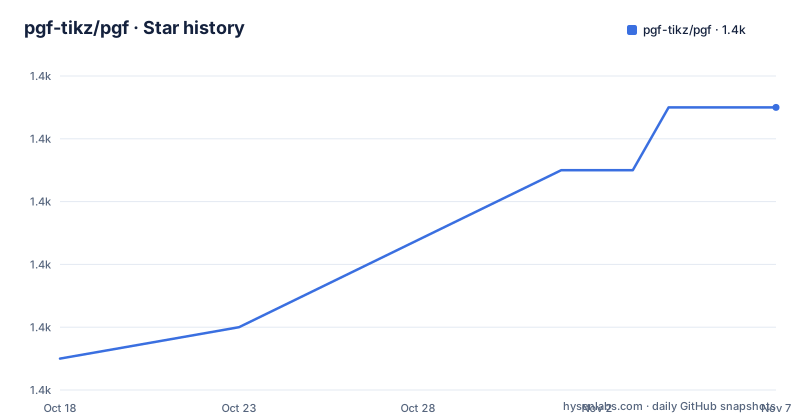
- pgf-tikz/pgf1,371 ★ · +8
| Repository | 2026-10-18 | 2026-11-07 |
|---|---|---|
| pgf-tikz/pgf | 1.4k | 1.4k |
8 Stars in the last 20 days, measured from the daily GitHub snapshot. Compare with other projects
Editorial analysis
What pgf-tikz/pgf solves inside TeX documents
PGF is a TeX macro package for generating graphics. The README describes it as platform- and format-independent and says that it works with important TeX backend drivers, including `pdftex` and `dvips`. The intended users are people who already work in TeX or LaTeX and want drawings to live inside the same document workflow as the text. PGF is not documented here as a general image editor, a standalone diagramming application, or a separate rendering service.
The package includes Ti*k*Z, described in the README as a user-friendly syntax layer. The name matters because it gives document authors a higher-level interface over the underlying TeX macros. The repository topics also place the project alongside drawing, graphs, LaTeX, TeX, TikZ, and visualization, but the more specific statement is that PGF generates graphics through a TeX macro package. That design is useful when a document needs repeatable shapes, diagrams, or illustrations without moving the graphic into a separate application.
The project does not promise a particular graphic style or a fixed set of diagram types in the README. Its scope is the combination of low-level TeX macros and the Ti*k*Z syntax layer. Adoption depends more on the document toolchain than on a separate runtime service or platform package.
How PGF and Ti*k*Z are organized
The repository layout separates implementation, documentation, build configuration, and regression material. The `source/` and `tex/` directories contain the project source structure, while `doc/` contains documentation. Configuration files such as `build.lua`, `config-examples.lua`, and `config-regression.lua` show that the repository is built and checked through TeX-oriented tooling rather than a conventional application package with a documented command-line launcher.
The README identifies `doc/generic/pgf/pgfmanual.pdf` as the manual and says that this documentation also explains installation. It points readers to `doc/generic/pgf` for more information. The manual is therefore the primary source for the full syntax, supported backends, package-loading behavior, and configuration details. The short README does not document a complete drawing program, a standalone API, or a public command that accepts a scene description.
The stated backend coverage includes `pdftex` and `dvips`. The development instructions separately identify LuaTeX as the recommended build target for broad coverage of PGF features, and mention `dvisvgm` for animation testing. These references show several output paths, but they do not mean that every backend supports every feature. The manual should be checked for the feature and driver combination required by the target document.
Installing PGF through the normal TeX distribution
For ordinary use, the README recommends the version of PGF shipped by the TeX distribution. This is the simplest route because the project is a TeX macro package, not a conventional application that must be compiled and installed as a separate executable. The README does not give a distribution-independent command for checking whether PGF is present.
The development install path is documented for TeX Live. These commands add the PGF development repository, pin the repository, update the package manager, and reinstall PGF:
$ tlmgr repository add https://pgf-tikz.github.io/pgf/tlnet pgf-development
$ tlmgr pinning add pgf-development "*"
$ tlmgr update --self --all
$ tlmgr install pgf --reinstall
The first command adds the repository under the name `pgf-development`. The second pins that repository with the documented `"*"` pattern. The last two commands update the TeX Live manager and reinstall PGF. The README presents this route for users who want the latest development version, not as the normal installation recommendation.
Building the manual as a first local PGF workflow
The repository gives a concrete first local operation: build the manual. On GNU/Linux, the documented workflow clones the repository, initializes a TeX Live user tree, points `TEXMFHOME` at it, enters the repository, and invokes `l3build`. The commands are:
$ git clone https://github.com/pgf-tikz/pgf
$ tlmgr init-usertree --usertree pgf
$ export TEXMFHOME=$(readlink -f pgf)
$ cd pgf
$ l3build doc -q -H
After the command completes, the intended artifact is the manual identified by the repository as `doc/generic/pgf/pgfmanual.pdf`. The README does not state the expected terminal output, so a reader should use the generated manual and build status rather than expect a specific success message. This is a documentation-building workflow, not a documented Ti*k*Z drawing example.
The README says that copying the repository into a `texmf` tree is not recommended. It instead directs GNU/Linux users to the TeX Live `usertree` option. For a first real use, this workflow offers a way to inspect the manual against the checked-out source. The manual, rather than the README, should supply the actual package-loading and drawing syntax.
The boundary between regression checks and feature coverage
The repository's own description of its testing is direct. The README says the test suite is rudimentary and is currently used to check for regressions, while bug checking is performed by building the manual for each commit. The repository contains `testfiles-regression/`, `testfiles-examples/`, and `testfiles-examples-pdf/`, but the README does not claim that these directories cover every Ti*k*Z feature or every backend combination.
That limitation affects adoption decisions. A passing CI status should not be interpreted as proof that every drawing construct behaves identically under `pdftex`, `dvips`, LuaTeX, or `dvisvgm`. The documentation specifically calls out animation testing with `dvisvgm`, which indicates that some behavior requires a particular build and test path. Projects with exact rendering requirements should check the relevant manual sections and their own document build rather than relying only on the regression workflow.
The README also does not specify a release policy, support window, or compatibility matrix. Recent release entries identify versions `3.1.12`, `3.1.11a`, and `3.1.11`, but release labels alone do not establish which version a TeX distribution will ship. The version actually available through the distribution remains a separate installation concern.
License, upgrades, and project-specific support channels
The repository metadata does not identify a license in the top-level summary. The README directs readers to `doc/generic/pgf/license/LICENSE` for license details. That locates the project's license text, but it does not by itself establish how the license interacts with a particular document, distribution, or commercial use. No legal interpretation is needed to decide whether to inspect the file, but the file should be reviewed before redistribution or embedding the package in a controlled build.
For users who rely on the TeX distribution version, upgrade behavior is delegated to that distribution's package management. The development repository commands are more direct, but they can move the local installation toward the latest development version. The README does not document a rollback procedure, a compatibility policy for earlier TeX releases, or a migration guide between releases. Those omissions matter when a build environment is shared or reproducible.
The README identifies the official repository for bug reports and feature requests, the `pgf-tikz` mailing list, and the Matrix channel `#pgf-tikz:matrix.org`. These are project-specific places to ask about behavior, but they do not replace checking the version bundled with the target TeX installation.
PGF compared with a separate graphics workflow
The closest practical alternative described by the project context is a separate graphics tool that produces an image for insertion into a document. The difference is architectural. PGF generates graphics from TeX macros and offers Ti*k*Z as a syntax layer, so the drawing process stays within the TeX document toolchain. A separate tool would instead require exporting or including an image, with a different handoff between drawing and typesetting.
PGF is the better fit when the graphic needs to participate in a TeX document and the author wants syntax integrated with the document source. A separate graphics workflow may be more appropriate when the drawing is produced outside TeX, when another tool manages the required output format, or when the team does not want to maintain TeX packages and backend-specific builds. The README does not name a particular alternative, so the comparison should remain at the workflow level rather than imply compatibility with an unlisted product.
The key adoption question is not whether PGF can draw graphics. The README already states that it can. The question is whether the document build, supported backend, and tested feature set match the project's requirements.
Editorial conclusion
Adopt PGF when graphics must remain part of a TeX document and the TeX distribution already provides the package. Do not treat it as a standalone graphics application or assume its rudimentary test suite covers every backend. Verify the installed version, read `doc/generic/pgf/pgfmanual.pdf` for installation and usage details, and check the renderer required for animations before selecting it.
Frequently asked questions
How do I install PGF for normal TeX use?
The README recommends using the version of PGF shipped by your TeX distribution. For a development version through TeX Live, it documents adding the PGF development repository, pinning it, updating the manager, and reinstalling PGF.
Which TeX backends does PGF work with?
The README names `pdftex` and `dvips` as supported TeX backend drivers. It also identifies LuaTeX as a recommended build target for broad feature coverage and mentions `dvisvgm` when testing animations.
Where can I find the PGF manual and installation details?
The README points to `doc/generic/pgf/pgfmanual.pdf` and says that the documentation explains installation. It also points to `doc/generic/pgf` for more information.
How complete is the PGF test suite?
The README describes the test suite as rudimentary and says it is used to check for regressions. It also says bugs are currently checked by building the manual for each commit.
Official sources
Add this badge to your README
If you maintain this project, the badge below links readers to this analysis and shows its maintenance status from the daily GitHub snapshot. Paste the markdown into your README; add ?metric=license or ?metric=stars to the image URL for a different field.

[](https://hysenlabs.com/projects/pgf-tikz-pgf)Star history chart for your README
[](https://hysenlabs.com/projects/pgf-tikz-pgf)Was this useful?