PicGo-Core turns image uploading into a CLI, an API and a plugin host
:zap:The ultimate image uploading engine. Both CLI & API supports.
At a glance
- What is it?
- PicGo-Core is the MIT licensed engine behind the PicGo ecosystem, shipping as the picgo command line tool, an HTTP server and a library that editor integrations call. It is a good fit for teams that want uploads scripted and repeatable, and a poor fit for anyone expecting a finished image host.
- Who is it for?
- PicGo-Core suits engineers who need image uploads to run inside a build script, an editor shortcut or a self-hosted HTTP endpoint, and who are willing to configure an uploader and hold the plugin set in their own dependency tree. It does not suit a team looking for a hosted image service, since the default host is SM.MS and credentials for anything else live in local configuration, nor a team still on Node 16.
- Can I use it commercially?
- Yes. MIT is a permissive licence: you can use, modify and sell software built on it, as long as you keep its copyright and licence notices.
- Is it still maintained?
- Yes. The repository last received commits 20 days ago.
- What is it written in?
- Mainly TypeScript, according to GitHub's language statistics.
Answers come from the project's GitHub data, last synced on November 7, 2026, and from our analysis. They are not legal advice.
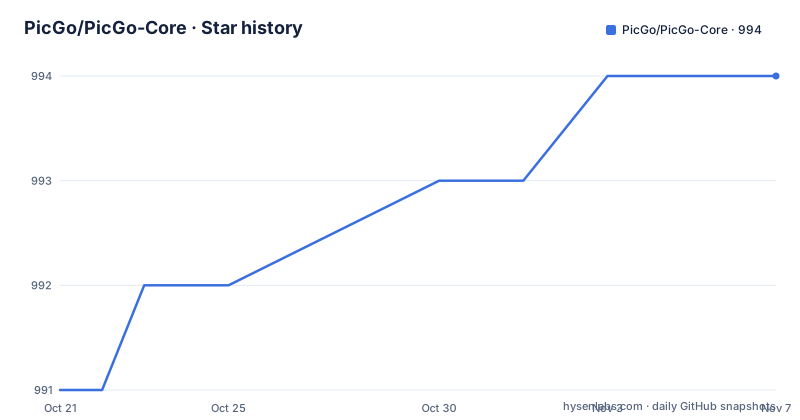
Star history
- PicGo/PicGo-Core994 ★ · +3
| Repository | 2026-10-21 | 2026-11-07 |
|---|---|---|
| PicGo/PicGo-Core | 991 | 994 |
3 Stars in the last 17 days, measured from the daily GitHub snapshot. Compare with other projects
Editorial analysis
An upload engine that other software calls
PicGo-Core is the part of the PicGo project that actually moves files to a host. The README describes it as a tool for image uploading with both CLI and API support, and the project description calls it the ultimate image uploading engine. The interesting part is that most people never install it as an application. They install a plugin that depends on it.
Typora supports PicGo-Core natively, which is the clearest example of the model. A note in the README says as much. The same shape applies to editor integrations and to scripts that need an image uploaded as one step inside a larger job. The package is published on npm under the name `picgo`, and the manifest gives it three entry points: a CommonJS build at `dist/index.cjs.js`, an ES module build at `dist/index.esm.js`, and type declarations at `dist/index.d.ts`. The CLI entry is `./bin/picgo`.
That build layout is why the package can be consumed three ways without anyone choosing: a shell user runs the binary, a Node application imports the module, and an HTTP client talks to the server mode. It also explains the runtime requirement, which is unusually specific for a tool of this kind.
Node 20.19 is the floor because of ES module stability
The installation section sets a hard runtime requirement and then explains it. PicGo requires Node.js >= 20.19.0 or >= 22.12.0, and for older PicGo versions, up to v1.5.x, Node.js >= 16 is sufficient. The stated reason is the stability of ES module support.
That version floor is not arbitrary noise. Node has been changing how it loads ES modules, and a package that ships both a CommonJS and an ES module build has to pick a set of loaders that behave predictably across the versions it claims to support. The README links to an article on the subject rather than restating the details, but the practical message for an adopter is that the two listed versions are the tested configurations, and anything in between is unverified.
There is a small inconsistency worth knowing about. The README badge in the repository advertises Node >= 20.0.0, which is a looser claim than the prose requirement of 20.19.0 or 22.12.0. The prose is the stricter and more useful of the two. A CI image pinned to Node 20.0 would satisfy the badge and fail the real requirement, so read the installation section rather than the badge.
Installing globally or pinning the package locally
The two supported install routes mirror the two usage patterns. A global install puts the `picgo` command on your PATH so an editor integration can call it from anywhere, while a local install pins the package inside a project so the version is locked in that project's dependency tree.
For a global install:
npm install picgo -g

# or

yarn global add picgo
For a project that should own its own copy:
npm install picgo -D

# or

yarn add picgo -D
The local form is the one that matters for reproducibility. Because PicGo-Core carries a plugin system and plugins are installed separately, a tool that is only present on one machine ends up with a different uploader set than a tool installed globally, and the local install keeps that difference visible in a lockfile rather than hidden in a user directory.
The published package is a single public npm artifact with `publishConfig` set to public access, and the repository pins `[email protected]` as its package manager, with a pnpm workspace file and a pnpm lockfile at the root. Contributors therefore need pnpm, even though the published package can be consumed with npm or yarn as shown above.
Naming the uploader configuration per upload
The most useful addition in the recent command line surface is per-upload configuration selection. The README documents `--configName` to pick a saved configuration for one upload, with `--uploader` added when the same name exists under more than one uploader type, and `--configId` as an alternative. A unique ID match takes precedence over the name, and an unresolved ID falls back to the name when one was given.
picgo upload ./photo.png --configName=Work
picgo upload ./photo.png --uploader=github --configName="Work Images"
picgo upload ./photo.png --uploader=github --configId=your-config-id --configName=Work
The documentation is explicit about two things that keep this predictable. These options follow the same lookup rules as the HTTP and SDK upload paths, so behaviour does not drift between the CLI and a programmatic call. And they do not change saved defaults, meaning a one-off run against a different account leaves your stored configuration untouched.
Two more details are documented. Existing local input files are kept after an upload, and only the temporary multipart files and clipboard images PicGo itself creates are cleaned up. Clipboard filenames keep the existing `YYYYMMDDHHmmssSSS.png` format. For anyone scripting around uploads, that last point matters, since a predictable filename is what lets a downstream step find the artifact.
Server mode, clipboard uploads and the default host
Two upload paths sit alongside the file path one. A picture on the clipboard is uploaded with no argument, and the README notes that a clipboard picture is converted to `png`. The method for pulling the clipboard is credited to the vs-picgo project and to Spades-S, which is a small reminder that the desktop integration path grew out of community work rather than from a spec.
For anything that needs to be triggered over the network, the server mode runs PicGo as a standalone process:
picgo server -p 36677 -h 127.0.0.1The example binds to the loopback address on port 36677, and the server surface accepts the same `uploader`, `configName` and `configId` selection as the CLI. Configuration names are recommended for readability, and names containing spaces need URL encoding. This is the mode a local automation tool or a script would call, and it is also the mode that needs the most care with network exposure, because an unauthenticated upload endpoint on a shared host is an open relay.
The default upload host is called out explicitly: PicGo uses SM.MS as the default upload image host. Anything else requires a plugin and a configuration, which brings the discussion to how hosts actually get added.
Uploaders, transformers and plugins are separate modules
The plugin model has three distinct module types, and the command surface treats them as such. The `set` command configures a module, with the module type given as uploader, transformer or plugin. The `use` command selects which module is active for that type, and `get` prints the current configuration for uploaders, transformers and plugins. Separate `uploader` subcommand manages uploader configurations on their own, and `install` and `uninstall` add and remove plugins, with `update` refreshing them.
The separation is the useful part. An uploader decides where a file ends up, a transformer changes the file before it goes, and a plugin extends the command surface itself. A workflow that needs to rename, compress or re-encode an image before upload does not have to reimplement the transport, and a workflow that only wants a different destination does not have to touch the transformer chain.
The ecosystem is curated rather than bundled. The README points to the Awesome-PicGo list to find plugins, and the repository carries a badge for the PicGo Convention, a version bump convention, along with a dedicated bump-version package in the dev dependencies. The convention matters for maintainers more than for users, but it explains why plugin versions track the core version so closely.
Two environment variables in the repository's `.env.example` point to the cloud side of the product: `PICGO_API_URL` and `PICGO_CLOUD_URL`, both shown with placeholder values. The CLI also carries `login` and `logout` commands for cloud.picgo.app and a `cloud` command for managing PicGo Cloud, so the core tool has a path into a hosted offering even though the engine itself is local.
The cloud service as the alternative to running the engine yourself
PicGo ships a hosted offering alongside the open source engine, and the CLI exposes it directly. There are `login [token]` and `logout` commands for cloud.picgo.app, a `cloud` command to manage PicGo Cloud, and the repository's `.env.example` carries `PICGO_CLOUD_URL` alongside `PICGO_API_URL`, both with placeholder values pointing at a deployment you configure. The i18n command changes the language of the CLI itself, which matters for anyone rolling the binary out to a team.
That hosted path and the local engine differ in a way that decides the architecture. Running PicGo-Core yourself keeps every upload on your own machine, with the host credentials held in local configuration and the plugin set pinned in your own dependency tree. Nothing leaves your network except the final transfer to whichever host you configured, and the default is SM.MS unless you change it.
Going through the cloud service instead removes the operational part. There is no Node.js runtime to provision, no uploader plugin to keep current, and no local configuration of secrets to protect. What it costs you is control over the pipeline: the plugin system, the transformer chain and the per-upload configuration selection described above are all part of the engine you would be giving up. For a team that only ever uploads to one destination with default settings, the hosted route is less machinery. For a team that needs a specific uploader, a transform before upload, or a script that calls a local endpoint, the engine is the only one of the two that fits.
Version 3 moved the build system and the branch
The package manifest shows how the project is built and released. `build` runs a Rollup configuration under a production environment, `dev` runs the same bundler in watch mode, and `test` runs Vitest. Linting is layered: a dependency check with `dpdm` that fails on circular imports from `src/index.ts`, then `tsc --noEmit`, then ESLint over `src` with the test files ignored. Release versioning is automated through the `bump-version` package with a `release` script, and commit messages are checked by commitlint with a project-specific configuration.
There is one structural oddity that affects contributors. The version bump scripts run `git push origin master` and `git push origin --tags`, but the default branch for the repository is `dev`, while the build badge in the README points at a `master` ref. The two names coexist in the project, which means anyone scripting a release or rebasing against upstream needs to check which branch is actually current rather than assuming from the badge.
The release history shows steady work through 2026: v3.0.2 on 2026-08-27, v3.1.0 on 2026-09-22, and v3.2.0 on 2026-10-19, with the last push on 2026-10-19. The licence is MIT, so there is no copyleft obligation and no restriction on embedding the engine in a proprietary product, which is the reason many integrations ship it as a dependency rather than calling the hosted service.
Editorial conclusion
PicGo-Core suits engineers who need image uploads to run inside a build script, an editor shortcut or a self-hosted HTTP endpoint, and who are willing to configure an uploader and hold the plugin set in their own dependency tree. It does not suit a team looking for a hosted image service, since the default host is SM.MS and credentials for anything else live in local configuration, nor a team still on Node 16. Verify three things before adopting it: that your runtime is on Node.js 20.19.0 or newer, that the uploader you intend to use has a plugin that supports your version 3 release line, and that the `picgo server` mode binds to an address your network will not expose, since the documented invocation listens on 127.0.0.1 on port 36677.
Frequently asked questions
What Node.js version does PicGo-Core require?
The README states that PicGo requires Node.js >= 20.19.0 or >= 22.12.0, because of the stability of ES module support. Older PicGo versions up to v1.5.x only needed Node.js >= 16.
How do I install PicGo-Core?
Globally with `npm install picgo -g` or `yarn global add picgo`, or inside a project with `npm install picgo -D` or `yarn add picgo -D`. The package is published on npm under the name `picgo` and provides the `picgo` command.
How do I upload an image to a specific PicGo account?
Use `--configName` on the upload command to pick a saved configuration for that run, adding `--uploader` when the same name exists under multiple uploader types. A `--configId` takes precedence over the name and falls back to the name if it does not resolve, and neither option changes your saved defaults.
Can PicGo-Core run as an HTTP service?
Yes. The `picgo server` command runs it as a standalone server, with the documented invocation `picgo server -p 36677 -h 127.0.0.1`. The server accepts `uploader`, `configName` and `configId` on `POST /upload` to select a saved configuration for a single request.
Which image host does PicGo-Core use by default?
The README states that PicGo uses SM.MS as the default upload image host. Other hosts are added through plugins, which the README points to the Awesome-PicGo list to find.
Official sources
Add this badge to your README
If you maintain this project, the badge below links readers to this analysis and shows its maintenance status from the daily GitHub snapshot. Paste the markdown into your README; add ?metric=license or ?metric=stars to the image URL for a different field.

[](https://hysenlabs.com/projects/picgo-picgo-core)Star history chart for your README
[](https://hysenlabs.com/projects/picgo-picgo-core)Was this useful?