AVAL: a media format that refuses to pick your fallback and encodes with no default timeout
A new open-source format for interactive video on the web, with a built-in state machine, frame-accurate transitions, and packed-alpha transparency.
At a glance
- What is it?
- A web format for prerendered interactive motion that ships one logical animation as several codec variants and lets the browser choose from a fixed ladder. The interesting parts are the deliberate omissions: no fallback content, no bundled FFmpeg, and no default wall-clock limit on encoding.
- Who is it for?
- aval suits someone shipping short interactive motion on the web who wants frame-accurate state transitions and codec choice without hand-rolling a player, and who can supply their own FFmpeg build. Three things to accept before adopting it.
- Can I use it commercially?
- Yes. MIT is a permissive licence: you can use, modify and sell software built on it, as long as you keep its copyright and licence notices.
- Is it still maintained?
- Yes. The repository last received commits 51 days ago.
- What is it written in?
- Mainly TypeScript, according to GitHub's language statistics.
Answers come from the project's GitHub data, last synced on November 15, 2026, and from our analysis. They are not legal advice.
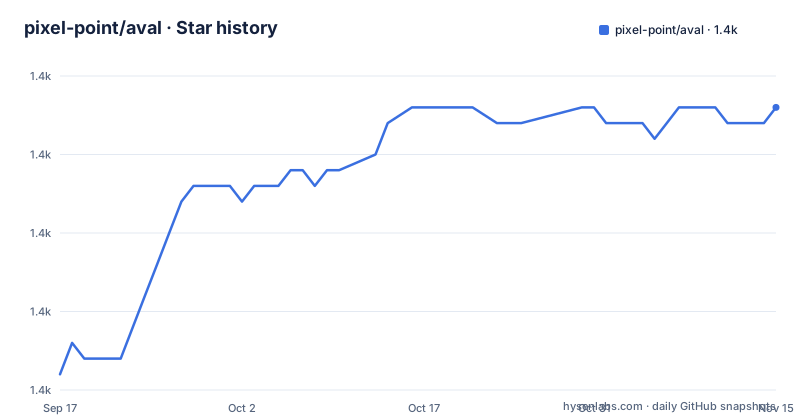
Star history
- pixel-point/aval1,408 ★ · +17
| Repository | 2026-09-17 | 2026-11-15 |
|---|---|---|
| pixel-point/aval | 1.4k | 1.4k |
17 Stars in the last 59 days, measured from the daily GitHub snapshot. Compare with other projects
Editorial analysis
The format will not choose your fallback for you
This is the most opinionated thing in the documentation and it is stated as a requirement rather than a limitation. Every integration has to own its unsupported-browser and fatal-error path, because a browser may lack the WebCodecs interfaces the format needs, every authored codec may be unsupported, or some other terminal playback failure may stop source generation. In those cases the prepare call rejects with AvalPlaybackError and the element raises one fatal error event carrying a failure code such as unsupported-profile or unsupported-browser. AVAL deliberately does not create, select, reveal or hide fallback content; whether the user sees an ordinary video, an image, text, another renderer or nothing is the application's decision. The instruction is to branch on the code and not parse the message, and to install the direct error listener before explicit registration so an upgrade-time failure cannot outrun the application boundary.
Author order and DOM order are both ignored at runtime
Browser selection follows one fixed ladder: AV1, then VP9, then H.265, then H.264. Two separate statements make clear that nothing else influences it. The first says DOM source order does not change the policy. The second says the order of the project's encodings array controls compiler and report publication only. So an author who lists H.264 first because it encodes fastest, or a developer who puts the H.264 source element first in the markup, gets the same result: the browser walks the ladder and takes the first candidate that decodes and passes pre-readiness output qualification. Configuration is still strict. Each candidate is a literal direct child of the host element carrying exactly one lowercase data-codec attribute, only four values are accepted, a family may appear at most once, and missing, unknown or duplicate declarations are invalid configuration.
Encoding has no default wall-clock limit
There is deliberately no default media timeout on an encode. Builds that need a ceiling opt in with a media-timeout-ms flag, and the compiler records sanitized tool invocations, exact MIME codec strings, per-file hashes and copyable source markup in its build report. The practical consequence is that a pathological source can occupy a build indefinitely unless the caller sets that flag, which is a choice the design leaves with you rather than guessing a value. The compression controls are also per-codec rather than unified. H.264 and H.265 expose compression presets, VP9 exposes a deadline setting and a cpu-used setting, and AV1 exposes bit depth, cpu-used, tiles, row multi-threading and thread count. Slower modes such as veryslow, the VP9 best deadline and AV1 cpu-used zero are supported rather than discouraged.
No FFmpeg is bundled, and the obligations come with that
The compiler calls FFmpeg and FFprobe that you installed, and asks them for the specific encoders it needs: libx264, libx265, libvpx-vp9 and libaom-av1. It bundles and downloads no native codec tool at all. The documentation then assigns the rest of the responsibility plainly, stating that codec, patent, source-media and distribution obligations remain the publisher's responsibility. The upside is real: no codec binaries inside an npm package, no download step at install time, and a notices file at the repository root covering third-party terms. The cost is that the four-codec ladder is only as available as your local FFmpeg build, so a machine missing libaom produces an AV1-shaped project with no AV1 in it, and the gap shows up at compile time rather than in the browser.
The compiler emits a directory, and npx leaves your project alone
There is no init step and no local compiler install. Compilation is one command:
npx @pixel-point/aval-compiler compile motion.json --out dist/motionnpx fetches the scoped compiler into the package manager's cache and runs its single executable, and it does not add the compiler to the current project, so nothing lands in your dependency list. The output is a directory rather than one file:
dist/motion/
  vp9.avl
  build.json
One logical animation compiles into several such files, one per codec, and a project can request all four together. The build report sitting next to them is a provenance record rather than a by-product: sanitized tool invocations, exact MIME codec strings, per-file hashes and copyable source markup. That combination means a reviewer can tell what was run and against which bytes without re-running the compile.
Four registration disciplines across three framework packages
The element package is named as the canonical browser runtime and is the sole browser loader, decoder scheduler, renderer and page resource owner, so there is exactly one thing that touches media. Registration around it is not uniform, and the differences are deliberate. The root exports explicit registration. A separate auto entry point exists as the opt-in automatic-registration path. The React package registers through its client ref and never imports that side-effect entry, which is what keeps it server-render safe. The Svelte package performs the same registration, but only after its component has mounted and native listeners are attached. The documentation sets that last rule mid-sentence and stops there, so the precise condition on those native listeners is not visible. For an author, the practical takeaway is that SSR safety differs per framework and the entry point you import changes the behaviour.
Two versioned formats, and identical state graphs in every file
There are two separate format versions and they are not the same thing. The authoring side is project version 1.0, which is the motion.json file written beside your source media, with fields for the canvas, frame rate, sources, encodings and renditions. The wire side is AVAL wire 1.1, which is what each compiled codec file contains and what the strict parser, validator and writer package handles. The source media constraints are exact rather than advisory: the worked example expects a progressive, square-pixel, unrotated 1920 by 1080 video at a constant 30 fps with at least 120 frames, with pixel aspect given as a unit pair, colour space as srgb, fit as contain, and source timing in exact mode. Alpha is set to auto. What holds the variants together is that the state graph and the authored timing are identical in every file.
No releases, and a test matrix wider than the workspace list
Two structural details are visible from the repository layout. First, there are no GitHub releases, so nothing here is versioned by tag; the packages carry their own versions and the project is described as early stage. Second, the testing surface is much wider than the build graph. There are eight Playwright configurations at the root, named for a grass-rabbit family split across codecs, React and Svelte variants, plus kinetic-orb, playground, production and reference, and a separate Vitest configuration whose name carries a suffix that is not explained anywhere in the visible documentation. The repository also holds fourteen example directories while the workspace list in the package manifest registers only seven of them as workspaces, so examples such as a network-integrity case and a zero-config loop are present in the tree but outside the npm workspace graph. A threat model document and a third-party notices file sit at the root alongside them.
Editorial conclusion
aval suits someone shipping short interactive motion on the web who wants frame-accurate state transitions and codec choice without hand-rolling a player, and who can supply their own FFmpeg build. Three things to accept before adopting it. The format deliberately provides no fallback: the unsupported-browser and fatal-error path belongs to your application, and you must branch on the failure code rather than parse a message. Encoding has no default media timeout, so a pathological input can stall a build unless you opt into a deadline. And the compiler downloads no codec binaries, which keeps packaging clean but means which of the four ladders you can actually produce depends on the FFmpeg you already have.
Frequently asked questions
What is AVAL and what does it do that a video element does not?
It is a web format and runtime for short prerendered motion with continuous loops, named application states, authored triggers, bounded transitions, reversals and packed transparency. Applications can select an authored state directly without media seeking, through a setState call on the player element.
How does AVAL choose which codec to play?
It walks a fixed ladder of AV1, then VP9, then H.265, then H.264, and takes the first candidate that decodes and passes pre-readiness output qualification. Neither the order of the encodings array nor DOM source order changes that policy.
What happens when a browser cannot play an AVAL file?
The prepare call rejects with AvalPlaybackError and the element raises one fatal error event with a failure code such as unsupported-profile or unsupported-browser. AVAL deliberately provides no fallback content; the application decides what to show instead, and should branch on the failure code rather than parse the message.
Do I need to install FFmpeg to compile an AVAL project?
You need your own FFmpeg and FFprobe providing libx264, libx265, libvpx-vp9 and libaom-av1, because the compiler bundles and downloads no native codec tool. It also does not impose a default media timeout, so builds that need a deadline have to opt in with the media-timeout-ms flag.
What npm packages does AVAL publish?
Six: a deterministic state and route engine, a strict wire 1.1 parser, validator and writer, a markup-first browser element that is the sole loader and decoder scheduler, the bundle compiler, plus React and Svelte integrations for React 18.3 and 19 and Svelte 5.
Official sources
Add this badge to your README
If you maintain this project, the badge below links readers to this analysis and shows its maintenance status from the daily GitHub snapshot. Paste the markdown into your README; add ?metric=license or ?metric=stars to the image URL for a different field.

[](https://hysenlabs.com/projects/pixel-point-aval)Star history chart for your README
[](https://hysenlabs.com/projects/pixel-point-aval)Was this useful?