Furo's two-line install, pinned Node build, and bias toward small docsets
A clean customizable documentation theme for Sphinx
At a glance
- What is it?
- Furo is a Sphinx documentation theme distributed on PyPI and switched on by one assignment in conf.py. Its build pins an exact Node version, its runtime dependency list is five entries long, and its layout is designed for docsets small enough to fit in a sidebar.
- Who is it for?
- Furo fits a project whose documentation runs to a few dozen pages and whose maintainer wants palette and typography control without copying templates by hand. Check the Sphinx ceiling against the version your docs already build on before pinning a date tag, and plan for appearance checks by eye rather than by test.
- Can I use it commercially?
- Yes. MIT is a permissive licence: you can use, modify and sell software built on it, as long as you keep its copyright and licence notices.
- Is it still maintained?
- Yes. The repository last received commits 1 day ago.
- What is it written in?
- Mainly Sass, according to GitHub's language statistics.
Answers come from the project's GitHub data, last synced on November 24, 2026, and from our analysis. They are not legal advice.
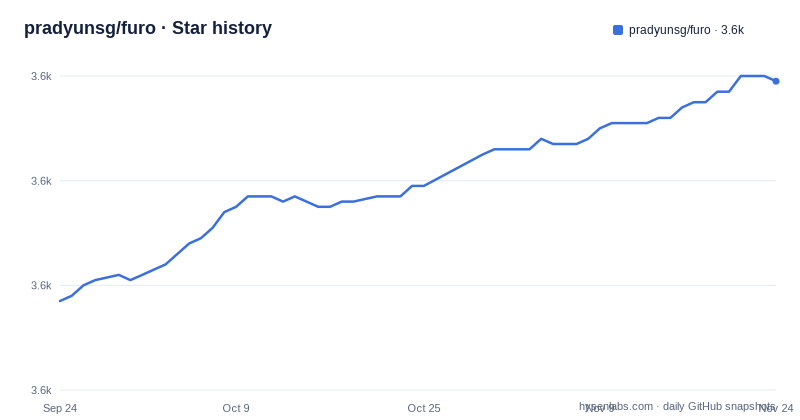
Star history
- pradyunsg/furo3,639 ★ · +42
| Repository | 2026-09-24 | 2026-11-24 |
|---|---|---|
| pradyunsg/furo | 3.6k | 3.6k |
42 Stars in the last 61 days, measured from the daily GitHub snapshot. Compare with other projects
Editorial analysis
One pip command and one assignment are the whole setup
Furo attaches to a Sphinx build the way any packaged theme does: an entry point declares the name, and the package sits in the environment that builds the docs. The entry point is declared as `"sphinx.html_themes" = { furo = "furo" }`, so the bare string furo is the only handle anyone ever needs. Installation is one command:
pip install furoand the switch is one assignment in conf.py:
html_theme = "furo"There is no separate asset download and no template directory to copy into your source tree. The quickstart puts the install step in the documentation build environment rather than in your own shell, which matters for hosted builders that start from a fresh container on every rebuild.
The dependency list stops at Sphinx 9, not 10
Furo pins its Python side tightly enough that you can predict where it stops working. It requires Python 3.10 or newer. Sphinx is accepted from 7.1 up to, but not including, 10.0. sphinx-basic-ng must be 1.0.0.beta2 or newer, a version that was still a beta when that floor was written. Pygments enters at 2.7, accessible-pygments at 0.0.5, and beautifulsoup4 comes along for the theme's own HTML processing. That is the entire runtime list: five entries, one of which is a range rather than a floor. The classifiers extend up to Python 3.15 and carry Development Status :: 5 - Production/Stable, which is the project's own statement about maturity. The practical consequence is the ceiling. A docs project already building against Sphinx 10 sits outside the accepted range, so a fresh install there resolves to something else or refuses outright.
The sidebar is sized for a docset, not for a manual
Furo states its bias directly: it is intended for smaller documentation sets, where presenting the entire hierarchy in the sidebar is not overwhelming. That single premise explains the rest of the pitch. Navigation rests on a carefully designed sidebar plus inter-page links, so a reader moves sideways to related pages instead of only downward through a table of contents. Typography and element styling carry the pages, on the assumption that the content matters more than the scaffolding around it. Search is treated as a surface worth styling rather than a box dropped in the corner, because a reader who cannot find a page never reads one. Responsiveness means adapting to the available screen space instead of pinning one layout width. If your tree runs to hundreds of pages or nests deeply, this premise is the first thing to test against your own hierarchy.
The stylesheet build pins one Node version with no range
Most Python packages do not care which Node is installed. Furo does, because it compiles its own styles. The build backend is sphinx-theme-builder, and pyproject.toml names the Node version it wants: 22.23.3, written as a single value with no lower or upper bound. One extra asset is compiled and shipped alongside the theme, styles/furo-extensions.css, which is where downstream extensions attach. The cost of that compile step is a full webpack toolchain in package.json: webpack, webpack-cli, sass, sass-loader, postcss-loader, css-loader, mini-css-extract-plugin, css-minimizer-webpack-plugin, style-loader, autoprefixer and normalize.css, eleven devDependencies in total. Exactly one npm script exists, build, and it runs webpack. The build side of the repository is therefore a styles pipeline, not a JavaScript application.
Strict typing and docstring rules, with one file exempt
Furo's Python side is small but closely policed. mypy runs in strict mode, which switches on the full set of optional checks instead of the default subset. Ruff extends the standard selection with D, the pydocstyle rule family, and TC, the flake8 type checking rules, then drops D203 and D213 so the two conflicting docstring conventions stop fighting each other. The single exemption is scoped at file level: noxfile.py carries D in its per-file ignores, so the automation script is not obliged to document each function it defines. At the top level, isort.cfg and .pre-commit-config.yaml sit beside .gitattributes and .git-blame-ignore-revs, the usual furniture for a repository that reformats code and wants history to stay readable. What none of this covers is the rendered page. Every one of those tools checks the theme source, not the HTML a reader sees.
Device testing happens by hand, through BrowserStack
Furo's testing story has one external piece and no automated visual layer. BrowserStack is credited with testing on real devices and browsers, and the project is named as a supporter of open source work. That loop is manual by nature: open the built docs on a device, look at the result, decide whether the layout holds. The repository signals match that arrangement. A tests directory is present and .readthedocs.yaml holds the hosted documentation build configuration, but the JavaScript side has one npm script and it is a webpack build, so the styles pipeline gets exercised by compiling it rather than by asserting against its output. For a theme whose pitch rests on responsiveness and on how search results appear, appearance is verified outside the suite. A fork inherits the same split: Python correctness is automatable, visual behaviour is a checklist.
Releases are calendar dates, and two tags landed together
Furo names releases by date instead of a semantic version sequence. The recent list reads 2025.12.19, 2025.09.25 and 2025.07.19, which looks like an ordinary version history. The timestamps underneath tell a different story. The 2025.12.19 tag was published on 2025-12-20, while 2025.09.25 and 2025.07.19 were both published on 2025-12-21, two seconds apart from each other and a day after the newer tag. The two older names were pushed to the repository together, later than the newer one, so the numbers in the tag carry the ordering rather than the upload order. Anyone pinning a dependency to one of those names is pinning a date string with no independent guarantee behind it. Commits are still landing on the default branch main, whose last push is dated 2026-09-28, after every tag in that list.
Editorial conclusion
Furo fits a project whose documentation runs to a few dozen pages and whose maintainer wants palette and typography control without copying templates by hand. Check the Sphinx ceiling against the version your docs already build on before pinning a date tag, and plan for appearance checks by eye rather than by test. Projects that need a large hierarchy surfaced in the sidebar should look elsewhere.
Frequently asked questions
How do I install Furo for a Sphinx project?
Run pip install furo in the documentation build environment, then set html_theme = "furo" in conf.py. Furo registers itself through the sphinx.html_themes entry point, so no template files are copied into your tree.
Which Sphinx and Python versions does Furo support?
The declared range is sphinx >= 7.1,<10.0 with sphinx-basic-ng >= 1.0.0.beta2, and Furo requires Python 3.10 or newer. The classifiers in the packaging metadata extend as far as Python 3.15.
Why does building Furo from source need Node?
The build backend is sphinx-theme-builder, and the packaging configuration pins Node to 22.23.3 for that build while compiling styles/furo-extensions.css. The toolchain behind it is webpack with eleven devDependencies, and the only npm script defined is build.
Is Furo a good fit for a large documentation site?
Its own pitch describes it as biased for smaller documentation sets, where putting the entire hierarchy in the sidebar would not be overwhelming. A wide or deeply nested tree is therefore the case to test before adopting it.
Where does the name Furo come from?
It is taken from the scientific name for the domesticated ferret, Mustela putorius furo. The reason given is that a ferret is cute, small, steals little things from various places, and hisses at you when you try to make it do something it does not like.
Which projects document themselves with Furo?
The used by list names urllib3 as the first adopter, attrs as an early adopter, and pip as what the maintainer wrote the theme for, alongside the Python Developer's Guide, Blender and black.
Official sources
Add this badge to your README
If you maintain this project, the badge below links readers to this analysis and shows its maintenance status from the daily GitHub snapshot. Paste the markdown into your README; add ?metric=license or ?metric=stars to the image URL for a different field.

[](https://hysenlabs.com/projects/pradyunsg-furo)Star history chart for your README
[](https://hysenlabs.com/projects/pradyunsg-furo)Was this useful?