PrettyTable for readable ASCII tables in Python
Display tabular data in a visually appealing ASCII table format
At a glance
- What is it?
- PrettyTable turns Python rows, CSV files, and database cursors into formatted ASCII tables for command-line output and text-oriented applications. It is a focused rendering library, with Python 3.11 or newer required by the current project metadata.
- Who is it for?
- Adopt PrettyTable for command-line reports, debugging output, and other text-based Python applications that already hold tabular records in memory. Do not treat its ASCII rendering as a replacement for an interactive terminal interface or a machine-readable exchange format.
- Can I use it commercially?
- Check first. The repository uses a licence we do not classify automatically, so read its LICENSE file before any commercial use.
- Is it still maintained?
- Yes. The repository last received commits 1 day ago.
- What is it written in?
- Mainly Python, according to GitHub's language statistics.
Answers come from the project's GitHub data, last synced on November 7, 2026, and from our analysis. They are not legal advice.
Star history
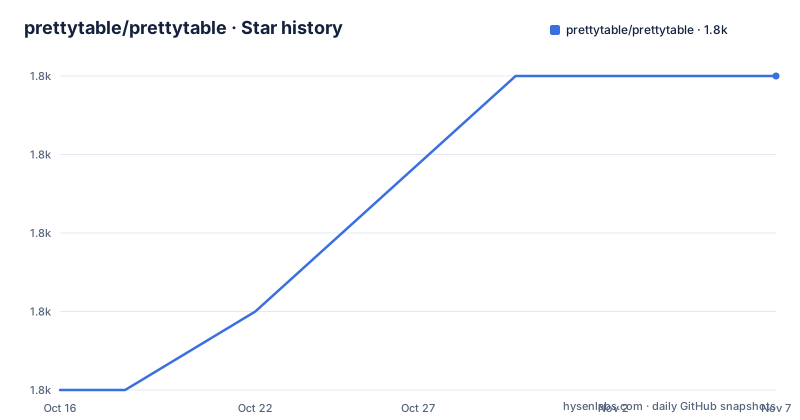
- prettytable/prettytable1,800 ★ · +4
| Repository | 2026-10-16 | 2026-11-07 |
|---|---|---|
| prettytable/prettytable | 1.8k | 1.8k |
4 Stars in the last 22 days, measured from the daily GitHub snapshot. Compare with other projects
Editorial analysis
PrettyTable's command-line table use case
PrettyTable addresses a narrow but common Python presentation problem: turning tabular values into readable terminal output. It is intended for developers who have records in Python lists, CSV files, or Python DB-API cursor results and want aligned columns, headers, and borders without writing layout code by hand. A command-line diagnostic tool is a direct fit. A small reporting script that prints query results is another. It can also provide a textual view while data remains in a script rather than a graphical interface.
The library does not provide a query engine, CSV parser, or database client. Its role begins after another part of an application has obtained the records. This boundary matters when evaluating it. PrettyTable can make a list of query results easier to inspect, but it does not decide which records to retrieve, parse a non-tabular file, or replace a database package. It produces an ASCII representation intended for display. The README does not document interactive cells, selectable regions, terminal resizing, or a machine-readable export workflow.
That scope makes PrettyTable useful when consistent console formatting matters. Its border characters and column alignment reduce the work required in a terminal script. However, the result remains fixed text. An application that needs keyboard controls, mouse interaction, or structured output for another program needs another representation or an additional library. PrettyTable is best treated as the rendering layer at the end of a Python data pipeline.
PrettyTable's row, column, and cursor flow
PrettyTable exposes several construction paths that converge on the same in-memory table object. With `add_row`, a caller assigns `field_names` and supplies one row at a time. `add_rows` accepts an existing sequence of rows in one operation. For data already organized by column, `add_column` receives a field name and a list or tuple of values. The README permits mixing `add_row` and `add_column`, although it warns that tables assembled this way can be confusing for other developers. That warning is practical because a consistent construction method makes later changes easier to review.
The examples show that PrettyTable accepts different Python types in one table. Numbers and strings appear side by side, while the renderer aligns their displayed forms. Calling `print(table)` sends the table representation to standard output. The README presents `get_string()` as the route for options that change the table's appearance, separating data construction from presentation choices.
Two convenience functions cover common external sources. `from_csv` accepts a file-like object and creates a table from comma-separated data. `from_db_cursor` accepts a cursor compatible with the Python DB-API. In the database example, the `sqlite3` module executes a query, and `from_db_cursor(cursor)` converts the result into a `PrettyTable`. The cursor still owns query execution. PrettyTable starts after the database library has returned the records.
Removal and reset operations are explicit. `del_row` removes one row by integer index, `del_column` removes one column by field name, and `clear_rows` removes all rows while retaining field names. The `clear` method removes rows and field names but retains style settings. This distinction matters when code resets records but intends to reuse formatting configuration.
Installing PrettyTable and defining its first table
The README directs users to install the package from PyPI with `python3 -m pip`. The upgrade flag requests the latest package available through that installer rather than preserving an installed version.
python3 -m pip install -U prettytableThe current `pyproject.toml` requires Python 3.11 or newer and lists `wcwidth>=0.3.5` as the runtime dependency. An environment using an older Python release does not meet the declared requirement. The README also documents installation directly from Git for the development version.
python3 -m pip install -U git+https://github.com/prettytable/prettytableAfter installation, begin with the `PrettyTable` class. The README introduces it through `from prettytable import PrettyTable` followed by construction of an empty table object.
from prettytable import PrettyTable
table = PrettyTable()
Define the field names before adding records. Assigning `field_names` establishes the columns used by later row calls.
table.field_names = ["City name", "Area", "Population", "Annual Rainfall"]
table.add_row(["Adelaide", 1295, 1158259, 600.5])
table.add_row(["Brisbane", 5905, 1857594, 1146.4])
Printing the object sends its ASCII representation to standard output.
print(table)The README also provides a built-in demonstration that displays table output through the package module.
python3 -m prettytableFor record-oriented application code, use `add_rows` when all records are already available as a sequence. For column-oriented data, `add_column` avoids repeatedly supplying one row at a time. The package metadata classifies PrettyTable as a typed Python 3 library, but the README excerpt does not document its public type annotation syntax. Applications should inspect the installed package documentation before depending on a particular typing interface.
PrettyTable limits for large and interactive terminal output
The main limitation is the boundary between formatted text and an interactive terminal application. PrettyTable builds strings with borders, headers, and aligned cells. It does not claim terminal cursor control, keyboard handling, resizing, panes, or selectable regions. A developer who needs those behaviors would have to add another package or implement that layer separately. Printing a PrettyTable cannot provide those interactions.
The documented APIs also operate on complete in-memory tables. The README describes `PrettyTable`, `add_rows`, `from_csv`, and `from_db_cursor`, but it does not document paging, streaming records, lazy cursors, or partial rendering for an unbounded result set. A query that returns a very large table can therefore produce a much larger rendering object than a paging-oriented display would require. The README also does not specify how tables handle extremely long cells or narrow terminal widths, so automatic wrapping should not be assumed.
There is also a maintainability constraint within the construction API. The README allows row and column calls to be mixed but says this can make code confusing to other people. That is a sensible reason to keep construction consistent in a shared codebase. Use row ingestion for record-oriented data, column ingestion for column-oriented data, and keep `from_csv` or `from_db_cursor` at a clear source boundary.
For exported data, PrettyTable is the wrong abstraction. ASCII borders and alignment are presentation artifacts rather than a stable exchange schema. The README documents CSV ingestion and table mutation, but it does not document JSON, HTML, spreadsheet, or database-specific export through PrettyTable. An application needs to retain or produce its intended exchange format separately.
PrettyTable versus manual formatting and CSV serialization
The direct alternative is manual string construction with `print`, string methods, and hand-written width calculations. That approach keeps dependencies at zero and can produce exactly the characters a small script needs. Its cost is that every script must implement column widths, padding, headers, and borders itself. Changes to table shape then require layout changes throughout the code. PrettyTable moves those repeated operations behind `PrettyTable`, `add_rows`, `get_string()`, and `print()`.
When the actual requirement is CSV rather than a readable console table, use a CSV serialization tool. The README already places PrettyTable alongside `from_csv`, showing that CSV handling and ASCII presentation can be adjacent concerns. It does not document reverse CSV export through PrettyTable, so retaining CSV as the exchange format and using PrettyTable only for its textual representation avoids adding an undocumented assumption.
Manual formatting can still be better for a tiny, fixed report whose layout never changes. PrettyTable earns its dependency when an application creates several tables, changes field sets, or needs repeated formatting decisions. A CSV serialization tool is better when another program consumes the records. PrettyTable is the better fit when a Python developer needs consistent ASCII rendering without maintaining a custom formatter.
PrettyTable releases, Python upgrades, and license metadata
The repository is not archived, and its last push was on 2026-10-06. The release list includes version 3.18.0 dated 2026-06-22, version 3.17.0 dated 2025-11-14, and version 3.16.0 dated 2025-03-24. These dates establish recent release and repository activity, but they do not establish compatibility with every adopting application.
Upgrade cost is shaped by the declared Python floor. Current metadata requires Python 3.11 or newer, so upgrading PrettyTable can affect every environment that installs the package. The runtime dependency `wcwidth>=0.3.5` must also be available through dependency resolution. The repository contains `CHANGELOG.md`, `RELEASING.md`, tests, and `tox.ini`, but the README excerpt does not summarize breaking changes for a particular release. Review the project changelog or release notes and run the application's output checks before changing versions.
The repository metadata initially labels the license as a custom GitHub category, while `pyproject.toml` declares `BSD-3-Clause` and identifies the repository `LICENSE` file. Distributors should inspect that file directly before redistribution. This is a statement about declared project configuration, not legal advice. An adopter that bundles PrettyTable, repackages it, or removes accompanying license material should review the applicable notice and source-code terms in `LICENSE`.
Editorial conclusion
Adopt PrettyTable for command-line reports, debugging output, and other text-based Python applications that already hold tabular records in memory. Do not treat its ASCII rendering as a replacement for an interactive terminal interface or a machine-readable exchange format. Before adoption, verify that every runtime can use Python 3.11 or newer, inspect `LICENSE` for the declared BSD-3-Clause terms, and check `get_string()` output against the terminal widths and data types your application will present.
Frequently asked questions
How do I install PrettyTable in Python?
The README documents `python3 -m pip install -U prettytable` for the package on PyPI. The current `pyproject.toml` requires Python 3.11 or newer.
How do I create an ASCII table with PrettyTable?
Create a `PrettyTable`, assign `field_names`, add records with `add_row` or `add_rows`, and call `print(table)`. The README also shows loading CSV data with `from_csv` and DB-API results with `from_db_cursor`.
Can PrettyTable read data from CSV files and database cursors?
Yes. `from_csv` accepts a CSV file-like object, while `from_db_cursor` accepts a cursor compatible with the Python DB-API. PrettyTable converts the returned records and does not execute the database query itself.
What Python version does the current PrettyTable require?
The current `pyproject.toml` declares `requires-python = ">=3.11"`. Its runtime dependency is `wcwidth>=0.3.5`.
What license is declared for PrettyTable?
The current `pyproject.toml` declares `BSD-3-Clause` and identifies the repository `LICENSE` file. The repository metadata also carries a custom-license classification, so distributors should inspect the actual `LICENSE` file.
Official sources
Add this badge to your README
If you maintain this project, the badge below links readers to this analysis and shows its maintenance status from the daily GitHub snapshot. Paste the markdown into your README; add ?metric=license or ?metric=stars to the image URL for a different field.

[](https://hysenlabs.com/projects/prettytable-prettytable)Star history chart for your README
[](https://hysenlabs.com/projects/prettytable-prettytable)Was this useful?