AI Product Development Toolkit: an interview before the first draft
Plan, build and launch products with AI: guided planning prompts, an AI App Starter for Next.js, Supabase and Vercel, and agent configurations.
At a glance
- What is it?
- This toolkit ships three things: six planning prompts that interview you before drafting a PRD, a Next.js, Supabase and Vercel starter an agent runs on your machine, and agent configuration files. The prompts need nothing but an AI chat, while the starter deliberately stops before any deploy happens.
- Who is it for?
- Take the planning prompts if you want a PRD built from your answers instead of the model's guesses, since they work in any AI chat and cost nothing but attention. Treat the AI App Starter as a prototype track only: its tested path stops at a local web shop, pushing and deploying are blocked by design, and Codex is listed as untested.
- Can I use it commercially?
- Yes. MIT is a permissive licence: you can use, modify and sell software built on it, as long as you keep its copyright and licence notices.
- Is it still maintained?
- Yes. The repository last received commits 6 days ago.
- What is it written in?
- GitHub does not report a main language for this repository.
Answers come from the project's GitHub data, last synced on October 23, 2026, and from our analysis. They are not legal advice.
Star history
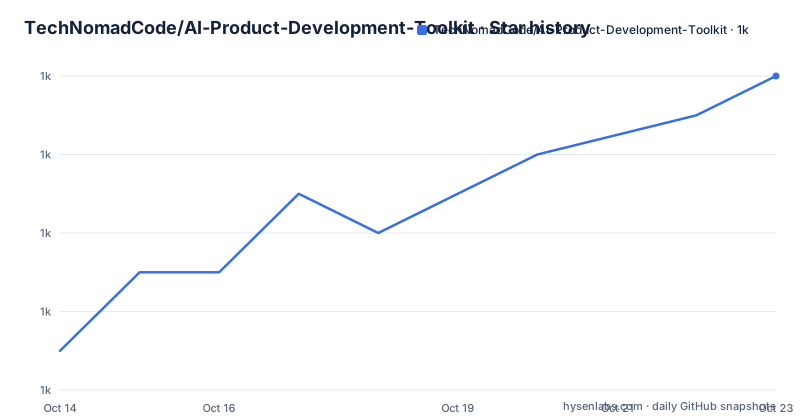
- TechNomadCode/AI-Product-Development-Toolkit1,028 ★ · +7
| Repository | 2026-10-14 | 2026-10-23 |
|---|---|---|
| TechNomadCode/AI-Product-Development-Toolkit | 1k | 1k |
7 Stars in the last 9 days, measured from the daily GitHub snapshot. Compare with other projects
Editorial analysis
Six prompts that refuse to draft anything first
Most prompts tell a model to produce a document at once, so every gap gets filled with invention. This toolkit inverts that order. Each prompt under prompt-templates/ runs an interview before it writes: it asks a few targeted questions at a time about the idea, the users and the goals, then states what it understood and waits for you to confirm those assumptions. Only after you agree does it draft, and the draft is assembled from your answers.
The chain is what makes the six prompts worth reading as one set. Step 1 is a user research questionnaire that ends in an evidence-based research summary for your PRD. Step 2 is PRD generation, which fixes goals, users, requirements and constraints. Step 3 maps user journeys, screens and interface requirements. Step 4 cuts a core hypothesis, the problem to solve first, and a short in/out feature list. Step 5 splits into two choices: a full MVP development plan, or an ultra-lean version that yields a lean build spec for a fast first version. Step 6 covers test scope, cases and acceptance criteria.
Later steps read the documents earlier steps produced, so a change in the PRD does not quietly contradict the flow map. That hand-off is the part of the design a single-file prompt library cannot offer, and it is why copying the whole set beats opening one template.
Starting at step two, the PRD generation prompt
None of this needs an agent, a repository or a toolchain. Open a prompt, fill in the bracketed placeholders, paste it into any AI chat, and answer the questions that come back. That is the whole setup for the planning half.
You may start at any step, and each folder carries a guide saying what to bring with you. Most people begin at step 2, and the file is:
prompt-templates/prd-generation/prd-generation.mdDo step 1 first if you have potential users you can ask. Otherwise there is nobody for the questionnaire to reach, and step 2 starts from your own answers. A separate prompt template guide sits alongside the folders, and a companion post on the project site explains why the interview is placed before the document.
For a first run, expect to answer questions rather than receive a finished PRD. Nothing in the sequence advances on its own, so a half-filled placeholder stays an open point instead of being quietly invented.
One pasted sentence triggers the whole setup
The build half works differently: nothing is pasted into a chat window, a coding agent does the work. Open the agent in a new, empty folder first. With the Claude Code desktop app you start a session from the Code tab and choose the folder. In a terminal you run `claude` inside that folder. With Codex you run `codex` there and approve the request to use the network for the download.
Then paste one line:
Set up this folder with the AI App Starter: clone https://github.com/TechNomadCode/AI-Product-Development-Toolkit with git clone --depth 1 into a temporary folder, then follow starters/nextjs-supabase-vercel/SETUP.md from it.Nothing in that sentence invites the model to improvise. It names a shallow clone into a temporary folder, then points at a setup file inside the clone, so the procedure lives in a file under version control rather than in your scrollback. When setup finishes you ask what comes next and reply with continue, or name a different task. If you already produced a PRD or an MVP scope with the planning prompts, the starter asks for those documents and skips the matching interviews instead of repeating them.
The starter copies six files into your folder
The structure copied into your project is small and deliberate. Rules that load on every session sit in one file, the current stage and next action sit in another, and decisions are kept apart from the plan:
your-project/
├── AGENTS.md              rules loaded every session (CLAUDE.md imports it for Claude Code)
├── docs/plan.md           the current stage, the next action, and the pieces of work
├── docs/decisions.md      the choices made, plus a Deferred list with due moments
├── docs/product/          your PRD, MVP scope and UX flow
├── KNOWN-ISSUES.md        open problems
├── .kit/stages/
Two details hide in plain view here. First, `AGENTS.md` is the portable filename and `CLAUDE.md` imports it, so one rule set survives moving between the desktop app and the terminal client. Second, `docs/decisions.md` carries a Deferred list with due moments, which parks a postponed choice instead of losing it. Open problems live in `KNOWN-ISSUES.md` rather than in the plan, and new ideas are meant to go into the plan so they cannot derail the current stage.
Blocking deploys is the safety net and the ceiling
The design choice that shapes everything else is that the starter cannot reach production. It works only on your computer, against a local database, with stand-in payment and email services. It holds no keys at all, not even test keys, and both pushing and deploying are blocked, which is why the project frames the approach as something that cannot break production.
That same boundary is what you have to weigh. Separate local, staging and production environments exist from day one, yet no credential ever enters the loop, so the distance from a working local app to a live one is not covered by the flow. Alongside that, the starter is built to be blunt about reality: the agent checks current official docs before using a tool, says when a test relied on a stand-in, and never decides law, tax or pricing for you. Payment and permission work gets an independent review, ideally from a second agent.
Prerequisites are few but not light. You need Node.js, Git and Docker on the machine, plus your coding agent, and setup is described as the heaviest step in the project. If the agent lets you pick an effort or reasoning setting, a higher level helps during setup, though a low setting worked in testing. Context7 is optional; without it the agent reads the official websites.
Codex is labelled beta and untested on the same page
One contradiction is worth knowing before you plan an afternoon around this toolkit. The header carries a badge reading Works with Codex (beta), the setup table gives a Codex row telling you to run `codex` in the folder and approve the network use, and skills for Claude Code and Codex shipped together in v1.1.0 on 2026-09-24. Further down, the section headed Tested so far carries one line: "Not tested yet: Codex, the hosted staging and production setup, and launch."
So the advertised path and the testing record disagree. What has actually been exercised is Claude Code desktop, through the first working pieces of a web shop, with the automatic checks passing on GitHub on the first push. Anyone who reads only the setup table will assume a Codex run behaves the same way, and the first agent you try may need more hand-holding than the flow assumes.
The web shop test stops where paid tiers begin
The one build that exists is the case that runs into the billing wall first. The tested path is a web shop, and free plans may not allow a commercial app such as a shop, so the agent checks the current plans for you. Local, staging and production environments are defined from the start, yet the hosted staging and production setup, and launch, are both listed as untested. GitHub, Vercel and Supabase accounts are only needed later, when the agent says so.
The repository is not archived, it carries the MIT licence, and the last push was on 2026-10-05. Nothing in the visible text describes moving an existing project onto a newer copy of the toolkit after setup has run, and the README does not document a rollback, so treat setup as a one-time step you may have to repeat by hand.
The same repository also holds agent-skills/ and agent-configs/ at the top level, described in the overview table as working instructions for Claude Code. Those two directories get a single row of visible text and no walkthrough, so anyone choosing this toolkit for daily Claude Code work is judging it on the planning prompts and the starter rather than on documentation of the configuration layer.
Editorial conclusion
Take the planning prompts if you want a PRD built from your answers instead of the model's guesses, since they work in any AI chat and cost nothing but attention. Treat the AI App Starter as a prototype track only: its tested path stops at a local web shop, pushing and deploying are blocked by design, and Codex is listed as untested. Before you start, confirm that Node.js, Git and Docker are installed, then read the current free plan limits on Vercel and Supabase against the kind of app you mean to sell.
Frequently asked questions
Do I need Claude Code to use the planning prompts in the AI Product Development Toolkit?
No. Open a prompt, fill in the bracketed placeholders, paste it into any AI chat, and answer the questions that come back. A coding agent is only required for the AI App Starter half of the repository.
What do I need before starting the AI Product Development Toolkit's AI App Starter?
Node.js, Git and Docker on your machine, plus your coding agent, and setup is described as the heaviest step. Context7 is optional, and GitHub, Vercel and Supabase accounts are only needed later, when the app goes online.
Is the AI Product Development Toolkit tested with Codex?
No. The testing section lists Codex, the hosted staging and production setup, and launch as not tested yet. What has been exercised is Claude Code desktop, through the first working pieces of a web shop, with the automatic checks passing on GitHub on the first push.
Can the AI Product Development Toolkit deploy an app to Vercel?
No. It runs only on your computer against a local database with stand-in payment and email services, holds no keys at all, and pushing and deploying are blocked. Local, staging and production environments exist from day one, so moving to a live app happens outside this flow.
How many steps does the AI Product Development Toolkit planning sequence have?
Six: a user research questionnaire, PRD generation, UX and user flow, MVP concept definition, either a full MVP development plan or an ultra-lean version, and a test plan. You can start at any step, and each folder's guide says what to bring.
What licence does the AI Product Development Toolkit use?
The repository carries the MIT licence, and the last push was on 2026-10-05, so the project is not archived.
Official sources
Add this badge to your README
If you maintain this project, the badge below links readers to this analysis and shows its maintenance status from the daily GitHub snapshot. Paste the markdown into your README; add ?metric=license or ?metric=stars to the image URL for a different field.

[](https://hysenlabs.com/projects/technomadcode-ai-product-development-toolkit)Star history chart for your README
[](https://hysenlabs.com/projects/technomadcode-ai-product-development-toolkit)Was this useful?