SecToolKit: a wiki for security tools rather than a tool dump
Cybersecurity tool repository / Wiki 收录常用 / 前沿 的CTF和渗透工具以及其 官方/使用 文档,致力于让每个工具都能发挥作用ww,不管你是萌新还是领域从业者希望你都能在这里找到适合你的工具或者获得一定的启发。
At a glance
- What is it?
- SecToolKit is a catalogue of CTF and penetration testing tools, each entry carrying a name, a source, a category, the platforms it runs on, its purpose, its usage, a tutorial and related documents. What makes it more than a link list is the argument in its own preamble, that collecting a tool is not the same as learning to use it, and the attempt to correct that.
- Who is it for?
- SecToolKit suits a student or a practitioner who wants to know which tool to reach for and how to drive it, rather than a spreadsheet of downloads, because the entries are written as usage notes with tutorials. It is a poor fit if you read English only, since the material and the commentary are in Chinese, and it is a poor fit if you want a maintained, tested toolchain, because the catalogue changes often while the tools it points at are maintained by other people.
- Can I use it commercially?
- Yes, with conditions. GPL-3.0 is a copyleft licence: if you distribute software that includes it, you must release that software's source code under the same licence. Running it internally without distributing it does not trigger that obligation.
- Is it still maintained?
- Yes. The repository last received commits 15 days ago.
- What is it written in?
- GitHub does not report a main language for this repository.
Answers come from the project's GitHub data, last synced on November 7, 2026, and from our analysis. They are not legal advice.
Star history
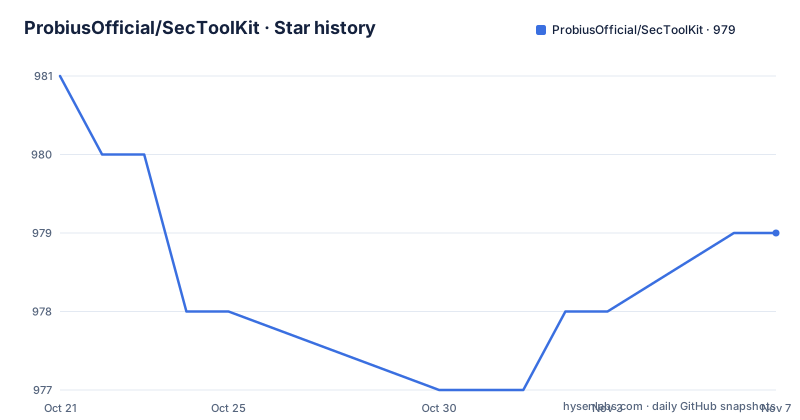
- ProbiusOfficial/SecToolKit979 ★ · -2
| Repository | 2026-10-21 | 2026-11-07 |
|---|---|---|
| ProbiusOfficial/SecToolKit | 981 | 979 |
-2 Stars in the last 17 days, measured from the daily GitHub snapshot. Compare with other projects
Editorial analysis
The argument in the preamble
The project's own statement of purpose is the most interesting thing in the repository, and it is a critique of how these lists are usually made.
The readme says there are already many good open source tool collections, so the purpose is not simply to provide one. Although the project is called a tool repository, it is more like a wiki for tools. The reasoning is that there is a large misconception in learning, that collecting is the same as learning, and that tools often do not have meaning on their own. Once a tool has been downloaded it is more like a collectible.
The stated aim is to try to correct that misconception, so that people really use tools rather than collecting them.
That is a better editorial standard than a link dump, and the structure of the entries follows from it. Every tool gets a set of basic elements: a name, its source, a category, the platforms it applies to, its purpose, its usage, a usage tutorial, and other related documents.
The requirement that every entry carry a tutorial and a platform list is what makes the difference in practice. A link list tells you a tool exists. An entry with a usage section and a platform column tells you whether it will run on your machine and what the first command is, which is the difference between a collectible and a tool you use.
Two categories, each tied to a companion project
The catalogue is split into two large categories, and the readme explains how they relate to two other repositories by the same organisation.
The tools are synced with the content of the CTF quick start project and the cybersecurity start guide project, and the readme is explicit that overlap between the two categories is normal, so the two are kept independent when collecting.
For the CTF category, the focus is on basic tools, but collection and wheel style tools are also included, as are the tools for solving exercises. That last group has a specific requirement, that it must be open source, and its purpose is learning rather than just solving, and those tools are marked so that a reader can tell them apart.
For the penetration testing category, the emphasis is on commonly used tools, with some frontier tools and projects collected and updated as well. The same open source requirement applies, and if a project has been unmaintained for a long time, or has some other problem, it is marked.
So there are two marks in the catalogue, one for tools that are collections in their own right and one for projects that have gone stale, and both exist so that a reader can judge the entry before downloading anything. For a list built by the community, that is the mechanism that keeps it honest.
The category split also matters for the legal question, which the readme addresses directly and without hedging. Every tool and technique in the project is for security research discussion only, and unauthorised penetration is explicitly disclaimed with the note that the responsibility is the user's.
The everyday software section, and the toolbox release
There is a section of common software, and the readme is careful to place it outside the core of the project.
The tools in that section are only there to improve efficiency, and the readme says they may deviate somewhat from the core of the project. The listed items are a file launcher that focuses on quickly starting files, a minimal plugin based desktop application, and a local file indexing and search tool for Windows, each with a project address and a documentation link where one exists.
The section closes with a piece of advice worth repeating. You are welcome to recommend more efficiency tools in an issue, but the tool that suits you is the best one, and you do not need to download all of them. Please do not hold an all-in mentality.
That line is a small piece of editorial policy, and it fits the thesis of the project. A collection that tells you to install everything is a collection that has become a list of favourites, which is the thing the preamble complains about.
The releases provide a packaged basic toolbox, and the readme explains that the toolbox is packaged on the basis of the file launcher tool, using relative paths so that path problems are solved and the thing works out of the box. That is a genuine convenience for a beginner who would otherwise have to install a dozen tools and configure paths by hand, and it is also the part of the project most likely to age badly, because a packaged toolbox of third party binaries is only as good as the versions it was built from.
How the catalogue is organised
The entry format is consistent and it is worth describing, because the tables are dense.
Every row has a name, often with small platform icons next to it, a usage description, a project address and a documentation column. The platform icons are the mechanism that makes the catalogue scannable, since the columns of icons in the description cell tell you at a glance whether a tool runs on Windows, Linux or macOS.
The first group is environment basics, and it is the part of the catalogue that is not about attacking anything. A text editor, a virtual machine application, a Python IDE, a Java IDE, a PHP IDE, a local web stack for beginners, a database management tool with visualisation, and a container service. The entry for the container service carries the note that almost every CTF task depends on it, apart from tasks with static attachments, and that it is commonly used for building local challenge environments and for reproducing vulnerabilities locally. That is the clearest statement in the whole project of what a capture the flag exercise is: a program you build and run yourself.
The second group is web security, and the section opens with a note distinguishing tools that are applications from tools that are browser extensions, and saying that the list covers commonly used and basic tools, with some exploit programs deliberately not classified here and a pointer to the archived project entries further back.
The browser extension entries make the point that a page-side editing extension, described as letting you edit request and response content directly on the page, is a debugging tool as much as anything else. The list also includes a proxy switcher extension. Both are the kind of entry that a reader might skip past, and both are the tools a person reaches for when a request is not behaving as the documentation says.
The site, the licence and the state of the project
The repository is a documentation site rather than a codebase, and the tree says so.
There is a site configuration, a docs directory, a source directory holding the small icon assets used in the tables, and a CNAME file, which is the mechanism for pointing a custom domain at a site hosted as a static page. There is a licence file, a readme, and a continuous integration directory.
Two details of the presentation are worth noting for anyone who wants to share or reuse the work. The readme asks that anyone reprinting the project credit the original author and give the project address, and it offers a short link for sharing the project more easily.
The licence is GPL-3.0, which is the right choice for a documentation corpus, since it ensures that an improved version stays open. The repository has no GitHub releases, and the last push was on 2026-10-19 with the repository not archived, so the catalogue is being maintained.
The one thing an English reader should know before starting is that the material, the commentary and the tool descriptions are in Chinese. The site has a web address of its own, and the readme includes a link to the documentation for the current version and to the community page, so the content is browsable outside the repository as well as inside it.
Editorial conclusion
SecToolKit suits a student or a practitioner who wants to know which tool to reach for and how to drive it, rather than a spreadsheet of downloads, because the entries are written as usage notes with tutorials. It is a poor fit if you read English only, since the material and the commentary are in Chinese, and it is a poor fit if you want a maintained, tested toolchain, because the catalogue changes often while the tools it points at are maintained by other people. Before you rely on it, check the marks on the entries, since the project flags collection tools and long-unmaintained projects, and read the disclaimer in the repository rather than assuming the intent.
Frequently asked questions
What is SecToolKit and what does it contain?
A GPL-3.0 catalogue and wiki of security tools, split into a CTF category and a penetration testing category, each entry carrying a name, source, category, applicable platforms, purpose, usage, a tutorial and related documents. The project also publishes a packaged basic toolbox built on a file launcher tool with relative paths.
How is SecToolKit different from a list of tool links?
The readme says the point is not to provide another collection but to act as a wiki for tools, because collecting is not the same as learning, and a downloaded tool is often just a collectible. Every entry is required to carry a usage section, a tutorial and the platforms it applies to.
What do the marks on entries in SecToolKit mean?
Two kinds of mark are used. Tools in the CTF category that are themselves collections or solution tools are marked, and the open source requirement is stated for them because they are meant to inspire rather than just solve. In the penetration testing category, projects that have been unmaintained for a long time or have some other problem are marked.
What is the stated legal position on the tools in SecToolKit?
The readme states that all tools and techniques in the project are for security research discussion only, and asks people not to perform any unauthorised penetration, taking responsibility themselves. It also asks that anyone reprinting the project credit the original author and the project address.
Official sources
Add this badge to your README
If you maintain this project, the badge below links readers to this analysis and shows its maintenance status from the daily GitHub snapshot. Paste the markdown into your README; add ?metric=license or ?metric=stars to the image URL for a different field.

[](https://hysenlabs.com/projects/probiusofficial-sectoolkit)Star history chart for your README
[](https://hysenlabs.com/projects/probiusofficial-sectoolkit)Was this useful?