AgML: agricultural datasets served through Hugging Face, with a lazy loader for image-text sets and a 4-million-image iNatAg collection
AgML is a centralized framework for agricultural machine learning. AgML provides access to public agricultural datasets for common agricultural deep learning tasks, with standard benchmarks and pretrained models, as well the ability to generate synthetic data and annotations.
At a glance
- What is it?
- Project-AgML/AgML is a Python library from UC Davis for agricultural machine learning. Its current quick start loads datasets from the Hugging Face Hub as native DatasetDict objects and deliberately leaves training to datasets and transformers, while a separate loader handles image-text sets too big to extract.
- Who is it for?
- Use AgML if you want agricultural image datasets, including iNatAg and image-text sets, loaded as Hugging Face objects with minimal glue code. Look elsewhere if you expect a training framework with its own preprocessing API, because the quick start hands that job to datasets and transformers.
- Can I use it commercially?
- Yes. Apache-2.0 is a permissive licence: you can use, modify and sell software built on it, as long as you keep its copyright and licence notices.
- Is it still maintained?
- Yes. The repository last received commits 2 days ago.
- What is it written in?
- Mainly Python, according to GitHub's language statistics.
Answers come from the project's GitHub data, last synced on November 25, 2026, and from our analysis. They are not legal advice.
Star history
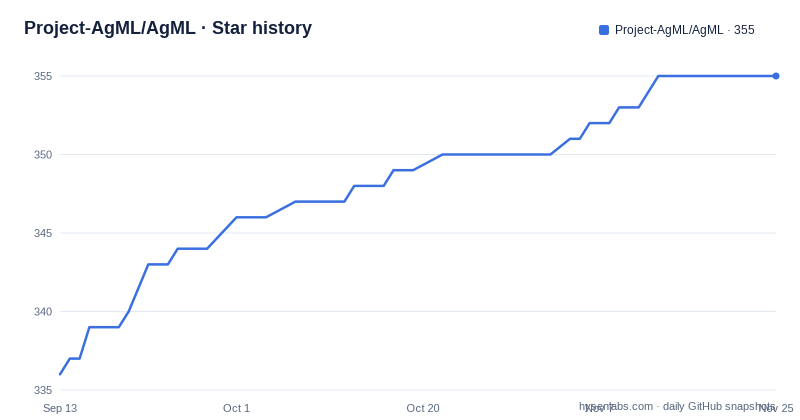
- Project-AgML/AgML355 ★ · +19
| Repository | 2026-09-13 | 2026-11-25 |
|---|---|---|
| Project-AgML/AgML | 336 | 355 |
19 Stars in the last 73 days, measured from the daily GitHub snapshot. Compare with other projects
Editorial analysis
Datasets live on the Hugging Face Hub under the Project-AgML organisation
AgML calls itself a centralized framework for agricultural machine learning, with access to public agricultural datasets for common deep learning tasks, standard benchmarks and pretrained models, and the ability to generate synthetic data and annotations. It supports both TensorFlow and PyTorch.
The current quick start is narrower than that description. Datasets are hosted on the Hugging Face Hub under the Project-AgML organisation, and you load them with HuggingFaceDataLoader. The project directs you to project-agml.github.io to browse the latest datasets, read the documentation and compare model performance on your crops and tasks.
The consequence is that dataset access goes through the Hub. You need network access to Hugging Face to fetch data, and some datasets need a token, as the image-text example shows. The repository also contains four example notebooks named AgML-Data, AgML-Detector, AgML-Models and AgML-Synthetic, which cover the broader areas.
Installation is pip, and loading is two lines
The install command is:
pip install agmlThen a dataset downloads and loads straight into a Hugging Face DatasetDict:
from agml.data import HuggingFaceDataLoader

# Load a dataset from the Hub
loader = HuggingFaceDataLoader("Project-AgML/apple_flower_segmentation")
A config selects a subset, for example an augmented variant, with config="augmented". The loader automatically casts image-like columns, meaning image, mask and image-typed label columns, to the Hugging Face Image type so that you get decoded pixel access.
The package requires Python 3.10 or newer, with classifiers for 3.10 through 3.13. Its dependencies include matplotlib, numpy, opencv-python, opencv-python-headless, requests, tqdm, pyyaml, albumentations, dict2xml, rich and datasets, so one install brings in both OpenCV variants and a plotting stack.
Splitting is built in, but processing and training are not AgML's job
loader.split(val_size=0.1, test_size=0.1, stratify_cols="label") returns a DatasetDict with train, val and test splits, and stratification can span one or more columns. The underlying DatasetDict is always available as loader.dataset.
Beyond loading and splitting, the project tells you to use the datasets and transformers libraries directly. Because loader.dataset is a native DatasetDict, it works with map, filter and with_transform for preprocessing, and with Trainer, Pipeline and model classes for training and inference. The README says there is no separate AgML-specific processing API to learn.
That is a clear tradeoff. You get no AgML augmentation or training wrappers in this path, but you avoid learning a second API and your code stays portable to any Hugging Face dataset. The example fine-tunes a google/vit-base-patch16-224 image classifier with num_labels taken from the dataset's label feature.
Image-text datasets bypass load_dataset and decode images lazily
Some datasets, such as Project-AgML/AgroOmni, are too large for the standard load_dataset() archive handling, which fully extracts every archive to disk before reading. These store images as raw relative paths inside zip shards with one shared path to shard index, so they are not load_dataset() compatible and are loaded with loadImageTextToTextDataset instead.
The function signature is loadImageTextToTextDataset(repo_id, config=None, split=None, cache_dir=None, token=None, cache_max_bytes=...). It returns a DatasetDict when split is omitted and a single Dataset when you pass one. Splits are discovered from metadata parquet filenames, so train-0000-of-0001.parquet becomes train, and if none can be inferred every row goes into a single train split.
For repositories with several configs, such as Project-AgML/MIRAGE, config is required, and leaving it out gives an error that lists the available ones. A token is passed in the examples via HF_TOKEN, so plan for authentication.
The byte cache is bounded at 256 MiB, and DataLoader workers each keep their own
Image bytes are read only the first time a row is accessed, whether by index, slice or batch, never eagerly across the whole dataset, and repeated access is cached. The ImageTextToTextShardStore behind that is attached to the returned dataset as ds.store. You can inspect its cache, call ds.store.getBytes(path) directly, or free open shard handles and cached bytes with ds.store.close().
The cache is bounded by total size, 256 MiB by default. Pass cache_max_bytes to change it, or 0 to disable it.
With a PyTorch DataLoader, the guidance is to prefer num_workers greater than 0. Each worker process opens its own shard handles and keeps its own byte cache, whether workers are forked or spawned. The consequence is memory arithmetic: with several workers, the total cache is roughly the per-process limit times the number of workers, so size cache_max_bytes with that in mind.
iNatAg offers over 4 million classification images, selected by name filters
AgML provides access to iNatAg and a smaller iNatAg-mini, described as one of the world's largest collections of agricultural images for image classification. Together they contain over 4 million images with detailed species classifications.
The loader for it uses AgMLDataLoader.from_parent with a filters argument. You can filter by a list of scientific family names through the family_name key, or by common names through the common_name key. This is a different class from HuggingFaceDataLoader, so the library currently presents two loading styles.
If you work with iNatAg, expect to use the filter route rather than download everything, since the point of the filters is to select a collection of families or common names. For other public datasets, the Dataset Search page supports filtering and previews, and agml.data.public_data_sources(...) supports task and modality filters when you want to filter in code.
Three releases in four months, a Beta classifier and uv-based builds
The newest releases are 0.8.0 on 2026-07-10, 0.8.1 on 2026-09-12 and 0.8.2 on 2026-10-20, with the last push on 2026-10-22. pyproject.toml also says version 0.8.2, and the classifier is Development Status 4 - Beta. The license is Apache-2.0 and the repository is not archived.
Beta means interfaces can still change between minor versions, so pin agml to the version you tested. The Makefile uses uv: uv build writes the distribution into dist, and tests run through uv run pytest with config/pytest.ini. The build backend is hatchling, and the dev group includes pytest, ruff, mypy and scikit-learn.
Maintainer contact is a UC Davis email, and the README advertises a postdoc position for Python library development and ML experience at the AI Institute for Food Systems. That signals academic stewardship, with its usual dependence on staffing.
Editorial conclusion
Use AgML if you want agricultural image datasets, including iNatAg and image-text sets, loaded as Hugging Face objects with minimal glue code. Look elsewhere if you expect a training framework with its own preprocessing API, because the quick start hands that job to datasets and transformers. Before adopting, check the Python version (3.10 or newer) and remember the package is classified Beta.
Frequently asked questions
What are some examples of agricultural projects using machine learning?
AgML is one: it gives access to public agricultural datasets such as apple_flower_segmentation, iNatAg with over 4 million images, and image-text sets like AgroOmni.
How do I install AgML?
Run pip install agml. It needs Python 3.10 or newer, and datasets load through HuggingFaceDataLoader from the Project-AgML organisation on the Hugging Face Hub.
Does AgML support TensorFlow and PyTorch?
Yes. AgML supports both TensorFlow and PyTorch, and its quick start produces Hugging Face DatasetDict objects that work with datasets and transformers.
Official sources
Add this badge to your README
If you maintain this project, the badge below links readers to this analysis and shows its maintenance status from the daily GitHub snapshot. Paste the markdown into your README; add ?metric=license or ?metric=stars to the image URL for a different field.

[](https://hysenlabs.com/projects/project-agml-agml)Star history chart for your README
[](https://hysenlabs.com/projects/project-agml-agml)Was this useful?