Psycopg2 2.9.13: the version lives in setup.py and the Makefile greps for it
PostgreSQL database adapter for the Python programming language
At a glance
- What is it?
- Psycopg2 is the C extension that wraps libpq for Python, implementing DB API 2.0 with shared connections across threads. Its own README tells new projects to start with psycopg3 instead, the build still runs through setup.py while pyproject.toml names only a backend, and the release number is parsed out of the source file with a regular expression.
- Who is it for?
- Psycopg2 still fits an existing codebase that depends on it, especially one that leans on shared connections across threads, COPY, notifications and custom type adaptation, and the last commit on 1 October 2026 shows work still landing. For anything new, the project's own note points at psycopg3, and that advice is worth following.
- Can I use it commercially?
- Check first. The repository uses a licence we do not classify automatically, so read its LICENSE file before any commercial use.
- Is it still maintained?
- Yes. The repository last received commits 14 days ago.
- What is it written in?
- Mainly C, according to GitHub's language statistics.
Answers come from the project's GitHub data, last synced on November 14, 2026, and from our analysis. They are not legal advice.
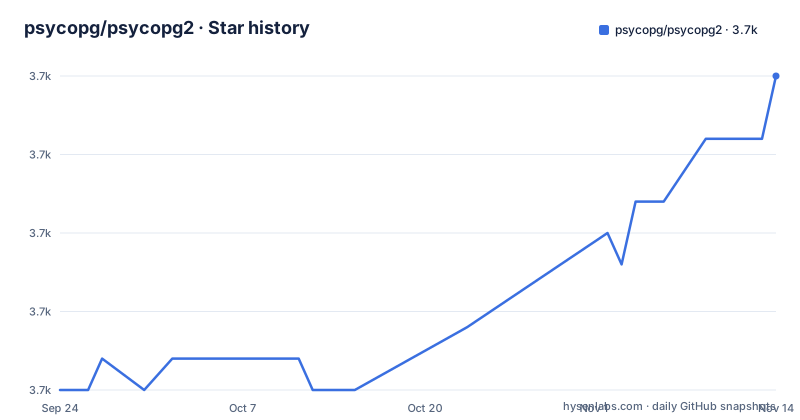
Star history
- psycopg/psycopg23,665 ★ · +10
| Repository | 2026-09-24 | 2026-11-14 |
|---|---|---|
| psycopg/psycopg2 | 3.7k | 3.7k |
10 Stars in the last 51 days, measured from the daily GitHub snapshot. Compare with other projects
Editorial analysis
The README tells new projects to start somewhere else
The most important paragraph in this repository is a note that says the psycopg2 package is still widely used and actively maintained, but is not expected to receive new features. It names Psycopg 3 as the evolution of psycopg2, the place where new features are being developed, and says that if you are starting a new project you should probably start from 3. Set against that, the packaging metadata carries the classifier `Development Status :: 5 - Production/Stable`, which is the standard way of saying a release line is finished rather than starting. Both statements can be true at once: the line is stable and still patched, and it is not where new capability lands. There are no GitHub releases here, so the `NEWS` file at the root is the changelog, the repository counters sit at 3,656 stars with 20 open issues, and the last commit landed on 1 October 2026.
Three install paths, and the binary one is steered away from production
Installing means choosing a distribution channel, and the three differ in what you compile. The source package needs a C compiler and development packages, with the details deferred to the install and FAQ documents rather than spelled out here; those documents sit in the `doc` directory and are also published at psycopg.org, while the project homepage is the place to find the source repository, the bug tracker and the mailing list.
pip install psycopg2
python setup.py build
sudo python setup.py install
pip install psycopg2-binary
The first line builds from source at install time. The middle two are for a source package you have already downloaded. The last installs a stand-alone package that requires no compiler and no external libraries. The guidance attached to that choice is explicit: the binary package is a practical choice for development and testing, but in production it is advised to use the package built from sources. That is the trade the project asks you to make, and it is the reason `psycopg2-binary` and `psycopg2` show up as separate installs in most dependency files rather than as one package.
pyproject.toml names a backend and nothing else
The pyproject.toml in this tree is four lines long. It declares a build system requiring setuptools 70.1 or newer and setting the backend to setuptools.build_meta, and stops there. There is no project table, no name, no version, no dependencies, no classifiers. All of that lives in setup.py instead, in the older distutils style, which is why the build script opens with a comment describing itself as distutils packaging and why a build frontend that honours only pyproject.toml has nothing to read. The version is a single assignment there, `PSYCOPG_VERSION = '2.9.13'`, and immediately above the classifier list sits a note: if you change the list of supported Python versions, fix the documentation in install.rst and the features page on the website as well. One list, three places to update.
The build script imports distutils directly
setup.py imports its build machinery from distutils itself, taking the extension builder from distutils.command.build_ext, the default compiler lookup from distutils.ccompiler and the compile error type from distutils.errors, then subclasses build_ext to drive the build. That is a deliberate choice for a package that has been assembling C extensions for two decades, but it means the build leans on the distutils compatibility layer that setuptools provides rather than on setuptools directly. The same file also carries the license as a header comment, the GNU Lesser General Public License, while the repository metadata names no license and a LICENSE file sits at the root of the tree whose text is not reproduced here. The license of this project is therefore stated in at least two places and settled in neither, and anyone redistributing it should read the root file rather than the header.
The Makefile reads the version with grep and sed
The top-level Makefile treats setup.py as the single source of truth and reaches into it with a shell pipeline. The version is extracted by grepping for the variable name, taking the first match, and rewriting it with sed to keep the quoted value, which then names the source distribution as `dist/psycopg2-$(VERSION).tar.gz`. Rename that variable in setup.py and the sdist target quietly stops resolving. The rest of the file is a small build matrix: the Python minor version is read from sys.version_info to form `build/lib.$(PYTHON_VERSION)`, C sources come from `psycopg/*.c` and `psycopg/*.h`, Python sources from `lib/*.py`, tests from `tests/*.py` and documentation from `doc/src/*.rst`. Setting PG_CONFIG in the environment appends a pg-config flag to the extension build, which is how you point the compile at a specific libpq.
C sources and Python sources live in separate directories
The layout splits the two languages and then glues them into one importable package at build time. The compiled artifact is `_psycopg.so`, placed at `$(BUILD_DIR)/psycopg2/_psycopg.so`, while the pure Python modules are mapped into that same package by rewriting their path, so at install time there is a single psycopg2 package containing both. The tree also keeps `psycopg2.cproj` at the root, a Visual C++ project file from the era when the Windows build was driven from the IDE, next to files with an older role: `INSTALL`, `AUTHORS`, `NEWS`, `MANIFEST.in` and `setup.cfg`. Nothing in the build requires them, but they are what a new contributor reads first, and the presence of the project file next to a modern build backend is a fair signal of how long the packaging arrangement has been carried.
The test suite needs a database created by a superuser
Running the tests is not a self-contained command. The Makefile has a target that first checks whether the test database already exists and drops it if so, then creates it, and it carries a note aimed at packagers saying this requires the PostgreSQL user running the test to be a superuser, with a suggestion to change the line so the superuser is used only to install what the test needs. The check target itself runs the suite through Python's unittest machinery with the build directory on PYTHONPATH, invoking a test_suite entry point rather than pointing a test runner at a directory, so the tests execute against the freshly built extension module rather than against an installed copy. Continuous integration runs through a GitHub Actions workflow referenced by the build status badge. The same file also builds the documentation separately, and produces a documentation archive for upload to PyPI.
What the feature list claims, and what it leaves out
The claims are specific and mostly about behaviour under concurrency. The stated main features are a complete implementation of the Python DB API 2.0 specification and thread safety, meaning several threads can share the same connection, with the design aimed at heavily multi-threaded applications that create and destroy many cursors and issue a large number of concurrent inserts and updates. Implementation is mostly C as a libpq wrapper, and the feature set covers client-side and server-side cursors, asynchronous communication and notifications, COPY to and COPY from, and many Python types adapted to matching PostgreSQL types through an extension mechanism. The package is also described as Unicode and Python 3 friendly, and its own packaging script claims full asynchronous operations with support for coroutine libraries. What is not in the file matters as much: no minimum libpq version, no list of which Python versions are supported, and no connection pooling guidance, even though sharing one connection across threads is the headline.
Editorial conclusion
Psycopg2 still fits an existing codebase that depends on it, especially one that leans on shared connections across threads, COPY, notifications and custom type adaptation, and the last commit on 1 October 2026 shows work still landing. For anything new, the project's own note points at psycopg3, and that advice is worth following. Three things to check if you maintain this one. The packaging metadata lives in setup.py, with pyproject.toml naming only the build backend, so a build tool that reads pyproject.toml alone sees an empty project. The version string is scraped out of setup.py by the Makefile with grep and sed, so renaming that variable breaks the source distribution target. And running the test suite requires creating a database as a PostgreSQL superuser, which rules out some CI setups until the role is granted.
Frequently asked questions
What is Psycopg2 used for?
It is the PostgreSQL adapter for Python, mostly C wrapping libpq, and its stated main features are a complete Python DB API 2.0 implementation plus thread safety, so several threads can share one connection. It adds client-side and server-side cursors, asynchronous communication and notifications, COPY support and an extensible type adaptation system.
How do I install Psycopg2?
Three paths, depending on what you compile: pip install psycopg2 builds from source and needs a C compiler, python setup.py build followed by sudo python setup.py install does it from a downloaded source package, and pip install psycopg2-binary installs a stand-alone build needing no compiler or external libraries. The project advises the source build for production and calls the binary package practical for development and testing.
Which is better, psycopg or Psycopg2?
Psycopg 3 is described as the evolution of psycopg2 and the place where new features are being developed, while psycopg2 is not expected to receive new features. The project's own note says that if you are starting a new project you should probably start from 3.
how to use psycopg2
Through DB API 2.0 objects on a connection: connect, hand back a cursor, execute, and commit. This line's own emphasis is concurrency, with cursors created and destroyed in large numbers by many threads over a shared connection, plus COPY for bulk transfer and asynchronous notification support.
Should I use SQLAlchemy or Psycopg2?
This repository does not compare itself with SQLAlchemy, and it names only one alternative, Psycopg3, which it calls its own evolution. The decision here is between a direct DB API 2.0 adapter and a new project starting from Psycopg3.
how to use psycopg2 in lambda
Not covered in this repository, which has no serverless guidance. The closest documented position is the distribution choice: psycopg2-binary needs no compiler, while the project advises building from sources for production, and libpq is a system library rather than something pip will supply.
Official sources
Add this badge to your README
If you maintain this project, the badge below links readers to this analysis and shows its maintenance status from the daily GitHub snapshot. Paste the markdown into your README; add ?metric=license or ?metric=stars to the image URL for a different field.

[](https://hysenlabs.com/projects/psycopg-psycopg2)Star history chart for your README
[](https://hysenlabs.com/projects/psycopg-psycopg2)Was this useful?