PurifyCSS removes selectors by static guesswork, and the guess is silent
GitHub describes it as Remove unused CSS. Also works with single-page apps.. The repository metadata lists JavaScript as its primary language. The metadata lists the MIT license. This article stays within the project description and details documented in the GitHub repository README.
At a glance
- What is it?
- PurifyCSS takes your content files and your CSS, statically works out which selectors appear, and hands back only the used rules. Its detection covers split and joined class strings, its whitelist is the only documented escape hatch, and its CLI cannot take file patterns.
- Who is it for?
- Reach for PurifyCSS when a CSS framework ships hundreds of selectors your app never touches, and you are willing to verify the result, since the decision to remove a rule is a static guess with no per-rule warning unless you turn on info or rejected. Turn on rejected and whitelist before you wire it into a build, since the only documented way to protect a class name is a whitelist entry and the only way to see what was dropped is a log line.
- Can I use it commercially?
- Yes. MIT is a permissive licence: you can use, modify and sell software built on it, as long as you keep its copyright and licence notices.
- Is it still maintained?
- Probably not. The repository last received commits 73 months ago, on October 17, 2020.
- What is it written in?
- Mainly JavaScript, according to GitHub's language statistics.
Answers come from the project's GitHub data, last synced on October 22, 2026, and from our analysis. They are not legal advice.
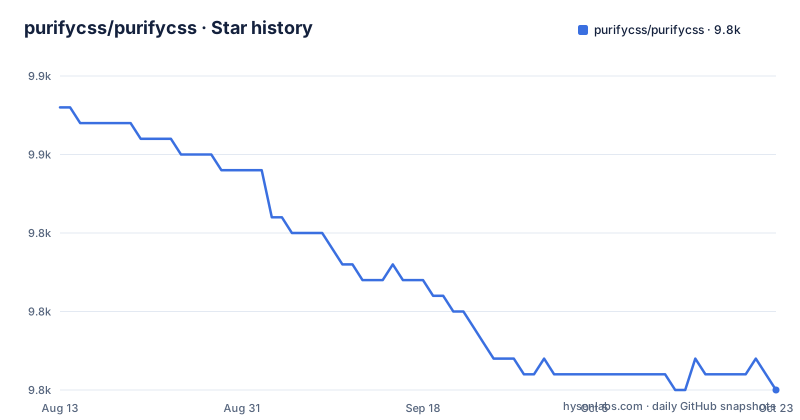
Star history
- purifycss/purifycss9,836 ★ · -17
| Repository | 2026-08-13 | 2026-10-22 |
|---|---|---|
| purifycss/purifycss | 9.9k | 9.8k |
-17 Stars in the last 70 days, measured from the daily GitHub snapshot. Compare with other projects
Editorial analysis
Used selector detection is a static scan, and the README asks whether it is complete
PurifyCSS decides what to keep by statically analyzing your files for selector text. The simple case is a class sitting directly on an element in HTML, and the same name appearing anywhere in JavaScript counts as used. The documented examples go further, and these are the shapes it claims to catch:
  // Can detect if class is split.
  var half = 'button-';
  $(button).addClass(half + 'active');

  // Can detect if class is joined.
  var dynamicClass = ['button', 'active'].join('-');
  $(button).addClass(dynamicClass);
The same section puts the question directly: will it catch all of the cases? The answer given is no, it is left open. Consequence for you: a name assembled at runtime from data the scanner never sees is treated as unused, and because the tool writes a new file rather than modifying your CSS, the deletion happens quietly and reaches production unless you check it.
whitelist is the only documented way to keep a selector you know is used
The options object carries five properties, and four of them only report: minify defaults to false and minifies the result, output defaults to false and writes to a filepath instead of returning a raw string, info defaults to false and logs how much CSS was removed, and rejected defaults to false and logs the CSS rules that were removed. The fifth does the real work. whitelist takes an array of selectors to always leave in, and the given example is ['button-active', '*modal*'], which leaves any selector that includes modal in it along with the exact match. Wrapping a string with asterisks leaves every selector containing it. That is the entire documented mechanism for protecting a class the scanner cannot see, and the callback simply receives the purified CSS, so a runtime name has to be either matched by text somewhere in the content or listed here. Consequence for you: forgetting a whitelist entry removes the rule with no error, which is why rejected should be on during the first run.
Three install paths, and the build-time ones live in other repositories
There are three ways in, and they pull from different places. For the JavaScript API the recommended step is a development dependency:
npm i -D purify-cssFor the command line tool the documented step is a global install:
npm install -g purify-cssFor build time use the overview points at separate projects: grunt-purifycss, gulp-purifycss, and purifycss-webpack-plugin. The published package name is purify-css even though the repository and the binary are both spelled purifycss, so a package.json line, an import, and a shell command can all disagree visually. Consequence for you: choosing a build plugin adds a dependency on a third repository whose version and maintenance are separate from the core package, and the core version number tells you nothing about the plugin you are pinning.
The CLI concatenates the files you name and rejects glob patterns
The command line form takes the CSS first and the content second, in the shape purifycss <css> <content> [option], with -m for minify, -o for the output filepath, -i for an info log, -r for a log of rejected rules, and -w for a list of classes that should not be removed. The worked example names three files explicitly:
purifycss src/css/main.css src/css/bootstrap.css src/js/main.js --min --info --out src/dist/index.cssBoth CSS files are concatenated, the selectors used inside main.js decide what survives, and the result goes to the output path. The last line of that documentation is a limitation rather than a feature: the CLI currently does not support file patterns. Consequence for you: a project with any directory depth has to enumerate every content file on the command line, and the glob support that the JavaScript API shows in its own examples is unavailable here.
One function, four arguments, and content as string means you did the globbing
The whole interface is a single call with four possible arguments, purify(content, css, options, callback). The content argument is either an array of glob file patterns pointing at the files to search for used classes, HTML, JS, PHP, ERB, templates, or anything else that uses CSS selectors, or a plain string of content. The css argument is either an array of glob patterns or a string of CSS to purify. Three shapes appear in the examples: a string content with a string css, a glob array for content with a glob array for css plus an output path, and a callback used either alone or after an options object:
purify(content, css, options, callback);Passing a string for content moves the file discovery onto you, since the globbing convenience lives only in the array form. Consequence for you: the difference between a working build and a broken one is often one argument type, and the same code path behaves differently depending on whether you pass patterns or pre-concatenated text.
The size reduction figures come from one Bootstrap example, not from a benchmark
The case for the tool rests on a single worked number. A Bootstrap file is given as roughly 140k, an app using about 40 percent of its selectors, a minified result of roughly 117k, and a purified plus minified result of roughly 35k. The CLI's -i flag prints a similar banner for whatever you run, showing the percentage the file size was reduced by, and the sample output in the documentation reads that the file size was reduced by about 33.8 percent. Those are the project's own illustrative figures for one stylesheet, attached to no bundle, page, or framework version. Consequence for you: do not budget page weight from them. Run info on your own stylesheet, read the rejected list once before you trust the file, and keep a copy of the original since the tool writes a new file and leaves your source CSS alone.
Old dependency majors and a repository whose last push was 2020-10-17
The package file dates the tool. Version is 1.2.6, the only release published, dated 2017-06-06, while the repository's last push landed on 2020-10-17. The runtime dependencies are clean-css at ^4.0.12, glob at ^7.1.1, rework at ^1.0.1, uglify-js at ^3.0.6, and yargs at ^8.0.1, and the development side pins jest at ^19.0.2 and rollup at ^0.41.6, with the build and watch scripts both driven by rollup -c config/rollup.config.js. The layout is src/, lib/, bin/, config/, and __tests__/, plus a .travis.yml, an .eslintrc, and a purified.css file committed at the repository root. The entry points are lib/purifycss.js for require and lib/purifycss.es.js for module, with the binary at ./bin/purifycss. Consequence for you: adding this to a current build drags in several old majors, and you should expect to read those dependency release notes yourself, since no patch has landed here since 2020.
Editorial conclusion
Reach for PurifyCSS when a CSS framework ships hundreds of selectors your app never touches, and you are willing to verify the result, since the decision to remove a rule is a static guess with no per-rule warning unless you turn on info or rejected. Turn on rejected and whitelist before you wire it into a build, since the only documented way to protect a class name is a whitelist entry and the only way to see what was dropped is a log line. Do not use the CLI when your content side is a directory tree, because it does not accept file patterns, and check whether your build tool's Grunt, Gulp, or Webpack plugin is still the shape you want, since those live in separate repositories with their own versions. Treat the package as frozen: the last push to the repository landed on 2020-10-17 and the only published release is v1.2.6 from 2017.
Frequently asked questions
How can I remove unused CSS from my website?
PurifyCSS takes your content and CSS and returns only the used CSS, either as a returned string or written to a file through the output option. The content argument accepts an array of glob file patterns, and turning on rejected logs which CSS rules were removed.
purgecss vs purifycss
This repository does not make that comparison, so nothing here supports a verdict. What it states about itself is narrower: a function that takes content such as HTML, JS, or PHP and CSS, and returns only the used CSS, published as purify-css at version 1.2.6 with a binary named purifycss.
How do I remove CSS from a website?
Install the CLI globally with npm install -g purify-css and pass the CSS files first, then the content files, in the form purifycss <css> <content> [option]. The flags cover minify, the output filepath, an info log, a rejected rules log, and a whitelist.
How do I remove a CSS property?
PurifyCSS does not work at the property level. It matches selectors found in your content and returns the CSS rules attached to them, and its rejected option logs whole CSS rules that were removed rather than individual declarations.
What exactly is CSS used for?
In this project's terms CSS is the second argument, either an array of glob patterns or a string, and PurifyCSS returns the subset of it whose selectors turn up in the content you supply. The tool does not modify the original CSS files and writes to a new file, like minification does.
Official sources
Add this badge to your README
If you maintain this project, the badge below links readers to this analysis and shows its maintenance status from the daily GitHub snapshot. Paste the markdown into your README; add ?metric=license or ?metric=stars to the image URL for a different field.

[](https://hysenlabs.com/projects/purifycss-purifycss)Star history chart for your README
[](https://hysenlabs.com/projects/purifycss-purifycss)