PurpleSchool knowledge base: Markdown articles published weekly from master
PurpleSchool Knowledge Base - единая база знаний по стеку JavaScript для frontend, backend и мобильной разработки, а так же DevOps.
At a glance
- What is it?
- An open, community-maintained repository of Russian-language material on the JavaScript stack and DevOps, where the folder tree is the schema, every article is an index.md with five frontmatter fields, and a moderator reviews each pull request within a week.
- Who is it for?
- This repository suits a developer who wants to write or correct material about a specific stack topic and is comfortable writing in Russian, since the article format is a fixed five-field frontmatter plus Markdown and the review is human. It does not suit you if you need a searchable product documentation system, a CMS, or an English corpus: it is a folder tree and a publishing schedule.
- Can I use it commercially?
- Not without permission. GitHub finds no licence file in the repository, and without a licence all rights are reserved by default: you may read the code but not reuse it. Check the README, or ask the authors, before using it.
- Is it still maintained?
- Yes. The repository received new commits within the last day.
- What is it written in?
- Mainly JavaScript, according to GitHub's language statistics.
Answers come from the project's GitHub data, last synced on October 21, 2026, and from our analysis. They are not legal advice.
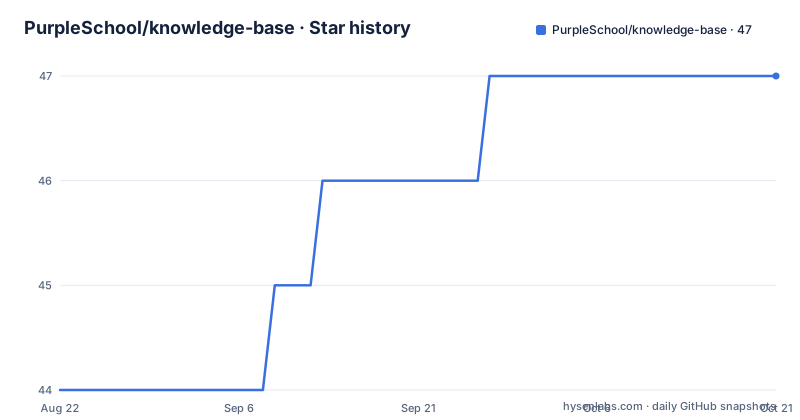
Star history
- PurpleSchool/knowledge-base47 ★ · +3
| Repository | 2026-08-22 | 2026-10-21 |
|---|---|---|
| PurpleSchool/knowledge-base | 44 | 47 |
3 Stars in the last 60 days, measured from the daily GitHub snapshot. Compare with other projects
Editorial analysis
The repository is the article store, and master is what goes live
There is no separate publishing system in the loop. The repository holds the articles, the supporting materials and the images, and once a week everything sitting on the master branch is put on the site, which is purpleschool.ru/knowledge-base. That makes the branch the publication boundary rather than a code release, and it explains why the contribution instructions talk about fork, pull request and a moderator rather than about versioning. The base is described as fully open, maintained and filled in by the school and the community, and its stated job is twofold: to carry current knowledge about technologies and to serve as reference material while studying. The description names the coverage as the JavaScript stack for frontend, backend and mobile work, plus DevOps, and the repository declares no licence file and publishes no GitHub releases.
Top-level folders are topics you pick from, not topics you invent
The folder tree is the schema, and it is explained with one worked example. /typescript is a top-level topic, and that level does not change: you choose it rather than create it. Under it, /typescript/types/ is a section, which you can create yourself if the one you need is missing. Under the section, a folder such as /typescript/types/unknown-how-to-use holds one article, and a new article means a new folder with an index.md inside it. The published tree follows the same idea: bash, css, docker, fsd, gatsby, git, golang, html, javascript, kubernetes, microservices, next-js, nuxt, python, react-native, react, remix, typescript and vue. The primary language of the repository is JavaScript, and the stated scope is a JavaScript stack, while the tree also carries python and golang topics.
Article folders take Latin letters, digits and hyphens only
Naming is restricted so URLs stay predictable. Inside a section you create a folder whose name may use only Latin letters, digits and the hyphen, and the documented example is how-to-use-unknown, which is a slug describing what the article answers. Inside that folder you create index.md, and that file is where the article itself lives. Images are optional and go in a subfolder named images inside the article folder, so the article markdown references them relatively and nothing sits loose at the top level. The practical result is that a reader sees a three-level path, topic, section, article slug, and a contributor has exactly two things to create: a folder and one index.md. The section itself may or may not exist yet, and the instructions cover both cases in the same worked example, which is why a new contributor can add material to a part of the curriculum that has no articles at all without asking anyone first.
Frontmatter is the whole interface of an article
Everything the site renders about an article comes from five fields at the top of the index.md:
metaTitle:
metaDescription:
author:
title:
preview:
metaTitle is the short form shown in the browser tab, metaDescription is what search engines read, author is your first and last name, title is what appears in the list, and preview is the list summary with a stated budget of 100 to 200 characters. Below the frontmatter comes the article body, where all of Markdown is available. The example given in the instructions is an article about using the unknown type, and its preview spells out why any is undesirable in the strictest TypeScript mode while acknowledging that there are situations where the type is unknown but still has to be handled safely.
A section is a three-field stub with one paragraph under it
Sections are cheaper than articles. If no existing section fits, you create a folder inside the top-level topic and add an index.md with just three fields, metaTitle for the tab heading, metaDescription for search engines, and title for the list entry. Under those fields you add a short paragraph describing what the section will contain, and that is the whole requirement. There is no author or preview field at this level, which is consistent with those two fields describing article content rather than a section. So creating a section is a two-minute job, and creating an article inside it is the part that gets reviewed.
Code blocks need a language or they lose highlighting
One instruction in the article template is easy to miss and shows up immediately when it is ignored: when you add a code block, you must state the language, with typescript, javascript, css and html given as the examples. The stated reason is correct syntax highlighting. Since the material is JavaScript-centric, the languages that matter in practice are the ones the curriculum teaches, and a fenced block with no language tag will be rendered as plain preformatted text rather than as code. This is the same class of rule as the folder naming restriction: the publishing pipeline is simple, so the conventions that keep the output clean are enforced in the contribution instructions rather than in tooling. The instruction sits next to an explicit permission, that the body may use all Markdown features, so the constraint is not about which markup you may use but about how code fences are labelled. Contributors writing from a habit of unlabelled fences will find their typescript samples rendered as plain text, which is the most common reason a technically correct article still looks broken on the site.
A moderator reads every pull request, and the wait is up to a week
The review path is human and slow on purpose. You fork the repository, choose a topic, find or create the section, create the article folder and index.md, write the article with all its tags filled in, and open a pull request. Within a week a moderator reads the article, either proposes edits or merges it. Nothing in the repository describes an automated content pipeline beyond the weekly copy from master to the site, so the quality bar is a person reading the article against the frontmatter contract. Two repository details are worth knowing before you start: the default branch is master rather than main, and a .gitmodules file sits at the root, so at least one part of the tree is a submodule rather than plain files you can edit in your fork. A second root file, fix-descriptions.js, is a maintenance script that no document in the repository explains. The repository declares no licence file and has no GitHub releases; the last push was September 30, 2026.
Editorial conclusion
This repository suits a developer who wants to write or correct material about a specific stack topic and is comfortable writing in Russian, since the article format is a fixed five-field frontmatter plus Markdown and the review is human. It does not suit you if you need a searchable product documentation system, a CMS, or an English corpus: it is a folder tree and a publishing schedule. Before opening a pull request, copy an existing article's folder name pattern exactly, keep the preview to 100 to 200 characters, and tag every code block with its language.
Frequently asked questions
What does knowledge base mean in the PurpleSchool repository?
It is a repository of Markdown articles, supporting materials and images organised by stack topic, where everything on the master branch is copied to the site once a week. Each article is a folder under a section, containing an index.md.
Is the PurpleSchool knowledge base free?
It is described as fully open, supported and filled in by the school and the community, with the site at purpleschool.ru/knowledge-base. The repository itself declares no licence file.
How do I add an article to the PurpleSchool knowledge base?
Fork the repository, pick a top-level topic such as typescript, find or create a section folder under it, then create an article folder whose name uses only Latin letters, digits and hyphens, add index.md with the five frontmatter fields, and open a pull request. A moderator reviews within a week.
Which frontmatter fields does a PurpleSchool article need?
metaTitle for the tab heading, metaDescription for search engines, author as first and last name, title for the list entry, and preview for the list summary at 100 to 200 characters. Code blocks inside the body must name their language, such as typescript or javascript, for highlighting.
Official sources
Add this badge to your README
If you maintain this project, the badge below links readers to this analysis and shows its maintenance status from the daily GitHub snapshot. Paste the markdown into your README; add ?metric=license or ?metric=stars to the image URL for a different field.

[](https://hysenlabs.com/projects/purpleschool-knowledge-base)Star history chart for your README
[](https://hysenlabs.com/projects/purpleschool-knowledge-base)