qbot's quick start points at a directory the repository does not have
An AI-powered automatic quantitative trading bot and research platform, fully self-hosted. Actively updated. Online docs at ufund-me.github.io/Qbot; see also qbot-mini at github.com/Charmve/iQuant.
At a glance
- What is it?
- Qbot is an MIT licensed quantitative trading research platform that presents itself as a full loop from data acquisition through backtesting and paper trading to live trading, and its own architecture diagram shows it as four layers built largely on upstream projects such as backtrader, qlib and vnpy rather than a new engine. The parts that decide whether you can run it are elsewhere: the README says it is tested only on Python 3.8 and 3.9, the install path exports a PYTHONPATH into a directory absent from the tree, and the dependency file mixes two ancient pins with a git URL and twenty-two unpinned packages.
- Who is it for?
- Qbot fits a retail or research user who wants a Chinese-market-capable backtesting and paper-trading stack with a GUI, assembled from known libraries, and who can run an end-of-life Python 3.8 environment.
- Can I use it commercially?
- Yes. MIT is a permissive licence: you can use, modify and sell software built on it, as long as you keep its copyright and licence notices.
- Is it still maintained?
- Activity is slowing. The repository last received commits 8 months ago.
- What is it written in?
- Mainly Jupyter Notebook, according to GitHub's language statistics.
Answers come from the project's GitHub data, last synced on November 15, 2026, and from our analysis. They are not legal advice.
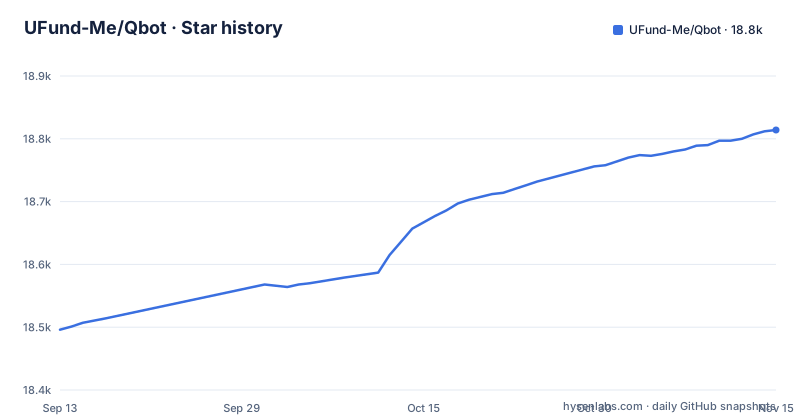
Star history
- UFund-Me/Qbot18,814 ★ · +318
| Repository | 2026-09-13 | 2026-11-15 |
|---|---|---|
| UFund-Me/Qbot | 18.5k | 18.8k |
318 Stars in the last 63 days, measured from the daily GitHub snapshot. Compare with other projects
Editorial analysis
The README says it is tested only on Python 3.8 and 3.9
One sentence in the Quick Start section states the constraint in bold, with a typographical error in the version numbers: Qbot has so far only been tested under python3.8 and pyhont3.9, and other versions are untested.
Both of those interpreters are past end of life, and the requirements file backs the same restriction rather than contradicting it. Two dependencies are commented out with the instruction to use a local wheel, and both wheels are for the same interpreter and platform:
# wxPython # use dev/wxPython-4.2.0-cp38-cp38-linux_x86_64.whl
# ta-lib # use dev/TA_Lib-0.4.28-cp38-cp38-linux_x86_64.whl
`cp38-cp38-linux_x86_64` is CPython 3.8 on 64-bit Linux, and both native dependencies, the GUI toolkit and the technical analysis library, are pinned to that wheel set.
So the stated test range is Python 3.8 and 3.9, and the two referenced wheels cover only CPython 3.8 on 64-bit Linux. A user on any other Python version is outside what the maintainers have tested, and on other platforms the two native packages have to come from somewhere other than those wheels. That is a real constraint rather than a missing detail, and it is the first thing to weigh.
The architecture is four upstream projects wired together
The README contains a diagram that is more honest than a feature list, because it names what each layer is built from:
Qbot = 智能交易策略 + 回测系统 + 自动化量化交易 (+ 可视化分析工具)
            |           |            |            |
            |           |            |             \_ quantstats (dashboard\online operation)
            |           |             \______________ Qbot - vnpy, pytrader, pyfunds
            |           \____________________________ BackTest - backtrader, easyquant
            \________________________________________ quant.ai - qlib, deep learning strategies
Read as four layers, each naming projects you would otherwise have to choose between. The trading layer is vnpy, pytrader and pyfunds. The backtest layer is backtrader and easyquant. The research layer is qlib with deep learning strategies. The dashboard and online operation layer is quantstats.
So the platform's own contribution is the layering and the abstraction between data, strategy and trading engine, which is what its first feature claims: a modular layered design with a data layer, a strategy layer and a trading engine abstraction, supporting stocks, funds, futures and cryptocurrency.
The consequence for an adopter is that the backtest engine and much of the research and trading stack are upstream code, though `pytrader/` and `pyfunds/` are directories in this repository, and the value is the integration. That is a perfectly good reason to use it, and it is also the reason the version pins in the requirements file matter so much, since a pin on a transitive dependency of four projects is where breakage will surface.
The quick start exports a PYTHONPATH into a directory that is not in the tree
The documented run is six commands, and the fifth one is the problem:
cd ~ # $HOME as workspace
git clone https://github.com/UFund-Me/Qbot --depth 1

cd Qbot

pip install -r dev/requirements.txt

export PYTHONPATH=${PYTHONPATH}:$(pwd):$(pwd)/backend/multi-fact/mfm_learner
python main.py  #if run on Mac, please use 'pythonw main.py'
The PYTHONPATH line appends the repository root and a second path, `backend/multi-fact/mfm_learner`. There is no `backend/` directory in the top level listing, which contains `dev/`, `docs/`, `pyfunds/`, `pyfutures/`, `pytrader/`, `qbot/`, `scripts/`, `tests/`, `utils/`, `web/` and the root files.
So the instruction adds a directory that does not exist to the module search path. On a fresh clone that is harmless, because Python ignores a path entry that is not there, which is exactly why the failure would be quiet. But it means either the tree has lost a directory, or the quick start is written for a layout that has since changed, and in neither case is a reader told which.
The other two details in the block are worth noting. The clone uses `--depth 1`, so there is no history to bisect. And the entry point is `python main.py`, with a note to use `pythonw main.py` on macOS, which is the windowed interpreter, so the primary interface is a desktop GUI rather than a command line.
The documented install uses dev/requirements.txt, not requirements.txt
The install line installs `dev/requirements.txt` while the top level also carries a `requirements.txt`. Two files with the same name in different directories, and the quick start picks the one whose directory implies development.
That choice has a consequence. A development requirements file exists to hold the tools a contributor needs, and installing it for a first run means the environment gets whatever the project considers its working toolchain rather than a minimal runtime. If the two files differ, and nothing in the README says whether they do, then the documented first run is not the documented deployment.
There are three Python files at the root. `main.py` is the one the quick start runs. `qbot_main.py` sits beside it with no explanation of when to prefer it. And `monitoring.py` is a third, whose name suggests a separate process rather than an entry point.
The `dev/` directory also holds the two local wheels referenced in the requirements comments, so the development tree is where the platform-specific artefacts live. A user on a platform without those wheels has to source them elsewhere.
There is an auto-trade workflow, and the feature list includes live trading
Four GitHub Actions workflows are badged at the top of the README: `codeql-analysis.yml`, `auto-trade.yml`, `pylint.yml` and `coverage.yml`.
Three of those are quality gates, and the fourth is named for something else. A repository whose third feature is multiple trading modes covering online backtesting, paper trading and automated live trading, described as strategy research aimed at improving returns, has a continuous integration workflow called auto-trade.
The README badge does not say what that workflow does or which account it runs against, and that is the first thing a prospective user needs an answer to.
The four Highlights blocks are otherwise conventional, and they are worth reading for scope. One covers the layered data, strategy and trading engine design with stocks, funds, futures and cryptocurrency. One covers machine learning, reinforcement learning and deep learning strategy work with automated factor mining. One covers the three trading modes. And the fourth covers notifications, listing email, Feishu, pop-up and WeChat as the channels for trade information, daily results and daily stock recommendations.
The requirements mix two ancient pins, a git URL and fifteen unpinned packages
The dependency file is thirty lines and four different policies in thirty lines.
Two are pinned exactly to versions from around 2020: `matplotlib==3.2.2` and `pyglet==1.5.0`. One is installed straight from a source tree with no revision at all, `git+https://github.com/quantopian/pyfolio`, which means whatever the head of that repository is on the day you run pip. And the rest are bare names with no constraint, including pandas, backtrader, scipy, statsmodels, quantstats, numpy, scikit-learn, IPython, jupyter, tensorboard, requests, pillow and loguru.
The instrument and data coverage follows from the unpinned set. `binance-connector` is the only explicit exchange connector, and the market data readers are `yfinance`, `efinance`, `akshare` and `pandas_datareader`, which is a US source, two China-facing sources and a general aggregator. `tensortrade`, `empyrical` and `backtrader_plotting` cover the reinforcement-learning and reporting side, and `pykalman` is a Kalman filter, which is how the market dynamics modeling the README mentions would be built.
So a fresh install resolves a large moving surface, plus one package at whatever commit a discontinued company's repository is on. That is the practical risk in this repository, and it is a bigger one than the architecture.
A price document, a sponsorship request, and a request not to fork
Three things in this repository sit awkwardly beside the MIT licence.
There is a `PRICE.md` at the top level. There is a line in the README asking whether you like the project and to consider sponsoring it to help improve it, alongside a request at the top of the file to click through and say you want the project to keep accelerating its development, marked with a heart and a coffee. And there is a bolded instruction not to fork the project, on the grounds that it will keep being updated and a fork will not see those updates, with a suggestion to star it instead.
None of that is enforced. MIT permits a fork, and a `PRICE.md` in an MIT repository is documentation rather than a term, so a reader who wants a fork is free to take one regardless of what the README asks.
It is still worth naming, because a repository that carries a price document and asks for donations in its README, while discouraging the one action the licence explicitly permits, is telling you something about how its maintainer expects the project to be used. The other root documents, `CLONE.md`, `COMMUNITY.md`, `CONTRIBUTING.md` and `DEVELOPMENT.md`, suggest the project has thought about its own process.
C++ and Bazel configuration, with no C++ source at the top level
The top level carries `.clang-format` and `.clang-tidy` in a repository whose primary language is recorded as Jupyter Notebook and whose dependency file is Python. There is also a `WORKSPACE` file with no extension, which is Bazel's workspace marker.
The Python tooling is present too and is more conventional: a `.flake8` for linting and a `.style.cfg` style configuration file, plus an `.editorconfig` and a `.vscode/` directory.
So there is build and lint configuration for a compiled language, and a Bazel workspace, in a tree whose visible top-level directories are `dev/`, `docs/`, `pyfunds/`, `pyfutures/`, `pytrader/`, `qbot/`, `scripts/`, `tests/`, `utils/` and `web/`. None of those is obviously a native component, although the architecture diagram names qlib and vnpy, both of which have native parts.
The likely explanation is a bundled native dependency that is built outside the documented Python flow. It is still a gap for a contributor, because the quick start describes a pip install and a `main.py` and does not mention a native build.
Editorial conclusion
Qbot fits a retail or research user who wants a Chinese-market-capable backtesting and paper-trading stack with a GUI, assembled from known libraries, and who can run an end-of-life Python 3.8 environment. It does not fit a team that wants a maintained dependency surface, since two packages are pinned to 2020-era versions and one is installed from a git URL with no revision, nor anyone who needs a reproducible install on a current interpreter, since the two native wheels in the repository are built for cp38 on Linux x86_64. Before running anything, check three things: whether the `auto-trade` workflow touches a real account, which the README does not say, whether the `PYTHONPATH` line in the quick start resolves on a fresh clone given that the `backend/` directory it names is not in the top level, and what `PRICE.md` alongside an MIT licence and a request not to fork actually means for your use.
Frequently asked questions
What is Qbot?
Qbot is described as an AI-oriented automated quantitative investment platform and an open source quantitative research tool covering data acquisition, strategy development, backtesting, paper trading and live trading in one loop, with a layered design over a data layer, a strategy layer and a trading engine abstraction. Its repository description also points readers to a related project, qbot-mini, in a different repository.
How do I run Qbot?
Clone with a shallow clone, install from the development requirements file with `pip install -r dev/requirements.txt`, export a PYTHONPATH containing the repository root and a `backend/multi-fact/mfm_learner` path, then run `python main.py`, or `pythonw main.py` on macOS. The README states the project has been tested only on Python 3.8 and 3.9.
What does Qbot build on?
The architecture diagram in the README names the upstream project behind each layer: quantstats for the dashboard and online operation, vnpy, pytrader and pyfunds for the trading layer, backtrader and easyquant for backtesting, and qlib with deep learning strategies for research. The requirements add pyfolio installed from its git repository, binance-connector, and the yfinance, efinance, akshare and pandas_datareader data readers.
Does Qbot trade real money?
The feature list covers online backtesting, paper trading and automated live trading, and the repository has a GitHub Actions workflow named auto-trade alongside codeql-analysis, pylint and coverage. The README does not say whether that workflow runs against a paper or a live account, so that is the first thing to establish before running anything.
Official sources
Add this badge to your README
If you maintain this project, the badge below links readers to this analysis and shows its maintenance status from the daily GitHub snapshot. Paste the markdown into your README; add ?metric=license or ?metric=stars to the image URL for a different field.

[](https://hysenlabs.com/projects/ufund-me-qbot)Star history chart for your README
[](https://hysenlabs.com/projects/ufund-me-qbot)Was this useful?