py2exe: freezing Python scripts into Windows executables
Create standalone Windows programs from Python code
At a glance
- What is it?
- py2exe turns a Python script into a standalone Windows program, either a console application or a GUI one, by bundling the interpreter and the modules it finds. The current API is py2exe.freeze, the setup.py command is on its way out, and the packaging story is carried by per-library hooks that have to keep pace with numpy, scipy, pandas and matplotlib.
- Who is it for?
- py2exe fits a Windows developer who has to hand a colleague or a customer a program that starts with a double click and no Python installed, and it fits a codebase with a clean import graph and few exotic binary dependencies. It does not fit a project that ships to Linux or macOS, since the package refuses to install off Windows, and it does not fit an application built on PySide2 or PyQt5 without accepting the missing plugin embedding hooks.
- Can I use it commercially?
- Check first. The repository uses a licence we do not classify automatically, so read its LICENSE file before any commercial use.
- Is it still maintained?
- Yes. The repository last received commits 139 days ago.
- What is it written in?
- Mainly Python, according to GitHub's language statistics.
Answers come from the project's GitHub data, last synced on November 7, 2026, and from our analysis. They are not legal advice.
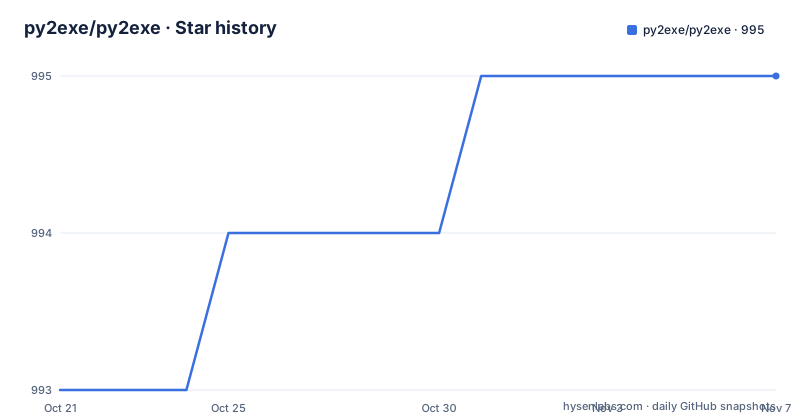
Star history
- py2exe/py2exe995 ★ · +2
| Repository | 2026-10-21 | 2026-11-07 |
|---|---|---|
| py2exe/py2exe | 993 | 995 |
2 Stars in the last 17 days, measured from the daily GitHub snapshot. Compare with other projects
Editorial analysis
The package refuses to install anywhere but Windows
py2exe builds standalone Windows executable programs from Python scripts, and the first thing it does is check where it is running. The setup script in the repository refuses to proceed on any other operating system:
import platform
import sys

from importlib import machinery

if platform.system() != 'Windows':
    raise RuntimeError("This package requires Windows")

if sys.version_info < (3, 7):
    raise RuntimeError("This package requires Python 3.7 or later")
So the platform constraint is not a limitation to work around, it is an assertion in the build script, and the same file also sets the minimum interpreter version. That is a sensible design for a freezer: the output is a Windows binary that depends on the layout of a Windows Python installation, the interpreter DLL naming differs between the Microsoft and other builds, and the compile and link flags in the rest of that file are specific to a Windows toolchain. The practical consequence for an evaluation is simple. If your application has to run on Linux or macOS as well, py2exe is not the tool for it, and there is no cross-platform mode hiding in the box.
py2exe.freeze replaced the setup.py command
The build interface has changed twice in recent years, and this is the part that catches people updating an old build script. The setup.py py2exe command and the use of distutils are deprecated in line with PEP 632, and the documentation states plainly that these interfaces will be removed in the next major release, with a migration guide in docs/migration.md. The build_exe command line interface, also reachable as -m py2exe, was removed outright in version 0.13.0.0. What replaces both is the py2exe.freeze function, documented in docs/py2exe.freeze.md, and it is what the README points you at. Version 0.14.2.0 also brought back Windows Service freezing inside freeze, through the service= argument, so a service can be frozen through the new API rather than the old one. If you inherit a project that still calls the setup.py command, the upgrade cost is not a version bump, it is a rewrite of the build step.
Install with pip, then call py2exe.freeze
Installation is a single pip command, and the usage instruction in the project documentation is short enough to state in full:
pip install py2exeThe rest of the flow is calling the freeze function on your entry script. The README gives no complete script for it, pointing instead to docs/py2exe.freeze.md for the argument reference, so a first use means reading that document rather than copying a snippet. The relevant options are the ones the release notes mention, including the service= argument for Windows Services, and the bundle_files and zipfile options that control how the bundle is laid out. Two build targets exist, a console executable and a Windows GUI executable, so a script with a tkinter window and one that prints to a terminal are frozen differently. The py2exe package directory, the zipextimporter module and the py2exe_setuptools.py helper sit at the top level of the repository, and the tests directory shows the expected behaviour of each option.
Hooks are where the real work happens
Freezing a script is easy when it only uses the standard library. It gets difficult the moment a package with binary extensions is involved, and py2exe handles that with hooks, small pieces of code that tell the freezer what to include for a specific library. The release history is a catalogue of them. Recent versions added a hook for pyphen and fixed the hooks for scipy, charset-normalizer, ctypes, pandas and numpy, while 0.14.0.0 fixed the matplotlib, numpy and tkinter hooks. Earlier versions added hooks for winrt and passlib, and adapted the numpy and pandas hooks for a new .libs location. The 0.13.0.1 notes are the clearest statement of the idea, since the matplotlib hook no longer excludes wx automatically and instead supports the use of delvewheel, which is what modern wheels rely on. The cost of this design is that your build depends on someone having written the hook for your dependency, and a missing hook shows up as a failure at runtime on the target machine rather than at build time.
bundle_files, zipfile and ctypes_comdll are all on the way out
The 0.14.2.0 release deprecates two options and one target, and the notes are explicit that they will be removed in the next major release. bundle_files values lower than 3 are deprecated, as is zipfile=None, with the discussion in the repository linked for the details. The ctypes_comdll target is officially deprecated as well and will be removed in the next major release. The bundle_files restriction is not only a naming matter, because 0.14.0.0 states that values below 3 are not supported at all on Python 3.12 and newer, and the 0.10.2.0 notes spell out why: with bundle_files of 2 or less only the standard library is supported and other dependencies may or may not work. If your build script sets bundle_files=1 or 2, you are already outside the supported range on a current interpreter. These are the kind of options that sit unchanged in a build script for years, so they are worth grepping for before an upgrade rather than after.
Two limitations the documentation states outright
The known issues section is short, which makes it easy to read, and both entries matter. The first is that high-level methods and hooks to embed Qt plugins in the bundle, which PySide2 and PyQt5 need, are missing. A PyQt application frozen without those plugins is an application that starts and then behaves strangely, and the project does not claim to have solved it. The second is the win32 wheels, which are still built and shipped but are provided untested, and issues encountered with them are not investigated. The recommendation in the documentation is to use the win_amd64 wheel instead. There is a related history here, since 0.13.0.0 dropped support for win32 wheels as a supported target while continuing to publish them. The other structural limit is the one already described: no platform but Windows. For a library author who wants one build script for several operating systems, none of these help.
Freezing versus shipping an interpreter with the app
The alternative to a freezer is not another freezer, it is the other way to distribute a Python program: put a Python installation next to the application and start it with the interpreter. The difference in approach is what gets analysed. Shipping an interpreter means the target machine runs a full installation, with the standard library, site-packages and the interpreter itself present, and the application is a script that the installation runs. Freezing means py2exe analyses the imports, works out which modules are actually reachable, and copies the interpreter DLL and those modules into a bundle, so the result is one directory or one executable that a user can run without Python present. The analysis is where the trouble lives, because a module that is imported dynamically, inside a try block or through a plugin system, is invisible to the finder, and the hook system exists to plug those gaps by hand. The trade-off is that a frozen build is smaller and self-contained but depends on correct hooks, while shipping an interpreter is larger and always complete but assumes the target can host a Python installation.
Editorial conclusion
py2exe fits a Windows developer who has to hand a colleague or a customer a program that starts with a double click and no Python installed, and it fits a codebase with a clean import graph and few exotic binary dependencies. It does not fit a project that ships to Linux or macOS, since the package refuses to install off Windows, and it does not fit an application built on PySide2 or PyQt5 without accepting the missing plugin embedding hooks. Verify the import graph of your own dependencies against the hook list in the release notes before you commit, and expect to move your build script onto py2exe.freeze. The last push to the repository was on 2026-06-21, and the current release is v0.14.2.0 from the same day.
Frequently asked questions
How do I install py2exe?
The project documentation gives pip install py2exe. The package only installs on Windows, and its setup script raises an error on other operating systems and on Python versions below 3.7.
How do I build an executable with py2exe now?
Use the py2exe.freeze function, which the README names as the supported interface and documents in docs/py2exe.freeze.md. The setup.py py2exe command is deprecated and the build_exe command line interface was removed in version 0.13.0.0.
Can py2exe freeze a PyQt5 or PySide2 application?
The known issues section states that high-level methods and hooks to embed Qt plugins in the bundle are missing, which those frameworks need. This is listed as a known gap rather than resolved.
Which Python versions does the current py2exe release support?
Version 0.14.1.0 added support for Python 3.14 and dropped Python 3.9, and 0.14.0.0 added Python 3.12 and 3.13 while dropping 3.8. The README also states that py2exe supports the Python versions included in the official development cycle.
Official sources
Add this badge to your README
If you maintain this project, the badge below links readers to this analysis and shows its maintenance status from the daily GitHub snapshot. Paste the markdown into your README; add ?metric=license or ?metric=stars to the image URL for a different field.

[](https://hysenlabs.com/projects/py2exe-py2exe)Star history chart for your README
[](https://hysenlabs.com/projects/py2exe-py2exe)Was this useful?