pycodestyle: one Python file that reads your whitespace and reports back
Simple Python style checker in one Python file
At a glance
- What is it?
- The PyCQA style checker for Python, kept deliberately small: a single module that needs only the standard library, reports PEP 8 conventions with line and column positions, and can be copied into a repository instead of installed. The trade is that configuration, renaming history and release numbering all have rough edges worth knowing before you wire it into a build.
- Who is it for?
- Pick pycodestyle when you want PEP 8 checks with no dependency weight and output your editor can parse, and skip it when you want a formatter that rewrites code or a linter with a wider rule set. Before adopting it, pin the version deliberately, because the newest published release dates from 2017 while the repository itself was pushed to on 2026-10-13, and the Debian and Ubuntu package can be behind PyPI.
- Can I use it commercially?
- Check first. The repository uses a licence we do not classify automatically, so read its LICENSE file before any commercial use.
- Is it still maintained?
- Yes. The repository last received commits 11 days ago.
- What is it written in?
- Mainly Python, according to GitHub's language statistics.
Answers come from the project's GitHub data, last synced on November 15, 2026, and from our analysis. They are not legal advice.
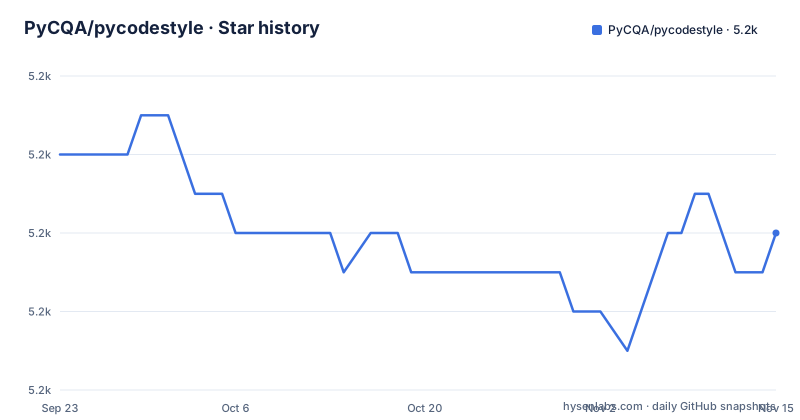
Star history
- PyCQA/pycodestyle5,166 ★ · -2
| Repository | 2026-09-23 | 2026-11-15 |
|---|---|---|
| PyCQA/pycodestyle | 5.2k | 5.2k |
-2 Stars in the last 53 days, measured from the daily GitHub snapshot. Compare with other projects
Editorial analysis
One module, standard library only, copyable into your tree
The stated design goal is size. The whole checker is one Python file, `pycodestyle.py`, it requires nothing beyond the standard library, and the README says outright that you can use just that file for the purpose. That is unusual for a tool people run in continuous integration: there is no plugin package to resolve, no compiled extension, and no transitive dependency tree to audit before a build.
The trade follows from the same choice. Copying the file into a repository removes the dependency, and it also removes the upgrade path that a package index gives you, because nothing then tells you that a newer release exists or that your copy has drifted from the project. Installing from PyPI keeps the upgrade, and then you own a version constraint instead. Three other properties come with the file: a plugin architecture where adding new checks is described as easy, output that is parseable so an editor can jump to the error location, and a comprehensive test suite.
The rename from pep8 broke every command that used the old name
This package used to be called `pep8`, and it was renamed to `pycodestyle` to reduce confusion. The README points at the issue where Guido requested the change and at a PyCon 2016 lightning talk comparing the old name with the style guide itself, which is the confusion the rename was meant to end.
For anyone wiring this into an existing project, the rename is the first thing to check. Every command line, editor task, continuous integration step and ignore list written against `pep8` uses the old name. Anything you inherit that still says `pep8` predates the rename and should be updated to the new name.
--first stops at one error, --statistics counts them all
The flags are what turn the output into something a workflow can use, and the README demonstrates three of them.
$ pycodestyle --first optparse.py
optparse.py:69:11: E401 multiple imports on one line
optparse.py:77:1: E302 expected 2 blank lines, found 1
optparse.py:88:5: E301 expected 1 blank line, found 0
optparse.py:347:31: E211 whitespace before '('
optparse.py:357:17: E201 whitespace after '{'
optparse.py:472:29: E221 multiple spaces before operator
The README's `--first` sample still prints six errors, each with a different code, so the flag does not stop at a single problem. The position in each line gives you the column the caret belongs under. Two more flags change what accompanies each error: `--show-source` echoes the offending line, and `--show-pep8` prints the relevant text from the style guide, which turns a bare code into a rule you can look up without leaving the terminal.
The statistics sample shows which codes actually pile up
The other demonstrated mode is `--statistics`, which reports how often each code fired instead of where.
$ pycodestyle --statistics -qq Python-2.5/Lib
232     E201 whitespace after '['
599     E202 whitespace before ')'
631     E203 whitespace before ','
842     E211 whitespace before '('
2531    E221 multiple spaces before operator
4473    E301 expected 1 blank line, found 0
4006    E302 expected 2 blank lines, found 1
165     E303 too many blank lines (4)
325     E401 multiple imports on one line
3615    E501 line too long (82 characters)
Read as a shape rather than as a benchmark, that sample is still useful: E301, E302, E501 and E221 each run into the thousands, while the bracket whitespace codes stay in the hundreds. That tells you which codes are worth deciding about before you wire the checker into a gate. Keep in mind the tree in the sample is a Python 2.5 standard library, so the mix of violations describes that codebase and not yours. Run the same command on your own code before choosing what to ignore.
setup.py is two lines and the real metadata lives in setup.cfg
The packaging entry point is as small as the module.
from setuptools import setup
setup()
Both lines do nothing but call setuptools, which means every piece of package metadata comes from `setup.cfg` in the same directory. That is worth knowing if you vendor this project or read its packaging: there is no version string, no entry_points block and no options to find in `setup.py`, so searching that file for configuration is a dead end. The development dependencies are split out again into `dev-requirements.txt`, and `tox.ini` drives the test matrix.
The repository also keeps two directories whose names read like synonyms, `testing/` and `tests/`, and the example output above points at a fixture inside the first of them, `testing/data/E40.py`. So the sample file the documentation depends on lives in one directory while the test configuration lives alongside the other. Anyone scripting a check against the sample data has to use the `testing/` path, not the `tests/` one.
The release target builds the artifacts and stops before uploading
Two make targets cover the whole publishing flow.
release:
	umask 022 && chmod -R a+rX . && python setup.py sdist bdist_wheel
	# twine upload dist/*

test:
	tox
The release recipe normalises file permissions, then builds a source distribution and a wheel into `dist/`. The upload step is present as a comment rather than a command, so nothing leaves the machine when you run `make release`. That is a deliberate-looking hand-off: the maintainer builds locally, inspects `dist/`, and uploads separately. For anyone else, the practical effect is that a fork can produce the same artifact pair without publishing anything.
The test target is a single `tox`, so the environments and their dependencies live in `tox.ini` rather than in the Makefile. Running the suite locally means having tox and the interpreters it asks for.
The Debian and Ubuntu package is not always the latest version
Alongside the PyPI route there is a distribution package for Debian and Ubuntu, and the README attaches a warning to it: it is not always the latest version. That is the only installation caveat stated here, and it is the one that bites in automation. A build agent that installs the distro package can end up running an older checker than the developer who runs `pip install pycodestyle` on a laptop, and the difference shows up as a code firing on one machine and not the other.
Nothing in this repository pins a distribution version or explains which release each distro currently carries, so the two routes cannot be assumed equivalent. If you want the same result everywhere, install the pinned version from PyPI in every environment, including the container images. If you let the distribution choose, treat any newly reported code as something to verify on a second machine before treating it as a real regression in your code.
The newest published release is from 2017, the last push is from 2026
The release list and the activity date point in different directions. The tags are `2.3.0` and `2.3.1`, both published on 2017-06-29, and `1.7.1`, published on 2017-10-25, which is the most recent of the three by date while carrying the lowest version number. The last push to the repository is dated 2026-10-13, and the repository is not archived.
So the code is being worked on while the published versions stay where they were, and the tags do not sort sensibly if you read them as a sequence: a `1.7.1` dated about four months after `2.3.1`. For a dependency constraint that means the tag list is not something to reason about. Write the version you tested with into your own configuration, and use an exact pin or an equivalent lock in your build so that a fresh environment cannot quietly install a different checker.
The repository root also carries `CHANGES.txt`, `.pre-commit-config.yaml`, `docs/` and `.readthedocs.yaml`, so change notes and a documentation build exist alongside the code even though the release history has not moved.
Editorial conclusion
Pick pycodestyle when you want PEP 8 checks with no dependency weight and output your editor can parse, and skip it when you want a formatter that rewrites code or a linter with a wider rule set. Before adopting it, pin the version deliberately, because the newest published release dates from 2017 while the repository itself was pushed to on 2026-10-13, and the Debian and Ubuntu package can be behind PyPI. Replace the old `pep8` command name once, since the project has been renamed to pycodestyle. On a large codebase, run the statistics form first so you know which codes actually dominate before you start ignoring them.
Frequently asked questions
What is pycodestyle?
A tool that checks Python code against some of the style conventions in PEP 8. It is one Python file that requires only the standard library, so you can copy `pycodestyle.py` into a project instead of installing it, and it also offers a plugin architecture for adding new checks.
How do I install pycodestyle?
Three commands cover the whole life cycle: `pip install pycodestyle`, `pip install --upgrade pycodestyle` and `pip uninstall pycodestyle`. A package also exists for Debian and Ubuntu, with the caveat that it is not always the latest version.
How do I use pycodestyle?
Point it at a file and read the codes: `pycodestyle --first optparse.py` reports line and column positions such as `optparse.py:69:11: E401 multiple imports on one line`. Add `--show-source` to echo the offending line and `--show-pep8` to print the guide text behind the code.
What does pycodestyle do?
It reports violations of PEP 8 conventions with a code, a line number and a column, in output that is parseable so an editor can jump to the error location. The README's `--first` sample still lists six differently coded errors, and `--statistics` replaces the per-line listing with counts per code.
What is the difference between pycodestyle and pep8?
They are the same project under two names. The package used to be called `pep8` and was renamed to `pycodestyle` to reduce confusion, at Guido's request. Any command still written as `pep8` is calling the old name.
How does pycodestyle compare to black?
No comparison is offered here. What this repository describes is a checker for PEP 8 conventions that reports problems and can print the source line and the guide text, and its links point to the documentation site and the repository, with nothing about formatters such as black, ruff or autopep8.
Official sources
Add this badge to your README
If you maintain this project, the badge below links readers to this analysis and shows its maintenance status from the daily GitHub snapshot. Paste the markdown into your README; add ?metric=license or ?metric=stars to the image URL for a different field.

[](https://hysenlabs.com/projects/pycqa-pycodestyle)Star history chart for your README
[](https://hysenlabs.com/projects/pycqa-pycodestyle)Was this useful?