Pydantic AI Harness: the package is alive and the repository is frozen
Batteries for your Pydantic AI agent. Pydantic AI core ships capabilities that require model or framework support, and capabilities fundamental to every agent web search, tool search, thinking.
At a glance
- What is it?
- Pydantic AI Harness is a library of composable agent capabilities that now ships from the pydantic-ai monorepo. This repository stopped at v0.36.0 and says so, while still opening with a note that the project is actively developed. The release numbering runs two major lines apart, and the Makefile default target reformats your tree.
- Who is it for?
- This library suits someone already on Pydantic AI who wants workspace, planning, memory, sub-agents, compaction and durable execution as composable blocks rather than hand-rolled scaffolding. It does not suit anyone pinning to this repository or filing issues here, because both are the wrong address.
- Can I use it commercially?
- Yes. MIT is a permissive licence: you can use, modify and sell software built on it, as long as you keep its copyright and licence notices.
- Is it still maintained?
- No. The owners have archived the repository on GitHub, so it is read-only and no longer receives changes.
- What is it written in?
- Mainly Python, according to GitHub's language statistics.
Answers come from the project's GitHub data, last synced on November 13, 2026, and from our analysis. They are not legal advice.
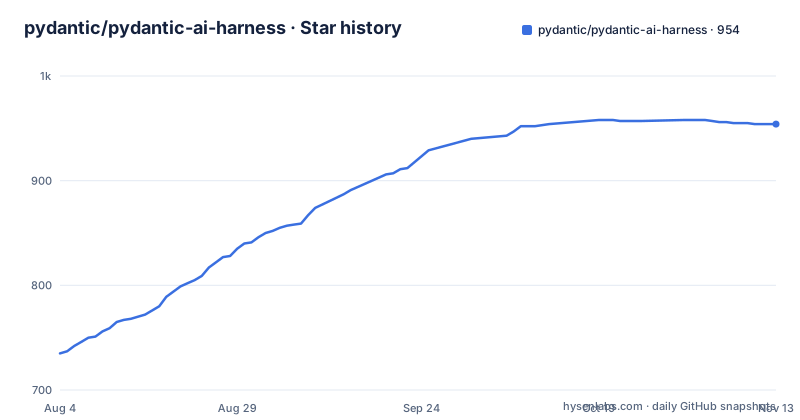
Star history
- pydantic/pydantic-ai-harness954 ★ · +219
| Repository | 2026-08-04 | 2026-11-13 |
|---|---|---|
| pydantic/pydantic-ai-harness | 735 | 954 |
219 Stars in the last 101 days, measured from the daily GitHub snapshot. Compare with other projects
Editorial analysis
One callout says actively developed, the next says frozen
The note at the top of this file contains both halves of the status. It opens by saying the harness is actively developed and released, now from the Pydantic AI repository. It then explains the mechanics: the code lives under a source directory in that repository, along with the CLI, with its full history, and it ships in every Pydantic AI release, with the harness on a 0.N line alongside the core package on a 2.N line, under the same name on PyPI. Issues and pull requests go to the other repository, and the documentation moved too. The last line of the same callout is the one that matters most for anyone who arrived here from a search result: this repository keeps the history up to v0.36.0 and is no longer updated. The package is moving; this copy of it is not.
Two capability counts appear without being reconciled
The introductory section says there are more than thirty capabilities and links to the catalogue, and names two complete agents, Coder and Researcher, as capabilities that are themselves combinations of others. Further down, the Capabilities section says 50+ in all, grouped by what they give your agent, and adds that some ship with the core package and the rest with this one, with a column saying which. The two numbers are not the same measurement, since one counts what you can add to an agent and the other counts the grouped catalogue including the harnesses, but the document does not say so. A reader who counts rows in the tables will arrive at a third figure. The release history compounds it: the harness is at 0.36.0 while the core package dependency floor is 2.44.0.
The Makefile default target reformats your working tree
The Makefile sets the default goal to a target called all, and that target depends on format, lint, typecheck and testcov. Format is not a check. It runs the formatter, and then runs the linter with both a fix flag and a fix-only flag, so it rewrites files. A bare `make` in a clean checkout therefore changes the source tree before it reports anything, and the first thing a newcomer sees may be a diff they did not write. The read-only variants are separate targets: `lint` runs the formatter in check mode and the linter without fixes. Formatting and type checking run through the project runner, and type checking uses pyright across all packages.
A missing prek prints the message about installing uv
The Makefile has two guard targets, one for the project runner and one for a pre-commit implementation called prek. Each checks whether its tool is present and prints an install hint if not. The check for the runner prints the project runner's own installation page. The check for prek prints the runner's installation page instead, pointing at the same tool rather than at the pre-commit repository named on the line above it. So a contributor who has uv but not prek is told to install uv, installs it, and hits the same message again. The install target depends on both guards, so this is the first thing that runs, and the fix is a copy-paste in the Makefile rather than anything the reader did wrong.
Three integration targets skip silently without their service
There are three named targets for tests that need a running service, and each is designed to pass when the service is absent. The localstack target points at one test file. The mongodb target points at another and carries a comment naming the command needed, a container run publishing a port, after which the tests skip if nothing is reachable. The redis target is the same shape with its own port. Both accept an environment variable so the tests can be pointed at a server elsewhere, which is the mechanism for actually running them. The practical consequence is that the default target chain exercises no external store, so a green run says nothing about the MongoDB, Redis or localstack paths. Those need a live service and a deliberate choice.
There is no OpenAI extra, and the reason is a dependency floor
The packaging metadata carries a comment explaining the extras, and it is unusually candid. Provider and CLI pass-throughs exist so that adding the harness with those extras works without separately naming the core package. Then a second comment says there are no OpenAI or Google pass-throughs, because a browser-use dependency pins provider SDK versions that conflict with the core package's floors when the workspace resolves all extras together. So the missing extra is a resolution conflict between a named transitive dependency and the package's own version floors, not an oversight. A third comment explains a different gap: extras metadata has no native redirect syntax, so the code-mode alias is represented as a duplicate extra. The code-mode group also pulls a separate package with its own version range.
The second install example installs a different package
The quick start offers two routes to the same install, one through the project runner and one through pip, both naming the harness with the anthropic extra:
uv add "pydantic-ai-harness[anthropic]"Then, further down, after saying every model works, the reader is told to add more, and both of those commands name the core package instead:
uv add "pydantic-ai-slim[openai]"The switch follows from the missing OpenAI pass-through, but the document never says so. A reader who wanted the harness with web search and cross-session memory ends up installing from a different distribution and has to work out for themselves whether the harness is still needed. The code that follows does still import from the harness, so the two commands are not interchangeable, and the sequence reads as a continuous quick start rather than as two different installs.
Coder is a recipe with two defaults switched off
The section headed no magic spells out how the coding agent is assembled, and the recipe is more informative than the name. It is a file system capability with five of its tools and content hashing off, a shell capability with its persistent tool and no allowlist, repository context, sub-agents that delegate back to the agent itself, two compaction behaviours, and a bounded output limit, plus default instructions and argument repair. Two of those are departures from a component's own defaults, so the composed agent is not simply the components stacked. The six tools are named: read, write, edit, list, grep and shell, with a seventh for delegating a sub-task. The shell statement is the one to sit with: commands are unrestricted and can persist beyond an individual run, and the README says the shell capability has no allowlist.
Editorial conclusion
This library suits someone already on Pydantic AI who wants workspace, planning, memory, sub-agents, compaction and durable execution as composable blocks rather than hand-rolled scaffolding. It does not suit anyone pinning to this repository or filing issues here, because both are the wrong address. Check three things first. Install from the current release rather than from this repository, since the version history stops at v0.36.0. Read the extras section of the packaging metadata, because there is deliberately no OpenAI pass-through and the reason is a dependency floor conflict rather than an oversight. And read the Coder composition before enabling it, since two of its component defaults are switched off and its shell tool has no allowlist.
Frequently asked questions
Is the pydantic/pydantic-ai-harness repository still updated?
No. The README states that this repository keeps the history up to v0.36.0 and is no longer updated. The code now lives in the Pydantic AI repository and ships in every release from there, and issues and pull requests go to that repository.
How do I install Pydantic AI Harness?
With uv, run uv add "pydantic-ai-harness[anthropic]", or with pip run pip install "pydantic-ai-harness[anthropic]". The package requires Python 3.10 or later and depends on the slim core package at 2.44.0 or newer.
Why is there no OpenAI extra for Pydantic AI Harness?
A comment in the packaging metadata says browser-use pins provider SDKs that conflict with the core package's floors when the workspace resolves all extras together, so OpenAI and Google pass-throughs are deliberately omitted while anthropic and cli pass-throughs are provided.
What does the Coder capability give an agent?
Six tools named read_file, write_file, edit_file, list_files, grep and shell, plus delegate_task to hand a sub-task to a fresh run of the same agent, along with repository context and context controls. Shell commands are unrestricted and can persist beyond individual runs.
How many capabilities does Pydantic AI Harness have?
The document gives two figures without reconciling them: more than thirty in the introduction, and 50+ in all in the Capabilities section, which also notes that some ship with the core Pydantic AI package and the rest with this one.
Official sources
Add this badge to your README
If you maintain this project, the badge below links readers to this analysis and shows its maintenance status from the daily GitHub snapshot. Paste the markdown into your README; add ?metric=license or ?metric=stars to the image URL for a different field.

[](https://hysenlabs.com/projects/pydantic-pydantic-ai-harness)Star history chart for your README
[](https://hysenlabs.com/projects/pydantic-pydantic-ai-harness)Was this useful?