user.js: three sed recipes, three policies, and a Tor Browser comparison pinned to one branch
user.js -- Firefox configuration hardening
At a glance
- What is it?
- pyllyukko/user.js is a single Firefox user.js file with every hardening measure it can find switched on, plus a relaxed branch for people who want usability back. The build is three sed passes that differ in one character of anchoring and produce three genuinely different policies, the test suite parses the file without checking a single preference value, and the Tor Browser comparison it offers is pinned to one named branch.
- Who is it for?
- This is a sensible starting point for a Firefox hardening policy rather than a finished one, and the right way to use it is to read user.js and relax the lines your own browsing needs. Verify four things before you copy it into a profile.
- Can I use it commercially?
- Yes. MIT is a permissive licence: you can use, modify and sell software built on it, as long as you keep its copyright and licence notices.
- Is it still maintained?
- Activity is slowing. The repository last received commits 7 months ago.
- What is it written in?
- Mainly JavaScript, according to GitHub's language statistics.
Answers come from the project's GitHub data, last synced on November 25, 2026, and from our analysis. They are not legal advice.
Star history
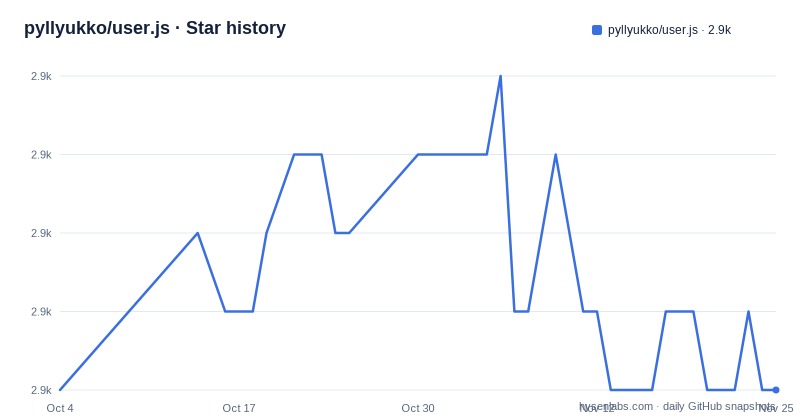
- pyllyukko/user.js2,897 ★ · +0
| Repository | 2026-10-04 | 2026-11-25 |
|---|---|---|
| pyllyukko/user.js | 2.9k | 2.9k |
0 Stars in the last 52 days, measured from the daily GitHub snapshot. Compare with other projects
Editorial analysis
Every hardening measure is enforced, and the usable variant is another branch
The repository is one file, user.js, described as a default template with every possible hardening measure enforced, and the alternative is not a set of options but a different branch: a relaxed branch is offered as a variant providing more usability. So the first decision a user makes is a branch checkout rather than a configuration choice. The goals behind it are eight and they read as a threat list: limiting tracking through web analytics, hardening against known data disclosure or code execution vulnerabilities, limiting persistent storage of anything remotely sensitive, revealing less to shoulder surfers, hardening encryption in terms of cipher suites and protocols, limiting browser and device fingerprinting, disabling features to shrink the attack surface, and still being usable in daily use. That last item is the one the relaxed branch exists to serve. The default branch is master, there are no releases, and the last push is dated 2026-04-07.
Three sed passes, one character apart, three different policies
The Makefile derives every installable variant from the same source file, and the difference between them is both mechanical and behavioural. The locked file comes from `sed 's/^user_pref/lockPref/' $< >| $@`, anchored to the start of a line, so each user_pref becomes a lockPref and the preference is fixed when a profile is created and cannot be changed afterwards from user.js, about:config or settings. The system-wide file comes from `sed 's/user_pref(/pref(/' $< >| $@`, which has no anchor, and its values act as defaults for every profile where they are not explicitly set, stay changeable in about:config and survive across sessions. The Debian variant applies a capture pattern that rewrites the call and appends the locked argument, and users there cannot override preferences at all. Anchoring is the whole difference between the first two recipes, and it decides whether a mention of user_pref inside a line is rewritten or not.
The test suite parses the file and lints scripts, and checks no preference
The default target builds a documentation piece and then runs the tests, written as all: doc-whatdoesitdo tests. The tests target has two children. test-acorn runs `acorn --silent user.js`, which validates the syntax of the configuration file and prints nothing on success, and test-shellcheck runs `shellcheck *.sh` over the shell scripts, with the requirement comment naming node-acorn and shellcheck. So the gate covers two things: the file parses as JavaScript, and the scripts are shell-clean. It does not check that a preference name still exists in Firefox, that a value is one Firefox accepts, or that a setting does what the comment above it claims. That gap is consistent with the rest of the repository, whose tree holds user.js, the Makefile, ignore.list, policies.json, gen-readme.sh, CONTRIBUTING.md, a .mailmap and a screenshots directory, with the documentation target matching the script that generates it.
The Tor Browser comparison follows one branch name and never moves
For a reference point the Makefile offers a comparison against Tor Browser's own configuration. The branch is set once as TBBBRANCH=tor-browser-68.8.0esr-9.5-1, and the 000-tor-browser.js target fetches firefox.js from the torproject gitweb for that branch with wget. Two targets then diff the values, diff-tbb and diff-tbb-2, both first reducing each file to setting name and value pairs with a shared PREF_REGEX and sorting them, so the output is a value-level comparison rather than a line diff. Because the reference is one named branch rather than a moving target, running the comparison again after a new Tor Browser release returns the same answer it gave before. The comparison is therefore a fixed snapshot against that specific tag, not a statement about current Tor Browser defaults.
Three path rows stop at the directory and leave the file name out
The single-profile installation table gives one path per platform, and the rows are not uniform. The Windows 7 row ends with a backslash and user.js, and the Linux row ends the same way, both under a profile folder whose name is written in placeholder form as XXXXXXXX.your_profile_name. The OS X row stops at the Firefox/Profiles/XXXXXXXX.your_profile_name directory with no file name appended. The Android row stops at the directory as well and adds a pointer to issue #14 for the mobile case, and the Sailfish OS row with Alien Dalvik is written the same incomplete way under /opt/alien. Only the portable Windows row uses a bracketed directory reference. So on the two desktop rows that matter most the instruction is complete, and on three others you get the folder and have to supply the name yourself.
Anything you change in about:config comes back on the next restart
The single-profile method has a consequence the page is explicit about. If you change a setting through about:config or the Firefox preferences dialogs, it is reset to the value defined in user.js after you restart Firefox, which is the point of the file, since the defaults are always reapplied. The stated cost is that it prevents persistently changing settings you do not consider appropriate, and the two ways out are given: edit user.js directly, or use the system-wide installation method instead. Before any of that, the page asks for a backup, recommending either a completely new profile or a copy of the existing profile directory, and giving the Profile Manager route as `firefox --no-remote -P`. The advice is framed around how much these settings alter browser behaviour, which is also why the relaxed branch exists.
A system-wide file needs a second file that points Firefox at it
Copying the generated file into the Firefox installation directory is only half the system-wide route. On Windows the destination is C:\Program Files (x86)\Mozilla Firefox\mozilla.cfg, on OS X it is inside the application bundle, on Linux /etc/firefox/syspref.js with firefox.js for older versions, on Debian /etc/firefox-esr/firefox-esr.js, and on Gentoo or Archlinux /usr/lib/firefox/mozilla.cfg with lib32 and lib64 variants mentioned. Firefox also has to be told to read it, through a local-settings.js created in the same directory:
pref("general.config.obscure_value", 0);
pref("general.config.filename", "mozilla.cfg");
Those two lines set the filename and clear the obscure-value warning. The table that follows, giving the same locations for local-settings.js, opens with a Windows row and stops there, so the remaining platforms for that file are not spelled out on this page.
The section list names ten headings and the text covers three of them
The contents list names Download, Installation, What does it do?, Further hardening, Known problems and limitations, FAQ, Contributing, Online tests, References and Maintenance. What is written here runs from Download through the start of the local-settings.js table and stops inside it. The consequence is specific rather than general: the goals and the install paths are available, while What does it do?, Known problems and limitations, Online tests, References and Maintenance are named without their text. So a reader cannot learn from this page which settings are known to break sites, how the online tests are run, or what the maintenance arrangement is, and the repository description itself offers nothing further, since it carries no homepage.
Editorial conclusion
This is a sensible starting point for a Firefox hardening policy rather than a finished one, and the right way to use it is to read user.js and relax the lines your own browsing needs. Verify four things before you copy it into a profile. Whether the reset behaviour suits you, since with the single-profile method anything you change in about:config comes back on the next restart unless you edit the file or switch to the system-wide variant. Whether you want maximum or usable, which is a branch choice rather than an option, and note that the default branch is master while the usable variant sits on relaxed. Whether a locked profile is what you want, since lockPref removes the escape hatch entirely. And what you are comparing against, because the Tor Browser diff in the Makefile follows one pinned branch rather than current releases. The test suite will catch a syntax error and nothing else.
Frequently asked questions
What is a user js file in Firefox?
It is a Firefox configuration file applied at the profile level. This repository is one such file, a default template with every possible hardening measure enforced, and it offers a relaxed branch as a variant that keeps more usability. Changes made elsewhere in the browser are reset to its values on restart.
How do I install user js in Firefox?
Copy user.js into the Firefox profile directory. On Linux that is ~/.mozilla/firefox/XXXXXXXX.your_profile_name/user.js and on Windows 7 %APPDATA%\Mozilla\Firefox\Profiles\XXXXXXXX.your_profile_name\user.js. Back up the profile or create a new one first, which you can do through the Profile Manager with firefox --no-remote -P, and run make for a system-wide or locked variant instead.
Why do my about:config changes get reverted in pyllyukko/user.js?
With the single-profile method, any setting changed through about:config or the preferences dialogs is reset to the value defined in user.js after Firefox restarts, so the defaults are always reapplied. The page gives two ways out: edit user.js directly, or use the system-wide installation method.
What do the make targets in pyllyukko/user.js produce?
Three variants from one file. locked_user.js uses lockPref so values are defaults on profile creation and cannot be changed; systemwide_user.js uses pref so values are defaults where not explicitly set, stay changeable in about:config and persist across sessions; debian_locked.js is Debian specific, where users cannot override preferences.
Does the pyllyukko/user.js repository run any tests?
The default target builds a documentation piece and then runs the tests, which are two commands: acorn --silent user.js to validate the syntax of the configuration file, and shellcheck *.sh to lint the shell scripts. Both node-acorn and shellcheck are named as requirements. No test checks preference names or values.
Official sources
Add this badge to your README
If you maintain this project, the badge below links readers to this analysis and shows its maintenance status from the daily GitHub snapshot. Paste the markdown into your README; add ?metric=license or ?metric=stars to the image URL for a different field.

[](https://hysenlabs.com/projects/pyllyukko-user-js)Star history chart for your README
[](https://hysenlabs.com/projects/pyllyukko-user-js)Was this useful?