OpenLLM: A Single-Command Path from Open-Weight Model to OpenAI-Compatible Endpoint
Run any open-source LLMs, such as DeepSeek and Llama, as OpenAI compatible API endpoint in the cloud.
At a glance
- What is it?
- OpenLLM wraps Llama, Qwen, DeepSeek and other open-weight models behind one CLI and an OpenAI-compatible API. It targets engineers who want a fast local or cloud deployment without building a serving stack.
- Who is it for?
- Adopt OpenLLM if you manage a handful of open-weight models and want a uniform OpenAI-compatible endpoint with minimal setup, especially if you already use BentoML. Skip it if you need fine-grained control over inference backends, if your model is not in the default repository and you cannot build a custom one, or if you prefer a tool like Ollama for purely local, single-machine use.
- Can I use it commercially?
- Yes. Apache-2.0 is a permissive licence: you can use, modify and sell software built on it, as long as you keep its copyright and licence notices.
- Is it still maintained?
- Yes. The repository last received commits 5 days ago.
- What is it written in?
- Mainly Python, according to GitHub's language statistics.
Answers come from the project's GitHub data, last synced on November 13, 2026, and from our analysis. They are not legal advice.
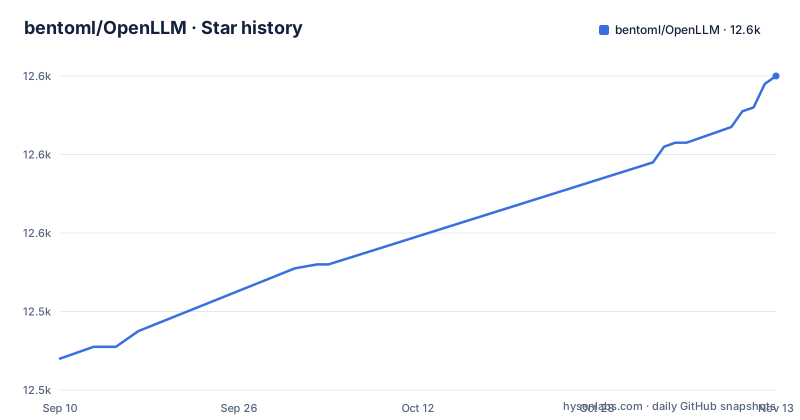
Star history
- bentoml/OpenLLM12,600 ★ · +72
| Repository | 2026-09-10 | 2026-11-13 |
|---|---|---|
| bentoml/OpenLLM | 12.5k | 12.6k |
72 Stars in the last 64 days, measured from the daily GitHub snapshot. Compare with other projects
Editorial analysis
What OpenLLM Actually Solves
The core value is uniformity. Once OpenLLM is running, any client that speaks the OpenAI protocol can talk to it. The README shows the OpenAI Python client and LlamaIndex both pointing at http://localhost:3000/v1 with a dummy API key. That means you can swap a hosted OpenAI model for a local open-weight one by changing a base URL, without rewriting your application logic. The project also includes a chat UI at /chat, which is useful for quick manual testing before you wire up a real client.
How the Serving Mechanism Works
OpenLLM does not store model weights. That is an important design detail. When you run openllm serve llama3.2:1b, the tool fetches the weights from Hugging Face at runtime. For gated models, you must set HF_TOKEN as an environment variable and have been granted access on Hugging Face. The server then exposes an OpenAI-compatible API on port 3000 by default. The model name you pass to the client, such as meta-llama/Llama-3.2-1B-Instruct, is the Hugging Face identifier, not the short tag you used in the CLI. That distinction can trip up new users. The README shows a call to client.models.list() to discover the exact model string. Under the hood, OpenLLM relies on a model repository concept. A repository is a catalog of available models, and the default one lives in a separate GitHub repository, bentoml/openllm-models. Commands like openllm model list, openllm repo update, and openllm model get let you inspect and synchronize that catalog. The architecture is clear: a CLI that talks to a remote repository definition, downloads weights on demand, and runs a server. The README's overview mentions state-of-the-art inference backends without naming them there.
Getting Started: Commands and Configuration
Installation is a standard pip install openllm. The README suggests running openllm hello for an interactive exploration, but the real entry point is openllm serve. For example, openllm serve llama3.2:1b starts a server on localhost:3000. Before that, you need to handle model access. For gated models like Llama 3.2, you must create a Hugging Face token, request access to the model on Hugging Face, and export HF_TOKEN. For a chat interface, you can either open http://localhost:3000/chat in a browser or use openllm run llama3:8b for a CLI-based conversation. The model repository commands let you manage what is available: openllm model list shows all models from connected repositories, openllm repo update fetches the latest catalog changes, and openllm model get llama3.2:1b shows details for a specific model. That is the whole setup surface. It is deliberately small. The trade-off is that you get less control than you would with a raw vLLM or TensorRT-LLM deployment.
The Model Repository and Custom Models
OpenLLM's model repository is a catalog of model definitions, not weights. The default repository is hosted in a separate GitHub repository, bentoml/openllm-models. The README says you can add a model repository to run custom models: follow the format of the default repository, with a bentos directory to store custom LLMs, build your Bentos with BentoML and submit them to your model repository. You can also contribute to the default repository by creating and submitting a Bento of the LLM. You cannot just point OpenLLM at any Hugging Face repo and expect it to work. The model must have a corresponding definition in a repository. That means a model outside the list requires building a Bento with BentoML. The supported model table lists 15 models, from deepseek to qwq, with parameter counts and GPU requirements. That range is decent, but it is not every open-weight model. If your model is not listed, you need to package it as a Bento yourself.
GPU Requirements: A Concrete Constraint
The README is refreshingly honest about hardware needs. Each model row includes a Required GPU column. For example, llama3.1:8b needs 24G, phi4:14b needs a single 80G GPU, and llama4:17b16e needs eight 80G GPUs. This is not marketing fluff; it is a practical deployment checklist. If you have a single 24G GPU, you can serve llama3.2:1b, but you cannot serve deepseek:r1-671b. The numbers tell you that OpenLLM is not just for laptops. It scales from a single consumer GPU to a multi-GPU node. The table states requirements such as 80Gx2 or 80Gx8 without describing how the model is split across GPUs. The GPU column is a requirement, not a performance guarantee. It tells you the minimum memory, but not the throughput you can expect.
A Real Alternative: Ollama
The most direct alternative is Ollama, which also serves open-weight models behind an OpenAI-compatible API. The key difference is in scope and deployment model. Ollama is designed for local, single-machine use, often on a developer laptop or a single server. It has its own model registry and a simple pull-and-run workflow. OpenLLM, by contrast, is built for cloud deployment. The README explicitly mentions Docker and Kubernetes, and the project is from the BentoML team, so it inherits that ecosystem's deployment tooling. If you only need a local model for development or a small internal tool, Ollama is simpler. If you plan to deploy to a Kubernetes cluster, OpenLLM's integration path is likely smoother. The choice comes down to where you intend to run the model, not just how you start it. Another difference: OpenLLM does not store weights, while Ollama has its own storage and model management. That means OpenLLM relies on Hugging Face for model weights, which has network and authentication implications.
Licence and Maintenance Considerations
OpenLLM itself is licensed under Apache-2.0, which is permissive for commercial use. The models you serve have their own licences, and the README does not address that. Llama models have the Llama Community License, Qwen has its own terms, and DeepSeek has a different licence. You need to check each model's licence before using it in production. OpenLLM does not add restrictions beyond what the model licence requires. On maintenance, tagged releases have stalled while commits continue. The latest release at the time of writing is v0.6.30 from April 2025, with v0.6.29 and v0.6.28 from the same month. No newer release has been tagged since then. However, the README does not describe an upgrade path or compatibility guarantees between versions. You should expect that model definitions in the repository may change, and you will need to run openllm repo update to stay current. The project is not archived, and the last push is dated November 2026, which indicates ongoing development. The maintenance cost is moderate: you need to track OpenLLM releases and repository updates, but the tool abstracts away most backend complexity.
Editorial conclusion
Adopt OpenLLM if you manage a handful of open-weight models and want a uniform OpenAI-compatible endpoint with minimal setup, especially if you already use BentoML. Skip it if you need fine-grained control over inference backends, if your model is not in the default repository and you cannot build a custom one, or if you prefer a tool like Ollama for purely local, single-machine use. Before committing, verify that your target model version is listed in the model repository, confirm your GPU memory meets the documented requirement, and check whether the model is gated on Hugging Face so you can set HF_TOKEN. Also confirm the API key handling in your client, since OpenLLM treats it as optional.
Frequently asked questions
What is OpenLLM?
OpenLLM runs open-source LLMs such as Llama 3.3, Qwen2.5, and Phi3, or custom models, as OpenAI-compatible APIs with a single command. It ships a built-in chat UI, inference backends, and a simplified Docker and Kubernetes cloud deployment workflow.
how to install openllm
Run `pip install openllm`, or pip3 install openllm, and then run `openllm hello` to explore it interactively. The package requires Python 3, and its classifiers name NVIDIA CUDA with CUDA 12, CUDA 11.8, and CUDA 11.7.
how to use openllm
Serve a model version with `openllm serve llama3.2:1b` and call the OpenAI-compatible endpoints at http://localhost:3000, or use `/chat` for the built-in chat UI. For a terminal conversation without a server, run `openllm run llama3:8b`.
Is there a library for LLMs in Python?
OpenLLM is one: it is classified for Python 3 only, from 3.8 through 3.12, on both CPython and PyPy. It exposes served models through OpenAI-compatible APIs, so client libraries written against that shape can talk to it.
what is open llm
An open-source large language model such as the Llama, Mistral, Qwen2, Gemma, Phi, Pixtral, DeepSeek, and QwQ families in the supported table. OpenLLM's job is to serve those models, and it does not store their weights.
Official sources
Add this badge to your README
If you maintain this project, the badge below links readers to this analysis and shows its maintenance status from the daily GitHub snapshot. Paste the markdown into your README; add ?metric=license or ?metric=stars to the image URL for a different field.

[](https://hysenlabs.com/projects/bentoml-openllm)Star history chart for your README
[](https://hysenlabs.com/projects/bentoml-openllm)Was this useful?