MeEdu: the quick start pulls a vendor image with a hard-coded root password
MeEdu is an online school, paid-knowledge and online-training solution for individuals and small-to-medium organizations.
At a glance
- What is it?
- MeEdu is an open-source online-school system for individuals and small institutions, built as a PHP and Laravel back end with three separately compiled front ends, shipped as a container stack plus a commercial edition with live classes and exams. The deployment files are where the detail is: the quick start builds nothing locally, the database root password is written into the compose file rather than the environment file, the search service starts with no master key, and the container waits fifteen seconds instead of waiting for its database.
- Who is it for?
- MeEdu fits a small institution or an individual seller who wants a course-selling site with a player, a bookshelf, a store and an admin, and who is comfortable running a container stack rather than assembling a PHP application by hand. Four things to settle before you put anything near it.
- Can I use it commercially?
- Yes. Apache-2.0 is a permissive licence: you can use, modify and sell software built on it, as long as you keep its copyright and licence notices.
- Is it still maintained?
- Yes. The repository last received commits 69 days ago.
- What is it written in?
- Mainly TypeScript, according to GitHub's language statistics.
Answers come from the project's GitHub data, last synced on November 21, 2026, and from our analysis. They are not legal advice.
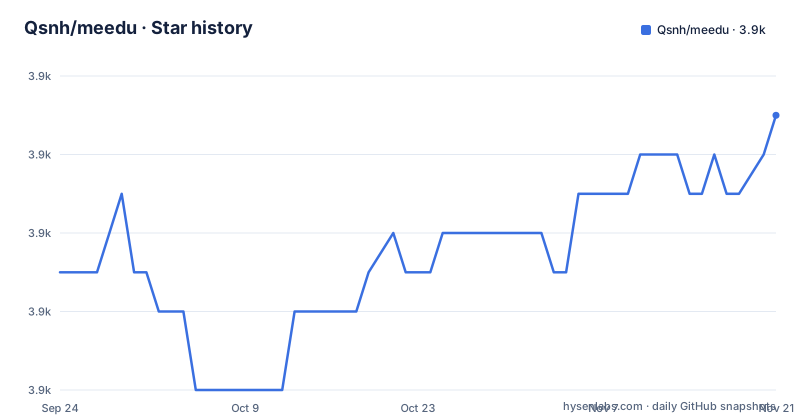
Star history
- Qsnh/meedu3,869 ★ · +4
| Repository | 2026-09-24 | 2026-11-21 |
|---|---|---|
| Qsnh/meedu | 3.9k | 3.9k |
4 Stars in the last 58 days, measured from the daily GitHub snapshot. Compare with other projects
Editorial analysis
The documented clone comes from another host and another account
The quick start's first instruction is to clone from a code hosting service, not from this repository, and under an account name that is not the repository's owner. Everything after that runs against whatever that clone contains. The three host links in the header are the project site, a page for the commercial edition, and a documentation centre, and the very first line of the file, above the project title, is a paid domain-certificate service with a referral parameter in the link. So the document a new user reads opens with a sponsor and then points them at a mirror, which is a reasonable way to run a project with a domestic hosting mirror and an awkward way to know whether the mirror matches what you are reading. Nothing in the file says which account is canonical or how the two are kept in step.
git clone --branch main https://gitee.com/myteng/MeEdu.git meeduThe quick start builds nothing, it pulls a vendor image
The third and final step is a single compose command, and there is no local build anywhere in its path. The application service in the compose file is declared as an image reference, not a build: a versioned tag in a registry the vendor controls, matching the current release number. The three backing services, a cache, a database and a search engine, come from the same registry under a different namespace, each on a specific version. The project's own image file shows what is inside that published image rather than what you would produce, since it starts from vendor base images for both the front-end and the back end, compiles the three front ends and the API, and exposes the four application ports. So the documented path runs a prebuilt application image published by the vendor, and the source tree is only used if you build it yourself, which the quick start never tells you to do.
The root database password is in the compose file, not the environment
Two files describe the same database credential and they disagree about how it is supplied. The environment example parameterises it, giving a host, a port, a username of root, a password value and a database name, all of which the compose file passes through as variables. But in the compose file the database service sets its root password as a literal string, not as a variable, so editing the environment file's database password has no effect on the password the database is actually created with. The application, meanwhile, is configured to connect as that same root user. So the credential a reader thinks they are changing is not the credential in force, and the account the application uses is the database superuser rather than a scoped one. The three data directories are named volumes, so a compose teardown keeps the database, the cache and the search index.
Two secrets are warned about and the service passwords are not
The environment example is careful about two values and silent about the rest. The application key and the token signing key are both left empty, each with a comment in two languages saying they must be generated and never copied from the example, and the file offers generation commands for both a Unix shell and a Windows shell as well as two in-container commands. That is the right treatment. The cache password, by contrast, is filled in with a concrete example value and no warning at all, and the search service's key is left empty while the compose file sets no master key for the search container anywhere. A search engine started without a master key accepts requests from anything that can reach its port, which is why the next section matters: the only thing stopping that is that the port is never published.
DB_HOST=mysql
DB_PORT=3306
DB_USERNAME=root
DB_PASSWORD=meeduxyz
DB_DATABASE=meedu
The container sleeps fifteen seconds instead of waiting for its database
The image's start command is a shell line that announces it is waiting, sleeps a fixed fifteen seconds, runs a schema upgrade, runs a lock command, then starts the web server and the process manager as background jobs under a small init shim. Fifteen seconds is a guess, not a check. The compose file declares that the application depends on the database and the cache, but with no health condition attached, so nothing waits for either service to report ready; on a cold machine with a database that takes thirty seconds to initialise, the upgrade command runs against a server that is not there yet. The lock command is also run at image build time, so it happens twice per lifecycle. The port picture is better: four application ports are published for the API, the desktop site, the mobile site and the admin, while the database, cache and search ports are present in the compose file and commented out.
Apache 2.0 with added commercial conditions, and a commercial edition
The licensing paragraph is short and the detail is in the file it links. It says the software follows the Apache 2.0 licence with specific additional conditions on commercial use, and that using it also requires following an attached terms document, which sits at the repository root. The repository metadata names plain Apache 2.0 with nothing added. Those are not the same grant, and the metadata is the one a package index or a scanning tool will read. The same paragraph names a company as the copyright holder for the current year. Separately, the header and the introduction make clear that this repository is the open-source edition and that a commercial edition is sold with live classes, exam practice, ebooks, text-and-image content, site Q&A, flash sales, group buying and redemption codes, plus mini-program, Android and iOS clients on top of the open-source feature set.
The metadata says TypeScript and the product is described as PHP
The two descriptions of the same project point at different halves of it. The product description calls it a solution developed in PHP with a specific major version of the framework, a database and a cache, and the tree confirms a Laravel API directory beside three front-end directories for the admin, the desktop site and the mobile site, which is why the repository's primary language is TypeScript. The build file compiles the three front ends with a frozen lockfile and a shared build-time URL variable pointing at the API, then installs the back-end dependencies without development packages and caches its routes. The root also carries a design document, a machine-readable design file and a product document, which is an unusual amount of prose for a framework application, and no test directory at all. The compose file pins an application image three months behind the last commit.
Editorial conclusion
MeEdu fits a small institution or an individual seller who wants a course-selling site with a player, a bookshelf, a store and an admin, and who is comfortable running a container stack rather than assembling a PHP application by hand. Four things to settle before you put anything near it. Read the licensing first, because the project states Apache 2.0 with added commercial-use conditions in a separate file while the repository metadata names plain Apache-2.0, and a commercial edition is sold on top of the open-source one. Replace the database root password, which is a literal in the compose file rather than a variable, and decide what your search service needs, because its master key is not set anywhere. Generate the two application secrets as instructed, since the file is right about those. And if you need live classes, exams or mobile clients, that is the commercial edition rather than this repository.
Frequently asked questions
What is MeEdu?
An open-source online-school and paid-knowledge solution for individuals and small institutions, developed in PHP with the Laravel framework, MySQL and Redis, with a front-end and back-end split. It covers on-demand video, course purchase, site decoration, learner registration by mobile number, study statistics and role management, and it is published alongside a separate commercial edition.
How do I run MeEdu locally?
The file gives three steps: clone from a code hosting service under an account that is not the repository owner, copy the example environment file and generate an application key and a token signing secret yourself, then bring the stack up with a compose command. The admin interface is on port 8300, with the desktop site on 8100, the mobile site on 8200 and the API on 8000.
Can I use MeEdu commercially?
Read the attached terms first. The project states Apache 2.0 with added conditions on commercial use, the repository metadata names plain Apache-2.0, and a commercial edition is sold on top of the open-source one with live classes, exam practice, ebooks, site Q&A, flash sales, group buying, redemption codes and mobile clients.
Official sources
Add this badge to your README
If you maintain this project, the badge below links readers to this analysis and shows its maintenance status from the daily GitHub snapshot. Paste the markdown into your README; add ?metric=license or ?metric=stars to the image URL for a different field.

[](https://hysenlabs.com/projects/qsnh-meedu)Star history chart for your README
[](https://hysenlabs.com/projects/qsnh-meedu)Was this useful?