The Strava MCP server takes your client secret through a local web page and the recommended path re-downloads itself on every launch
A Model Context Protocol (MCP) server that connects to Strava API, providing tools to access Strava data through LLMs
At a glance
- What is it?
- An MCP server that exposes your Strava activities, segments, shoes and streams to a chat client, installed with no setup beyond npx. The tool surface is unusually rich for a data connector, including shoe usage and heart-rate time series. The credential flow asks for a long-lived API secret rather than a per-session token, and the default install path fetches whatever the registry currently serves, unconfirmed, on every client start.
- Who is it for?
- Use this if you want to interrogate your own Strava history conversationally and are willing to manage a client secret by hand, since the tool surface goes well past activity summaries into shoes, photos and streams. Do not adopt the default install path in a context where a supply-chain change would be unwelcome, because it runs an unconfirmed package fetch on every client start.
- Can I use it commercially?
- Yes. MIT is a permissive licence: you can use, modify and sell software built on it, as long as you keep its copyright and licence notices.
- Is it still maintained?
- Yes. The repository last received commits 155 days ago.
- What is it written in?
- Mainly TypeScript, according to GitHub's language statistics.
Answers come from the project's GitHub data, last synced on November 15, 2026, and from our analysis. They are not legal advice.
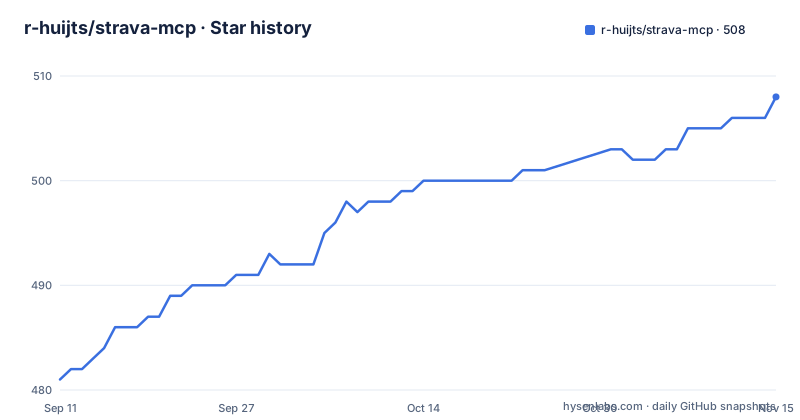
Star history
- r-huijts/strava-mcp508 ★ · +27
| Repository | 2026-09-11 | 2026-11-15 |
|---|---|---|
| r-huijts/strava-mcp | 481 | 508 |
27 Stars in the last 65 days, measured from the daily GitHub snapshot. Compare with other projects
Editorial analysis
The repository says MIT and the published manifest says ISC
Two of the three places a licence can be stated disagree.
The repository-level licence metadata reads MIT. The package manifest reads ISC. Both are permissive, so nothing here is a copyleft problem, and a LICENSE file exists at the repository root without the text being quoted anywhere in the documentation.
Which one governs is not settled by anything in the project. The metadata field is what a repository viewer shows; the manifest field is what npm displays on the package page and what tooling reads when resolving dependencies. A downstream user checking the licence before vendoring the code has two answers and no way to tell which is current.
It is worth naming separately from the credential design because it is the kind of thing that is fixed by editing one field, and because a package that publishes with no author, an empty author string in the manifest, is exactly the kind of package where metadata hygiene tends to lag.
The rest of the publishing metadata is thin in the same way. The manifest carries four keywords, two of which are the generic tokens that exist for discoverability rather than description. The registry identifier is declared, and a server manifest sits at the repository root, so the package is discoverable through the MCP registry rather than only through npm.
Two third-party directories also list the server, and neither of those listings is under the author's control, which is worth knowing if you are evaluating how widely this is distributed.
The flow asks for a client secret, not a token, and saves it as plaintext JSON
The connection flow is the part to read carefully. You ask the assistant to connect your Strava account, a browser window opens to a setup page, and the instruction is to enter your Strava API credentials, meaning the Client ID and the Client Secret.
A client secret is not a per-session token. It is the long-lived application credential you get from creating a Strava API application, and the README's own guidance for creating one asks you to set the authorization callback domain to localhost and says the website field can be anything, for example a localhost address.
So the sequence is: register an application with Strava by hand, obtain both halves of the credential, then type them into a page served by the local server, then complete authorization on Strava's site. The secret is transmitted to localhost and then persisted:
Your credentials are saved locally at `~/.config/strava-mcp/config.json` and persist across sessions.A file path is given. A file permission is not. Nothing in the documentation says the file is written with restrictive permissions, and a config file holding an application secret in a home directory is the kind of thing a permissions bit matters for.
Two things soften this. The Disconnect tool is documented as unlinking Strava and clearing the stored tokens, so there is a documented path to remove the credential. And the authorization step itself is a redirect to Strava, so the token exchange does not involve the secret being re-presented to a third party.
One thing the README does not raise: no public-key exchange flow is described. Because the flow requires a secret at all, the usual argument for keeping the secret off the machine does not apply here. That is a design choice, not a defect, but it means the security of the setup rests entirely on the one file on disk.
There is also a second credential path documented only in the repository. The environment example file defines an access token variable and a directory for exported route files, and neither appears anywhere in the README. So there are two ways to authenticate and only one of them is written down.
The recommended install is an unconfirmed package fetch on every client start
Three installation options are offered and the first is marked recommended, with the note that no installation is needed because the command in the quick start automatically downloads and runs the latest version.
The command is npx with an argument list containing the yes flag and the package name. So on every launch of the chat client, the client executes a package runner that fetches whatever the registry currently serves for that name, auto-confirms the install, and runs it.
Three consequences follow, and none of them is hypothetical.
There is no version pin. The recommended configuration resolves to whatever the latest tag is at the moment the client starts, so two people using the documented setup a week apart can run different code, and a given user silently upgrades without a prompt.
There is no install confirmation. The yes flag exists precisely to suppress the package runner's own confirmation, which is the one moment a user could see what is about to execute.
And it runs repeatedly. This is not a one-time setup cost that gets cached in a project directory; it is part of how the client launches the server, so the fetch path is exercised every session.
The global install option avoids all three by pinning a copy once, and the from-source option avoids them by pointing at a local build. The README does not argue for either. It presents the unconfirmed floating fetch as the fast path and the safer paths as alternatives for people who prefer them.
One small inconsistency between the two client instructions: the chat-desktop configuration uses the yes flag, and the single-line command for the other client does not. So the same package is confirmed in one path and not in the other.
Three install options produce three different command shapes
The configuration file is the whole integration surface, and each option fills it differently.
The recommended path sets the command to the package runner and passes the yes flag plus the package name as arguments. The global install path sets the command to a bare executable name with no arguments at all. The from-source path sets the command to node and passes an absolute path to a built file as the single argument.
So switching from the first to the second is not just deleting an arguments array, it is changing the command value too, and switching to the third changes both again and requires the user to edit a placeholder path.
The three options are documented in three separate sections with three separate configuration blocks, and nothing states that these are three values for one field. A reader who tries option two after option one and finds the server failing has to work out which of the two fields to change.
The executable naming is a fourth layer on top. The manifest package is scoped and suffixed, the bin it installs is neither, and the README explains the mismatch explicitly as a backward-compatibility holdover, noting that the executable name remains the shorter form even though the package name is the longer one. It does not say what the name was before, or when it changed, so the holdover cannot be aged.
The from-source path is the only one that gives you something to read. It is four commands: clone, change directory, install, build. Everything else is a fetch.
The published tarball omits both the changelog and the troubleshooting guide
The manifest's file allowlist has four entries: the build output, a scripts directory, the README, and the licence file.
The repository root holds more than that. There is a changelog, a troubleshooting guide, an environment example file, and a server manifest, and none of them is in the allowlist.
The two omissions are not equally important. The changelog is history, and a package whose history lives only on GitHub is a common and acceptable arrangement. The troubleshooting guide is operational documentation, and the situation this server creates is exactly the kind that produces one: a browser window that opened, a secret that was pasted, an authorization that either completed or did not.
So the file that answers those questions exists in the repository and is not in the tarball. Someone who installed from the registry rather than the repository has no copy of it.
The scripts directory is in the allowlist, which creates a second gap. The manifest defines a script that runs an authentication setup file through a TypeScript execution runner, and that runner is a development dependency. In a global install the scripts directory is present and the runner is not, so a script that works in a clone cannot run in an installed copy. The from-source instructions do not mention this script at all, so the failure mode is a missing runner rather than a missing step.
Two other root-level items are worth a note. There is a TypeScript file at the repository root whose name refers to the Strava API, sitting outside both the source and test directories, and it is referenced by no script in the manifest. And there is a package lockfile rather than any other lock format, which matches the npm instructions throughout.
Tests and lint do not gate publish, and the API tests need a real token
The publish hook runs one command, and that command is a type check. Neither the test suite nor the linter is in the path that produces a release.
So a type error blocks a publish and a failing test does not. For a package whose whole job is talking to a third-party API and getting the response shapes right, that is the wrong gate, because shape errors are exactly what the type checker cannot see.
The test setup compounds it. The default test command runs the suite, and a separate command runs one API test file with an environment flag set to true. So the tests that actually contact Strava do not run by default, and enabling them requires credentials, since the environment example defines the access token variable.
That is a reasonable structure for a connector. It keeps the default suite runnable with no account and no network. The problem is only that the publish path does not run the default suite either, so the tests that do run by default are also the only tests that never gate a release.
There is also no continuous integration directory at the repository root, so nothing runs them automatically on a push either.
The toolchain has its own age. The manifest declares a Node floor of 18, and type definitions are pinned to the Node 20 line, so the code is checked against an API surface newer than the runtime it claims to support. Node 18 has been out of standard support since early 2025, so the declared floor admits a runtime that no longer receives security updates, while the types assume a newer one than that floor guarantees.
The linter is on the previous major of its own ecosystem, with an extension flag that the current major removed, paired with the matching previous major of the TypeScript linter plugins. Consistent internally, and dated.
The examples promise training-load modelling that the tool table never lists
The documented tool surface is wide. Beyond activity lists, single-activity detail, laps, filters and segment search, it includes a tool that lists your shoes and their usage distance, a tool that shows training zones for heart rate and power, a tool that returns heart-rate time series described as an optimised compact format, and a tool that shows activity photos.
Two of those deserve more attention than the README gives them.
Shoes are the interesting one, and it is introduced in the table as a casual question about what shoes you have. Accumulated distance per pair is a behavioural fingerprint. It distinguishes a runner from a cyclist, it tracks when a given activity type was last done, and combined with segment searches by location it is more identifying than it looks. The README presents it as a feature with no note attached.
Photos are the other. Activity photos come with location and time attached, so a tool that surfaces them hands the model a set of geotagged images.
Then there is what the examples promise. One section is titled coaching insights and offers to analyse this week's training load and compare current fitness with last month. A worked example ends with the assistant computing a power-to-heart-rate ratio and concluding that the ratio suggests good aerobic efficiency.
None of the listed tools is a training-load or fitness model, and nothing in the documentation says the server computes physiological ratios. A Strava activity response is streams and summary fields; deriving normalised power or a power-to-heart-rate ratio is inference, and a training-load number is a specific model from a specific vendor. So the examples show reasoning the server does not perform and the tool table does not expose.
The compact-format claim for time series is also unquantified. Token efficiency is the obvious reason to compact a stream, and it is the right thing to do, but no figure is given for how much it saves.
One capability the examples imply rather than the table lists is a write path: an offer to star segments so they can be found later. Exporting a route as a GPX file writes to disk, at a path set by the environment variable whose only documented requirement is that the directory exists and the process can write to it.
Editorial conclusion
Use this if you want to interrogate your own Strava history conversationally and are willing to manage a client secret by hand, since the tool surface goes well past activity summaries into shoes, photos and streams. Do not adopt the default install path in a context where a supply-chain change would be unwelcome, because it runs an unconfirmed package fetch on every client start. Verify first what ends up in the config file and with what permissions, since the README names the path for the stored credentials but not how they are protected.
Frequently asked questions
what is strava mcp
It is a Model Context Protocol server, published as the scoped package @r-huijts/strava-mcp-server, that connects to the Strava API and exposes activities, laps, segments, streams, shoes, training zones, photos and profile data as tools a chat client can call. The repository is r-huijts/strava-mcp and the manifest declares a registry name for it.
how to add strava mcp to claude
Either add an entry to the client's configuration file whose command is the package runner with a yes flag and the package name as arguments, then restart the desktop client, or run a single command for the other client that adds the server over the standard-input transport. Restarting is required in both cases for the new configuration to load.
how to access strava mcp
After adding the server to a client you ask it to connect your Strava account. A browser window opens to a setup page where you enter the Client ID and Client Secret from a Strava API application you created, then you authorize on Strava's site. The credentials are saved to ~/.config/strava-mcp/config.json and persist across sessions.
how to use strava mcp
Ask questions in ordinary language about your activities: distances and durations for a period, a breakdown of one workout, lap-by-lap data, heart-rate zones, popular cycling segments near a location, your starred segments, or a route exported as a GPX file. Status, reconnect and disconnect are also exposed as tools.
is strava mcp free
The server itself installs at no cost: the recommended path needs no installation because the package runner fetches and runs it, and the global option is a single npm install. Registering a Strava API application to obtain the client credentials is described as free. The Strava API's own terms and any rate limits are not covered in the documentation.
Official sources
Add this badge to your README
If you maintain this project, the badge below links readers to this analysis and shows its maintenance status from the daily GitHub snapshot. Paste the markdown into your README; add ?metric=license or ?metric=stars to the image URL for a different field.

[](https://hysenlabs.com/projects/r-huijts-strava-mcp)Star history chart for your README
[](https://hysenlabs.com/projects/r-huijts-strava-mcp)Was this useful?