create-react-app: the scaffolder froze at v5.0.1 in April 2022
GitHub describes it as Set up a modern web app by running one command.. The repository metadata lists JavaScript as its primary language. The metadata lists the MIT license. This article stays within the project description and details documented in the GitHub repository README.
At a glance
- What is it?
- Create React App put webpack, Babel, ESLint and a test runner behind a single react-scripts dependency. The tool is deprecated, the newest release is v5.0.1 from 2022-04-12, and the scaffold it produces still ships pieces the README describes as included but that do nothing until you switch them on.
- Who is it for?
- Use Create React App to finish a tutorial or to read a project somebody froze in 2021, and do not start anything you intend to maintain on it, because the README itself sends new work to the frameworks on Start a New React Project and the last push to main was 2025-02-15.
- Can I use it commercially?
- Yes. MIT is a permissive licence: you can use, modify and sell software built on it, as long as you keep its copyright and licence notices.
- Is it still maintained?
- Probably not. The repository last received commits 21 months ago, on February 15, 2025.
- What is it written in?
- Mainly JavaScript, according to GitHub's language statistics.
Answers come from the project's GitHub data, last synced on November 14, 2026, and from our analysis. They are not legal advice.
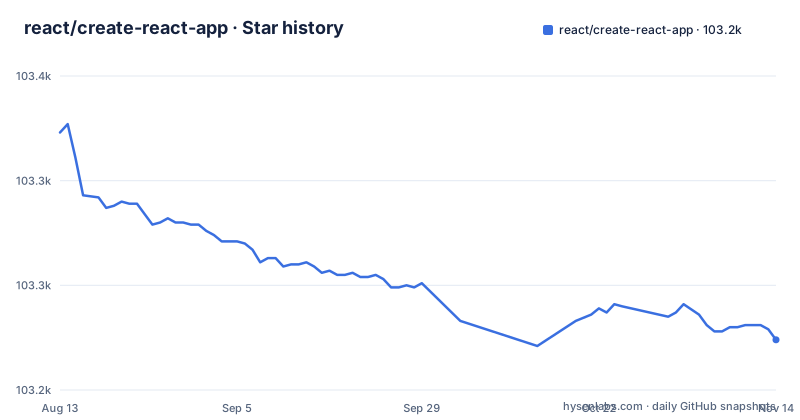
Star history
- react/create-react-app103,224 ★ · -99
| Repository | 2026-08-13 | 2026-11-14 |
|---|---|---|
| react/create-react-app | 103.3k | 103.2k |
-99 Stars in the last 93 days, measured from the daily GitHub snapshot. Compare with other projects
Editorial analysis
The deprecation box is the first block in the file
Open the README and the first thing is a CAUTION panel headed Deprecated. It says Create React App was one of the key tools for getting a React project up and running in 2017-2021, that it is now in long-term stasis, and that you should migrate to one of the React frameworks documented on Start a New React Project. It also splits the audience in two: if you are following a tutorial to learn React there is still value in continuing, but the same panel says it does not recommend starting production apps on top of it.
The repository is not archived, so the code is readable and the tracker is open, with 2411 open issues against 103251 stars. The last push to main was 2025-02-15 and the newest release is v5.0.1 from 2022-04-12. Consequence for the reader: the scaffolder is frozen while your Node release and your browser keep moving, so a project generated today begins on a four-year-old toolchain. One oddity worth knowing: the README's own links, including the build badge, the contributing file and the user guide, still use the facebook organisation path even though the repository now sits under the react organisation, and the guide is served from a facebook.github.io address.
build, start and test all funnel through one binary
The Philosophy section claims one build dependency and no configuration, and package.json makes that literal. Three scripts carry the entire toolchain:
"build": "cd packages/react-scripts && node bin/react-scripts.js build",
"start": "cd packages/react-scripts && node bin/react-scripts.js start",
"test": "cd packages/react-scripts && node bin/react-scripts.js test",
Scaffolding takes a different road. The `create-react-app` script is `node tasks/cra.js`, so generating a project and building one do not share an entry point. Consequence for the reader: react-scripts is the single chokepoint a generated project depends on, which is exactly why the README can call ejecting a single command that moves all configuration and build dependencies into your own project, and why a react-scripts version is the unit of upgrade you will reason about for years. It is also why a React upgrade can reach you wearing build-system clothes, and why ejecting is irreversible in the sense that nothing in the repository puts the hidden configuration back.
Installing the repository builds a workspace package first
Two workspaces are declared, `packages/*` and `docusaurus/website`. The second is the documentation site, so the user guide is a build target inside the same tree as the command line tool,. The `postinstall` script is:
"postinstall": "npm run build:prod -w react-error-overlay",Consequence for the reader: a plain install in a clone does not stop at installing, and a break inside react-error-overlay shows up as an install failure rather than a build failure, which sends people debugging in the wrong directory. The documentation site has to keep building as well, so a docs dependency can block a clone of the tool itself. The repository also lints its own prose, with an `alex .` script and a .alexrc file beside a .alexignore, which is a small sign of how carefully the README was once maintained and is one more thing that now has nobody editing it.
Five changelog files cover 0.x through 4.x, and none covers 5.x
The root carries CHANGELOG.md plus CHANGELOG-0.x.md, CHANGELOG-1.x.md, CHANGELOG-2.x.md, CHANGELOG-3.x.md and CHANGELOG-4.x.md. The versioned files end at 4.x, alongside the unversioned CHANGELOG.md. The releases, meanwhile, top out at v5.0.1 published on 2022-04-12, behind v5.0.0 on 2021-12-14 and v4.0.3 on 2021-02-22.
Consequence for the reader: the versioned changelog files stop at 4.x, so check whether CHANGELOG.md or the release pages cover the 5.x line before relying on either to explain an upgrade.
The scaffold ships a service worker you have to switch on
A generated project contains src/serviceWorker.js and public/manifest.json. The list of what is included calls this an offline-first service worker together with a web app manifest, meeting all the Progressive Web App criteria, and then the parenthetical note on the same bullet says that using the service worker is opt-in as of [email protected] and higher.
Consequence for the reader: a fresh project looks like a Progressive Web App on paper and serves nothing offline until you opt in, so an audit or a product requirement that assumes offline support fails on a project that matches the README exactly. The presence of the file makes the work look finished.
npm test watches only the files changed since the last commit
The README describes `npm test` and `yarn test` as running the test watcher in an interactive mode, and adds that by default it runs tests related to files changed since the last commit. The generated tree arrives with App.test.js and setupTests.js, so a new project looks tested from its first minute.
Consequence for the reader: a green run is not a full-suite result. A test broken in a file nobody has touched stays broken and stays quiet, and the moment most likely to expose it, someone else's pull request, is exactly the one the default skips. Treat the watcher's green as evidence about your edit rather than about the project. Running the full suite before you trust a number is worth doing on a toolchain this old.
A global install quietly wins over npx
Three commands generate a project and each has its own floor: npx needs npm 5.2 or higher, `npm init react-app` needs npm 6 or higher, and `yarn create react-app` needs Yarn 0.25 or higher.
npx create-react-app my-app
npm init react-app my-app
yarn create react-app my-app
The README also warns about a global copy, because a `create-react-app` installed with `npm install -g create-react-app` has to be removed with `npm uninstall -g create-react-app` or `yarn global remove create-react-app` so that npx uses the latest version. Consequence for the reader: on a machine that once carried the global package, `npx create-react-app` runs the old one and says nothing, so a scaffolder that behaves unlike the README is usually a stale global rather than a defect. Node 14.0.0 or later is the stated floor for the development machine, and it is explicitly not required on the server.
Editorial conclusion
Use Create React App to finish a tutorial or to read a project somebody froze in 2021, and do not start anything you intend to maintain on it, because the README itself sends new work to the frameworks on Start a New React Project and the last push to main was 2025-02-15. Before you adopt the existing output for anything, check three things in the generated project: whether src/serviceWorker.js is actually registered, since the file ships but the feature is opt-in, whether your test command runs the whole suite, since the default watches only files changed since the last commit, and whether a global create-react-app is shadowing the version you think you invoked. If any of those three is unresolved, the distance between your app and a fresh framework start is larger than the deprecation box admits.
Frequently asked questions
how to create react app
Run `npx create-react-app my-app` with npm 5.2 or higher, or `npm init react-app my-app` with npm 6 or higher, or `yarn create react-app my-app` with Yarn 0.25 or higher. It creates a directory called my-app inside the current folder and installs the transitive dependencies.
how to install create react app
The README does not ask you to install the package first, it runs it through npx. It warns that a copy installed with `npm install -g create-react-app` should be removed with `npm uninstall -g create-react-app` so npx picks up the latest version, and that you need Node 14.0.0 or later on the development machine.
how to use npx create react app
Run `npx create-react-app my-app`, then `cd my-app`, then `npm start`, and open http://localhost:3000. The page reloads when you change code, and build errors and lint warnings appear in the console. npx comes with npm 5.2 and higher.
how to create react app with typescript
TypeScript syntax support is part of what the generated environment includes, listed beside React, JSX, ES6 and Flow. The three creation commands the README gives carry no TypeScript flag..
how to create react app in vs code
It states that Create React App works on macOS, Windows and Linux, and all three creation commands run in any terminal. The development server is then at http://localhost:3000.
Official sources
Add this badge to your README
If you maintain this project, the badge below links readers to this analysis and shows its maintenance status from the daily GitHub snapshot. Paste the markdown into your README; add ?metric=license or ?metric=stars to the image URL for a different field.

[](https://hysenlabs.com/projects/react-create-react-app)Star history chart for your README
[](https://hysenlabs.com/projects/react-create-react-app)Was this useful?