React Navigation: the main branch is version 8, but npm still serves 7.x
Routing and navigation for React Native and Web apps
At a glance
- What is it?
- A pnpm and lerna monorepo of twelve navigation packages for React Native and web apps. Its default branch holds an unreleased React Navigation 8, and it cannot be installed from a repository URL.
- Who is it for?
- If you want routing you configure yourself rather than a file based router, this monorepo is the option, but read the 7.x documentation rather than the 8 branch, install from npm instead of the repository URL, and pin the drawer and tab view packages by hand. Anyone who just wants web routing already set up should read the docs before adopting it.
- Can I use it commercially?
- Not without permission. GitHub finds no licence file in the repository, and without a licence all rights are reserved by default: you may read the code but not reuse it. Check the README, or ask the authors, before using it.
- Is it still maintained?
- Yes. The repository received new commits within the last day.
- What is it written in?
- Mainly TypeScript, according to GitHub's language statistics.
Answers come from the project's GitHub data, last synced on November 15, 2026, and from our analysis. They are not legal advice.
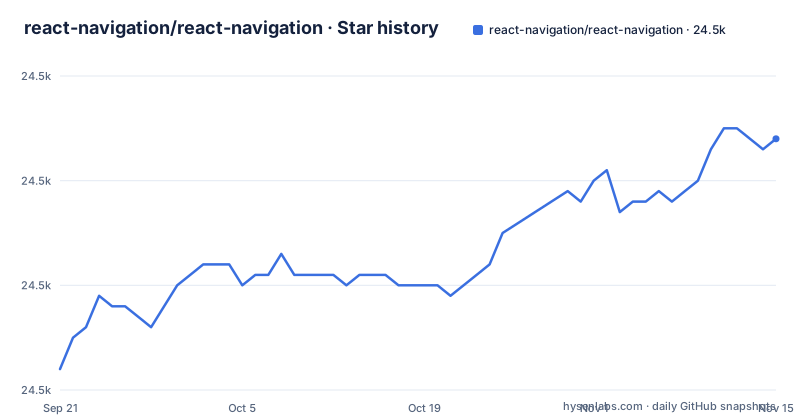
Star history
- react-navigation/react-navigation24,524 ★ · +22
| Repository | 2026-09-21 | 2026-11-15 |
|---|---|---|
| react-navigation/react-navigation | 24.5k | 24.5k |
22 Stars in the last 55 days, measured from the daily GitHub snapshot. Compare with other projects
Editorial analysis
The main branch is React Navigation 8 while npm still serves 7.x
The README opens with the title React Navigation 8 and states that this branch contains the code for the upcoming major version. The line it labels latest stable is the 7.x branch, and 6.x, 5.x, 4.x, 3.x, 2.x, and 1.x are all still parked in the same repository. So the branch you land on by default is a development surface, not the version a lockfile resolves to. The most recent releases recorded for the repository are @react-navigation/[email protected], @react-navigation/[email protected], and @react-navigation/[email protected], all dated 2026-10-13. If you read main as the documentation for what npm hands you, the props and types in your editor will not match the page you read.
Stack and native-stack sit side by side with no rule for choosing
Two stack packages live in packages/, @react-navigation/stack and @react-navigation/native-stack, and the repository never marks one as the default. The cost of the choice shows up at runtime rather than in your dependency list. Nothing here states which package carries native screen transitions, header behaviour, or gesture response, so you cannot settle it from the source tree. Decide against the documentation site instead, and pin the exact version you read.
A monorepo that cannot be installed from a repository URL
The twelve packages are published from a pnpm workspace covering packages/* and example, with publishConfig set to access public. Because the layout is a monorepo, the README states that it is not possible to install a package from the repository URL. The consequence for a reader is concrete: dropping a Git URL into package.json will not produce a working build, so you either take the published package from npm or commit to the fork procedure described below. That closes the usual shortcut for locking in an unreleased fix by pinning a commit hash.
Fork installs go through gitpkg and a seven step publish
A complete fork procedure does exist, and it is the only install path written down. You add gitpkg globally first:
pnpm add --global gitpkgThen the steps are: fork the repository to your account and clone it, cd into the clone, run pnpm install, make and commit your changes, run pnpm lerna run prepack to perform the build steps, cd into the package directory such as packages/stack for @react-navigation/stack, and run gitpkg publish. A successful publish reports:
Package uploaded to [email protected]:<user>/<repo>.git with the name <name>The dependency you then add is `pnpm add <user>/<repo>.git#<name>`. What you end up with carries no published version, so every change means rebuilding and republishing before it reaches your app.
Node 24.13 and pnpm 11.13.1 are pinned rather than optional
package.json sets engines to node >= 24.13.0 and names [email protected] as the packageManager, so both are constraints. npm is not a supported route here, because the workspace layout, the pnpm-lock.yaml, and every release script assume pnpm. Build and publish run through lerna-lite, where the build script is `lerna run prepack`, the publish script is `lerna publish`, clean is `lerna run clean`, and the release script is `run-s build publish`. Type checking is split across four separate scripts, including standalone static and standalone dynamic projects under example/__typechecks__.
The package table links to npm with empty version cells
The README carries a Package Versions table naming all twelve packages, from @react-navigation/bottom-tabs down to react-native-tab-view. The Latest Version column links each package to its npm page rather than writing a version number into the text. For a reader trying to answer how to install react navigation bottom tabs or the drawer, the README answers neither. There is no install command for any of the twelve anywhere in it, and the only pointer to setup is the link to reactnavigation.org. The badges have the same shape: build status points at the ci.yml workflow and coverage points at a codecov badge, but neither value is written out in the text.
Drawer and tab view ship their own version lines
Two entries in that table are not navigation abstractions. react-native-drawer-layout and react-native-tab-view are published from this same monorepo without the @react-navigation scope. The consequence is that upgrading React Navigation does not by itself tell you which drawer view version you ended up with, and a fork that changes a navigation package does not automatically change the native view it drives. Pin these two by hand or they drift independently of the navigator you picked.
The only web build configuration lives in the example app
Routing for web is part of the project's stated scope, yet the twelve package names contain no browser-only entry. The only web configuration in the repository lives in example/, where index.html, vite.config.mjs, server.tsx, web/, and metro.config.js sit beside the native example. That directory also carries gesture-handler.tsx and gesture-handler.native.tsx, two files for one concern split by platform, plus an e2e folder and the two standalone typecheck projects the scripts point at. The consequence for a reader is that the package table cannot tell you which navigator suits a web build, and the example app is the only place here where a web setup is visible. Anyone targeting browsers is reading an example to learn a production configuration.
Editorial conclusion
If you want routing you configure yourself rather than a file based router, this monorepo is the option, but read the 7.x documentation rather than the 8 branch, install from npm instead of the repository URL, and pin the drawer and tab view packages by hand. Anyone who just wants web routing already set up should read the docs before adopting it.
Frequently asked questions
What is React navigation used for?
Routing and navigation for React Native and web apps, shipped as twelve packages in one pnpm and lerna monorepo under the MIT license.
how to install react navigation
The README carries no install command for any of the twelve packages. Setup details sit behind the link to reactnavigation.org, and the only install path written down is the gitpkg fork procedure.
react navigation 8
Version 8 is the upcoming major version and lives on the main branch, while 7.x is the branch labelled latest stable. The newest recorded stack release is @react-navigation/[email protected].
Which is better, Expo Router or React navigation?
The repository draws no comparison with Expo Router. It describes itself as routing and navigation for your React Native apps and points every setup question at reactnavigation.org.
what is react navigation stack
@react-navigation/stack is one of the twelve packages in the workspace, with a most recent release of 7.12.1. A forked copy is built from the packages/stack directory using pnpm lerna run prepack.
Official sources
Add this badge to your README
If you maintain this project, the badge below links readers to this analysis and shows its maintenance status from the daily GitHub snapshot. Paste the markdown into your README; add ?metric=license or ?metric=stars to the image URL for a different field.

[](https://hysenlabs.com/projects/react-navigation-react-navigation)Star history chart for your README
[](https://hysenlabs.com/projects/react-navigation-react-navigation)Was this useful?