@receptron/laya: running a Jev-compatible System-1 decision model from Node.js
Run Laya, the open-source Jev-compatible System-1 decision model, from Node.js / TypeScript via ONNX Runtime
At a glance
- What is it?
- The @receptron/laya package runs the Laya decision model from Convai Innovations inside Node.js through ONNX Runtime, returning calibrated probabilities for typed questions in a single forward pass. The package is MIT licensed and the weights are about 1.7 GB, cached on first use.
- Who is it for?
- @receptron/laya fits Node.js and TypeScript teams that want calibrated classification, scoring, and yes or no judgements from a local model without a Python service, particularly for ticket routing, urgency scoring, and similar decision support. It is a poor fit for free form generation, since Laya does not generate text, and a poor fit for small edge devices, since the loaded model wants roughly 2 GB of RAM and the fp32 weights are about 1.7 GB.
- Can I use it commercially?
- Yes. MIT is a permissive licence: you can use, modify and sell software built on it, as long as you keep its copyright and licence notices.
- Is it still maintained?
- Yes. The repository last received commits 22 days ago.
- What is it written in?
- Mainly TypeScript, according to GitHub's language statistics.
Answers come from the project's GitHub data, last synced on November 7, 2026, and from our analysis. They are not legal advice.
Star history
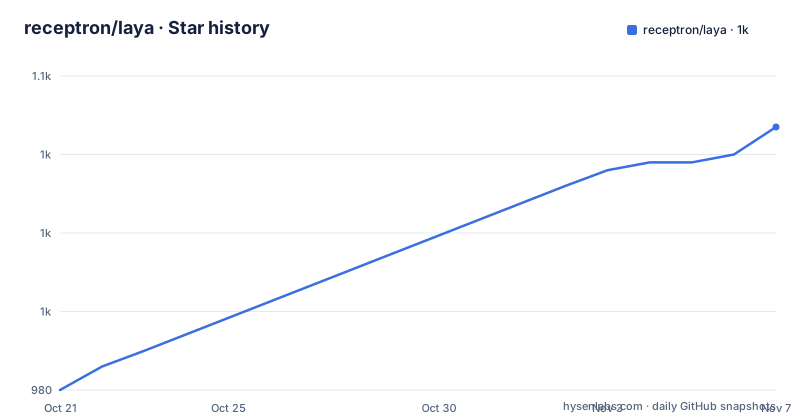
- receptron/laya1,047 ★ · +67
| Repository | 2026-10-21 | 2026-11-07 |
|---|---|---|
| receptron/laya | 980 | 1k |
67 Stars in the last 17 days, measured from the daily GitHub snapshot. Compare with other projects
Editorial analysis
Laya answers typed questions instead of writing text
Most local model wrappers give you a chat completion. This one does something narrower. Laya, described as the open-source, Jev-compatible System 1 decision model by Convai Innovations, does not generate text. You hand it a state, which can be a ticket, an email, or a JSON object, along with typed questions, and it returns every answer with calibrated probabilities in one forward pass. Three question types are supported. A choice question picks one option with a probability per option. A score question returns an expected level on an ordered rubric together with the distribution. A noul question gives a calibrated P(true) for a yes or no statement. The audience is application engineers who need a decision, not a paragraph: routing a support ticket to a department, scoring urgency on a scale, or estimating churn risk. Because everything happens in one pass, the cost of asking three questions is close to the cost of asking one.
ONNX Runtime instead of a Python service
The package runs the model with ONNX Runtime, and PyTorch and Python are not needed at runtime. That is the whole point of the wrapper. The request and response shape is the same as the Python reference implementation, RLAgent.system_one, and as the system_one API in TypeSafe Jev, and the README states that the output matches the Python implementation to four decimal places. The runtime dependencies in the package manifest are narrow: onnxruntime-node at version 1.22.0 or newer, and the Hugging Face tokenizers package. The package itself is ESM, with the main entry at ./dist/index.js and type declarations alongside at ./dist/index.d.ts, and it declares Node 20 or newer as its engine requirement. The model weights are not in the npm package. They come from a Hugging Face repository named in the options as receptron/laya-onnx, and the checkpoint variant is selected with a subfolder such as multilingual, which lets you pick a different published checkpoint from the same bundle repository.
Installing the package and warming the weight cache
Installation is a single command:
npm install @receptron/layaThe wrinkle is the download. The ONNX weights, about 1.7 GB in fp32, are fetched from Hugging Face on first use and cached under ~/.cache/receptron-laya, and the cache location can be overridden with the LAYA_CACHE environment variable. Memory is the other thing to plan for: budget roughly 2 GB of RAM for the loaded model plus a few hundred MB per batch of questions. Because the first Laya.load() includes that download, the README tells you to time it after the cache is warm rather than measuring the cold path. In a build step or a container image you can prefetch the weights with:
node -e 'import("@receptron/laya").then((m) => m.ensureBundle())'Later loads only send a cheap freshness check and read from the cache, which the README puts at about 4 seconds on an Apple M4, measured in issue 13. Node 20 is the floor, and CI runs on Node 20, 22, and 24 across Linux, macOS, and Windows. The @types/node version in devDependencies exists only for type checking the package and does not require Node 24 on your machine.
A full systemOne call with choice, score, and noul questions
The API is one call. You load the model, pass a state and a map of questions, and read typed answers back:
import { Laya } from "@receptron/laya";

const laya = await Laya.load();

const result = await laya.systemOne(
  { subject: "Refund not received", body: "I cancelled two weeks ago and still have no refund..." },
  {
    department: {
      type: "choice",
      instructions: "Which team should handle this ticket?",
      criteria: { billing: "payments, refunds, invoices", support: "product help and bugs", sales: "new purchases" },
    },
    urgency: {
      type: "score",
      instructions: "How urgent is this ticket?",
      criteria: ["not urgent", "somewhat urgent", "urgent", "critical"],
    },
    churn_risk: { type: "noul", instructions: "Is the customer likely to cancel or dispute?" },
  },
);
The answers come back under result.answers, keyed by the question names you chose, and the README notes that the answer types follow the question types, so result.answers.department is a ChoiceAnswer and result.answers.churn_risk a NoulAnswer without any casting. The shape of a choice result carries the winning label, a probabilities map, and answer_confidence, which is documented as the max probability and is present on every answer type. A score result carries an expected level, with the rubric indexed from zero, plus the distribution. The result also reports usage.input_tokens, so token accounting is available without a separate tokenizer pass. When you are done, laya.close() releases the session.
answer_confidence versus confidence, and why it matters for gating
There are two confidence numbers in the output and the README is emphatic that they are not the same quantity. answer_confidence is the probability of the reported answer, that is max(p). It is described as the quantity the checkpoint temperatures are fitted for, and it means the same thing for every question type. The confidence property on choice and score answers is something else entirely, namely one minus normalized entropy. If you gate a workflow on a threshold, an entropy-based number behaves differently from a probability, and it is not comparable across a choice question and a noul question. The project recommends answer_confidence for gating and confidence as a within-type spread indicator. Validate calibration and thresholds on representative data before relying on automated decisions, since fitting temperatures does not guarantee accuracy for every deployment. The measured latency for the three question call above is about 140 ms on an Apple silicon CPU once the model is warm, and every question in one systemOne call is batched into a single run, so adding questions to a batch is much cheaper than adding calls.
Options for local bundles, pinned revisions, and execution providers
The load options cover the situations that come up in production. You can point at a local ONNX export with modelDir, pin a specific commit with revision for reproducible results while main follows the repository, set a custom cache directory, pass a Hugging Face token for private repos, and subscribe to download progress:
await Laya.load({
  modelDir: "./onnx",
  repo: "receptron/laya-onnx",
  subfolder: "multilingual",
  revision: "main",
  cacheDir: "/var/cache/laya",
  token: process.env.HF_TOKEN,
  onProgress: ({ file, received, total }) => {},
  executionProviders: ["cpu"],
  sessionOptions: { intraOpNumThreads: 4 },
});
The executionProviders list is passed through to onnxruntime-node, so on a machine with a supported accelerator you can choose a different provider than cpu, and sessionOptions gives you direct control over the session, including the thread count. The cacheDir option is worth pairing with the LAYA_CACHE environment variable in a container, where the home directory is often not writable or not persistent. If your organisation mirrors model artifacts, modelDir is the cleanest route since it removes the network dependency entirely at start-up.
Exporting the ONNX bundle yourself for a newer checkpoint
The published bundle is enough for most people. You only need to export your own when you want a newer checkpoint or a variant that is not published, and the export directory contains export/export_onnx.py, which turns the Hugging Face checkpoint, a ModernBERT encoder plus Laya decision head, into one ONNX graph and copies the tokenizer and calibration values next to it. The export sequence uses uv for the environment and downloads the checkpoint with snapshot_download:
cd export
uv venv -p 3.12 .venv
uv pip install -p .venv/bin/python torch transformers safetensors onnx onnxscript onnxruntime huggingface_hub
.venv/bin/python -c "from huggingface_hub import snapshot_download; snapshot_download('convaiinnovations/laya', local_dir='model', allow_patterns=['model.safetensors','encoder/*','tokenizer/*','rl_agent_config.json','rl_common.py','rl_agent_api.py'])"
.venv/bin/python export_onnx.py model ../onnx
The script prints the maximum logit difference against PyTorch, which the README puts at about 1e-5. After that you load with Laya.load({ modelDir: "./onnx" }). The bundle is exactly five files, listed in BUNDLE_FILES: laya.onnx, laya.onnx.data, laya_config.json, tokenizer/tokenizer.json, and tokenizer/tokenizer_config.json. That is a small, inspectable artifact, which makes it easier to sign, checksum, or ship in a build than a full checkpoint directory.
Limits that will throw at runtime
Several constraints are documented as hard failures, and they are worth knowing before you wire this into a service. Each question's options must fit in head_max_len, which is 192 tokens, or systemOne throws. The model also recommends fewer than about 20 options per choice question. The state itself is truncated to max_len, which is 512 tokens for the English checkpoint, and the truncation happens after the question header. How the state is cut depends on its type: a string or object state keeps its start, while a list state, which is how a conversation is passed, keeps its newest end, matching training behaviour. Choice labels supplied as a list must be distinct, and a repeated label throws rather than being merged. Temperatures are clamped to the range 0.5 to 5, and the published bundle uses 0.945 for choice questions with eleven or more options, where the upstream checkpoint ships 0.1006, a value the Python laya package clamps to 0.5. The README is explicit that confidences for those questions therefore differ from upstream by design. One more subtlety affects reproducibility: a JSON state is serialized the way Python json.dumps with ensure_ascii=False would serialize it so that tokens match the reference implementation, and non-integer numbers may format differently between JavaScript and Python.
Editorial conclusion
@receptron/laya fits Node.js and TypeScript teams that want calibrated classification, scoring, and yes or no judgements from a local model without a Python service, particularly for ticket routing, urgency scoring, and similar decision support. It is a poor fit for free form generation, since Laya does not generate text, and a poor fit for small edge devices, since the loaded model wants roughly 2 GB of RAM and the fp32 weights are about 1.7 GB. Before adopting it, run ensureBundle() in your build step so the download does not land on a request path, confirm your state fits within the 512 token limit and each choice within 192 tokens, and decide whether to gate on answer_confidence, which is the quantity the checkpoint temperatures are fitted for.
Frequently asked questions
How do I install @receptron/laya and where are the model weights cached?
Run npm install @receptron/laya on Node 20 or newer. The ONNX weights, about 1.7 GB in fp32, are downloaded from Hugging Face on first use and cached under ~/.cache/receptron-laya, and the LAYA_CACHE environment variable overrides that location.
Does @receptron/laya need Python or PyTorch at runtime?
No. The package runs the model through ONNX Runtime with onnxruntime-node, and the README states that PyTorch and Python are not needed at runtime. Python is only used if you export your own ONNX bundle from a newer checkpoint using export/export_onnx.py.
What should I use to gate on confidence in @receptron/laya?
Use answer_confidence, which is max(p), the probability of the reported answer and the quantity the checkpoint temperatures are fitted for. The confidence property on choice and score answers is a different quantity, one minus normalized entropy, and it is not comparable across question types.
How many tokens of context can I pass to @receptron/laya?
The state is truncated to max_len, which is 512 tokens for the English checkpoint, and each question's options must fit in head_max_len of 192 tokens or systemOne throws. A string or object state keeps its start while a list state keeps its newest end.
What licence applies to @receptron/laya and the Laya weights?
The npm package is MIT licensed. The Laya model weights are published by Convai Innovations under Apache 2.0, so the two terms differ and the weights carry their own licence.
Official sources
Add this badge to your README
If you maintain this project, the badge below links readers to this analysis and shows its maintenance status from the daily GitHub snapshot. Paste the markdown into your README; add ?metric=license or ?metric=stars to the image URL for a different field.

[](https://hysenlabs.com/projects/receptron-laya)Star history chart for your README
[](https://hysenlabs.com/projects/receptron-laya)Was this useful?