redis-developer/ArXivChatGuru: a Streamlit RAG tutorial where Redis is the only interesting part
Use ArXiv ChatGuru to talk to research papers. This app uses LangChain, OpenAI, Streamlit, and Redis as a vector database/semantic cache.
At a glance
- What is it?
- ArXiv ChatGuru turns an arXiv topic into a topic-scoped Redis vector index and answers questions against the papers you loaded. It calls itself a learning project, and the repository says so: Docker runs Python 3.12 while the README tells you 3.13, the default Redis URL is a container name, and the last commit is dated 18 March 2026.
- Who is it for?
- ArXiv ChatGuru fits someone learning where Redis sits in a retrieval pipeline, since the app does one thing with it, names the three jobs it does, and gives you a stats page to inspect the resulting index. It is a poor fit if you want a research assistant to depend on, because the project states it is not meant to be production-ready and its own planned follow-ups are still metadata filters and better chunking.
- Can I use it commercially?
- Yes. MIT is a permissive licence: you can use, modify and sell software built on it, as long as you keep its copyright and licence notices.
- Is it still maintained?
- Activity is slowing. The repository last received commits 8 months ago.
- What is it written in?
- Mainly Python, according to GitHub's language statistics.
Answers come from the project's GitHub data, last synced on November 15, 2026, and from our analysis. They are not legal advice.
Star history
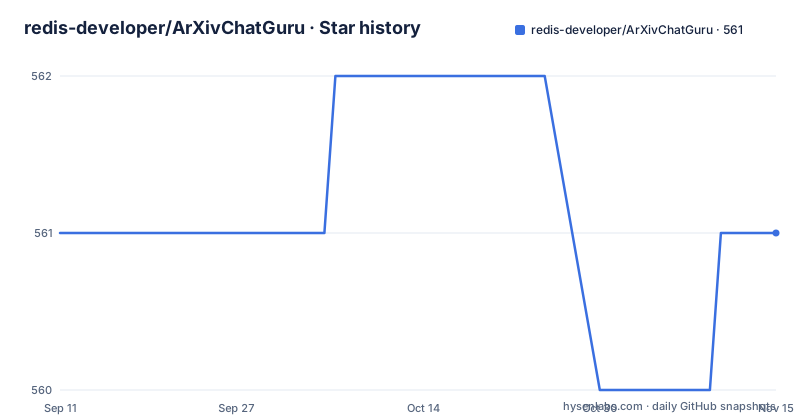
- redis-developer/ArXivChatGuru561 ★ · +0
| Repository | 2026-09-11 | 2026-11-15 |
|---|---|---|
| redis-developer/ArXivChatGuru | 561 | 561 |
0 Stars in the last 65 days, measured from the daily GitHub snapshot. Compare with other projects
Editorial analysis
The index is scoped by topic and you read it from a stats page
The unit of work is a topic, and it becomes a named Redis index.
You enter a topic and choose how many papers to load. The app pulls those papers from arXiv and splits them into chunks, OpenAI generates embeddings for the chunks, and Redis stores the chunks and the embeddings together in a topic-scoped index. LangChain then retrieves the closest chunks for each question and passes that context to the chat model.
Redis is given exactly three jobs in this app, and naming them plainly is the clearest thing about the design. It stores the topic-specific paper chunks and their embeddings. It powers vector search for the retrieval step. And it lets you inspect the active index from a built-in stats page.
That stats page is the part that makes it a tutorial rather than a demo. After loading a topic you open the Streamlit stats page and see index metadata, the indexed fields, and Query Engine stats for the active topic. You are expected to look at what was actually written.
The scope is honest too. The project calls itself a learning project for academic RAG, intentionally simple, meant to show how Redis fits into a paper question-and-answer workflow rather than to act as a production-ready research assistant.
Docker is the primary path and its Redis has no password
Docker is named the primary local path, and it is one command:
make docker-upThat brings up two services defined in docker-compose.yml. The app service is built from the repository root, publishes port 8501 to the host, reads its configuration from the .env file, and depends on the redis service. The redis service is the redis:alpine image with a named container, publishing port 6379 to the host and backing its data with a named volume called redis_data. Both are set to restart unless stopped, and the compose file declares that volume.
Two details are worth reading before you start it. Redis has no password and no requirepass line, and its port is published to the host rather than kept inside the compose network. On a machine reachable from another network, that is an open Redis. And the app depends_on redis, which in compose orders startup rather than waiting for Redis to accept connections, so an early request can still arrive before Redis is up.
Stopping is the matching command:
make docker-downThree Python versions across three files
The Python target is inconsistent across the repository, and it is the kind of mismatch that costs an afternoon.
The README asks for Python 3.13 for local development. The manifest allows a wider range than that, from 3.11 up to but not including 3.14. And the Dockerfile builds from the python:3.12-slim image, which is neither of the two above.
So a person following the README on a machine with 3.12 gets an environment the documentation did not describe, and a person on 3.13 is running newer than the container. The manifest is the permissive one, so nothing prevents either case from installing.
The local path is Poetry-based and looks like this:
python3 -m pip install --user poetrythen pointing the environment at 3.13 and running make install followed by make dev. If Poetry is not already present, the install step above is the documented way to add it.
The linting target agrees with the manifest rather than the README or the image: ruff is configured with a target version of py311 and a line length of 100, so the oldest supported interpreter is the one the tooling checks against.
The default Redis URL is a container name
The environment template ships four defaults, and one of them only works in one of the two documented setups.
The chat model defaults to gpt-4.1-mini and the embedding model to text-embedding-3-small. The index basename defaults to arxiv. And REDIS_URL defaults to redis://arxivchatguru-redis:6379.
That host is the compose service container name, not a resolvable address on your machine. So the default is correct for make docker-up and wrong for make dev, and the README says so: if you run locally outside Docker, make sure REDIS_URL points at a reachable Redis instance such as redis://localhost:6379.
The consequence is that the local path has a step the Docker path does not, and it is an edit rather than a flag. Nothing in the Makefile rewrites it, and there is no second template for the local case. You copy the template, set the OpenAI key, and then find out which one of the two you are running before the URL makes sense.
There is also a second template file in the repository, .env.azure.template, that the documentation never mentions.
The container turns off XSRF protection and binds every interface
The Streamlit invocation is where to look for the runtime posture, and it appears twice.
In the Dockerfile the command runs the app with four flags: the file watcher type is set to none, usage statistics gathering is false, XSRF protection is set to false, and the server address is 0.0.0.0. The Makefile defines the identical four values as a single STREAMLIT_FLAGS variable and uses them for make dev.
So the local development server is not bound to loopback either. Both paths listen on all interfaces, which is what a container needs and what a laptop does not.
Disabling XSRF protection is the other half. Combined with the OpenAI key living in the environment file and the interface being reachable from the network, a browser on that network can drive the app on your behalf. The Docker path publishes port 8501 to do this to make it reachable from a browser at all, and the standard trade is that the port should not be forwarded on an untrusted network.
The rest of the image is conventional. Bytecode writing and output buffering are disabled for a container, Poetry runs without interaction and with virtual environment creation turned off so dependencies land in the system interpreter, only main dependencies are installed with the root package excluded, and an OCI source label records the repository URL.
Five make targets, and one of them builds the image
The Makefile is the whole developer interface, and it is short enough to read in one pass.
make install runs poetry install with the dev group and no root package. make format runs ruff format over app and tests, so both directories are covered by one command. make test runs pytest. make dev starts Streamlit with the flags described above. make docker-up runs docker compose up with build, and make docker-down runs docker compose down. There is also make build, which runs docker compose build on its own, and all seven are declared phony so file names cannot shadow them.
Two things follow from that shape. The build target exists separately from the up target, which means the image can be built without starting anything, and docker-up passes --build so a stale image is rebuilt rather than reused.
Test discovery is configured rather than conventional. Pytest is given a pythonpath entry of app and a testpaths entry of tests, which is what lets a test import application modules by their package path without the package being installed, which is consistent with package-mode being false in the manifest.
Thirteen dependency lines for a project that calls itself simple
The dependency list is larger than the framing suggests, and reading it tells you what the app really is.
Thirteen lines, of which one is the Python constraint, so twelve packages. Five of them are LangChain: langchain-core, langchain, langchain-openai, langchain-redis and langchain-community. The split across five packages rather than one is a consequence of LangChain's packaging, and it means the integration surface with Redis and with OpenAI are separately versioned from the core.
The rest are the parts that make an arXiv reader work. arxiv for the paper feed, pymupdf for parsing PDFs, streamlit for the interface, redis for the client, python-dotenv for the configuration file, tenacity for retries, and aiohttp for the async HTTP calls.
The manifest pins them as caret ranges rather than exact versions, with poetry.lock carrying the resolved set, and the project is marked package-mode false, meaning it is not published as a library. Version is 0.2.0 and there are no GitHub releases, so the version lives in the manifest only.
The author field names one person and one organisation address, and the licence is MIT.
The planned follow-ups are filters and chunking
What is missing is listed as concretely as what exists, and the list explains the scope.
Three follow-ups are named. Better metadata filters, such as year or author. An improved chunking strategy for long papers. And chat history or memory features, added only if the tutorial needs them.
The third is qualified in a way that says a lot about the intent: memory is conditional on the tutorial requiring it, rather than being a planned feature on its own. That is the same restraint as the statement that the project is not meant to be a production-ready research assistant.
The first two are the ones with real consequences for anyone benchmarking against it. Without year and author filters, retrieval across a large topic is unfiltered by metadata. Without a chunking strategy tuned for long papers, a document's answer quality depends on how its text happened to split, and that is the variable that decides whether two runs agree.
The repository state at the time of writing: the last push to the default branch main is dated 18 March 2026, the repository is not archived, there are no releases, and the counters read 561 stars, 74 forks and 7 open issues.
Editorial conclusion
ArXiv ChatGuru fits someone learning where Redis sits in a retrieval pipeline, since the app does one thing with it, names the three jobs it does, and gives you a stats page to inspect the resulting index. It is a poor fit if you want a research assistant to depend on, because the project states it is not meant to be production-ready and its own planned follow-ups are still metadata filters and better chunking. Before you run it, check three things: that your Redis URL matches how you are starting it, since the template default is a Docker service name, which Python you have, since three different versions appear across the README, the manifest and the image, and that you are content with a Redis published on port 6379 with no password while you read the index over Streamlit with XSRF protection switched off.
Frequently asked questions
What does ArXiv ChatGuru do?
It is a Streamlit app that turns a topic from arXiv into a topic-scoped Redis vector index. It fetches papers, chunks them, stores the chunks and their embeddings in Redis, and answers grounded questions against the papers you loaded.
How do I run ArXiv ChatGuru?
Docker is the primary path: run make docker-up and open http://localhost:8501, then make docker-down to stop. For a local run, install Poetry, use Python 3.13, then make install and make dev, and point REDIS_URL at a reachable instance such as redis://localhost:6379.
Which models does ArXiv ChatGuru use by default?
gpt-4.1-mini as the chat model and text-embedding-3-small as the embedding model, both set in the .env template alongside REDIS_INDEX_BASENAME=arxiv. An OpenAI API key is a prerequisite.
Is ArXiv ChatGuru meant for production use?
No. It is described as a learning project for academic RAG, intentionally simple, meant to show how Redis fits into a paper question-and-answer workflow rather than to act as a production-ready research assistant. Its own planned follow-ups are metadata filters and better chunking.
What can I see about the Redis index ArXiv ChatGuru creates?
A built-in Streamlit stats page shows index metadata, the indexed fields, and Query Engine stats for the active topic once you have loaded that topic. Redis is given three jobs: storing chunks and embeddings, powering vector search, and letting you inspect the active index.
Official sources
Add this badge to your README
If you maintain this project, the badge below links readers to this analysis and shows its maintenance status from the daily GitHub snapshot. Paste the markdown into your README; add ?metric=license or ?metric=stars to the image URL for a different field.

[](https://hysenlabs.com/projects/redis-developer-arxivchatguru)Star history chart for your README
[](https://hysenlabs.com/projects/redis-developer-arxivchatguru)Was this useful?