RediSearch: the Redis module that stopped shipping on its own
A query and indexing engine for Redis, providing secondary indexing, full-text search, vector similarity search and aggregations.
At a glance
- What is it?
- RediSearch gives Redis secondary indexes, full-text search, vector similarity search and aggregations, but since Redis 8 it is part of Redis itself, so there is no standalone module left to install and no standalone release to wait for.
- Who is it for?
- Choose RediSearch when your data already lives in Redis and the query you need is search, filtering, geo or vector similarity over the same hashes, and you have settled the licensing question first: from Redis 8 onward you pick between RSALv2, SSPLv1 and AGPLv3. Skip it if you need to evaluate the module on its own, because standalone versions are no longer released, or if 32-bit targets matter, which the project states it does not support.
- Can I use it commercially?
- Check first. The repository uses a licence we do not classify automatically, so read its LICENSE file before any commercial use.
- Is it still maintained?
- Yes. The repository received new commits within the last day.
- What is it written in?
- Mainly Rust, according to GitHub's language statistics.
Answers come from the project's GitHub data, last synced on November 15, 2026, and from our analysis. They are not legal advice.
Star history
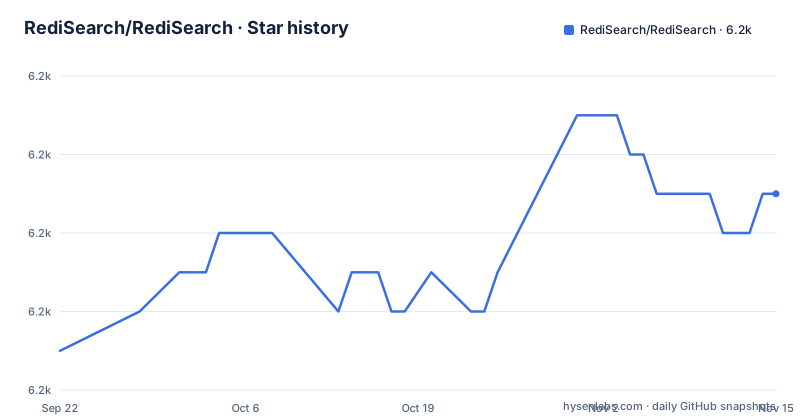
- RediSearch/RediSearch6,245 ★ · +4
| Repository | 2026-09-22 | 2026-11-15 |
|---|---|---|
| RediSearch/RediSearch | 6.2k | 6.2k |
4 Stars in the last 54 days, measured from the daily GitHub snapshot. Compare with other projects
Editorial analysis
Redis 8 folds the module in, which ends the standalone release line
The first two things to understand about this repository are not features at all. RediSearch is now integral to Redis 8, which means you do not install this module separately, and standalone versions of RediSearch are no longer released at all. Both statements sit in a note at the top of the README, above the overview, and both change what a build engineer actually does. There is no artifact to fetch from a release page and no `loadmodule` line pointing at a downloaded shared object, because the query engine arrives with Redis itself. The release history shows what that meant in practice: three tags, v2.10.31, v2.8.38 and v2.6.37, all published on 2026-06-17 within a few hours of each other, at 14:32, 10:36 and 12:55 UTC. That is patching across three lines at once, so the branch you pick is a stability choice rather than a features choice. Nothing in the listing says which line Redis 8 embeds, so confirm that against the Redis repository the README points to before choosing a tag. The repository itself is not archived and its last push was on 2026-11-02.
The Makefile is a compatibility shim over build.sh
You will not find build targets written out in the Makefile. Its own header says it acts as a thin wrapper around build.sh, providing backward compatibility for existing make targets while using build.sh for all actual build operations. Two lines show how little the Makefile decides:
BUILD_SCRIPT := $(ROOT)/build.sh
.DEFAULT_GOAL := build
It also makes sure the script is executable before calling it, and it prepends `$HOME/.cargo/bin` and `$HOME/.local/bin` to PATH, which tells you the build expects a Rust toolchain and a local Python install rather than a system-wide one. The Makefile is marked `.NOTPARALLEL` with `MAKEFLAGS += --no-print-directory`, so recipes run in sequence and make's directory messages are suppressed. If you are scripting a build, call build.sh directly and skip the make layer, because the make layer exists for the comfort of people and CI setups that expect make targets rather than for anything the build itself needs.
COORD, SAN and MAX_WORKER_THREADS become build.sh arguments
The interesting part of the Makefile is its translation table. Each make variable is tested and, when set, appended to BUILD_ARGS, which is then handed to build.sh. `COORD` is special: both `COORD=1` and an empty value are overridden to `oss`, so there is no way to leave it unset, and the flag is always passed. Plain switches like DEBUG, PROFILE, TESTS, FORCE and VERBOSE are appended only when they equal 1. Values that carry data are forwarded verbatim, including `ENABLE_ASSERT`, `SAN`, `MAX_WORKER_THREADS` and `RUST_PROFILE`, while `COV` and `RUST_DYN_CRT` are passed as `COV=1` and `RUST_DYN_CRT=1` only when set to 1:
ifeq ($(COORD),1)
	override COORD := oss
else ifeq ($(COORD),)
	override COORD := oss
endif
BUILD_ARGS += COORD=$(COORD)

ifneq ($(SAN),)
	BUILD_ARGS += SAN=$(SAN)
endif

ifneq ($(MAX_WORKER_THREADS),)
	BUILD_ARGS += MAX_WORKER_THREADS=$(MAX_WORKER_THREADS)
endif
So the build has a sanitizer mode, a thread cap and a Rust profile dial, all reachable as environment variables on the make command line. Reading this file is the fastest way to learn what the build can do, because every knob it exposes is named there.
The Dockerfile installs bash before it installs the Rust toolchain
The container build makes an unusual ordering choice explicit. It takes the base image as a build argument rather than hardcoding one, with the comment showing ubuntu:24.04, rockylinux:9 and alpine:3 as the intended choices, and then its very first step installs bash if the image does not have it, trying apt-get, then yum, then apk in sequence. Only after that does it run the dependency installer, with SKIP_BOOST=1 and SKIP_PYTHON_TEST_DEPS=1 passed through `bash retry.sh bash -l -eo pipefail install_script.sh`. Two details there are worth copying if you build this yourself. The `-eo pipefail` flags make the installer fail loudly instead of continuing past a broken step, and `retry.sh` wraps it, so transient network failures during toolchain download are retried. LLVM is installed conditionally, only when the build argument is `address`, which is the sanitizer build path rather than the normal one.
BM25 ranks by default and you supply the field weights
Ranking is a documented choice rather than an opaque one. Document ranking uses BM25 as the default scoring method, and optional user-provided weights are supported, alongside field weighting as its own listed capability. So the question of what a result means is answerable: the score is a term weighting formula over the indexed text, and the per-field importance is yours to set when several fields are indexed. Alongside that, retrieval is flexible in shape: you can pull full documents, selected fields, or only document IDs, and you can sort results, the example given being by creation date. The boolean layer supports AND, OR and NOT, with prefix matching, fuzzy matching and exact-phrase queries. What the feature list does not mention is any cross-field relevance learning or machine reranking of results, so the ranking story ends at weighted term statistics.
Chinese goes through Friso, everything else through Snowball
Language handling is split across three named third-party engines, and each covers a different problem. Stemming based query expansion works in many languages and uses the Snowball stemmer. Chinese-language tokenization and querying uses Friso, which is a separate choice because Chinese word segmentation needs a dictionary-driven segmenter rather than a suffix stripper. Phonetic matching uses double-metaphone, which lets a query spelled one way find text pronounced another way. Auto-complete is also there, and it supports fuzzy prefix suggestions, so a partially typed term can still match. What is not covered by these entries is per-language stemming configuration in the feature list itself, nor any analyzer for languages that need something other than a Snowball stemmer; the language list for stemming lives behind the documentation link rather than in the repository, which is where you would look before promising a specific language is handled.
Vector search arrives as KNN, filtered KNN and a range query
Vector similarity search is described in three shapes rather than one. KNN is the plain nearest neighbours case, filtered KNN restricts the candidate set with a filter, and a range query covers the case where you want everything inside a distance bound. That third form is the one people reach for when a model score has a natural cutoff. The same entry point also lists geospatial search built on Redis geospatial indexing, and geoshape indexing as a separate capability, so polygon work is not folded into the point-in-circle feature. The whole set of these features shares one indexing model: you declare indexes on your Redis data first, then query them with the RediSearch query language. What the feature list does not claim is anything about recall tuning, index build times under write load, or how the vector index behaves when the underlying hashes are updated frequently, so treat those as questions for the documentation and for your own load rather than as answered properties.
32-bit targets are excluded and cluster search is a commercial feature
Two boundaries are stated plainly and both will affect a decision. The first is a note in its own right: 32 bit systems are not supported. There is no fallback build for an ARMv7 or x86 32-bit host, so a legacy machine in your fleet simply is not a candidate, whatever the Redis version is. The second is scope. RediSearch has a distributed cluster version that scales to billions of documents across hundreds of servers, but at the moment distributed RediSearch is available as part of Redis Cloud and Redis Enterprise Software. That is the honest catch in the whole repository: the sharding and scale story exists, and it is not something you get from building this module yourself. A team that wants to self-host a clustered search tier on plain Redis would have to design that topology elsewhere. The primary language of the code is Rust, and the build is driven by build.sh, CMakeLists.txt and the scripts directory rather than by a conventional package manifest.
Editorial conclusion
Choose RediSearch when your data already lives in Redis and the query you need is search, filtering, geo or vector similarity over the same hashes, and you have settled the licensing question first: from Redis 8 onward you pick between RSALv2, SSPLv1 and AGPLv3. Skip it if you need to evaluate the module on its own, because standalone versions are no longer released, or if 32-bit targets matter, which the project states it does not support. Distributed search across hundreds of servers is only available through Redis Cloud and Redis Enterprise Software, so a self-hosted cluster plan has to account for that. Before you commit, read the licensing terms in the license folder, and check the release page for the 2.x line you would actually deploy.
Frequently asked questions
What is RediSearch?
RediSearch is a Redis module that provides querying, secondary indexing and full-text search for Redis. You declare indexes on your Redis data, then query that data with the RediSearch query language. It uses compressed inverted indexes, and adds exact-phrase matching, fuzzy search, numeric filtering, aggregations, geospatial search and vector similarity search to Redis.
How do I install RediSearch now?
Starting with Redis 8, RediSearch is integral to Redis and you do not need to install the module separately. Standalone versions are no longer released, so there is no module artifact to download. The project points at the redis repository for the current picture.
Is RediSearch open source?
Starting with Redis 8 it is licensed under your choice of Redis Source Available License 2.0, the Server Side Public License v1, or the GNU Affero General Public License version 3, and the full terms are in the license folder. Prior versions remain subject to the first two of those. Contributions are accepted under the Redis Software Grant and Contributor License Agreement.
Is RediSearch free to use?
The module itself ships as part of Redis with the three license options described in the repository, so there is no separate paid module download. The part that is not free of conditions is distributed search: the cluster version is available as part of Redis Cloud and Redis Enterprise Software.
What is the difference between RediSearch and Redis itself?
Redis is the data store, and RediSearch is the module that adds secondary indexes, full-text search, vector similarity search and aggregations on top of it. Since Redis 8 the distinction is packaging rather than deployment: RediSearch is integral to Redis and no longer released on its own.
Official sources
Add this badge to your README
If you maintain this project, the badge below links readers to this analysis and shows its maintenance status from the daily GitHub snapshot. Paste the markdown into your README; add ?metric=license or ?metric=stars to the image URL for a different field.

[](https://hysenlabs.com/projects/redisearch-redisearch)Star history chart for your README
[](https://hysenlabs.com/projects/redisearch-redisearch)Was this useful?