Reticle asks for Node 20 and its manifest requires 22
AI agents can generate code, but they still struggle to understand what they build. Reticle gives them runtime perception of web & desktop applications.
At a glance
- What is it?
- A verification layer that drives a running web app over MCP and answers pass, fail or couldn't tell with a file and line number. The install instructions pipe a script from the main branch, the installer pre-approves its own tools, and the default connect path sends your history to a cloud project.
- Who is it for?
- The verification idea is worth the trouble and the documentation is unusually honest about its own limits, which is more than most tools in this space manage. Before running the installer, read three things and pick your path deliberately.
- Can I use it commercially?
- Check first. The repository uses a licence we do not classify automatically, so read its LICENSE file before any commercial use.
- Is it still maintained?
- Yes. The repository received new commits within the last day.
- What is it written in?
- Mainly TypeScript, according to GitHub's language statistics.
Answers come from the project's GitHub data, last synced on November 22, 2026, and from our analysis. They are not legal advice.
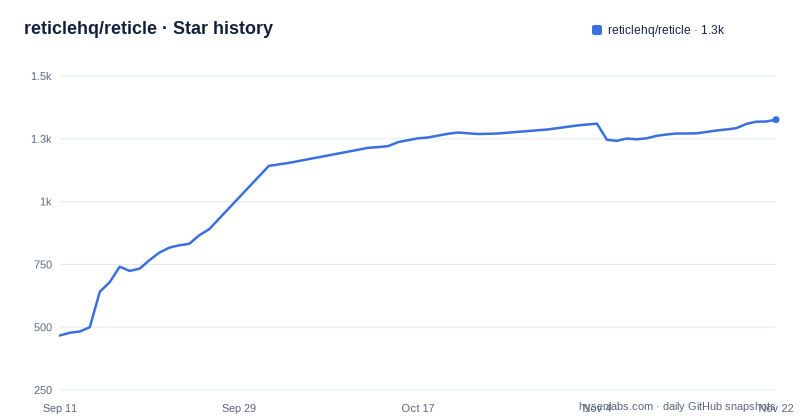
Star history
- reticlehq/reticle1,326 ★ · +859
| Repository | 2026-09-11 | 2026-11-22 |
|---|---|---|
| reticlehq/reticle | 467 | 1.3k |
859 Stars in the last 72 days, measured from the daily GitHub snapshot. Compare with other projects
Editorial analysis
The install page and the manifest disagree about Node
The install section opens by stating you need Node 20.11 or newer. The package manifest at the root of the same repository declares its engine requirement as Node 22.12 or newer, and pins a package manager at a specific major version. That is a two major version gap between what a reader is told and what the tooling enforces, and it is the kind of mismatch that turns into a confusing failure rather than a clear one, because the install path goes through npm or a shell script rather than through the engine check. The rest of the runtime story is consistent: the root is a pnpm workspace with a task runner, TypeScript project references, Vitest configured three separate ways, and the package description describes observing and verifying a running web app over MCP with no screenshots.
The installer registers itself and pre-approves its own tools
Installing is one line, and it is a piped script fetched from the main branch:
curl -fsSL https://raw.githubusercontent.com/reticlehq/reticle/main/install/install.sh | shwith a PowerShell equivalent for Windows. The page then explains what it does to your machine: it installs the CLI, registers its MCP server with whichever coding agents it finds, and configures approval for its own tools where the agent supports that. In other words the installer edits your agent configuration to pre-approve Reticle's tool calls, so prompts for its actions stop appearing. That is stated plainly, and the page names the trade-off in the opposite direction too: if you register the server yourself instead, its approval prompts are left as they are. The target is the moving main branch rather than a tag, so what runs is whatever is there when you run it.
The no-pipe route exists and it is inside a disclosure
There is a manual path, and it is not the one the page leads with. It sits inside a collapsed section labelled no pipe to shell:
npm install -g @reticlehq/server   # 1. the CLI
npx @reticlehq/server setup mcp    # 2. register it with your agents
Skipping step two and adding the server to a client yourself is the third option, shown as a configuration object with the command set to npx and the server argument, which leaves the approval prompts untouched. Two more routes follow for people who want the skill rather than the whole registration: a marketplace add followed by a plugin install for one agent, and a single command that adds the skill for any agent supporting the skills interface. So four install paths exist, differing in how much they write to your configuration and whether they bypass prompts, and the ordering of the page puts the most privileged one first.
Connect uploads your history, init does not
Two commands wire an app, and they are not equivalent. The documented default opens a browser for sign-in approval, links your folder to a cloud project, and sends any Reticle history already present on the machine. The alternative is explicitly local: nothing from your project goes to the cloud until you choose to connect it, and there is a dry run flag to preview the changes the command would make to your app first. A third command tells you which cloud project a folder is linked to, which only matters if you connected one. Both paths then do the same local work: install a development-only SDK, wire your build configuration, start your dev server and prove that a browser session actually connects. If your dev server was already running, the page tells you to restart it once.
The maintainers telemetry opt-out is a source-checkout detector
The environment template is four lines of comment and one assignment, and the comment is more interesting than the assignment. It sets the telemetry variable to zero and also honours the cross-tool convention for not tracking. Then it explains that the committed guarantee that development never reports telemetry is not the assignment at all but a function named for detecting a source checkout, which recognises the monorepo by its root package name. So the promise that the project's own developers are not reporting usage is enforced by code that inspects where it is running, and the file describes itself as a belt to that structural support. It also points at a separate document for exactly what can be synced.
The repository benchmarks its own false passes
Most verification tools publish a hit rate. This one publishes the failure modes. The benchmark scripts at the root include a cost measurement for exploration, a verifier for a corpus named after false greens, and a recoverability measurement for diagnosis, and the test script runs the benchmark harness, the evaluation set and the end-to-end apps together. There is also a separate guard test suite distinct from unit tests, and a documentation lint that executes command blocks and code samples from the docs, checks that the documentation index covers them, and asserts that the published skill artefacts match. That is a project testing its own instructions, which is the discipline that keeps a tool with this many install paths honest. It also explains why the headline verdict has three states rather than two.
Two root directories the page never explains
The top level runs to around fifty entries. There is the obvious set: an adapters directory, an engine directory, a server, an initialisation package, an install directory, skills, a plugin, a spec runner, conformance and open verification folders, apps and tests, and a bench tree. Then the governance documents, a changelog with a changes directory and an assemble script, a migration guide, a releasing guide, a roadmap, a security policy, a code of conduct, a contribution guide, an agent instruction file and a skill file, plus a text file written for language models, a dead-code config, a task runner config and two git hook scripts. Among the rest, one directory is named break and nothing on the page refers to it. And the licence is a third inconsistency: the repository metadata comes back unclassified while a licence file sits at the root behind a badge.
Editorial conclusion
The verification idea is worth the trouble and the documentation is unusually honest about its own limits, which is more than most tools in this space manage. Before running the installer, read three things and pick your path deliberately. Use the manual npm route rather than the piped script if you would rather review what lands in your agent configuration, because the difference is exactly the automatic approval of its own tools. Use the local initialisation path rather than connect unless you want your run history in someone else's cloud project. And install on Node 22 or newer regardless of what the page says, because that is what the package manifest will check.
Frequently asked questions
What does Reticle actually verify?
It drives the real running application and reports pass, fail, or couldn't tell for a flow you describe in plain English, with the request that fired, the state that changed, the console line, and the file and line to fix. The page positions it beside scanners rather than over them, saying security checks pair with a vulnerability scanner and accessibility checks pair with a full audit tool.
What does installing Reticle change on my machine?
The installer installs the CLI, registers its MCP server with the coding agents it finds, and configures approval for Reticle's own tools where the agent supports it, so its prompts stop appearing. A manual npm route does the same registration, and adding the server to a client yourself leaves the approval prompts untouched.
Does Reticle send my project to a cloud service?
Only the connect path does. It opens a browser for sign-in approval, links the folder to a cloud project and sends any Reticle history already on the machine. A separate initialisation command is local only, with a dry run flag for previewing the changes it would make. A whoami command reports which cloud project a folder is linked to.
What Node version does Reticle need?
The install section says Node 20.11 or newer, while the package manifest declares an engine requirement of Node 22.12 or newer and pins a specific package manager version. The manifest is the stricter of the two and is the one your tooling will check.
Does Reticle report telemetry?
The environment template disables anonymous usage telemetry and honours the cross-tool do-not-track convention. It also explains that the guarantee covering the project's own development is a function that detects a source checkout by the monorepo's root package name, rather than the environment setting, and points to a separate document for what can be synced.
Official sources
Where developers are discussing it
Posts on Hacker News, dev.to and Lobsters that link to this repository, found by our scan of those communities. 0 in the last 30 days; newest first.
- Show HN: Make AI coding agents verify its own workHacker News · Oct 20, 2026 · 11 points · 6 comments
Add this badge to your README
If you maintain this project, the badge below links readers to this analysis and shows its maintenance status from the daily GitHub snapshot. Paste the markdown into your README; add ?metric=license or ?metric=stars to the image URL for a different field.

[](https://hysenlabs.com/projects/reticlehq-reticle)Star history chart for your README
[](https://hysenlabs.com/projects/reticlehq-reticle)Was this useful?