Zep: a small embeddable editor with an optional Vim mode
Zep - An embeddable editor, with optional support for using vim keystrokes.
At a glance
- What is it?
- Zep is a mini editor library written in C++ with a rendering agnostic core, an optional modal Vim editing mode, and backends for Qt and Dear ImGui, intended for embedding in a game engine as an in-game or live-coding editor. It suits a developer who wants a text field with real editing behaviour and no dependency on something as heavy as Neovim, and its Vim mode is deliberately a subset.
- Who is it for?
- Adopt Zep if you are embedding a text editor into a C++ application, a game engine or a live-coding tool and want something lighter than a full editor framework. Skip it if you need a complete Vim experience, because the documentation is explicit that ex commands such as %s///g for find and replace are missing.
- Can I use it commercially?
- Check first. The repository uses a licence we do not classify automatically, so read its LICENSE file before any commercial use.
- Is it still maintained?
- Yes. The repository last received commits 169 days ago.
- What is it written in?
- Mainly C++, according to GitHub's language statistics.
Answers come from the project's GitHub data, last synced on November 7, 2026, and from our analysis. They are not legal advice.
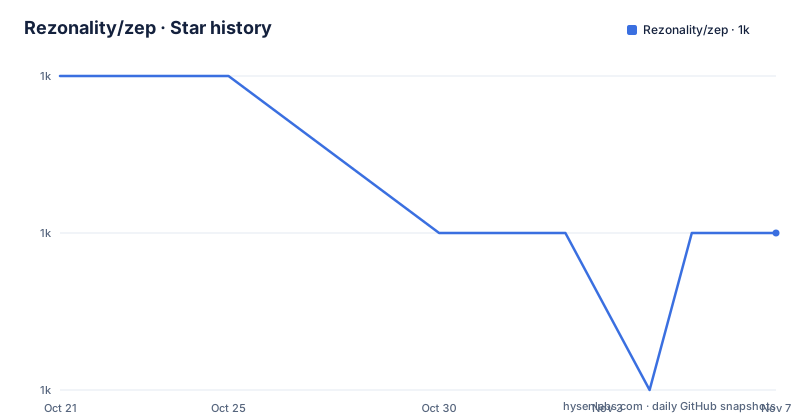
Star history
- Rezonality/zep1,041 ★ · -1
| Repository | 2026-10-21 | 2026-11-07 |
|---|---|---|
| Rezonality/zep | 1k | 1k |
-1 Stars in the last 17 days, measured from the daily GitHub snapshot. Compare with other projects
Editorial analysis
What Zep is, and where it is meant to live
Zep is a simple embeddable editor with a rendering agnostic design and optional Vim mode, built as a shared modern-cmake library, usable as a single header include or as a static library. The core library is dependency free, and the demo application requires an installed package, and it is possible just to copy the files into your project and build it. The stated purpose is embedding. Zep is ideally suited to embedding in a game engine, as an in-game editor, or anywhere you need a simple editor without a massive dependency on something more substantial like NeoVim. It is also intended to eventually sit inside a live-coding environment, which is the direction the author names as a target, and the repository has screenshots of Zep embedded in a game engine and in a live coding tool, plus a minimal mode intended for exactly that. The primary language is C++, the licence is a custom one GitHub cannot classify although the badge says MIT, and the releases are v0.1.12 from 2020-10-16 and v0.1.11 from 2020-09-11, with the last push on 2026-05-23.
The two rendering backends, and why the core is agnostic
Out of the box Zep can draw to a Qt Widget or an ImGui window, and the point of the agnostic core is that the editing logic does not know which. A header-only implementation of the ImGui and Qt backends is provided as an addendum to the core library, which enables Zep to render in an ImGui or Qt environment. After building and installing Zep on your system, only two lines are required in your CMakeLists to use it, and the mechanism is a `Zep::Zep` target in `target_link_libraries`. An alternative is to just copy and build the source files for the core library into your project, which is the option for a project that does not want a dependency in its build system at all. The demos for Qt and ImGui require additional packages, but these are not required to embed Zep in an application, and the ImGui demo builds and runs on Windows, Linux and Mac OS. The topics list confirms the technology set, with imgui, qt, qt6, opengl, direct3d and sdl all named.
Editing modes, and the Vim subset
The editing model offers a modal vim style or a modeless standard editing style, both built around a common core of functionality, and the demo project lets you switch between the modes on the fly. The author is direct about the intent, saying Zep is not meant to replace Vim, that he does not have a lifetime spare to write that, but it has most of the functionality he uses day to day and anything missing gets added over time. A keymapper enables configuration of Zep outside the standard modes offered, and there is more generic keymapping for extensible modes. The current limitation is stated too, and it is a real one. Vim mode is limited to common operations, not the extensive set of commands typical in Neovim or Vim. There are now a considerable number of commands, but notably ex commands are missing, such as %s///g for find and replace. If your workflow depends on ex commands, this is where it stops.
The feature set beyond editing
The key features list covers more than the text buffer. There is terminal-style text wrapping and a work in progress non-wrapped mode. There are splits and tabs. There is a simple syntax highlighting engine with pluggable secondary highlighters, and theme support. There is a Repl for integrating a command or scripting language, with the demo project integrating a Janet Lang interpreter reachable as `:ZRepl`, and the try being `(+ 2 2)`. There is CTRL+P search for quick searching files with fuzzy matching. There are text markers for highlighting errors. And there is a minimal mode, which is the one aimed at the live-coding use case. Recently added features include support for tabs instead of spaces with the display of tabs as whitespace arrows, UTF8 support that is marked as a work in progress and not completely done yet, and /search support. The configuration lives in a simple toml-format file, `zep.cfg`, which is in the repository root.
The repository, and how the build is organised
The tree shows a project that has been set up carefully for a long life. There is a `CMakeLists.txt` at the root with a `cmake/` directory, `src/` and `include/` for the library, `demos/` for the Qt and ImGui applications, `tests/` with over 200 unit tests for the editing modes, and `scripts/`. The build is driven by a family of configuration scripts, with `config.sh`, `config_imgui.sh`, `config_qt.sh` and `config_qt_imgui.sh` and the matching `config.bat` files for Windows, plus `build.sh` and `build.bat` and a `prebuild.sh` and `prebuild.bat`. The `libonly` configuration name is the one that matters for embedding, since it builds the core library without any of the demo frontends. There is a `vcpkg` directory for dependency management, an `app_config.h` for compile-time configuration, an `Info.plist` for the macOS bundle, and a `.zep/` directory which is the editor's own project directory holding per-project state.
The project's stated limits and its pace
The author's own account of the project is unusually direct and worth repeating in substance. Zep was his 2018 project but has already proved quite popular, and he tries to throw more features in when he can, and he works on it at York Developer's regular Code and Coffee sessions. The project started mainly as an experiment and a learning exercise, and the philosophy is stated as liking the idea of a programmer building programmer tools for their own use, just as carpenters used to build their toolbox. Two targets are named. One is to get Zep to the point where it can be used as a standalone editor for common tasks, which the author says is almost equivalent to how he would use NeoVim day to day. The other is to use it in a live-coding environment. The limited rate of development is the honest caveat, and the tag list of hacktoberfest and a Discord channel show the community around it is small but present.
Editorial conclusion
Adopt Zep if you are embedding a text editor into a C++ application, a game engine or a live-coding tool and want something lighter than a full editor framework. Skip it if you need a complete Vim experience, because the documentation is explicit that ex commands such as %s///g for find and replace are missing. Before you commit, note that it is an early project with tagged releases dating from 2020 and the last push on 2026-05-23, that the core library is dependency free while the demo application needs an installed package, and that the build requires a modern C++ compiler with C++14 as the baseline.
Frequently asked questions
What is Zep?
A simple embeddable editor with a rendering agnostic design and optional Vim mode, built as a shared modern-cmake library usable as a single header include or as a static library. The core library is dependency free and needs only a modern C++ compiler.
How do I embed Zep in my project?
Build and install Zep, then set the Zep::Zep target in target_link_libraries, which is two lines in your CMakeLists. Alternatively copy and build the core library source files directly into your project. A header-only implementation of the ImGui and Qt backends is provided as an addendum to the core library.
Is Zep's Vim mode a full Vim?
No. The documentation states that Vim mode is limited to common operations rather than the extensive command set typical of Neovim or Vim, and that while there are now a considerable number of commands, ex commands are missing, such as %s///g for find and replace.
What can I build Zep against?
C++14 is the basic requirement, and it builds on VC 2017, GCC 6 and Clang. The ImGui demo builds and runs on Windows, Linux and Mac OS, and the Qt and ImGui demos need additional packages that are not required to embed Zep itself.
Official sources
Add this badge to your README
If you maintain this project, the badge below links readers to this analysis and shows its maintenance status from the daily GitHub snapshot. Paste the markdown into your README; add ?metric=license or ?metric=stars to the image URL for a different field.

[](https://hysenlabs.com/projects/rezonality-zep)Star history chart for your README
[](https://hysenlabs.com/projects/rezonality-zep)Was this useful?