free-claude-code: a proxy that puts other model backends behind the Claude Code CLI
Use Claude Code for free in the terminal, VSCode extension, or via Discord
At a glance
- What is it?
- free-claude-code is a Python proxy that intercepts the Anthropic API calls Claude Code makes and forwards them to NVIDIA NIM, OpenRouter, LM Studio or eight other providers, so the CLI and VSCode extension run without an Anthropic key. It is a compatibility shim with a feature set, not a substitute for Claude's own models, and it requires Python 3.14.
- Who is it for?
- free-claude-code fits a developer who wants the Claude Code interface and tooling driven by a free or local model, especially with LM Studio for offline work, and it does not fit a team that needs Anthropic model behaviour, since the mapping layer sends your requests to a different model entirely.
- Can I use it commercially?
- Yes. MIT is a permissive licence: you can use, modify and sell software built on it, as long as you keep its copyright and licence notices.
- Is it still maintained?
- Yes. The repository last received commits 22 days ago.
- What is it written in?
- Mainly Python, according to GitHub's language statistics.
Answers come from the project's GitHub data, last synced on November 7, 2026, and from our analysis. They are not legal advice.
Star history
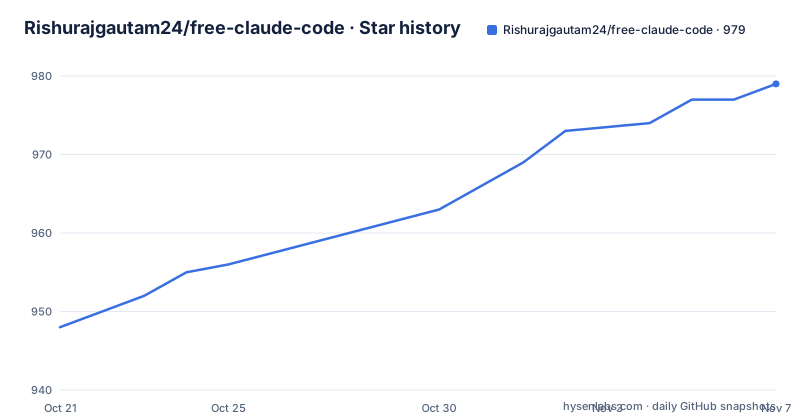
- Rishurajgautam24/free-claude-code979 ★ · +31
| Repository | 2026-10-21 | 2026-11-07 |
|---|---|---|
| Rishurajgautam24/free-claude-code | 948 | 979 |
31 Stars in the last 17 days, measured from the daily GitHub snapshot. Compare with other projects
Editorial analysis
A compatibility shim, not a free Anthropic
The claim on the repository is precise and worth repeating exactly as stated: a lightweight proxy that routes Claude Code's Anthropic API calls to NVIDIA NIM at 40 requests per minute free, to OpenRouter with hundreds of models, or to LM Studio fully locally. The mechanism is substitution, not cracking. Claude Code speaks the Anthropic API; the proxy accepts those calls, translates them, and forwards them to whichever backend you named in the MODEL variables, then translates the response back. What you get is the Claude Code interface, its tool calls, its session handling and its editor integration, running on a different model. What you do not get is Claude. The models in the example configuration are GLM, Kimi, Step, DeepSeek, GPT-OSS, Qwen and MiniMax, so the reasoning quality, context window and tool-use behaviour are those of the substitute model. Anyone evaluating this should hold that distinction in mind, because the value is workflow continuity rather than model capability.
Two environment variables and a model prefix
The drop-in claim is implemented through configuration rather than patching. The proxy exposes an Anthropic-compatible endpoint and Claude Code is pointed at it with two environment variables, with no modification to the Claude Code CLI or the VSCode extension required. The model selection syntax is a prefix: provider_type/model/name, so nvidia_nim, open_router, lmstudio, ollama, groq, cerebras, gemini, mistral, deepseek, together and custom are the valid prefixes.
MODEL_OPUS="nvidia_nim/z-ai/glm4.7"
MODEL_SONNET="open_router/arcee-ai/trinity-large-preview:free"
MODEL_HAIKU="open_router/stepfun/step-3.5-flash:free"
MODEL="nvidia_nim/z-ai/glm4.7"
Mapping per Claude model tier is the interesting part. Claude Code issues requests under Opus, Sonnet and Haiku names, and the proxy decides what each of those maps to, so you can send the cheap tier to one provider and the heavy tier to another. The MODEL variable is the fallback, and the configured models show up in Claude Code's own /model picker, which means you can switch backend models mid-session without restarting the CLI.
Getting it running from a clone to a configured proxy
The setup path is short. You need a provider key, or none at all if you use LM Studio, and you need Claude Code and uv installed. The repository suggests updating uv with uv self update if it is already present.
git clone https://github.com/Rishurajgautam24/free-claude-code.git
cd free-claude-code
cp .env.example .env
Editing .env is the next step, and the .env.example file in the tree is the reference. The provider block holds NVIDIA_NIM_API_KEY, OPENROUTER_API_KEY and LM_STUDIO_BASE_URL pointing at http://localhost:1234/v1, plus the OpenAI-compatible keys GROQ_API_KEY, CEREBRAS_API_KEY, GEMINI_API_KEY, MISTRAL_API_KEY, DEEPSEEK_API_KEY and TOGETHER_API_KEY, along with OLLAMA_BASE_URL defaulting to http://localhost:11434/v1 and CUSTOM_BASE_URL for anything else that speaks the OpenAI chat API. There is also a doctor.py at the top level of the repository, and the Python requirement is strict: pyproject.toml sets requires-python to >=3.14, and the Dockerfile builds on python:3.14-slim.
A per-provider rate limit, a concurrency cap and 429 backoff
Free tiers fail in predictable ways, so the proxy deals with them directly. The configuration exposes a rolling-window throttle, backoff on 429 responses and a concurrency cap, applied separately for each provider rather than globally, which is the right shape when you have two providers with very different quotas.
PROVIDER_RATE_LIMIT=40
PROVIDER_RATE_WINDOW=60
PROVIDER_MAX_CONCURRENCY=5
A limit of 40 requests per 60 seconds and a maximum concurrency of 5 is the NVIDIA NIM free tier as documented, and the per-provider split means an OpenRouter fallback is not throttled by NIM's exhausted quota. There is also a stream keepalive feature: SSE pings are sent while a slow model is thinking so the client does not drop a quiet stream. That is a real detail rather than a cosmetic one, since a long thinking block with no bytes on the wire is exactly the situation where a client-side timeout fires and the request dies mid-answer.
Fallback chains decide what happens when a free model breaks
Because a free endpoint can fail at any moment, the proxy supports fallback chains inside a single model variable. The syntax is a comma-separated list, and the semantics are specific: the next model is tried when one fails before sending any output, so the chain does not produce duplicated or merged answers mid-stream.
# All Claude model requests are mapped to these models, plain model is fallback
# Format: provider_type/model/name
# Fallback chain: comma-separate models, e.g. MODEL_SONNET="nvidia_nim/a,open_router/b"
The example file spells this out in a comment, noting that the next model is tried when one fails before sending any output. This is the single most operationally important behaviour in the project, because on a free tier a hard failure is the normal case rather than the exception. The trade-off is a limit on control: once the chain is configured, a failing model is invisible unless you read the logs, and you have no way to tell from the Claude Code window that your request was served by the second model in the list.
The proxy holds your prompts, so the log level matters
Security details in the .env file deserve attention because the proxy sits between you and your model provider, which means it sees your prompts and your code. The file warns that LOG_LEVEL controls server.log verbosity and that DEBUG also writes full request payloads including prompts and file contents. The default is INFO, which is the setting to keep. The default bind address is HOST="127.0.0.1", and the documentation states that the proxy listens on localhost only, with PROXY_AUTH_TOKEN as an optional gate that clients must send as ANTHROPIC_AUTH_TOKEN, optionally in the form token:provider/model to pick a model directly. The compose file publishes the port as 127.0.0.1:8082:8082 with a comment that this machine only applies, while the Dockerfile notes that inside a container the proxy must listen on all interfaces and starts uvicorn with --host 0.0.0.0 --port 8082, so if you expose the container beyond the host, set PROXY_AUTH_TOKEN first. The Discord and Telegram bots also ignore anyone not on the allowlist.
A Discord and Telegram bot for remote autonomous coding
Beyond the CLI and the VSCode extension, the project ships messaging integrations: a Discord bot and, according to the feature table, Telegram support, built on discord.py and python-telegram-bot. The described design is remote autonomous coding with tree-based threading, session persistence and live progress. The dependency on python-telegram-bot at 21.0 and discord.py at 2.0.0 is in the main dependency list rather than an extra, and the messaging directory sits at the top level of the repository next to providers/, api/, cli/ and config/. The security model here is the one to read twice. A bot that runs coding tasks on a remote machine holds filesystem and command access, so the allowlist is the control that matters, and the feature table states that bots ignore everyone not on it. The README also notes a subagent control behaviour where the Task tool is intercepted to force run_in_background=False, which is a guardrail against runaway background agents.
Python 3.14, no releases, and a licence that permits commercial use
The maintenance picture is thin and factual. The repository is not archived, the last push was on 2026-10-17, and there are no GitHub releases at all, so there is no version history to read and no changelog to diff. The version marker lives in pyproject.toml, which reads 2.0.0, and the project requires Python 3.14 or newer, with ruff configured for target-version py314 and the Dockerfile pinning the uv image to 0.10.8 and installing dependencies with uv sync --locked --no-dev --no-install-project. The licence is MIT, which permits commercial use and modification, and it covers the proxy code only, not the terms of the model providers you route through. Tooling is modern and consistent: pytest with pytest-asyncio and pytest-cov for tests, ty for type checking, ruff for linting and format, and loguru for logging. The one structural risk is the Python floor. A project requiring 3.14 narrows the set of environments it runs on, and combined with the absence of published releases, pinning matters.
Editorial conclusion
free-claude-code fits a developer who wants the Claude Code interface and tooling driven by a free or local model, especially with LM Studio for offline work, and it does not fit a team that needs Anthropic model behaviour, since the mapping layer sends your requests to a different model entirely. Before you point a real project at it, read the LOG_LEVEL setting, because the documentation warns that DEBUG writes full request payloads including prompts and file contents, and set PROXY_AUTH_TOKEN before binding the service beyond localhost, since the default listener is 127.0.0.1:8082 and the container start command uses --host 0.0.0.0.
Frequently asked questions
Does free-claude-code give free access to Anthropic models?
No. The proxy routes Claude Code's Anthropic API calls to other backends such as NVIDIA NIM, OpenRouter or LM Studio, and the example configuration maps the Opus, Sonnet and Haiku names to models from other providers. The Anthropic interface is preserved, not the Anthropic models.
How do I configure a provider in free-claude-code?
Copy .env.example to .env and set the relevant key, such as NVIDIA_NIM_API_KEY or OPENROUTER_API_KEY, then set the MODEL_OPUS, MODEL_SONNET, MODEL_HAIKU and MODEL variables using the provider_type/model/name format. LM Studio needs no key and uses the local LM_STUDIO_BASE_URL.
What happens when a free provider returns an error?
You can set a comma-separated fallback chain in a model variable, for example MODEL_SONNET="nvidia_nim/a,open_router/b", and the next model is tried when one fails before sending any output. The proxy also applies a per-provider rate limit, 429 backoff and a concurrency cap.
Is it safe to expose the free-claude-code proxy to other machines?
The default listener is localhost only, on port 8082. The documentation states that to reach it from WSL, Docker or another machine you should set PROXY_AUTH_TOKEN and start it with uv run uvicorn server:app --host 0.0.0.0 --port 8082, and the compose file publishes 127.0.0.1:8082:8082 with a comment that this machine only applies.
Official sources
Add this badge to your README
If you maintain this project, the badge below links readers to this analysis and shows its maintenance status from the daily GitHub snapshot. Paste the markdown into your README; add ?metric=license or ?metric=stars to the image URL for a different field.

[](https://hysenlabs.com/projects/rishurajgautam24-free-claude-code)Star history chart for your README
[](https://hysenlabs.com/projects/rishurajgautam24-free-claude-code)Was this useful?