lm-evaluation-harness: running the benchmarks behind the Open LLM Leaderboard
A framework for few-shot evaluation of language models.
At a glance
- What is it?
- EleutherAI's lm-evaluation-harness is the Python framework that runs over 60 academic benchmarks against local, hosted and API models. It is the standard harness for comparable few-shot numbers, and the cost of that standard is a task model you have to learn.
- Who is it for?
- Adopt lm-evaluation-harness when you need benchmark numbers that other people can reproduce, when you are evaluating a HuggingFace, vLLM or API-hosted model, and when you are willing to work inside its task YAML and Jinja2 prompt system. Do not adopt it as a general LLM application test suite, and do not expect the base install to load a model: the base package deliberately excludes transformers and torch.
- Can I use it commercially?
- Yes. MIT is a permissive licence: you can use, modify and sell software built on it, as long as you keep its copyright and licence notices.
- Is it still maintained?
- Yes. The repository last received commits 10 days ago.
- What is it written in?
- Mainly Python, according to GitHub's language statistics.
Answers come from the project's GitHub data, last synced on November 14, 2026, and from our analysis. They are not legal advice.
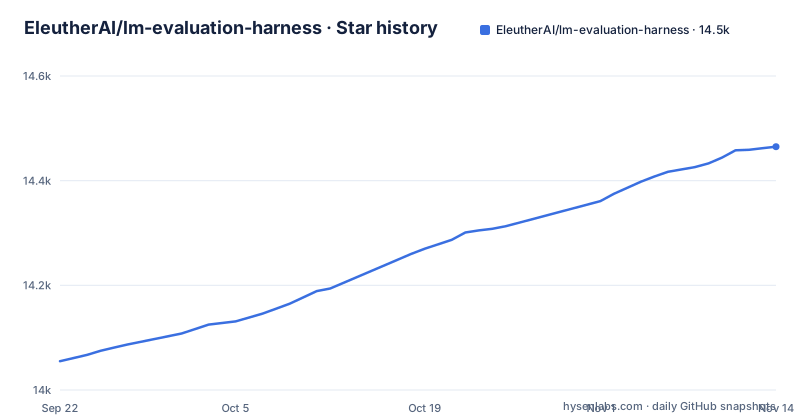
Star history
- EleutherAI/lm-evaluation-harness14,465 ★ · +410
| Repository | 2026-09-22 | 2026-11-14 |
|---|---|---|
| EleutherAI/lm-evaluation-harness | 14.1k | 14.5k |
410 Stars in the last 53 days, measured from the daily GitHub snapshot. Compare with other projects
Editorial analysis
What lm-evaluation-harness actually solves
Benchmark numbers are only useful if two people running the same model on the same task get the same answer. In practice they often do not, because few-shot prompting is full of small decisions: how many examples go in the context, how they are separated, how the model's raw string output is turned into a label, and what happens when the model emits something that matches no label at all. Every lab that wrote its own evaluation script made those decisions differently, and the resulting numbers were not comparable even when the task name was identical.
The harness exists to fix that by owning the whole pipeline from prompt construction to metric computation. It ships implementations of more than 60 standard academic benchmarks with hundreds of subtasks, and the README states that evaluation with publicly available prompts is what makes results reproducible and comparable between papers. That claim is load-bearing: the value is not that the code runs a model, it is that the prompt and the scoring rule are fixed and published.
The audience follows from that. It is used as the backend for Hugging Face's Open LLM Leaderboard, and the README lists NVIDIA, Cohere, BigScience, BigCode, Nous Research and Mosaic ML among the organizations using it internally. If you are a researcher producing a results table, a model author checking a fine-tune, or someone who needs to reproduce a number from a paper, this is the tool the number probably came from. If you want to test whether your RAG pipeline answers support tickets correctly, this is not that tool.
How a task moves from YAML to a score
The unit of work is a task, and tasks are defined in YAML rather than in Python. Since v0.4.0 the project has used config-based task creation, and pyproject.toml declares that YAML files are shipped as package data, so task definitions travel with the installed package. A task config names a dataset, a split, the prompt template, the target field, and the metric. Prompts are written with Jinja2, which is what allows a few-shot example block to be rendered consistently across tasks and what makes prompts importable from Promptsource.
Running a task walks a fixed path. A model object is constructed from one of the backends, the task config is resolved into a dataset of documents, each document is rendered through the Jinja2 template with the configured number of few-shot examples, the model generates or scores the continuation, and a filter turns the raw output into a prediction. Filters matter more than they look: they handle things like extracting a multiple-choice letter from a sentence, or stripping a chain-of-thought trace before the answer is parsed. The metric then compares predictions to targets and the results are logged.
The backend interface is deliberately tokenization-agnostic, which is why the same task can run against a HuggingFace transformers model, a vLLM server, or a commercial API without the task author changing anything. The README also documents a newer extension point: as of September 2026, model backends, filters, metrics and aggregations can be registered from your own package by declaring an lm_eval.* entry point, or by pointing --plugins at a local module. That is a real change from the older pattern of forking the repository to add a model type, and it is the cleanest way to add a private model without carrying a divergent fork.
Installing lm-evaluation-harness and running a first task
The base package is intentionally thin. The README states plainly that the base installation provides the core evaluation framework and that model backends must be installed separately, because transformers and torch are no longer in the base dependency list. The dependency list in pyproject.toml reflects that: datasets, numpy, evaluate, jinja2, rouge-score, sacrebleu, scikit-learn, sqlitedict, dill, tqdm and a handful of small utilities. Nothing that loads a neural network.
So the install is two steps. First the harness itself, from the repository, which the README gives as a shallow clone followed by an editable install:
git clone --depth 1 https://github.com/EleutherAI/lm-evaluation-harness
cd lm-evaluation-harness
pip install -e .
Then exactly one backend extra. For a HuggingFace transformers model on a CUDA-capable GPU, the README gives:
pip install "lm_eval[hf]"Extras can be combined, so a machine that needs to evaluate both a local HF checkpoint and a hosted API model would use pip install "lm_eval[hf,api]". The pyproject.toml also defines vllm, gptq, gptqmodel, ipex, archiver and ibm_watsonx_ai extras, among others.
Before running anything, confirm what is available. The CLI was refactored in December 2025 into subcommands, and the README documents listing tasks as:
lm-eval ls tasksThat prints the task registry your installation actually contains, which is the fastest way to check whether a benchmark you read about ships under the name you expect. The same release added YAML config file support through --config, so a repeated evaluation can be pinned in a file rather than retyped as flags. For the full evaluation options the README points at lm-eval run -h, and the guides under docs/ cover the CLI reference, the config file format, the Python API built on simple_evaluate(), and task configuration.
Where the harness is the wrong instrument
One failure is a mismatch between the command in a blog post and the CLI you installed. The subcommand refactor landed in December 2025, adding run, ls and validate, so check an older command against the current interface documented in docs/interface.md. If a command errors immediately, check the subcommand list before assuming the task is broken.
The second failure mode is the backend split. Installing lm_eval without an extra gives you a working CLI that cannot load a model, and the error surfaces at model construction rather than at install time. The README flags this in a callout for the HuggingFace path specifically, which suggests it is a frequent enough mistake to warrant one.
A subtler limitation is that the harness scores what a model emits for a fixed prompt, and that is a narrow definition of quality. It will not tell you whether a model follows a system prompt, whether it refuses harmful requests appropriately, whether it stays coherent over a long conversation, or whether it is fast enough for your latency budget. Those are properties of a deployed system, not of a benchmark completion. Teams that need them tend to end up maintaining a second, application-shaped test suite, and the harness numbers then sit alongside it rather than replacing it.
Finally, the project's own metadata describes it as Development Status :: 3 - Alpha, and the README describes the multimodal hf-multimodal and vllm-vlm model types and the mmmu task as a prototype feature. The README itself points readers to lmms-eval, a project that forked from this one, for a broader range of multimodal tasks. If vision-language evaluation is your main goal, that pointer is worth taking seriously rather than treating the prototype path as production-ready.
lm-evaluation-harness compared with lighteval
The closest alternative people ask about is lighteval, Hugging Face's evaluation library. The difference is not primarily task count, it is where the task definitions live and who controls them. In lm-evaluation-harness a task is a YAML config plus a Jinja2 prompt template, shipped inside the installed package, and the project's stated purpose is that publicly available prompts make results comparable across papers. The task set is therefore a curated artifact with a release history: the Open LLM Leaderboard tasks live under a leaderboard task group, and new benchmarks arrive as versioned additions.
lighteval comes from the same ecosystem as the models and datasets it evaluates, and is designed to sit inside Hugging Face tooling. If your models, datasets and experiment tracking already live there, the integration path is shorter. The trade-off is the one you would expect: a harness that is the reference implementation for a public leaderboard carries more weight when you need a number a reviewer will recognize, and less flexibility when you want to bend the evaluation to your own pipeline.
A practical way to decide is to ask what the number is for. If it goes into a paper, a model card, or a comparison against published results, use the harness whose prompts the published results used. If it is an internal signal inside a training loop, the tighter integration with your existing stack probably matters more than prompt provenance. The two are not mutually exclusive, but running both doubles the surface area you have to keep working.
Maintenance, upgrades and the MIT licence
The repository is not archived and the last push was on 2026-09-14, with v0.4.13 released on 2026-08-31, v0.4.12 on 2026-05-11 and v0.4.11 on 2026-02-13. That is a steady release cadence, and the news entries in the README show the direction of travel: plugin registration in September 2026, the CLI refactor and lighter install in December 2025, SGLang support in February 2025, steering for HF models in March 2025.
Upgrade cost is concentrated in two places. The first is the CLI: the move to run, ls and validate subcommands means a scripted invocation written before December 2025 is worth checking against the CLI Reference, and the YAML config file support added in the same release is the better place to put those invocations going forward. The second is the dependency split. Because the base package no longer pulls in transformers or torch, a pinned environment file that previously installed everything in one line now needs the matching extra, and the extras have their own version floors: hf requires transformers>=4.1, torch>=1.8, accelerate>=0.26.0 and peft>=0.2.0, while vllm requires vllm>=0.18. Upgrading the harness can therefore force a backend upgrade you did not plan for.
On licensing, the project is MIT, and pyproject.toml carries the license field as MIT with the full text in LICENSE.md. MIT is permissive and places few conditions on how you use or redistribute the code. What it does not cover is the data: the benchmarks the harness runs are third-party datasets fetched through the datasets library, and their terms are set by their own publishers, not by this repository. If you are evaluating on a benchmark whose licence restricts commercial use or redistribution, an MIT harness does not change that. That is a question for whoever owns the dataset, not a legal reading of this project.
Editorial conclusion
Adopt lm-evaluation-harness when you need benchmark numbers that other people can reproduce, when you are evaluating a HuggingFace, vLLM or API-hosted model, and when you are willing to work inside its task YAML and Jinja2 prompt system. Do not adopt it as a general LLM application test suite, and do not expect the base install to load a model: the base package deliberately excludes transformers and torch. Before committing, install the backend extra you actually need, run lm-eval ls tasks to confirm the tasks you care about are present under the names you expect, and check the docs/interface.md subcommand list against the version you pinned, because the CLI was refactored to subcommands in December 2025 and older command lines in blog posts may not match.
Frequently asked questions
What is lm-evaluation-harness?
It is EleutherAI's Python framework for few-shot evaluation of language models, providing over 60 standard academic benchmarks with hundreds of subtasks and variants. It is the backend for Hugging Face's Open LLM Leaderboard and is used internally by organizations including NVIDIA, Cohere, BigScience, BigCode, Nous Research and Mosaic ML.
How do I install lm-evaluation-harness?
Clone the repository and run pip install -e . for the base framework, then install a model backend separately, for example pip install "lm_eval[hf]" for HuggingFace transformers or pip install "lm_eval[vllm]" for vLLM. The base package deliberately excludes transformers and torch, so a backend extra is required before a model can be loaded.
How do I use lm-evaluation-harness to run a benchmark?
Use the CLI subcommands: lm-eval ls tasks lists the tasks your installation provides, and lm-eval run -h shows the evaluation options. The December 2025 release also added YAML config file support through --config, so a repeated evaluation can be pinned in a file instead of retyped as flags.
What are the benchmarks available in LM Harness?
The README states that over 60 standard academic benchmarks are implemented, with hundreds of subtasks and variants, including the Open LLM Leaderboard tasks under a leaderboard task group and additions such as CoT BIG-Bench-Hard and Belebele. The authoritative list for a given install is lm-eval ls tasks.
What is the alternative to lm-evaluation-harness?
lighteval is the main alternative, from Hugging Face. The practical difference is that lm-evaluation-harness defines tasks as YAML configs with Jinja2 prompt templates shipped inside the package, which is what makes its prompts the reference for published comparisons, while lighteval is designed to sit inside Hugging Face tooling.
Does lm-evaluation-harness support vLLM?
Yes. The vllm extra is installed with pip install "lm_eval[vllm]" and requires vllm>=0.18, and the README recommends hosting Llama 405B through vLLM's OpenAI-compliant API and evaluating it with the local-completions model type.
Official sources
Add this badge to your README
If you maintain this project, the badge below links readers to this analysis and shows its maintenance status from the daily GitHub snapshot. Paste the markdown into your README; add ?metric=license or ?metric=stars to the image URL for a different field.

[](https://hysenlabs.com/projects/eleutherai-lm-evaluation-harness)Star history chart for your README
[](https://hysenlabs.com/projects/eleutherai-lm-evaluation-harness)Was this useful?