ShellGPT pipes your diffs to an API and hands you a root command to press E on
A command-line productivity tool powered by AI large language models like GPT-5, will help you accomplish your tasks faster and more efficiently.
At a glance
- What is it?
- ShellGPT is a small Python CLI that turns prompts into shell commands, code snippets and explanations, with a mode that executes what it generates and a shell integration that rewrites your rc file. By default it uses the paid OpenAI API, stores your key in a plain config file, and is explicitly not tuned for the local models it also supports.
- Who is it for?
- ShellGPT fits someone who already pays for an API and wants a fast path from question to command, treats generated commands as something they read before running, and is comfortable with an MIT-licensed Python package holding a key on disk. It does not fit a machine where secrets cannot sit in a config file, an air-gapped setup that expects local models to work well, or a PowerShell or CMD user who wants the Ctrl+l shell integration.
- Can I use it commercially?
- Yes. MIT is a permissive licence: you can use, modify and sell software built on it, as long as you keep its copyright and licence notices.
- Is it still maintained?
- Yes. The repository last received commits 136 days ago.
- What is it written in?
- Mainly Python, according to GitHub's language statistics.
Answers come from the project's GitHub data, last synced on November 13, 2026, and from our analysis. They are not legal advice.
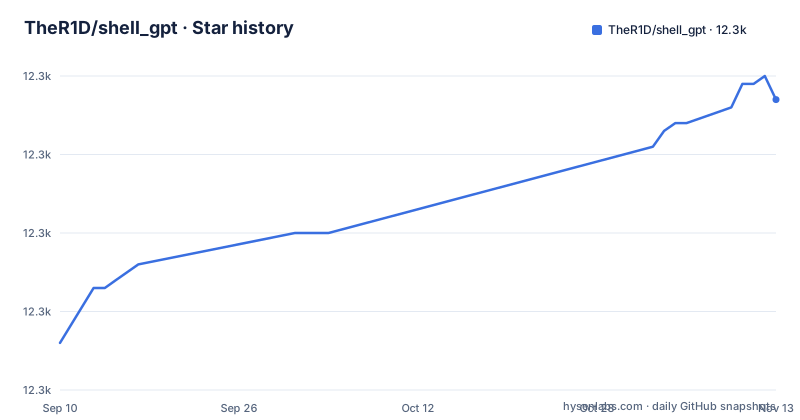
Star history
- TheR1D/shell_gpt12,307 ★ · +31
| Repository | 2026-09-10 | 2026-11-13 |
|---|---|---|
| TheR1D/shell_gpt | 12.3k | 12.3k |
31 Stars in the last 64 days, measured from the daily GitHub snapshot. Compare with other projects
Editorial analysis
Shell integration edits your rc file and covers Bash and ZSH only
The most invasive feature is the one that changes your shell. Running sgpt --install-integration adds lines to your .bashrc or .zshrc, and after you restart the terminal a hotkey, Ctrl+l by default, replaces whatever is currently in your input line with a suggested command. You then edit it and press Enter. The suggestion lands in the buffer rather than running immediately, which is the right shape for this feature. The sharper limitation is coverage: the opening claim is Linux, macOS, Windows and all major shells including PowerShell and CMD, but shell integration is stated as supported by both Bash and ZSH. The README documents the hotkey integration only for those two shells.
The shell mode offers execute, describe, abort, and the example runs sudo
With --shell or -s, ShellGPT prints a command and then asks you to choose:
sgpt --shell "find all json files in current folder"
# -> find . -type f -name "*.json"
# -> [E]xecute, [D]escribe, [A]bort: e
Execute is the first option offered, and the worked examples include privileged commands, since asking it to update your system on macOS returns sudo softwareupdate -i -a and on Ubuntu returns sudo apt update && sudo apt upgrade -y. The tool is aware of your OS and $SHELL and returns commands for that system, which is genuinely useful and also means the output is shaped to run as written with no translation step. The guard is the three-way prompt, and the guard disappears when you pass --no-interaction, which prints the generated command to stdout instead. Piping that flag into pbcopy or into a script is the documented pattern, and it removes the last human checkpoint in the chain.
The documented workflow pipes diffs and container logs off the machine
ShellGPT reads prompts from arguments or from stdin, and the examples push you hard toward piping:
git diff | sgpt "Generate git commit message, for my changes"The log example is docker logs -n 20 my_app | sgpt "check logs, find errors, provide possible solutions", and there are also file redirection examples such as sgpt "summarise" < document.txt. Every one of those sends its input to the model provider. A diff of a private repository, twenty lines of container output containing connection strings, or a whole text file all leave your machine and land in someone else's request log, and by default you are paying per request for the privilege. If that is not acceptable for a given input, the choice is whether to pass it at all.
Your key is prompted for once and written to a plain config file
The default provider is OpenAI's API with GPT-4, and the first run asks for a key and then stores it at ~/.config/shell_gpt/.sgptrc. The path is a plain dotfile in your home directory. Two consequences follow for anyone on a shared or managed machine. First, the key is readable by anything running as your user, including other tooling that reads your home directory. Second, a tool whose main feature is executing generated commands should not be the tool holding a long-lived billable credential in a config file. If you use ShellGPT on a work machine, check the file mode on that config, and treat the key as something you would rotate rather than something you would share. The README is direct that the OpenAI API is not free and points at OpenAI pricing.
Local models are supported and explicitly not tuned for
There is a documented route to running an open-source model for free, which means standing up your own backend such as Ollama and following the project's Ollama guide in the wiki. The same note carries a warning that ShellGPT is not optimized for local models and may not work as expected. That warning matters more than it looks, because the free route is the only one that does not send your code to a third party, so anyone who cares about that has to use the path the project itself flags as unpolished. The packaging reflects a second wrinkle: the LiteLLM integration is an optional extra pinned to one exact version.
litellm = [
    "litellm == 1.83.4"
]
An exact pin means a new provider or a fix upstream reaches you only when the project bumps it, so an older local setup can stop matching your model of choice. Test the combination you intend to keep rather than assuming the extra tracks upstream.
The container image turns the interaction prompt off by default
The Dockerfile at the root of the repository bakes in the safety switches:
ENV SHELL_INTERACTION=false
ENV PRETTIFY_MARKDOWN=false
ENV OS_NAME=auto
ENV SHELL_NAME=auto
The entrypoint is sgpt itself, and /tmp/shell_gpt is declared as a volume. SHELL_INTERACTION false is the right default inside a container, where nobody is there to answer the execute, describe, abort prompt, so generated commands are printed rather than run. The consequence is for anything you build around the image: if you take that stdout and hand it to a shell, you have removed the only human checkpoint and re-created it downstream, where it is easier to forget.
Python 3.10 is the floor, and the dev toolchain is frozen at 2023 versions
Install is one line, pip install shell-gpt, and the package targets Python 3.10 and newer with classifiers up through 3.13. The dependency set is small and the OpenAI SDK is bounded to a major version, openai >= 2.0.0, < 3.0.0, which means a new SDK major release waits on a ShellGPT release before it can reach you. The test and development extras are where the age shows, with exact pins including black == 23.1.0, mypy == 1.1.1, types-requests == 2.28.11.17 and ruff == 0.0.256. Those are frozen baselines, so a contributor inherits a formatter, type checker and linter from 2023 and cannot pick up fixes without editing pyproject.toml. The release history is bursty rather than steady: 1.4.5 on 2025-04-08, 1.5.0 on 2026-01-28 and 1.5.1 on 2026-05-06, with the last recorded push to main dated 2026-07-02. Pin the version you install rather than tracking main.
Editorial conclusion
ShellGPT fits someone who already pays for an API and wants a fast path from question to command, treats generated commands as something they read before running, and is comfortable with an MIT-licensed Python package holding a key on disk. It does not fit a machine where secrets cannot sit in a config file, an air-gapped setup that expects local models to work well, or a PowerShell or CMD user who wants the Ctrl+l shell integration. Before using it on real work, decide what you are willing to pipe, since the documented workflow sends git diffs and container logs to the model provider, and read the config file location so you know exactly what leaves the machine and what stays behind.
Frequently asked questions
how to install shell gpt
Run pip install shell-gpt, which requires Python 3.10 or newer. On first use you are prompted for an OpenAI API key, which is then stored in ~/.config/shell_gpt/.sgptrc. The package is MIT licensed and the console entry point is sgpt.
is shell gpt free
The tool itself is MIT licensed and free to install, but by default it calls the OpenAI API with GPT-4, which is not free of charge. You can run open-source models locally for free by setting up a backend such as Ollama, though the project notes that ShellGPT is not optimized for local models and may not work as expected.
how to use shellgpt
Pass a prompt as an argument or through stdin, use --shell or -s to generate and optionally execute a command, --code or -c for pure code output, --no-interaction to print a command to stdout without prompting, and --install-integration to add Ctrl+l completions to your Bash or ZSH rc file.
what is shell gpt
It is a command-line productivity tool powered by large language models that generates shell commands, code snippets and documentation instead of making you search for them. It supports Linux, macOS and Windows, and works with major shells including PowerShell, CMD, Bash and Zsh.
Official sources
Add this badge to your README
If you maintain this project, the badge below links readers to this analysis and shows its maintenance status from the daily GitHub snapshot. Paste the markdown into your README; add ?metric=license or ?metric=stars to the image URL for a different field.

[](https://hysenlabs.com/projects/ther1d-shell-gpt)Star history chart for your README
[](https://hysenlabs.com/projects/ther1d-shell-gpt)Was this useful?