Posh-ACME: an ACME client for PowerShell, with plugin-driven DNS challenges
PowerShell module and ACME client to create certificates from Let's Encrypt (or other ACME CA)
At a glance
- What is it?
- Posh-ACME is a PowerShell module and ACME client that issues publicly trusted certificates from any ACME capable CA, including Let's Encrypt, using New-PACertificate and Submit-Renewal. Its distinguishing feature is a plugin architecture for validation challenges, so DNS and HTTP challenges can be driven by a provider specific plugin instead of manual record editing.
- Who is it for?
- Posh-ACME fits a Windows or cross platform PowerShell shop that already manages certificates in the shell and wants renewal without a separate ACME binary, and it is the wrong choice if you cannot run PowerShell at all, since the module requires Windows PowerShell 5.1 with .NET Framework 4.7.1 or PowerShell 6.2 or later in FullLanguage mode.
- Can I use it commercially?
- Yes. MIT is a permissive licence: you can use, modify and sell software built on it, as long as you keep its copyright and licence notices.
- Is it still maintained?
- Yes. The repository last received commits 5 days ago.
- What is it written in?
- Mainly PowerShell, according to GitHub's language statistics.
Answers come from the project's GitHub data, last synced on November 6, 2026, and from our analysis. They are not legal advice.
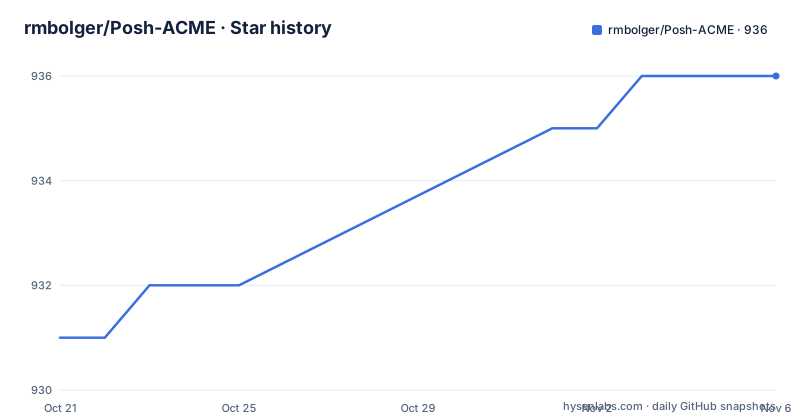
Star history
- rmbolger/Posh-ACME936 ★ · +5
| Repository | 2026-10-21 | 2026-11-06 |
|---|---|---|
| rmbolger/Posh-ACME | 931 | 936 |
5 Stars in the last 16 days, measured from the daily GitHub snapshot. Compare with other projects
Editorial analysis
ACME without leaving the shell you already administer from
Posh-ACME is described as a PowerShell module and ACME client for creating publicly trusted SSL/TLS certificates from an ACME capable certificate authority such as Let's Encrypt, and it implements RFC 8555. The reason to care is not the protocol, which is now ordinary, but the shape of the tool. Certificates become pipeline objects handled by cmdlets, and the account state lives on the local filesystem alongside whatever else the module manages.
The feature list is broad enough to be worth reading closely rather than skimming. Multi-domain SAN and wildcard certificates are supported. IP address certificates are supported under RFC 8738, with the explicit caveat that this requires CA support. Both RSA and ECDSA keys work for accounts and certificates. Pre-created certificate requests, meaning CSRs you supply yourself, are accepted. Output is available as PEM and PFX files.
Several entries concern less common ACME mechanics, and they are the ones that distinguish this client from a simple wrapper. Account key rollover is supported. OCSP Must-Staple support is there. Preferred Chain support lets you pick alternative CA trust chains. External Account Binding is supported for CAs that require it. Multiple ACME accounts per CA are allowed. There is also support for ARI, the ACME Renewal Information draft, at draft 07, ACME Profiles at draft 00, and two experimental DNS validation methods, dns-account-01 at draft 03 and dns-persist-01 at draft 02.
The audience is administrators and DevOps engineers who live in PowerShell. The module also integrates with PowerShell SecretManagement, so account keys can sit in a secret store rather than a plain file.
New-PACertificate and the manual DNS plugin you will hit first
The quick start states the minimum parameters are a domain name and the `-AcceptTOS` flag:
New-PACertificate example.com -AcceptTOSThat single line hides the main onboarding friction, and the README is upfront about it. The default is the `Manual` DNS plugin, which requires you to edit your DNS server by hand to create the TXT records used for challenge validation. So the very first certificate is an interactive operation.
Two environment notes follow. On Windows you may need a less restrictive execution policy before the module can be imported:
Set-ExecutionPolicy RemoteSigned -Scope CurrentUser -Force
Import-Module Posh-ACME
The README shows a fuller example that uses a wildcard and a DNS plugin with a credential, which is what the shape of a real invocation looks like:
$certNames = '*.example.com','example.com'
$email = '[email protected]'
$pArgs = @{
    FDToken = (Read-Host 'FakeDNS API Token' -AsSecureString)
}
New-PACertificate $certNames -AcceptTOS -Contact $email -Plugin FakeDNS -PluginArgs $pArgs
The pattern to copy is the structure rather than the plugin name. Names go in as an array so a wildcard and its apex domain are requested together. `-Contact` attaches an email to the account for expiry notification. `-Plugin` selects the DNS challenge implementation, and `-PluginArgs` passes whatever that plugin needs, here a token read with `-AsSecureString` so it never lands in the shell history as plain text.
A related point about the output. `New-PACertificate` returns an object with many properties, and only a subset is displayed by default. To see everything, including the filesystem paths of the generated files, pipe the original output to `Format-List`, or use `Get-PACertificate | Format-List`. The path to the module's own configuration folder comes from `(Get-PAServer).Folder`, which is where you look when you need to find the account keys on disk.
Plugins are the core extension point for DNS validation
Validation is where ACME clients differ most in practice, and Posh-ACME treats it as a pluggable concern. The README lists built-in validation plugins for DNS and HTTP based challenges, and asks for pull requests for more.
The mental model is straightforward. A plugin knows how to create the TXT record a DNS challenge needs, or how to serve the token file an HTTP challenge needs, on your behalf. The manual plugin that ships as default does neither automatically, which is why the first run is interactive. A provider plugin replaces that manual step with an API call, which is what makes unattended renewal possible.
Discovery is built into the module. To learn how a specific plugin works, the README points to `Get-PAPlugin <PluginName> -Guide`, which is a per-plugin guide rather than a single generic manual. That is a small design choice with a large effect on usability, because the differences between providers are exactly where a generic document would leave you guessing.
There is also DNS challenge CNAME support, documented in a guide on using DNS challenge aliases. That pattern lets a validation record live under a subdomain you control while the certificate is issued for a domain whose DNS you do not delegate, a common arrangement with CDN providers.
The `FakeDNS` name in the example above is a placeholder for a provider plugin. The structure of the call is what transfers: the plugin name goes to `-Plugin`, and plugin-specific arguments go into a hashtable passed as `-PluginArgs`.
Renewal is a separate command, and the draft features sit at the edges
Issuing a certificate is only half of an ACME client's job. Posh-ACME separates renewal into its own cmdlet, `Submit-Renewal`, which the README lists alongside the all in one `New-PACertificate` command for new certificates. The split is sensible: renewal is the operation you want to schedule and monitor, and it should not require re-specifying domains, contacts and plugin arguments every cycle.
The draft-based features deserve a separate word, because that is where a client can quietly differ from another. ARI, the ACME Renewal Information draft, at draft 07, lets the server tell the client when to renew and with which identifier, which changes the renewal model from client-side scheduling to server-hinted scheduling. ACME Profiles at draft 00 is a proposal for the CA to publish and the client to request a specific profile. dns-account-01 at draft 03 and dns-persist-01 at draft 02 are experimental DNS validation methods, and the README labels both experimental.
That word is the important part. dns-account-01 in particular is a validation method some providers have been moving towards, and an implementation based on draft 03 may behave differently from a CA's current implementation. If you plan to rely on either experimental method, test it against your CA before you depend on it for renewal.
The stable parts of the feature set are the ones to build on: SAN and wildcard certificates, DNS and HTTP challenges, RSA and ECDSA, CSR support, PEM and PFX output, renewal through `Submit-Renewal`, and multiple accounts per CA.
PowerShell version, .NET, language mode and the TLS gotcha on 5.1
The requirements are specific and worth reading before you install anything.
Windows PowerShell 5.1, the desktop edition, is supported with .NET Framework 4.7.1 or later. PowerShell 6.2 or later, the Core edition, is supported on all supported operating system platforms, which is what makes the module usable on Linux and macOS rather than only on Windows. The module requires the `FullLanguage` language mode, which rules out running it under a constrained session.
There is a footnote about versions between: PowerShell 6.0 and 6.1 should also work, but with known issues when using `SecureString` or `PSCredential` plugin args on non-Windows platforms. That caveat lands precisely on the credential pattern used in the plugin example above, so on Linux with an old Core build you should assume secure plugin arguments will not behave.
A separate installation wrinkle applies to Windows PowerShell 5.1 and earlier. The README warns that `Install-Module` may throw an error depending on the Windows and .NET version, because of a change the PowerShell Gallery made to its TLS settings, and links to the official blog post explaining it and the workaround.
Two installation paths are offered. The stable one is from the PowerShell Gallery or the GitHub releases page:
# install for all users (requires elevated privs)
Install-Module -Name Posh-ACME -Scope AllUsers

# install for current user
Install-Module -Name Posh-ACME -Scope CurrentUser
The development one installs the latest build from the git `main` branch:
iex (irm https://raw.githubusercontent.com/rmbolger/Posh-ACME/main/instdev.ps1)That command assumes a default `PSModulePath` and installs to the CurrentUser scope. You can also download the source and extract the `Posh-ACME` folder into a module location of your choosing.
Renewal needs no elevation, installation sometimes does
One feature line in the README is easy to skim past and worth pausing on: no elevated Windows privileges are required, unless the `-Install` switch is used.
That statement is about the module's own operations rather than about your whole setup. Issuing a certificate means creating a private key, talking to the CA, and completing a challenge. Doing that with HTTP validation means binding a port, and doing it with DNS validation means an API credential that the provider may require to be privileged. The point of the claim is narrower and still useful: the module itself does not demand an elevated session, so it can run from a scheduled task or a CI job under a service account rather than requiring someone to be logged in as an administrator.
The exception is the `-Install` switch, which is the path that writes the resulting certificate into a Windows certificate store or performs the machine-level install step. That is where the elevated privilege requirement comes from, and it is also why the AllUsers install scope of `Install-Module` needs elevation while the CurrentUser scope does not.
The module also supports PowerShell SecretManagement, with a guide in the documentation. That matters for the same reason the `-AsSecureString` pattern does: account keys are long lived and grant the ability to issue certificates, so keeping them out of plaintext files on disk is a reasonable default rather than an extra.
Active development, MIT licence, and a documentation site built from the repository
Maintenance is current. The last push was on 2026-10-15, and the release history shows v4.35.0 on 2026-10-12, v4.34.0 on 2026-08-23 and v4.33.1 on 2026-06-16. A 4.x version line with releases every few weeks is what a client that tracks CA protocol changes and provider APIs tends to look like.
The licence field on the repository says MIT, which is what you want from a tool that ends up holding account keys on a build agent. The project also carries a CODE_OF_CONDUCT.md and a CONTRIBUTING.md, and the Pester Tests badge in the README points at a GitHub Actions workflow, so the test suite runs in CI rather than being a local-only habit.
The documentation is a mkdocs site, and the repository shows how it is built. There is a `mkdocs.yml` at the root, a `docs/` directory, and scripts named `gen-maml.ps1` and `update-func-markdown.ps1`, which suggests the reference pages for individual cmdlets are generated from the module rather than written by hand. The homepage is poshac.me, with the FAQ covering cross platform PowerShell Core questions. The repository also holds `Tutorial.md` at the root, a longer walkthrough, and a `CHANGELOG.md` referenced from the README.
One thing the documentation does not promise is a long term support branch or a compatibility guarantee between major versions. On a 4.x line with steady releases, the practical advice is to read the changelog before pinning a new version in a renewal schedule, since a change in challenge handling or output format would surface as a failed renewal rather than as a clear error.
Editorial conclusion
Posh-ACME fits a Windows or cross platform PowerShell shop that already manages certificates in the shell and wants renewal without a separate ACME binary, and it is the wrong choice if you cannot run PowerShell at all, since the module requires Windows PowerShell 5.1 with .NET Framework 4.7.1 or PowerShell 6.2 or later in FullLanguage mode. Verify three things before you rely on it: that your PowerShell version and language mode meet the stated requirements, that the DNS plugin you intend to use actually exists for your provider rather than falling back to the Manual plugin that needs hand edited TXT records, and that your CA supports the optional features you plan to turn on, since IP address certificates need RFC 8738 support and External Account Binding is only needed by CAs that require it.
Frequently asked questions
How do I install Posh-ACME?
From the PowerShell Gallery with `Install-Module -Name Posh-ACME -Scope AllUsers` for all users, or `-Scope CurrentUser` for the current user. The latest release is also on the GitHub releases page, and a development build from the main branch can be installed with `iex (irm https://raw.githubusercontent.com/rmbolger/Posh-ACME/main/instdev.ps1)`.
What PowerShell versions does Posh-ACME support?
Windows PowerShell 5.1 with .NET Framework 4.7.1 or later, and PowerShell 6.2 or later on all supported operating systems. The module requires the FullLanguage language mode. PowerShell 6.0 and 6.1 should work but have known issues with SecureString or PSCredential plugin args on non-Windows platforms.
How do I renew a certificate with Posh-ACME?
Renewal has its own cmdlet, `Submit-Renewal`, separate from the `New-PACertificate` command used for new certificates. The module also supports ARI, the ACME Renewal Information draft at draft 07, which lets the server indicate when a certificate should be renewed.
Why does New-PACertificate ask me to edit DNS records manually?
The default is the Manual DNS plugin, which requires you to create the TXT records for challenge validation by hand. Passing a provider specific plugin with `-Plugin` and `-PluginArgs` automates that step, and `Get-PAPlugin <PluginName> -Guide` documents each plugin.
Can Posh-ACME request wildcard and IP address certificates?
Wildcards such as *.example.com are supported, alongside multi-domain SAN certificates. IP address certificates are supported under RFC 8738 but require ACME CA support.
Does Posh-ACME need administrator rights?
No, except when using the `-Install` switch. The README states that no elevated Windows privileges are required otherwise, and the AllUsers scope of Install-Module needs elevation while CurrentUser does not.
Official sources
Add this badge to your README
If you maintain this project, the badge below links readers to this analysis and shows its maintenance status from the daily GitHub snapshot. Paste the markdown into your README; add ?metric=license or ?metric=stars to the image URL for a different field.

[](https://hysenlabs.com/projects/rmbolger-posh-acme)Star history chart for your README
[](https://hysenlabs.com/projects/rmbolger-posh-acme)Was this useful?