LingBot-VLA for Robot Post-Training
A Pragmatic VLA Foundation Model
At a glance
- What is it?
- LingBot-VLA is an Apache-2.0 Python framework for vision-language-action model training, with 4B checkpoints for depth-free or depth-distilled use. It is aimed at researchers adapting pretrained models to LeRobot v3.0 datasets and dual-arm robot tasks.
- Who is it for?
- Adopt LingBot-VLA when your team already has LeRobot v3.0 robot demonstrations, a CUDA-capable environment, and the required auxiliary checkpoints, and needs a documented path to post-train a 4B VLA model. Do not choose it for a CPU-only workflow, an immediate open-loop evaluation without checking the added configuration, or a release-stability policy that requires tagged GitHub releases.
- Can I use it commercially?
- Yes. Apache-2.0 is a permissive licence: you can use, modify and sell software built on it, as long as you keep its copyright and licence notices.
- Is it still maintained?
- Yes. The repository last received commits 149 days ago.
- What is it written in?
- Mainly Python, according to GitHub's language statistics.
Answers come from the project's GitHub data, last synced on November 7, 2026, and from our analysis. They are not legal advice.
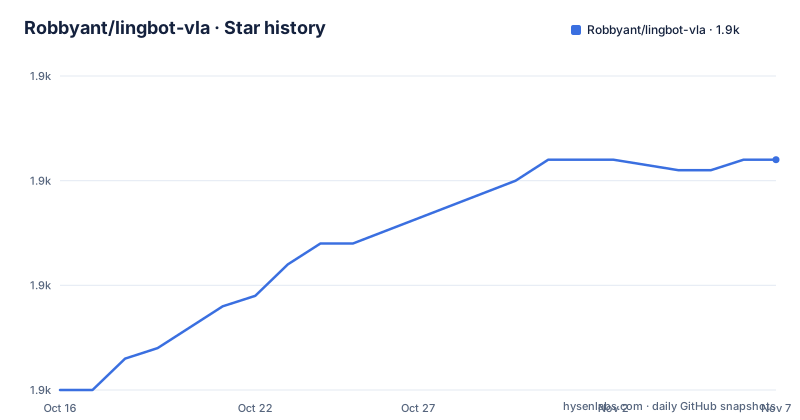
Star history
- Robbyant/lingbot-vla1,882 ★ · +22
| Repository | 2026-10-16 | 2026-11-07 |
|---|---|---|
| Robbyant/lingbot-vla | 1.9k | 1.9k |
22 Stars in the last 22 days, measured from the daily GitHub snapshot. Compare with other projects
Editorial analysis
What LingBot-VLA Is For
LingBot-VLA addresses a specific problem: adapting a pretrained Vision-Language-Action model to robot demonstrations after the general model has already been trained. The intended users are robotics researchers and engineers who have demonstration data from dual-arm systems and need a path for post-training rather than building a VLA training stack from individual components. The repository describes pretraining on 20,000 hours of real-world data collected across nine dual-arm robot configurations. That figure describes the project's stated data scale, not a guarantee that a new user's task will transfer directly.
The released model is available as `LingBot-VLA-4B` without depth and `LingBot-VLA-4B-Depth` with depth. The README also names a RoboTwin 2.0 example covering five tasks: `open_microwave`, `click_bell`, `stack_blocks_three`, `place_shoe`, and `put_object_cabinet`. This gives the project a concrete post-training scenario, but it does not establish suitability for every robot, camera arrangement, or action space. A team must still map its own observations and actions into the format expected by the training code.
The Checkpoint and Training Path
The documented flow has three data preparation stages. First, demonstrations are converted to LeRobot v3.0 format. Second, a robot configuration maps raw state, action, and image keys into the feature space used by LingBot-VLA. Third, normalization statistics are calculated for the dataset and stored as a JSON file. The repository's RoboTwin example uses `configs/robot_configs/robotwin.yaml` and the precomputed `assets/norm_stats/robotwin_50.json`.
Training starts from a configuration such as `configs/vla/robotwin_load20000h.yaml`, or its depth counterpart, and passes the dataset path, data name, normalization file, and output directory to `train.sh`. The framework therefore depends on explicit data conventions rather than accepting arbitrary demonstration layouts without configuration. The repository includes a custom data guide at `lingbotvla/data/vla_data/README.md` for readers preparing a different dataset.
For training, the README says that weights from `Qwen2.5-VL-3B-Instruct`, `MoGe-2-vitb-normal`, and `LingBot-Depth` are also required. The checked-in `requirements.txt` adds project-level dependencies including `torchcodec==0.6.0`, `datasets==3.6.0`, `transformers==4.51.3`, `numpy==1.26.4`, and `tensorboard==2.16.2`. The `setup.py` file pins the PyTorch family to `torch==2.8.0`, `torchvision==0.23.0`, and `torchaudio==2.8.0`.
Installing LingBot-VLA in the Documented Environment
The README specifies Python 3.12.3, PyTorch 2.8.0, and CUDA 12.8. Its installation procedure creates a Conda environment, clones the repository, and runs the repository installation script. The commands below are copied from the README.
The reader should first confirm that the target machine has the required CUDA setup before creating the environment. The README does not provide a CPU installation path.
conda create -n lingbotvla python=3.12 -y
conda activate lingbotvla

git clone https://github.com/Robbyant/lingbot-vla.git
cd lingbot-vla
bash install.sh
After installation, the model download is performed with the supplied script. This command downloads the depth-free `lingbot-vla-4b` checkpoint into the local `lingbot-vla-4b` directory. The README also links a `lingbot-vla-4b-depth` checkpoint on Hugging Face and ModelScope.
python3 scripts/download_hf_model.py --repo_id robbyant/lingbot-vla-4b --local_dir lingbot-vla-4bThe download script is only the checkpoint step. The README separately states that training also requires the `Qwen2.5-VL-3B-Instruct`, `MoGe-2-vitb-normal`, and `LingBot-Depth` weights.
Running the RoboTwin Post-Training Example
The documented RoboTwin example uses five named tasks and already supplies a feature mapping and normalization file. Readers who are using that example should still follow the RoboTwin preparation instructions in `experiment/robotwin/README.md` to download and convert the data. The example then has separate commands for the depth-free and depth-distilled configurations.
The following command starts the depth-free example. It points the training script at the mixed RoboTwin dataset, identifies it as `robotwin`, loads the supplied statistics, and writes results below `output/`.
bash train.sh tasks/vla/train_lingbotvla.py ./configs/vla/robotwin_load20000h.yaml \
    --data.train_path /path/to/mixed_robotwin_5tasks \
    --data.data_name robotwin \
    --data.norm_stats_file assets/norm_stats/robotwin_50.json \
    --train.output_dir output/
For the depth version, use the depth configuration shown below. The rest of the documented arguments are the same in this example.
bash train.sh tasks/vla/train_lingbotvla.py ./configs/vla/robotwin_load20000h_depth.yaml \
    --data.train_path /path/to/mixed_robotwin_5tasks \
    --data.data_name robotwin \
    --data.norm_stats_file assets/norm_stats/robotwin_50.json \
    --train.output_dir output/
The README does not specify a short inference command in the excerpt, so a first real use for a new user is checkpoint download plus post-training setup. It does state that the April 30, 2026 codebase update supports open-loop evaluation and Torch Compile for inference.
LeRobot v3.0 Migration as a Constraint
LeRobot format is the central integration boundary in this repository. The README says that older LeRobot v2.1 datasets can be converted with `convert_dataset_v21_to_v30.py`, but the rest of the workflow expects a LeRobot v3.0 dataset directory. The robot configuration then defines how raw keys become the unified state, action, and image features. This is more demanding than passing a directory to a generic trainer, although it makes the expected data contract visible in configuration files.
There is a concrete checkpoint compatibility issue. The README warns users who downloaded `LingBot-VLA-4B` or `LingBot-VLA-4B-Depth` before May 1, 2026 that loading may fail because their `config.json` contains fields that are not valid for `PI0Config`. The documented fixes are to download the latest checkpoint or manually remove the listed fields from `config.json`. This is an important upgrade consideration: an older local model directory may not match the current codebase after the migration from LeRobot v2.1 to v3.0.
The package metadata declares `requires-python = ">=3.8"`, while the README recommends Python 3.12.3 and the repository targets Python 3.12 in `pyproject.toml`. For deployment, the README's environment is the safer documented starting point because it aligns the interpreter with the stated training stack.
Maintenance, Licensing, and Operational Limits
The repository is not archived. Its last push was on 2026-06-11, and the README records codebase updates on 2026-04-30. The repository has no GitHub releases, so there is no tagged release history documented in the repository metadata. That makes checkpoint and environment compatibility a direct operational concern. The README's migration warning demonstrates why users should verify the checkpoint date and configuration fields rather than assume that any downloaded directory is interchangeable with the current code.
LingBot-VLA is distributed under `Apache-2.0`. The `pyproject.toml` identifies the license as `Apache-2.0` and includes the repository `LICENSE` file. This is licensing metadata, not a legal assessment. Users still need to review the license text and the separate model and dataset terms for the checkpoints and data they download. The README does not document a separate license policy for `Qwen2.5-VL-3B-Instruct`, `MoGe-2-vitb-normal`, or `LingBot-Depth`, so those components require their own review.
A clear limitation is hardware and data preparation. The documented stack depends on CUDA 12.8 and a large multi-component model set. The project is aimed at post-training, not a lightweight local demo. It is also the wrong choice if a team cannot produce normalized state, action, and image mappings, because the training configuration expects those files to be prepared first. The project does not claim that a checkpoint trained for RoboTwin will work unchanged on an unrelated robot.
LingBot-VLA Compared with Direct LeRobot Use
LingBot-VLA's post-training workflow uses LeRobot v3.0 datasets and adds a VLA-oriented training configuration, checkpoint release, robot feature mapping, normalization workflow, and depth or non-depth model choices. The difference is therefore not simply "robot code versus general robot code." LeRobot is the underlying data ecosystem; LingBot-VLA is a specific model and training recipe built around it.
For a team that only needs dataset conversion or standard robot data handling, starting with LeRobot directly may be simpler because LingBot-VLA adds required checkpoint downloads, a larger dependency stack, and model-specific feature conventions. For a team already working with LingBot-VLA's 4B checkpoints or its RoboTwin-style training recipes, using this repository avoids reconstructing those mappings and configurations. The choice depends on whether the team needs the particular VLA model and its associated data contract, rather than on LeRobot compatibility alone.
Editorial conclusion
Adopt LingBot-VLA when your team already has LeRobot v3.0 robot demonstrations, a CUDA-capable environment, and the required auxiliary checkpoints, and needs a documented path to post-train a 4B VLA model. Do not choose it for a CPU-only workflow, an immediate open-loop evaluation without checking the added configuration, or a release-stability policy that requires tagged GitHub releases. The first verification should be compatibility between the local robot feature mapping, `assets/norm_stats/<name>.json`, and the downloaded checkpoint configuration.
Frequently asked questions
What are the system requirements for installing LingBot-VLA?
The README specifies Python 3.12.3, PyTorch 2.8.0, and CUDA 12.8. It does not document a CPU installation path.
Which LingBot-VLA checkpoint should I download?
Choose `lingbot-vla-4b` for the depth-free version or `lingbot-vla-4b-depth` for the depth-distilled version. The README also states that training requires additional weights from `Qwen2.5-VL-3B-Instruct`, `MoGe-2-vitb-normal`, and `LingBot-Depth`.
What data format does LingBot-VLA expect for post-training?
Post-training expects a LeRobot v3.0 dataset, a robot configuration mapping states, actions, and images, and normalization statistics stored as JSON. The README points to `lingbotvla/data/vla_data/README.md` for custom dataset preparation.
Official sources
Add this badge to your README
If you maintain this project, the badge below links readers to this analysis and shows its maintenance status from the daily GitHub snapshot. Paste the markdown into your README; add ?metric=license or ?metric=stars to the image URL for a different field.

[](https://hysenlabs.com/projects/robbyant-lingbot-vla)Star history chart for your README
[](https://hysenlabs.com/projects/robbyant-lingbot-vla)Was this useful?