raylib-cpp turns raylib's struct API into C++ classes
C++ Object Oriented Wrapper for raylib
At a glance
- What is it?
- raylib-cpp is a single-header C++ wrapper around raylib that adds constructors, destructors, method chaining, operator overloads and exceptions to the raylib C API. It is a convenience layer, not a rewrite, and it tracks raylib 6 closely enough that the upstream version still shapes your upgrade decisions.
- Who is it for?
- raylib-cpp suits a C++ developer who already writes raylib and wants resource handling and chaining without leaving the raylib feature set, and it costs you little more than a header include. It does not suit a team that wants C++ semantics in a codebase where raylib is only one dependency, since the wrapper mirrors the C API closely rather than redesigning it, and the readme does not document how raylib itself is obtained or built.
- Can I use it commercially?
- Yes. Zlib is a permissive licence: you can use, modify and sell software built on it, as long as you keep its copyright and licence notices.
- Is it still maintained?
- Yes. The repository last received commits 7 days ago.
- What is it written in?
- Mainly C++, according to GitHub's language statistics.
Answers come from the project's GitHub data, last synced on November 7, 2026, and from our analysis. They are not legal advice.
Star history
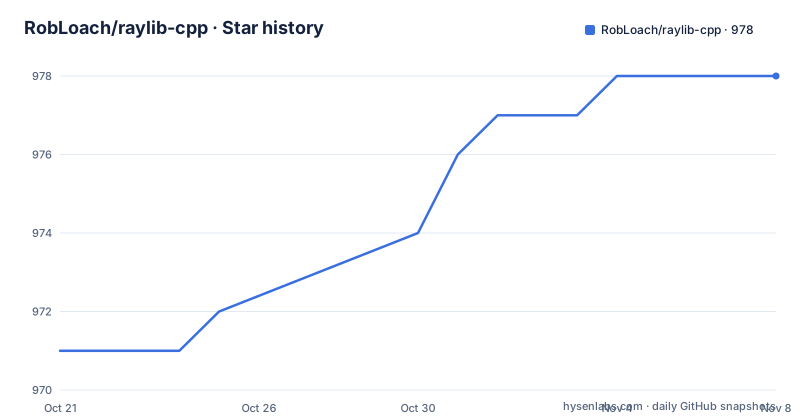
- RobLoach/raylib-cpp978 ★ · +7
| Repository | 2026-10-21 | 2026-11-07 |
|---|---|---|
| RobLoach/raylib-cpp | 971 | 978 |
7 Stars in the last 17 days, measured from the daily GitHub snapshot. Compare with other projects
Editorial analysis
The wrapper covers raylib's structs, not the whole library
raylib-cpp is a C++ wrapper library for raylib, which the readme describes as a simple and easy-to-use library for videogame programming. The wrapper provides object-oriented wrappers around raylib's struct interfaces.
That boundary is important and the readme is upfront about it. raylib-cpp is not required to use raylib in C++. The classes bring using the raylib API more in line with C++'s language paradigm, which is a convenience argument rather than a capability argument. Anything you can do with raylib directly, you can still do directly; the wrapper removes friction from the parts of the API that are shaped like C structs.
The audience is therefore narrower than it first looks. It is for a developer writing a game or a graphical tool in C++ who has already chosen raylib and wants RAII, chaining and exceptions without writing that plumbing by hand. It is not a path into raylib for someone who has not chosen a graphics library, and it is not a general purpose C++ game engine.
The project is a single C++ header, which is why the example begins with an include and nothing else, and it targets raylib 6 according to the badge in the readme. The licence is Zlib, and the upstream project is written by Rob Loach.
Constructors load resources and destructors unload them
The core convention is that an object owns the raylib resource behind it. Constructors load, destructors unload.
// raylib
Texture2D texture = LoadTexture("texture.png");

// raylib-cpp
raylib::Texture2D texture("texture.png");
The same convention covers the window, and it removes the most error prone part of raylib's C style code, where the matching Close or Unload call has to be reached on every path including the error path.
// raylib
InitWindow(640, 480, "Hello World");
CloseWindow();

// raylib-cpp
raylib::Window window(640, 480, "Hello World");
// window.Close() will be called automatically when the object is destructed.
The readme lists the window, textures, images, sounds and others as falling under this rule. The example program in the readme shows the payoff, with a comment noting that UnloadTexture() and CloseWindow() are called automatically at the end of main.
There is a design consequence worth naming. Because destruction triggers the unload, the lifetime of your graphics resources is now tied to C++ scope rules, which is the point, but it also means that copying a wrapper object is a question you have to answer yourself. The readme does not describe copy semantics for these types, so treat the wrapper objects as handles you own rather than freely copyable values until you have checked the documentation.
Methods move onto the object and lose the type name
Three naming rules turn raylib's free functions into member functions. When a raylib method takes an object as one of its arguments, you can call it on the object instead. And when a method name contains the object's name, that name is removed, which is why DrawTexture becomes Draw.
// raylib
Vector2 position(50, 50);
DrawPixelV(position, PURPLE);

// raylib-cpp
raylib::Vector2 position(50, 50);
position.DrawPixel(raylib::Color::Purple());// raylib
DrawTexture(texture, 50, 50, WHITE);
// raylib-cpp
texture.Draw(50, 50, raylib::Color::White());Optional parameters come with sensible defaults, so the colour argument can simply be dropped.
// raylib-cpp
texture.Draw(50, 50); // raylib::Color::White() is provided as the default tint.
Raylib distinguishes variants by suffix, with a V in the name for the vector form, and the wrapper resolves that with function overloading instead.
// raylib-cpp
raylib::Color color = raylib::Color::Gray();
color.DrawPixel(50, 50);
Vector2 position(50.0f, 50.0f);
color.DrawPixel(position); // No V in method name.
position.DrawPixel(color); // Alternatively
The effect is that the raylib function list becomes a class hierarchy you navigate in an editor, with autocomplete showing what each object can do.
Chaining, operators and std::string overloads remove the C glue
Methods that return nothing usually return the object itself, so calls can be chained.
// raylib-cpp
raylib::Image cat("cat.png");
cat.Crop(100, 10, 280, 380)
   .FlipHorizontal()
   .Resize(150, 200);
Operator overloads are implemented for the objects, so vector arithmetic reads like the underlying maths rather than like field access.
// raylib-cpp
raylib::Vector2 position(50, 50);
raylib::Vector2 speed(10, 10);
position += speed; // Addition assignment operator override.
There are also std::string overrides for many raylib functions, which avoids the c_str() detour.
// raylib-cpp
std::string url = "https://raylib.com";
raylib::OpenURL(url);
Properties can be set through setters, and the readme notes that you still have access to the internal properties, so both spellings work.
// raylib-cpp
raylib::Vector2 position;
position.SetX(50);
position.SetY(100);

// ... or
position.x = 50;
position.y = 100;
One more convenience matters for file handling. Where raylib returns a pointer array with a count, the wrapper offers a version returning a std::vector of objects instead, and the readme notes that the raymath methods are included as well.
Failed asset loads become exceptions instead of silent warnings
This is the wrapper's most substantive departure from the C API, and it is the one that changes program structure rather than syntax.
In raylib, a failed asset load produces a logged warning and no other feedback, so the code has to check the result by hand. The readme compares the two styles directly.
// raylib
Texture texture = LoadTexture("FileNotFound.png");
if (texture.width == 0) {
    TraceLog(LOG_ERROR, "Texture failed to load!");
}

// raylib-cpp
try {
    raylib::Texture texture("FileNotFound.png");
}
catch (raylib::RaylibException& error) {
    TraceLog(LOG_ERROR, "Texture failed to load!");
}
The wrapper throws a RaylibException runtime error, declared in include/RaylibException.hpp, giving you a catchable failure instead of a width check.
The trade-off is that this is a behaviour change, not only an addition. Code that was written to check a loaded texture and carry on with a placeholder will now throw, and if the load happens deep inside a constructor chain, the exception can surface far from the code that made the request. Exceptions also interact badly with some real time game loops, where the usual instinct is to keep the frame going rather than unwind the stack.
If you adopt this, decide up front where you catch. The readme frames it as a way to provide a safe method for catching failed loads, which is accurate, but it does not say how failures during the draw loop should be handled.
Building the library and running the test binary
The repository is a CMake project with a CMakeLists.txt at the root and a cmake directory beside it, and the npm scripts in package.json wrap the same commands. The prebuild script configures the project and the build script compiles it.
cmake -S . -B build
cmake --build build
The test script then runs the compiled test executable directly, with the build as a precondition.
build/tests/raylib_cpp_testThe package.json marks the npm package as private, and its only dev dependency is gh-pages, which exists for the documentation deployment rather than for the build. So npm is a convenience wrapper around CMake here, not a separate toolchain, and you can run the two cmake commands yourself if you prefer.
Documentation is generated with Doxygen from a configuration file kept in the projects directory.
doxygen projects/Doxygen/DoxyfileThe docs deployment script points gh-pages at the docs directory. The submodule configuration in the repository means the documentation setup expects a git submodule to be initialised before the docs can be built, and the readme points to the published documentation at robloach.github.io/raylib-cpp for the full API.
For a first program, the shape of the code matters more than the build details. The example program in the readme creates a window of 800 by 450, loads a texture, sets a target frame rate of 60, and then loops until the window reports it should close, drawing a background colour, a line of text and the texture in the centre of the screen. The examples folder holds the ported raylib examples, organised into audio, core, models, module, multiple, shaders, shapes, text and textures directories.
Version tracking, upstream coupling and where the wrapper stops
raylib-cpp follows raylib closely, and the readme carries a badge stating which raylib version it targets, currently raylib 6. The released versions are in step with that: v6.0.1 on 2026-05-30, v6.0.2 on 2026-06-16 and v6.0.3 on 2026-08-03, which is also the version in package.json. The last push was on 2026-10-18 and the repository is not archived.
That cadence tells you something specific. A wrapper whose value is fidelity to the C API has to move when the C API moves, so upgrades to raylib 6 and beyond are the forcing function for versions here, and your own upgrade decisions will be driven by upstream raylib releases rather than by anything happening in this repository alone.
The limits of the approach are worth stating plainly. The wrapper is a header that mirrors an existing API, so it does not add any graphics capability, it does not make raylib easier to install, and it does not cover the parts of raylib that are already plain functions with no struct to attach them to. The readme does not document how raylib itself is obtained or built on your platform, and the repository contains a .gitmodules file, which suggests some dependency is fetched as a submodule.
The alternative is to use raylib's C API directly, which the readme explicitly allows and which is what many raylib projects do. The difference in approach is ownership and ergonomics: direct C means manual Unload and Close calls and manual error checks on every load, and in exchange you keep the API surface identical to upstream with no wrapper semantics to learn or work around. The wrapper is worth it when you are writing enough code that resource lifetime and error handling start to matter, and it is overhead when you are prototyping a single window.
Editorial conclusion
raylib-cpp suits a C++ developer who already writes raylib and wants resource handling and chaining without leaving the raylib feature set, and it costs you little more than a header include. It does not suit a team that wants C++ semantics in a codebase where raylib is only one dependency, since the wrapper mirrors the C API closely rather than redesigning it, and the readme does not document how raylib itself is obtained or built. Before adopting it, check the raylib major version your project targets against the raylib 6 badge in the readme, and confirm that the CMake configure step cmake -S . -B build succeeds in your environment before writing code against these classes.
Frequently asked questions
What does raylib-cpp add on top of raylib?
It provides object-oriented wrappers around raylib's struct interfaces, so resources are loaded in constructors and unloaded in destructors, methods move onto the objects they belong to, and names lose the type name. The readme notes that raylib-cpp is not required to use raylib in C++.
How do I build raylib-cpp and run its tests?
The project is a CMake build. The package.json scripts run cmake -S . -B build, then cmake --build build, and the test script executes build/tests/raylib_cpp_test. The Makefile-free toolchain is CMake, with npm acting as a wrapper.
How does raylib-cpp handle a texture that fails to load?
It throws a RaylibException runtime error, which you can catch, instead of leaving you to check the loaded width by hand as raylib requires. The exception class lives in include/RaylibException.hpp.
Which version of raylib does raylib-cpp target?
The readme carries a badge stating that raylib-cpp targets raylib 6. The recent releases are v6.0.1 on 2026-05-30, v6.0.2 on 2026-06-16 and v6.0.3 on 2026-08-03, and the last push was on 2026-10-18.
Do I have to call UnloadTexture or CloseWindow with raylib-cpp?
No. Objects attempt to unload their raylib resources on destruction, which covers the window, textures, images, sounds and similar objects, so there is no need to call Unload or Close methods yourself.
What licence does raylib-cpp use?
The package.json lists the licence as Zlib, and the repository contains a LICENSE file. The author listed in package.json is Rob Loach.
Official sources
Add this badge to your README
If you maintain this project, the badge below links readers to this analysis and shows its maintenance status from the daily GitHub snapshot. Paste the markdown into your README; add ?metric=license or ?metric=stars to the image URL for a different field.

[](https://hysenlabs.com/projects/robloach-raylib-cpp)Star history chart for your README
[](https://hysenlabs.com/projects/robloach-raylib-cpp)Was this useful?