AMD MIGraphX builds one GPU target at a time and ships with ROCm
AMD's graph optimization engine.
At a glance
- What is it?
- MIGraphX is AMD's C++ graph inference engine, MIT licensed and built inside the ROCm stack. Its build detects a single gfx target from rocminfo, its dependencies are pinned by commit, and its release tags are ROCm release names.
- Who is it for?
- MIGraphX fits a team already running ROCm on AMD hardware, where the graph optimizer and the ROCm libraries are the point rather than an extra dependency. It does not fit a machine without ROCm or without an AMD GPU, because the package path assumes ROCm is present and the build detects one architecture instead of asking for it.
- Can I use it commercially?
- Yes. MIT is a permissive licence: you can use, modify and sell software built on it, as long as you keep its copyright and licence notices.
- Is it still maintained?
- Yes. The repository received new commits within the last day.
- What is it written in?
- Mainly C++, according to GitHub's language statistics.
Answers come from the project's GitHub data, last synced on November 14, 2026, and from our analysis. They are not legal advice.
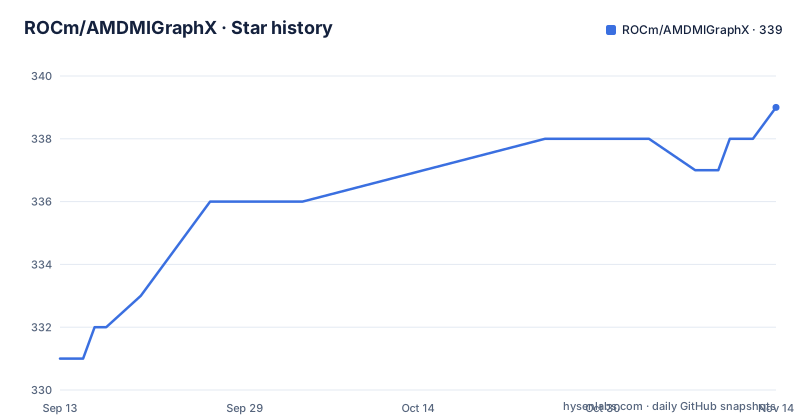
Star history
- ROCm/AMDMIGraphX339 ★ · +8
| Repository | 2026-09-13 | 2026-11-14 |
|---|---|---|
| ROCm/AMDMIGraphX | 331 | 339 |
8 Stars in the last 62 days, measured from the daily GitHub snapshot. Compare with other projects
Editorial analysis
The migraphx package needs ROCm underneath it
ROCm is a prerequisite, not an optional extra: the install note says ROCm has to be installed before MIGraphX, so a machine without ROCm cannot take the package path at all. From there it is one apt line.
sudo apt update && sudo apt install -y migraphxHeaders and libraries land under /opt/rocm-<version>, where <version> is the ROCm version, so the MIGraphX install and the ROCm install have to agree on that number. The repository is MIT licensed, defaults to the develop branch, and its last push was 2026-10-01. Published documentation sits on the rocm.docs.amd.com MIGraphX site with its source files in the docs folder, so the manual lives outside the README and the README only links to it. A machine with no ROCm has to start from the install on Linux page that note points at, because the migraphx package assumes the stack underneath it is already in place.
GPU_TARGETS is whatever rocminfo prints first on the build machine
Both source build routes end in the same substitution. The rbuild path:
rbuild build -d depend -B build -DGPU_TARGETS=$(/opt/rocm/bin/rocminfo | grep -o -m1 'gfx.*')The CMake path:
CXX=/opt/rocm/llvm/bin/clang++ cmake .. -DGPU_TARGETS=$(/opt/rocm/bin/rocminfo | grep -o -m1 'gfx.*')grep -o -m1 takes the first gfx string rocminfo reports and stops there, which means the architecture is detected rather than chosen by whoever runs the build. Flags follow the machine doing the compiling, so a build host whose first gfx string differs from the deployment host yields a library built for the other one. Nothing in these instructions shows a way to pass two architectures in a single configure; the only override on offer is a value typed by hand, or handed to the container build as GPU_ARCH. Note the small difference between the two spellings: the host commands spell the tool out as /opt/rocm/bin/rocminfo, while the container command calls rocminfo bare, because ROCm is already on PATH inside the image. The debug configure repeats the host line with a build type added, which is how the same architecture value survives into a debug build.
rbuild prepare fills depend, and CMake needs the prefix path that points at it
Prerequisites do not live in the repository, so something has to fetch them. The rbuild route is one command:
rbuild prepare -d dependEverything lands in depend, and the CMake configure has to be told so with -DCMAKE_PREFIX_PATH=depend, or CMake searches its default paths and misses what rbuild just downloaded.
The second route mirrors what the Dockerfile does and calls ./tools/install_prereqs.sh. With no argument it installs to /usr/local, which requires sudo and leaves the prerequisites readable by every user on the machine. Given a path, as in ./tools/install_prereqs.sh $custom_location, the configure has to carry -DCMAKE_PREFIX_PATH=$your_loc instead. Shared location, root privileges, nothing extra to remember. Private location, no root, and one more flag on every configure you run afterwards. Either way the next step is a build directory inside the checkout:
mkdir build
cd build
The real difference is where the dependencies end up. rbuild keeps them in depend inside the tree, so the checkout carries its own prerequisites and can be deleted whole. install_prereqs.sh writes to a prefix that outlives the checkout and is shared with whatever else runs on the machine, which is why its configure has to name that prefix.
rbuild: command not found means $HOME/.local/bin is not on PATH
System packages come first:
sudo apt install -y rocm-cmake python3-pip rocblas miopen-hipThen rbuild lives in a Python venv:
python3 -m venv venv_rbuild
source venv_rbuild/bin/activatepip install https://github.com/RadeonOpenCompute/rbuild/archive/master.tar.gzThe script lands in $HOME/.local/bin, which is not always on PATH, and the failure arrives at the worst moment, when the build command cannot be found. Two escapes are named: export PATH=$HOME/.local/bin:$PATH, or add the option --prefix /usr/local to the pip3 command so the script is written somewhere PATH already covers. Note what that install points at, the master branch tarball rather than a pinned release, so rbuild is the one tool in this chain that is not version pinned. deactivate leaves the venv, and the prepare and build steps both need it active. When a build does succeed, the prerequisites end up in depend and MIGraphX itself in build, which are the two directories the prepare step created.
Release is the default build type, and verification is its own make target
Two things get pinned at configure time rather than left to the environment: the compiler, which has to be the ROCm clang at /opt/rocm/llvm/bin/clang++ instead of the system one, and the target architecture. Beyond that CMake defaults to a Release build, and two other values matter when something misbehaves. Passing -DCMAKE_BUILD_TYPE=Debug gives a debug build. RelWithDebInfo gives optimized binaries that still carry debug symbols, which is the one to reach for when a kernel miscompiles only on AMD hardware.
make -j$(nproc)
make -j$(nproc) check
make install
Three make targets in that order: build, verify, install. Verification is separate from the build rather than part of it, so a build that finishes quietly says nothing about whether the checks ran. The container route reaches the same three targets with the prerequisites already present and the source tree already mounted.
Ten prerequisites, and each entry names the job it does
Only rocm-cmake carries the required marker. The GPU side is MIOpen, rocBLAS and HIP. Protobuf exists to read onnx files, Half is the IEEE 754 based half precision floating point library, and pybind11 is there for the Python bindings. Model serialization comes in two shapes: JSON for serialization to a json string, MessagePack for the binary format. SQLite3 does double duty, creating a database of kernels' tuning information and running queries against an existing database. MIOpen, rocBLAS and HIP are all listed for running on the GPU, so a build host that has ROCm on it without those libraries has a gap to fill before the compiler is satisfied.
requirements.txt pins three dependencies by commit: abseil/[email protected], google/[email protected], nlohmann/[email protected]. rbuild.ini is what the rbuild route reads, and dev-requirements.txt covers the tooling side. What the list does not carry is a support matrix. Nothing in it says which gfx architectures the engine covers, and nothing enumerates the model formats the loader accepts.
GPU_ARCH decides how much device code lands in the image
The Dockerfile starts from ubuntu:24.04 and takes four build args. ROCM_VERSION defaults to 10.0 and feeds the versioned package names, such as amdrocm-developer-tools7.13. GPU_ARCH defaults to empty, which means architecture independent packages; give it a family such as gfx942 or gfx120x and the image carries device code for that one. USE_WHL switches the ROCm install from system packages to Python wheels, and INDEX_URL then points pip at https://stable.repo.amd.com/rocm/whl-next/, which only takes effect when USE_WHL is set. The image also adds i386 architecture support for multiarch builds. The mechanism behind GPU_ARCH is packaging: ROCm's underlying drivers and libraries, known as TheRock, support multi-arch packaging and install device code only for the GPU architecture present on the system.
docker build -t migraphx --build-arg GPU_ARCH=$(rocminfo | grep -o -m1 'gfx.*') .docker run --device='/dev/kfd' --device='/dev/dri' -v=`pwd`:/code/AMDMIGraphX -w /code/AMDMIGraphX --group-add video -it migraphxSmaller image tied to one GPU family, or a larger one carrying device code for every supported architecture, which is what you want when the same image has to land on different ROCm GPUs. The run command passes both device nodes, adds the video group, and mounts the working tree at /code/AMDMIGraphX, where the CMake steps resume at the prepare step. One wrinkle there: the header of the Dockerfile itself suggests changing into /code/AMDMIGraphX and running rbuild build -d depend -B build inside the container, while the README points container users at the CMake steps starting from step 2. Both routes end in a build directory, but they are not the same commands.
Release tags are ROCm release names, and examples are split by model family
Tags track the ROCm train rather than a project version of their own: rocm-10.0 published 2026-08-28, rocm-7.14 on 2026-07-20, and rocm-7.2.4 on 2026-05-28. The useful question about a MIGraphX build is therefore which ROCm release it came from, not what the tag number reads like on its own.
The examples directory is split the same way, by what you intend to run: diffusion, nlp, transformers, vision, a migraphx folder and an onnxruntime folder, each a subdirectory of examples/ sitting next to examples/README.md. The rest of the top level describes what a contributor works with: .clang-format and .clang-tidy for style, .githooks and .github for hooks and workflows, a Jenkinsfile, codecov.yml, CMakeLists.txt, cmake/, src/, test/, tools/ and AGENTS.md. tools/ is where install_prereqs.sh comes from, the same script the container path relies on. Also sitting at the top level are .azuredevops/, .dockerignore, hip-clang.docker, rbuild.ini, CHANGELOG.md, SECURITY.md and the MIT LICENSE, the same license text the header of requirements.txt repeats.
Editorial conclusion
MIGraphX fits a team already running ROCm on AMD hardware, where the graph optimizer and the ROCm libraries are the point rather than an extra dependency. It does not fit a machine without ROCm or without an AMD GPU, because the package path assumes ROCm is present and the build detects one architecture instead of asking for it. Check two things before adopting: which gfx string rocminfo prints first on the build host, and where model loading and kernel tuning are documented, because the repository README stops at the build and container steps and sends readers to the docs site for everything after that.
Frequently asked questions
Does MIGraphX have to be built for the GPU it will run on?
The build commands derive the target from the first gfx string rocminfo prints, so the architecture comes from the build machine rather than from a value you choose. The README does not document a way to pass more than one target in a single configure.
What does MIGraphX need before the migraphx package will install?
ROCm first, since the install note requires it before MIGraphX. After the package installs, headers and libraries sit under an /opt/rocm-<version> directory whose version number is the ROCm version.
Why is rbuild not found right after pip installs it?
rbuild installs into $HOME/.local/bin, which is not always on PATH, and the symptom is an rbuild: command not found error. Either export PATH=$HOME/.local/bin:$PATH or add the option --prefix /usr/local to the pip3 command that installs it.
How are MIGraphX releases versioned?
The release tags are ROCm release names rather than MIGraphX versions: rocm-10.0, rocm-7.14 and rocm-7.2.4. The default branch is develop, and the last push to the repository was on 2026-10-01.
Will one MIGraphX Docker image run on different ROCm GPUs?
Leaving GPU_ARCH unset installs device code for every supported architecture, which suits an image that has to run on different ROCm GPUs. Setting GPU_ARCH to a family such as gfx942 or gfx120x reduces the image to that architecture, and ROCM_VERSION defaults to 10.0 in the Dockerfile.
Official sources
Add this badge to your README
If you maintain this project, the badge below links readers to this analysis and shows its maintenance status from the daily GitHub snapshot. Paste the markdown into your README; add ?metric=license or ?metric=stars to the image URL for a different field.

[](https://hysenlabs.com/projects/rocm-amdmigraphx)Star history chart for your README
[](https://hysenlabs.com/projects/rocm-amdmigraphx)Was this useful?