Paperasse: six Markdown skills, one npm semicolon, and a script table that stops mid row
🇫🇷 Skills pour agents IA spécialisés dans la bureaucratie française : Comptable, Notaire, ...
At a glance
- What is it?
- Paperasse packages French accounting, tax, audit, notary and co ownership work as Markdown files for AI agents, with Node scripts behind them for the FEC, the financial statements and the PDFs. Installation is a prompt you paste into another agent, and several seams in the packaging are visible from the outside.
- Who is it for?
- Read this as a prompt library rather than as software to deploy. The six Markdown skills carry their weight in any agent that can read files, while the npm layer is where the caution belongs: the combined fetch entry reports only the second process, and the PDF step depends on a browser download.
- Can I use it commercially?
- Yes. MIT is a permissive licence: you can use, modify and sell software built on it, as long as you keep its copyright and licence notices.
- Is it still maintained?
- Yes. The repository last received commits 10 days ago.
- What is it written in?
- Mainly Python, according to GitHub's language statistics.
Answers come from the project's GitHub data, last synced on November 22, 2026, and from our analysis. They are not legal advice.
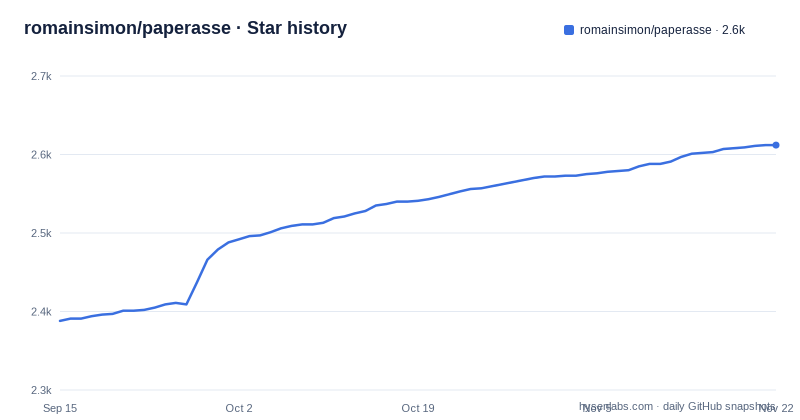
Star history
- romainsimon/paperasse2,612 ★ · +224
| Repository | 2026-09-15 | 2026-11-22 |
|---|---|---|
| romainsimon/paperasse | 2.4k | 2.6k |
224 Stars in the last 68 days, measured from the daily GitHub snapshot. Compare with other projects
Editorial analysis
Six skills are Markdown files, and installing them means pasting two sentences
Paperasse ships no plugin and no binary. The six skills are plain Markdown: comptable, controleur-fiscal, commissaire-aux-comptes, fiscaliste, notaire and syndic. Any agent or tool able to read files can load them, and the named targets are Claude Code, Claude Cowork, Codex, Mistral Vibe, Cursor, Windsurf, Cline and Aider. Installation comes in two flavours and neither of them is a package manager call. Option 1 points the agent at the agentskill.sh registry page, which is also the project's declared homepage, and promises upkeep through ags plus a security scan and auto review of the skills. Option 2 names the GitHub repository and lets the agent clone it. Both routes are two lines of natural language meant to be pasted into a chat window:
Suis les instructions pour installer le skillset Paperasse depuis https://agentskill.sh/skillsets/paperasse
Lance ensuite le setup pour la gestion de toute ma paperasse
The second line is what turns a download into configuration, because the guided setup asks for the company name, the VAT regime and the bank accounts. Note what neither route contains: no version, no commit, no checksum. The GitHub option resolves whatever master holds at that moment, and the registry option defers the choice to the registry. The breadth claimed for the set is also worth reading as a claim rather than a measurement: the skills are described as knowing the CGI, BOFiP and NEP texts plus the 1965 co ownership law, comptable alone is credited with more than 800 PCG accounts and the 2026 electronic invoicing rules, and no file in the tree records how any of that was checked.
The semicolon in the combined fetch discards the Stripe exit code
The connectors are exposed as three npm entries, and the combined one is wired differently from the closing chain:
npm run fetch          # Récupère Qonto + Stripe
npm run fetch:qonto    # Qonto seulement
npm run fetch:stripe   # Stripe seulement
In package.json the combined entry reads `node integrations/stripe/fetch.js; node integrations/qonto/fetch.js`. The separator is a semicolon, not the `&&` that the closing script uses for generate-fec.js, generate-statements.js and generate-pdfs.js. With a semicolon the Qonto process starts whether or not Stripe succeeded, and the status the shell reports afterwards is Qonto's alone. A missing or expired Stripe key therefore surfaces as a partial fetch that still reports success, while the separate `fetch:stripe` entry, which runs a single process, fails loudly. Stripe goes first, so the ordering looks deliberate and the failure reporting does not follow from it. Two test hooks sit near this code, `test:calc` for the deterministic calculations and `test:qonto` for fetch.test.js, and neither one exercises the separator itself.
A browser download sits in the dependency list of a document generator
Four dependencies carry the whole generator: marked ^15.0.0, pdf-lib ^1.17.1, puppeteer ^24.0.0 and stripe ^17.0.0. One of them downloads and launches a browser, and it sits in the path of the final step of the closing chain:
npm run closing # Génère tout d'un coup (états financiers + FEC + PDFs)That script expands to `node scripts/generate-fec.js && node scripts/generate-statements.js && node scripts/generate-pdfs.js`, so the browser step runs third. If the browser is missing or blocked, the FEC and the three statements have already been written to disk by the time the failure appears, leaving partial output on disk rather than nothing at all. Qonto, by contrast, has no SDK in the dependency list, which puts the banking API on hand written HTTP inside integrations/qonto, with fetch.test.js as the only visible check on it. The package is marked private, so nothing is published to a registry under this name, and package-lock.json is present, so at least the Node dependency versions are pinned.
Version 1.1.0 with no releases, no license field, and a language label nothing matches
Three small facts about identity do not line up. The version in package.json is 1.1.0 and the repository has no GitHub releases, so that number exists in one file and nowhere else. The same file carries no license field, even though a LICENSE file sits at the repository root and the project is MIT. And the declared primary language is Python, which nothing in the visible tree supports: every script entry calls node, the tooling described is Node.js, and no Python packaging file appears among the top-level entries. The repository is not archived, and the last push is dated 2026-08-10. The surrounding counts are 2496 stars, 189 forks and 18 open issues, and the root also carries marketplace.json, evals/, CONTRIBUTING.md and a .github/ directory that no instruction in the documentation names.
Three Stripe key shapes, and the account mapping lives in JSON instead
Credentials are split across two files, which is the main thing to understand before running anything. The .env.example at the root holds one Qonto pair, QONTO_ID and QONTO_API_SECRET, and three shapes of Stripe key: a single STRIPE_SECRET, a per account STRIPE_SECRET_SHOP for several separate accounts, and STRIPE_PLATFORM_SECRET when one platform key covers Stripe Connect sub accounts. Every example value is a placeholder such as sk_live_..., votre-organisation or votre-secret. Account identifiers are not in the environment at all. The comments say the stripe_account_id values, written acct_xxx, are configured in company.json, and the tracked file at the root is company.example.json, which the guided setup fills with the company identity. So the secrets sit in the environment while the mapping sits in JSON, and the environment on its own cannot reconstruct which account a given row of transactions came from.
Shared directories are symlinked, and folder by folder downloads turn them into text files
The manual install path has a documented failure mode. The skills share four directories, data, scripts, templates and integrations, and the documentation warns that these are reached through symbolic links. Installers that download the folders one at a time through the GitHub API do not preserve links, and what comes out is described as small text files standing where shared resources should be. That failure is quiet, because the skill text still loads, it being Markdown, and only the moment a script is invoked does the missing target show up. The repository points at docs/manual-install.md for the Codex commands and for the checks to run afterwards, which is the one piece of installation guidance that is not a sentence to paste into a chat window. The registry route sidesteps the problem differently, by letting ags perform the install, and in exchange the copy that lands on disk is chosen by the registry rather than pinned by you.
Four chained phases for the annual closing, and only one command to start them
The annual closing is described as four phases that follow each other, and only the middle of that chain corresponds to something you can run. The trigger is one sentence:
Fais la clôture annuelle de ma sociétéThe phases are current bookkeeping and VAT under comptable, then the year end itself with cut off, amortissements, provisions, IS, FEC, liasse fiscale and PDFs, then the audit by commissaire aux comptes across seven NEP phases with a cross check between the bilan, the compte de résultat and the liasse, and finally the DGFIP simulation by controleur fiscal on eight axes. `npm run closing` covers the second phase and stops at generate-pdfs.js. There is no npm entry for the audit phase and none for the control simulation, so the last two steps exist as prompt text and nothing else. Underneath sits calc.js for the deterministic layer, covering CCA, amortissements, IS, simplified VAT and prorata, with `test:calc` as its only test, and the evals/ directory at the top level has no matching script.
The script table ends one line into the tax package row while package.json keeps going
The table of scripts and templates names calc.js, generate-statements.js, generate-fec.js, generate-pdfs.js and templates/2065-sd.html, then the entry for templates/liasse-fiscale-2033.md stops after the words Liasse fisc. What belongs after that line is written down nowhere else in the documentation. package.json moves ahead regardless and defines two entries the table never reaches, `facture` pointing at scripts/generate-facturx.js and `validate:facture` at scripts/validate-facture.js. Those two line up with the Factur-X and e-reporting mention in the comptable row of the skills table, so the code for electronic invoicing exists while its description does not. The same gap covers three other top-level directories: data/, assets/ and evals/ appear in the tree and in neither a script nor a table row, so a reader has no way to tell from the documentation alone which of them a skill will read at run time. The scripts that are named do line up with their entries, down to the legal references: generate-fec.js is credited with the eighteen column FEC of art. L. 47 A-I LPF, and templates/2065-sd.html is the corporate income tax return form. What the reader cannot reconstruct is the shape of the data those scripts consume, since company.example.json is the only visible hint at that structure.
Editorial conclusion
Read this as a prompt library rather than as software to deploy. The six Markdown skills carry their weight in any agent that can read files, while the npm layer is where the caution belongs: the combined fetch entry reports only the second process, and the PDF step depends on a browser download. Nothing described here transmits anything to the tax authority, so every generated figure is still a draft that a human has to check before anyone signs it.
Frequently asked questions
What does the paperasse skillset cover?
Six skills: comptable for bookkeeping, VAT, the twelve step annual closing, the FEC and the tax package, controleur-fiscal for a simulated DGFIP control on eight axes, commissaire-aux-comptes for a seven phase NEP audit, fiscaliste for personal income tax, notaire for notary fees, capital gains and transfers, and syndic for co ownership management.
Does paperasse install with pip or with npm?
Neither in the usual sense. Installation goes through the agentskill.sh registry page or a git clone, both driven by two sentences pasted into an agent, and no Python packaging file appears among the top-level entries. The runnable pieces are npm scripts that need Node.
Can paperasse read my bank transactions by itself?
Yes, through the Qonto and Stripe connectors, with the mapping in company.json and the keys in environment variables. npm run fetch retrieves both sources, npm run fetch:qonto and npm run fetch:stripe retrieve one each, and several Stripe accounts plus Stripe Connect are supported.
Does paperasse file anything with the French tax authority?
No transmission path is described anywhere. It generates documents from templates, including the eighteen column FEC, the statements, PDFs, a 2065-SD form and the 2033 tax package, and the control phase is a simulation of a DGFIP review rather than a submission.
What does the paperasse install ask me for?
The second line of either installation instruction runs a guided setup that asks for your company name, your VAT regime and your bank accounts, then writes the configuration the skills read afterwards.
Which agent platforms does paperasse target?
Claude Code, Claude Cowork, Codex, Mistral Vibe, Cursor, Windsurf, Cline and Aider are named. Because the skills are plain Markdown files, any tool able to read files can load them, and no agent specific plugin format is required.
Official sources
Add this badge to your README
If you maintain this project, the badge below links readers to this analysis and shows its maintenance status from the daily GitHub snapshot. Paste the markdown into your README; add ?metric=license or ?metric=stars to the image URL for a different field.

[](https://hysenlabs.com/projects/romainsimon-paperasse)Star history chart for your README
[](https://hysenlabs.com/projects/romainsimon-paperasse)Was this useful?