Plik uploads a file with two identifiers in the URL and no client library at all
Plik is a temporary file upload system (Wetransfer like) in Go.
At a glance
- What is it?
- Plik is a self-hosted Go temporary file upload system with pluggable storage and metadata backends, Age encryption, a stream mode that stores nothing and an MCP server. Its quick start hardcodes one release number and its last service line is cut off mid-word.
- Who is it for?
- Plik is the self-hosted answer to a service people usually rent, and the parts that make it practical are the boring ones: a curl multipart POST with no client library, a stream mode for files that must never be written to disk, OneShot downloads and a TTL with auto-cleanup. Two things to check before you point a team at it.
- Can I use it commercially?
- Check first. The repository uses a licence we do not classify automatically, so read its LICENSE file before any commercial use.
- Is it still maintained?
- Yes. The repository last received commits 6 days ago.
- What is it written in?
- Mainly Go, according to GitHub's language statistics.
Answers come from the project's GitHub data, last synced on November 22, 2026, and from our analysis. They are not legal advice.
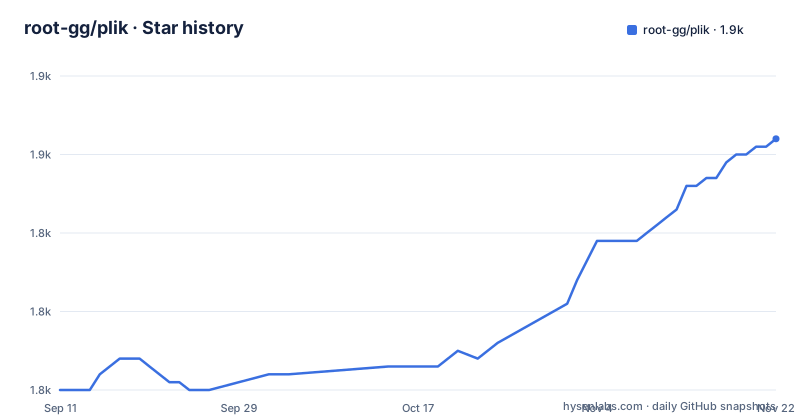
Star history
- root-gg/plik1,852 ★ · +32
| Repository | 2026-09-11 | 2026-11-22 |
|---|---|---|
| root-gg/plik | 1.8k | 1.9k |
32 Stars in the last 72 days, measured from the daily GitHub snapshot. Compare with other projects
Editorial analysis
Four storage backends, three metadata stores, five login providers
The pluggability is stated as three separate lists and each one has a matching dependency in go.mod, which is the clearest way to see the design. Storage is local disk, S3, OpenStack Swift or Google Cloud Storage, and the module requires minio-go for S3, ncw/swift for Swift and cloud.google.com/go/storage for Google, so only the local backend ships with no client library. Metadata goes to SQLite, PostgreSQL or MySQL, and there are three GORM drivers for exactly those three, plus go-gormigrate for the schema history and a cursor paginator for listing uploads. Authentication is local, Google, GitHub, OVH or OIDC, and the OAuth and crypto dependencies in the module list, golang.org/x/oauth2 and golang-jwt/jwt/v5, are what the non-local providers are built on. The web interface is Vue 3 with internationalisation in twelve languages and light, dark and custom themes, and Prometheus metrics are exported through the client library plus the GORM Prometheus plugin.
A curl multipart post is a complete upload, and the URL carries two ids
The client example prints what the server hands back, and it hands back a URL with two opaque identifiers in it, one for the upload and one for the file, followed by a curl command that reconstructs the file from those two values. The simpler path is the one underneath it:
$ plik myfile.txt
Upload successfully created at Sat, 21 Feb 2026 09:02:54 CET :
    http://127.0.0.1:8080/#/?id=vDPmPEUqc5oCt31T

myfile.txt :  2.56 KiB / 2.56 KiB [=========================================] 100.00% 719.15 KiB/s 0s

Commands :
    curl -s "http://127.0.0.1:8080/file/vDPmPEUqc5oCt31T/UZzSdZ7zPgfRiTem/myfile.txt" > 'myfile.txt'

# or with just curl
$ curl --form 'file=@/path/to/myfile.txt' http://127.0.0.1:8080
https://plik.root.gg/file/eeBKaTQhg5xv0zTL/WWVhZc0PFtvoZgCu/myfile.txt
The second form posts a multipart field to the server root and receives a link back, with no token, no SDK and no client installed. That is why three third-party clients exist: ShareX has it integrated as an uploader, plikSharp is a .NET API client, and a Filelink extension for Thunderbird sends attachments through it. The command line itself is built on cobra, and the progress bar in the output is the pb library rather than terminal tricks, with go-humanize doing the size formatting.
Four different confidentiality models, chosen per upload
The feature list names four mechanisms that are easy to confuse because they sit next to each other. Stream mode is the one with no storage at all: the uploader connects to the downloader and the bytes pass through, which is why the entry is described as uploader to downloader with nothing stored. OneShot downloads delete the file after the first retrieval, which turns a link into a one-time capability rather than a permanent one. Password protection is described as BasicAuth on the upload, which is a gate on the link rather than an encryption of the content. End-to-end encryption is separate again and is done with Age, and the module requires filippo.io/age to do it. The property that matters for interoperability is stated on the feature line itself: the CLI and the web interface can each read what the other encrypted. A file encrypted from the command line is therefore not locked into the command line, and a QR code dependency in the module suggests the download link is rendered as a code for the same reason.
Build tags, static linking and a race detector that is on by default
The Makefile decides three build properties before compiling anything. Build tags are fixed at osusergo, netgo and sqlite_omit_load_extension, and that last one is the interesting choice: it compiles SQLite without the extension loading feature, which narrows what the metadata backend can be made to do at runtime. Static linking is conditional on the build host, with EXTLDFLAGS set to -static everywhere except Darwin, where full static linking is unavailable, and the Makefile carries a second BUILD_FLAG variant for that case. Tests run with the race detector unless NO_RACE is set, and with GORACE set to halt_on_error, so the first race stops the run instead of being collected. Coverage goes to a fixed path, /tmp/plik.coverprofile, and the test command also passes -p 1, which forces serial packages, so two concurrent test runs in the same machine will overwrite each other's coverage file. Version and build metadata are not hard-coded: two variables shell out to server/gen_build_info.sh, one base64 encoded for the linker and one for display.
Three container stages, and a cross-compiler for four embedded architectures
The image is built in three stages. A node:24-alpine stage installs git, make and bash, copies only the Makefile and the webapp directory, and runs make clean-frontend frontend, which is a second invocation of the frontend target rather than a package manager command written out by hand. A golang:1-bookworm stage then runs releaser/build_clients.sh to cross-compile every client binary, and the comment is explicit that this is pure Go cross-compilation with no CGO needed, which is why that stage carries no compiler packages. The third stage is where the server is built, and it is the one that installs build-essential plus four crossbuild-essential packages for armhf, armel, arm64 and i386, because the server links SQLite and therefore needs a C toolchain per target. It receives the frontend dist directory and the pre-built clients from the earlier stages rather than rebuilding them, and takes the target triple from build arguments. The Go builder image tracks a rolling minor tag while the module file names an exact language version, so the image can float above the version the code declares.
The quick start pins one release, and its last line stops mid-word
Three routes are given, all in one block:
# Docker
docker run -p 8080:8080 rootgg/plik

# From release
wget https://github.com/root-gg/plik/releases/download/1.4.2/plik-server-1.4.2-linux-amd64.tar.gz
tar xzvf plik-server-1.4.2-linux-amd64.tar.gz
cd plik-server-1.4.2-linux-amd64/server && ./plikd

# Debian / Ubuntu
curl -fsSL https://root-gg.github.io/plik/apt/gpg.key | sudo gpg --dearmor -o /etc/apt/keyrings/plik.gpg
echo "deb [signed-by=/etc/apt/keyrings/plik.gpg] https://root-gg.github.io/plik/apt stable main" | sudo tee /etc/apt/sources.list.d/plik.list
sudo apt update && sudo apt install plik-server
sudo systemctl start p
The container line is the only one with no version in it. The tarball route hardcodes 1.4.2 twice, in the URL and again in the directory name, so a reader following it after the next release downloads the same archive or edits four strings. The apt route is the maintainable one, importing a signing key into its own keyring and writing a sources list with signed-by, and its final line is cut off partway through the service name, so the unit to start is not fully visible in the block. After any of them the page says to open http://127.0.0.1:8080, which is the same port the container publishes.
Vendored dependencies, an MCP server, and a licence the badges disagree about
The repository layout says a lot about how the project is built. A vendor/ directory is committed, so dependency sources travel with the checkout rather than being resolved at build time. The code is split into server/, client/ and a top-level plik/ directory, with releaser/ holding the two build scripts the Dockerfile calls, charts/ holding deployment charts, testing/ and testing helpers, docs/ the site sources behind root-gg.github.io, and a changelog/ directory. Two files sit at the root that are not typical for a Go service: ARCHITECTURE.md and AGENTS.md, alongside an .agents/ directory, which matches the MCP server feature and its dependency on the official Go SDK for the Model Context Protocol, version 1.4.1 in the module file. The feature line calls it an MCP server for AI assistant integration, so an assistant can create and fetch uploads rather than only hand out links. The licence is the loose end: the page links the MIT licence and a LICENSE file is at the root, while the repository licence metadata does not resolve to a named licence, so the file is the one to read.
Editorial conclusion
Plik is the self-hosted answer to a service people usually rent, and the parts that make it practical are the boring ones: a curl multipart POST with no client library, a stream mode for files that must never be written to disk, OneShot downloads and a TTL with auto-cleanup. Two things to check before you point a team at it. The licence, because the page links MIT and a LICENSE file sits at the root while the repository licence metadata does not resolve to a named licence, so read the file rather than the badge. And the deployment path, because the quick start pins one release number in a download URL and its final systemd line stops mid-word, while the container image is the route that does not need that decision made by hand. The last push to main was 2026-10-01 and the newest release is 1.4.2 from 2026-03-31, so the branch is ahead of the tagged line.
Frequently asked questions
What is Plik?
Plik is a self-hosted temporary file upload system written in Go, comparable to WeTransfer and free to run yourself. It ships a Vue 3 web interface, a command line client, and pluggable backends for storage, metadata and authentication.
How do I run Plik for a quick test?
The container route is one command, docker run -p 8080:8080 rootgg/plik, after which the web interface is at http://127.0.0.1:8080. The release route downloads a versioned linux-amd64 tarball and runs the plikd binary inside it, and the Debian and Ubuntu route installs a signed apt package named plik-server.
Which storage and metadata backends does Plik support?
Storage can be local disk, S3, OpenStack Swift or Google Cloud Storage. Metadata can go to SQLite, PostgreSQL or MySQL, with three GORM drivers in the module for exactly those three. Authentication can be local, Google, GitHub, OVH or OIDC.
Can I upload to Plik without installing a client?
Yes. A multipart form post to the server root returns a download link, and the download link carries an upload identifier and a file identifier so any tool with curl can reconstruct the file. ShareX, a .NET client called plikSharp and a Thunderbird Filelink extension all build on that interface.
How does Plik handle files that must not be kept?
Stream mode passes bytes straight from uploader to downloader without storing them, OneShot deletes the file after the first download, and a configurable time to live with auto-cleanup removes uploads that were never taken. End-to-end encryption uses Age and interoperates between the command line client and the web interface.
Official sources
Add this badge to your README
If you maintain this project, the badge below links readers to this analysis and shows its maintenance status from the daily GitHub snapshot. Paste the markdown into your README; add ?metric=license or ?metric=stars to the image URL for a different field.

[](https://hysenlabs.com/projects/root-gg-plik)Star history chart for your README
[](https://hysenlabs.com/projects/root-gg-plik)Was this useful?